


TheRydad
Members
-
Joined
-
Last visited
-
@IndyMike do you have a reference source for reading the Insteon protocol frames? I used to have the API documentation but can't find it. The Insteon developer website requires a partner registration now. And thanks, again, for the detailed breakdown above.
-
Thanks for the thorough reply. I am quite rusty with the actual packets in the transmission logs but do know enough to know that the wrong data were being communicated. I was just hoping there was a way to rebuild the interconnections correctly and send them to the devices. I really appreciate you taking a look at this. I have already started the process of manually rebuilding everything. Just documenting which devices are in which scenes and what their roles are took many hours. Luckily everything still communicates and I know what each device is. Rebuilding the complex scenes with many dozens of actors is a good brain exercise to keep it all straight! Next step: Proper backup procedures!
-
Yeah- the backup I have is about 2 years old. It would theoretically work to get all the devices talking via a "Restore PLM", but having the devices communicating to each other or the eISY isn't my problem. I started added a ton of scenes and done a lot of programmed automations since then which would be lost. My question was more asking about whether the eISY could "rebuild" the scenes internally and send them to all devices. The eISY knows all the scenes along with the scene actors and their roles in each scene. It seems theoretically possible, but I understand that it's not available.
-
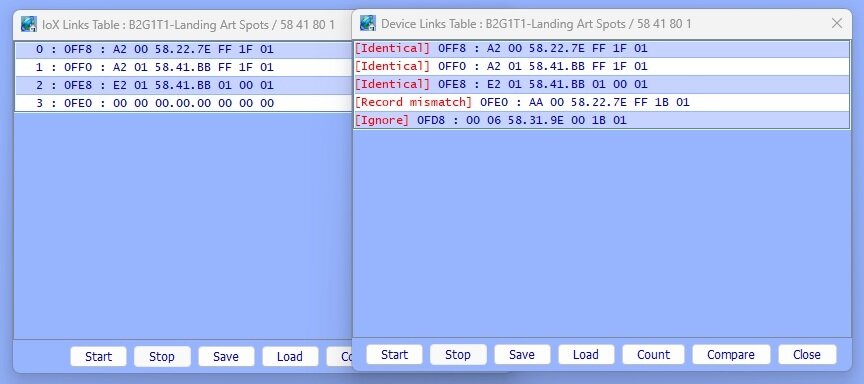
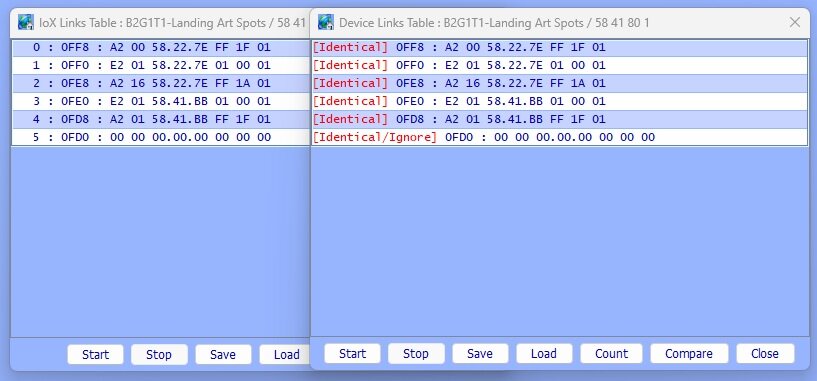
I did this with the same device. The first picture is the before, and the second picture is the after. The scene could not be controlled by the eISY before and now it can. Note that the scene worked fine when either device was the controller, so the native Insteon scene remained intact (which makes sense). Note: 58.22.7E is the PLM. I'd love to hear any thoughts/ideas. Thanks!
-
Yesterday, the power glitched on my eISY. I brought it back online, but the Insteon PLM wasn't working (or so I thought). I swapped it with another one as prescribed and started the restore PLM procedure. The power glitched again during the restore process, so I got everything back up and restarted the restore. Now, none of the scenes can be controlled with the eISY. Each individual device responds perfectly, but I can't control any scenes. If I remove a device from a scene then re-add it, it works fine, but I have to do that for every device in the scene. I have compared the device link tables before and after removing and adding it back to the scene and it does make a slight change in the link table an entry for the PLM so the device table is definetly current bad. The IoX link table matches the (incorrect) device link table before the manual scene delete/add so a device restore has no effect since it's just rewriting the bad information. The IoX "database" seems to be aware of the scene relationships since they all appear correctly in the device tree. Also, each device entry in each scene it is a member of still has its correct "behavior" in it, but the bottom line is that all the device link tables are corrupt. Is there a way to have the eISY "rebuild" each scene/device correctly and restore each device? I have over 63 scenes with 462 device entries across all of them. Just going through each one and documenting the device behavior in each scene will take hours. Removing and adding them one by one could take days. I'm feeling pretty defeated and am hoping someone has a miracle cure. Thanks for any guidance. -r Incase case anyone is interested... The back story (that makes me feel stupider than I look): The "power glitches" were me sloppily removing a bad UPS to replace it with a new one. No- I did not make any backups before I started all of this despite knowing way better. I'll take my licks. I have them coming.
-
What you are referring to is VLAN tagging. It can be done on the client side, but that would usually only be done on network infrastructure devices or servers. Eiher way, the eISY does not support VLAN tagging on ingress or egress. Did your network switch perhaps revert the eISY port to the native VLAN? It may also be reffered to as a trunk port on the network switch in which case most implementations would often send a native VLAN as untagged traffic. Bottom line- this problem almost has to be on the network infrastructure side.
-
Thanks, @DennisC & @Techman!
-
I am going to replace mu ISY994 with a new EISY. I see on the product page that I should be able to use a current ISY994 backup to restore the configuration on my new EISY. I also plan to purchase a new Insteon USB PLM (I currently have a Serial PLM for the ISY994). Is there a documented upgrade path for this? I assume I will do something like this: Backup current ISY994 and power off/decommission the ISY994. Install new EISY and bring it online on my network. Plug new USB PLM into power and then EISY. Restore the backup from step 1 on the new EISY. Perform a PLM "Restore" on the new EISY to reprogram all links with the new PLM Insteon ID. Am I on the right track?
-
Thanks, @MrBill and @lilyoyo1. If you'll indulge me a little further, I have a couple of technical and "style" questions now that I have read up some more. 1. With the exception of the links created between devices and PLM, does creating an ISY scene populate the devices' link tables the same as the manual method of "put device in linking mode, press set button on other device, repeat..."? In other words, are they more or less functionally equivalent? (I am only talking about Insteon here.) This is more of a curiosity than anything. I am trying to make sure I understand what is happening under the hood so I can have a deeper understanding of the technology architecture. 2. My understanding of the "spoken" field for devices and scenes is that this is how I will refer to the device/scene when speaking to Alexa, etc. I assume that I need to make sure that what I put in "spoken" is unique and only applied to 1 device/scene. However, I was able to give the same spoken name to 2 devices and a scene using the admin console, so that uniqueness is apparently not enforced in the UI. When making a 3 way/4-way scene, should I apply the preferred "spoken" name to the scene? Is there a best practice for this? 3. This is more of a style thing, but I am trying to decide how I want to name everything. I think I want to give each device a name based on the load it controls and it's location in the house and on the wall. i.e. Something like "Foyer Chandelier-Entry-B2-S3" would mean the switch is in the entryway, 2nd box down, 3rd switch from left and controls the foyer chandelier. I would then use the "spoken" field referenced above to name it for Alexa purposes-"foyer chandelier" in this case. Any opinion about this approach? It sounds like "device discovery" vs. "key in address" methods of adding devices is a matter of preference. I have already made some progress toward making a spreadsheet of all devices with addresses, locations, controlled load and whether the load is wired to the device or it is a 3/4-way "remote" device, so I will finish that up for documentation. I will factory reset everything and then manually key them in from my desktop using the spreadsheet. There's a bunch of rooms and locations where there isn't a great spot to set a laptop. That is why I was asking about being able to tag or name devices using the mobile app. I really appreciate the time you took to answer my earlier posts. Thank you!
-
Thanks, @MrBill. That's kind of what I figured. If I manually add a device in ISY and choose the "delete existing links" option, will that erase all links in the device and effectively "reset" it? I feel like that would at least eliminate me having to walk around to every device and factory reset it. I assume that would leave the device with only a link to the PLM in its link table, but I am not certain about that assumption. Is the correct way to create a 3-way/4-way configuration by putting all devices in a scene, and make them all controllers and responders for the scene? I want them to all respond with the correct LED level indicator when touching a physical switch and when calling them from Alexa, etc. Is there some kind of way to tag or name a device in the mobile app? I didn't see a way to do it, but that would allow me to figure out which device is which without having to walk back and forth to my computer or laptop every time. Is there any kind of "local API" that would let me script some of this through SSH or http calls from a desktop machine? I appreciate the guidance as I get more familiar with this product. It will certainly give me a lot of the scheduling and other flexibility I was missing when just using the Hub.
-
I have about 150 Insteon switches and lamp modules in my house. They are all linked to an Insteon Hub for now, but I want to move everything to my new ISY 994i/Pro. Insteon support says they can send me a list of all of my Insteon devices and the names I have given them in the Insteon app. Is it possible to do some kind of bulk import of devices with names? Is it possible to use the ISY to bulk delete all existing links and then recreate them manually in the admin console*? Is there a command line or scripting engine that can be used to set this stuff up in ISY? Thanks for any help and guidance anyone can provide! -R *- Side note: There are a lot of really weird links that my electrician made. To be fair, he had never installed any Insteon switches before, but he wanted to get the 3-way setups working so I showed him how to do the multi-way manual linking on switches. A lot of bizarre things appear to have happened while he was "learning" how it worked. A bunch of three way switches were only setup in one direction. I also keep finding weird links that must have been accidentally setup. For example, turning on a light in the kitchen also turns on a floodlight in the driveway (but not vice-versa).
