garybixler
Members
-
Joined
-
Last visited
-
I have been able to recreate the event. If the eisy-ui is rebooted and then run the QueryAll program the event will happen. Since I needed to reboot the eisy-ui daily because of the migration that is why it has been happing lately. Thanks Gary
-
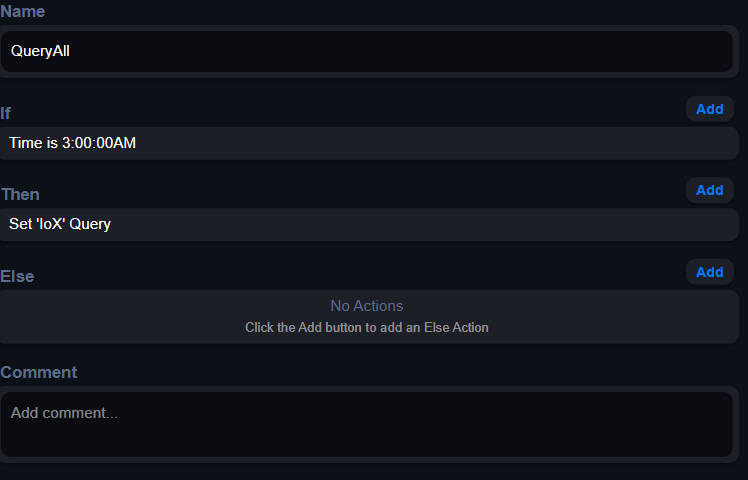
I have been unable to recreate this behavior during the day but this is the QueryAll program. This is the only program that runs at 3 AM. I will keep trying to reproduce the event Thanks Gary
-
After most of my NSs have been migrated with some still with problems I was introduced to a new problem at 3 AM for the last two days. This seems to be an eisy_ui issue. At 3 AM the program QueryAll runs and causes some programs into running due to their if statement being true and playing their voice messages by the audio player. Before this issue I had set the 'Missed Schedule Grace Period' to 10 min. as it was in the AC. I have set the grace period back to '0' and disabled QueryAll. Hopefully no more awaking at 3 AM. Gary
-
The issue of an internal server error turned up on one of the Rokus but can still function from a program. The control buttons are no longer present on the one with the error.
-
I just tried the Roku NS today and it can now discover and load both Rokus correctly. All seems to work now. Thanks Gary
-
I am seeing these system errors coming from NS2 Roku. I stopped Roku and errors stopped. 26-10-21 05:11:10 [info] Polls: Message sent to plugin (slot 2) successfully 2026-10-21 05:11:10 [info] pluginEvent: Received commands on topic udi/pg3/ns/status/plugin_2: set 2026-10-21 05:11:10 [warn] pluginEvent: Error processing API command 'set': Validation failed: 0.value: Invalid input: expected number, received NaN Received: { "set": [ { "address": "2m67n", "driver": "GV2", "value": "native-ui", "uom": 56, "text": null } ] } 2026-10-21 05:11:10 [info] pluginEvent: Sending response to plugin plugin_2: set 2026-10-21 05:11:10 [info] pluginEvent: Message sent to plugin (slot 2) successfully 2026-10-21 05:11:10 [info] pluginEvent: Received commands on topic udi/pg3/ns/status/plugin_2: set 2026-10-21 05:11:10 [debug] pluginEvent: Processing set property request from plugin 2 2026-10-21 05:11:10 [debug] pluginEvent: Set property GV2=562859 (uom:56) for node n002_33908 2026-10-21 05:11:10 [info] pluginEvent: Sending response to plugin plugin_2: set 2026-10-21 05:11:10 [info] pluginEvent: Message sent to plugin (slot 2) successfully 2026-10-21 05:11:10 [info] pluginEvent: Received commands on topic udi/pg3/ns/status/plugin_2: set 2026-10-21 05:11:10 [debug] pluginEvent: Processing set property request from plugin 2 2026-10-21 05:11:10 [debug] pluginEvent: Set property GV1=0 (uom:25) for node n002_33908 2026-10-21 05:11:10 [info] pluginEvent: Sending response to plugin plugin_2: set 2026-10-21 05:11:10 [info] pluginEvent: Message sent to plugin (slot 2) successfully 2026-10-21 05:11:13 [debug] proxy: Proxy connection check: Successful. 2026-10-21 05:11:13 [debug] Polls: Sending short poll to plugin 10 2026-10-21 05:11:13 [info] Polls: Message sent to plugin (slot 10) successfully 2026-10-21 05:11:13 [debug] Polls: Sending short poll to plugin 7 2026-10-21 05:11:13 [info] Polls: Message sent to plugin (slot 7) successfully 2026-10-21 05:11:13 [debug] Polls: Sending short poll to plugin 8 2026-10-21 05:11:13 [info] Polls: Message sent to plugin (slot 8) successfully 2026-10-21 05:11:13 [debug] Polls: Sending short poll to plugin 5 2026-10-21 05:11:13 [info] Polls: Message sent to plugin (slot 5) successfully 2026-10-21 05:11:13 [debug] Polls: Sending long poll to plugin 1 2026-10-21 05:11:13 [info] Polls: Message sent to plugin (slot 1) successfully 2026-10-21 05:11:15 [debug] Polls: Sending short poll to plugin 2 2026-10-21 05:11:15 [info] Polls: Message sent to plugin (slot 2) successfully 2026-10-21 05:11:15 [info] pluginEvent: Received commands on topic udi/pg3/ns/status/plugin_2: set 2026-10-21 05:11:15 [warn] pluginEvent: Error processing API command 'set': Validation failed: 0.value: Invalid input: expected number, received NaN Received: { "set": [ { "address": "2m67n", "driver": "GV2", "value": "native-ui", "uom": 56, "text": null } ]
-
I migrated Roku over to the eisy-ui and am having problems getting both of my Rokus to properly install. What happens is that if both are online they get discovered and added but one or the other will show internal server errors. Both wont install properly. I reinstalled Roku in the eisy-ui but with the same results. If I disconnect one and restart the NS the connected one will get discovered and installed properly but then if I connect the other Roku and restart that on will have the internal server error. A similar thing is happing with Tivo. May be a discovery issue. Thanks Gary Roku-log-2026-10-20T23-55-49.308Z.zip
-
I added a TIVO , saved and did a NS restart. The log is from the restart. The Tivo node never gets added. It has worked fine until the migration. Thanks Gary TIVO.txt
-
I used the Hilitchi 3m/9.8ft Waterproof Temperature Sensors Digital Temp Probe (Pack of 5pcs) from amazon as suggested by Eric. The are readily available and aren't expensive. On another note I am still waiting for the Hanwell HIH-4000-003 Humidity sensor and of coarse coming from Chine. Is there any alterative humidity sensor that can be used with the Webcontrol8? These Honeywell sensors are not readily available unless you pay a ridiculesly high price. Thanks Gary
-
I migrated AVRemote over to eisy-ui after which I could not get TIVO to accept any commands so I deleted ARRemote and reinstalled it under eisy-ui. The problem is after I enter all the TIVO configuration parameters they never get saved. If I restart the plugin the TIVO configurations disappear even after they have been saved. Clicking the save button didn't show any sign of saving like the status bar on the bottom. Thanks Gary
-
@mbking I probably went the long way around but after migrating and deleting from pg3 and rebooting the eisy the key I think is to do a discover at the node server.
-
I have found that doing a discover worked best in adding my thermostat especially after migrating the NS to eisy-ui.
-
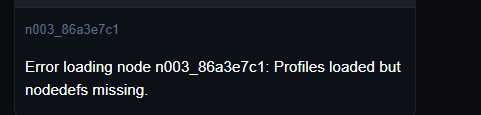
After installing the latest production updates and moving VenstarCT NS from Pg3 to the eisy I can no longer get it to work. No nodes show up in the nodes list. Debug shows the IP address of the thermostat is recognized but doesn't seem to make contact. Moving the NSs from PG3 has been a disaster for me. I think I will stop at 4. Two work but no luck with VenstarCT or Tivo under AVRemote. Each time a NS was moved a reboot was necessary for it to be recognized. I included a snapshot on the home screen of the VenstarCT issue. I was able to get Weatherlink llive and itech to migrate and work after reboots. Gary I did finally get VenstarCT to work so it is just AVremote so far that is not working.
-
Hi Tim, I tried Hilitchi sensors and they work perfectly. Temp in dead on accurate. Gary
-
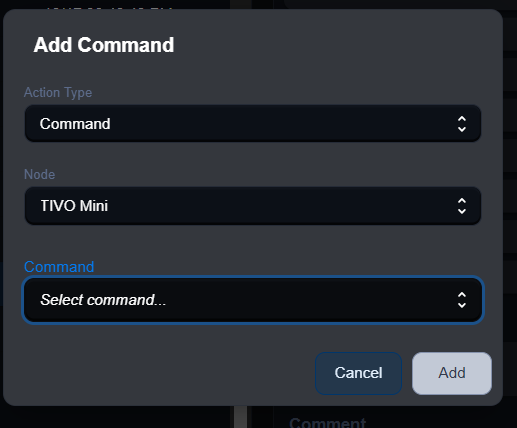
I just did the latest eisy updates and tried migrating one NS over from Pg3. The NS AVRemote migrated but doesn't seem to accept commands in programing. I am trying to enter commands to tivo NS but just get this screen that doesn't accept and commands. When trying to enter a command it just dims.