


DennisC
-
Joined
-
Last visited
Posts posted by DennisC
-
-
42 minutes ago, Brian H said: I do not think a restore will work. Maybe you are thinking of the Replace function.
You have to rewrite all the links in you modules. For the 2413U's six digit so they respond to the commands from the new PLM.
It has been a long time since I did it, but what I posted above is from the wiki on migration.
This is done during the migration, so maybe when using the migration backup that is taken in to account when restoring the migration backup?
The migration procedure indicates:
"If you are using a new PLM, Restore the PLM."
-
1 hour ago, windrockwater said: In the wiki for restoring the PLM it says I need to connect my new PLM to the old PLM? I don’t think I have the cable to do that, so is that completely necessary?
I don't believe I have ever seen that in the wiki.
You need to plug the new plm in to eisy and at the right time, restore the plm.
Follow these instructions:
Migrating
On the Eisy / Polisy you are migrating to
Do the appropriate preparation step (see above)
Make sure Eisy / Polisy is up to date
Go to Admin Console configuration page and select update packages
If you don't have a current backup, make a backup of your Eisy / Polisy (Admin Console | File | Backup ISY)
If you are using Insteon, plug in the PLM
If you are not migrating your Z-Wave network
Use (Admin Console | File | Restore IoX) to restore either your Eisy / Polisy backup or your ISY-994 backup
If you are migrating your Z-Wave network
If you aren't already using it, plug in your ZMatter Z-Wave dongle and unplug any other Z-Wave dongle you may have been using.
(Polisy only) If you have a ZMatter Z-Wave board then power down Polisy, add it, then power on again.
Reboot Eisy / Polisy
Use (Admin Console | File | Restore IoX) to restore your "migration" backup
If you are migrating from Eisy / Polisy use the migration backup (e.g. "ISY-BackupWithZWaveMigration.v5.5.4__Sat 2023.01.21 09.07.44 AM")
If you are migrating from ISY-994 use your ISY-994 backup
When IoX restarts, it automatically does the following:
Writes you Z-Wave network into the ZMatter Z-Wave controller
Interviews every Z-Wave device in the Z-Wave nework, creating/updating nodes, programs and scenes.
This process can take anywhere from a few seconds to a few minutes for each device depending on the complexity of the device.
The best way to monitor the progress is to open the Admin Console Event Viewer to level 3
For those who want lots of low-level details, you can also use this from the command line: tail -f /var/isy/FILES/LOG/ZWAY.LOG
If you don't actually change your Z-Wave network by adding/removing Z-Wave devices after migration, you can back out the migration by connecting whatever Z-Wave dongle you were using before migration and restoring the backup you made prior to migration.
If you are using Insteon
Go to the Admin Console configuration tab and make sure INSTEON Support is enabled (default username/pwd = admin/admin)
If you are using a new PLM, Restore the PLM
Reconfigure any software utilizing to point to this Eisy / Polisy, restart the other software, if necessary.
If you have ISY Portal on your 994
Follow these instructions to migrate your account, license, and Alexa/Google Home settings
This will also migrate all node server licenses from your Polisy to Eisy / Polisy
If you are using Polyglot / Node Servers
See Migrating Node Servers to PG3x
If you migrated your Z-Wave Network then make a backup of it (Z-Wave | Backup)
Make a backup of your newly configured IoX.
-
13 hours ago, lhranch said: Well, that pushed the project ahead. It let me install Virtual, and now Admin Console has new virtual thinginess in the menu. Now I gotta read up on what it expects me to provide for addresses, etc. so I can create one. Thanks a bunch, @DennisC !
Since at least the release of v6.0, the recommended method for accessing pg3x is from eisy.local. In fact, using any other method involving port 3000 potentially impacts some plugins. Using the local port causes some plugins, including Elk, to disconnect and than reconnect. This is also the case if you access pg3x from UD Mobile using a local connection. It is something UD is working to correct.
As for login credentials, UD is moving to single sign on concept. Currently, for the Launcher & eisy.local you use your portal credentials.
Using ssh, remains the original a**** credentials.
Connecting locally, by directly downloading the admin console is still your local credentials.
Hope that helps.
-
 1
1
-
-
-
Now that I am at a computer, here is the link to the wiki instructions:
https://wiki.universal-devices.com/UD_Mobile#Backup_and_Restore
-
1
-
-
8 hours ago, Kentinada said: @Javi hello! Been a while since we chatted thru the issues with my wife’s iPhone 13. But it has been working fine the last year or so. Today, however, I bit the bullet and ordered is both new iPhone 17’s. Is there a doc anywhere you can point me to make this transition as painless as possible?
Thanks!
Before switching phones, make sure your phone is backed up so all of your programs will load on your new phone.
Specifically for UD Mobile, do and app backup, which will take a snapshot of your app settings and favorites. After your new phone is up and running, you can import the app backup.
Be sure to save the app export backup in a location you can load on your new phone when the time comes to restore it.
There are detailed instructions in the wiki for exporting and importing the backup.
-
1
-
-
-
-
9 hours ago, Techman said: That's the version that corrected the issue for me.
-
7 hours ago, twagoner said: thanks for the quick reply. Is node server in slot one the first entry in the main tab in admin console? It's labeled Notification controller and under that UD Mobile. In the xray it says family instance 2 not 1. I'm not sure if I'm looking in the right place. You will have to excuse my lack of expertise.
I'm not sure you are in the right location. While you can check plugins within UD Mobile, it might be best to use eisy ui. From the menu, select Pluging, Dashboard.
That will open the dashboard for all plugins. Check slot 1.
-
1 hour ago, Techman said: where there should be text options, only numbers appear
When was the last time you ran upgrade packages?
I have another post that talks about this issue and around beginning of December, and update to udx corrected the problem.
I suggest upgrading packages, reboot when instructed, and after everything is up and running, an UD Mobile sync. Before syncing UD Mobile make sure you are on latest version.
-
4 hours ago, landolfi said: Just an advisory about an annoying UI update experience:
After a reboot that upgraded IoX to 6.0.3_3, I noticed other packages that needed updating, including eisy-ui from 0.7.2 to 0.8.5. A couple observations:
The other updates finished quickly, eisy-ui update took much longer. Eventually the UI said it required a reboot, but the System menu item was unavailable (it said "API not available" when I tried to select it). I had to reboot eisy from the mobile app because the web browser wouldn't display the Reboot ISY button.
With the new version, when I first logged in on both Chrome and Firefox, the home screen was black--no menu items, just a black screen and my mouse pointer. It required a refresh to see the contents of the home screen. I thought it was a one-time issue, but it still happens when I haven't logged in to eisy for a few hours.
UD support is aware of both of these issues. I reported them this morning and was told they are looking in to #1 and #2 is a known issue.
-
1
-
Would you be able to check something for me? Sign in to eisy.local and go to menu Plugins Dashboard. Is Elk Plugin connected?
Next go to Elk nodes tab and see if the nodes are populated with values.
-
2 hours ago, Javi said: Does anyone else see the same?
Javi, the upgrade to UDX v4.2.0 fixed the Elk value display for me.
2 hours ago, Javi said: Is eisy UI at version 0.8.8?
My eisy UI is on v0.8.5 and there is no upgrade showing as available. Further, I had to upgrade packages this morning to test a fix for plugins not starting that Benoit released last night. eisy UI did not upgrade and is still on v0.8.5
-
1 hour ago, hbdude said: Thanks for your reply
My secure port is set to 2601. Should it be blank?
You must use non secure port as shown in the plugin instructions. The plugin will not work with the secure port.
You also need to follow the example in the instructions for adding the port at the end of the IP address, :2101.
-
1
-
-
5 hours ago, hbdude said: The PG3 is stuck at ELK Connection started... Config info will update when complete.
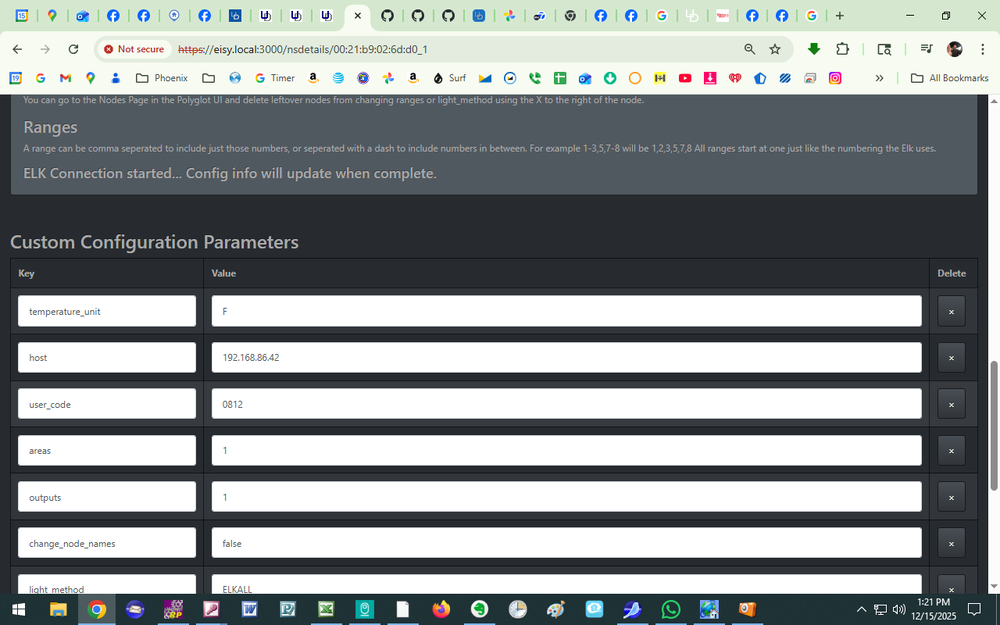
You need to add the non secure port to the IP address, as per the instructions:
"Set host to the host or ip address and port, e.g. 192.168.1.15:2101"
The non secure port is 2101. In addition make sure Elk M1XEP is not set for "secure port".
Remember, only one connection can be made to Elk at a time. Therefore, you can not be in ElkRP2 while trying to connect with the plugin.
-
1
-
-
I would suggest upgrading packages to be sure all went well with the upgrade, and rebooting. After everything is up and running (be sure to check all plugins have started - there is a separate issue with plugins not restarting after reboot), then synchronize UD Mobile.
If that doesn't work, I would then open a new support ticket, as something else is going on.
-
2
-
-
3 hours ago, dbwarner5 said: However, please note that with the update, Elk will report status in names vs numbers but that remote access to UDM is still not populating these statuses of Elk or Z-wave devices unless you "open dashboard" of each device.
I'm not clear on what you are saying. After the update and UD Mobile synchronization, UD Mobile shows names instead of values everywhere I look (tiles, favorites, notifications, etc)?
-
9 hours ago, apostolakisl said: 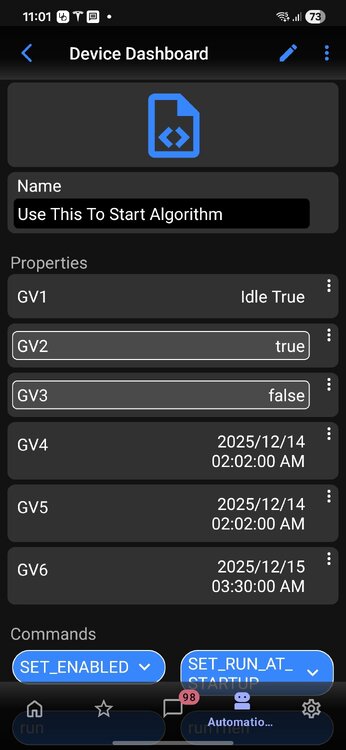
There is an update to udx (v4.2.0) that corrects the Elk Plugin from displaying names instead of numerical values in UD Mobile & eisy-ui. It is available from the upgrade packages in the admin console.
Run: https://eisy.local:8443/WEB/sysconfig.txt to check your version of udx. If it is at least v4.2.0, then reboot eisy. After complete startup, synchronize UD Mobile and you should be good to go.
-
2 hours ago, Geddy said: a lot of memory to use 1024 or 2048 in place of 512
I would advise some caution here. I had a situation with eisy that I had to get UD support involved with. It turned out eisy balked at a memory setting of 1028 and the Launcher would not open the admin console.
-
 1
1
-
-
10 minutes ago, baabm said: I restarted my modem and my router, then I rebooted my EISY and am still getting the same issue with synchronization. It gets a little past "programs", then bombs out with a message that disappears so quickly, I cannot read it. Then I noticed that my caseta devices weren't working using UDM, so I opened the PG3 server and Admin Console on my mac. I got at least one instance of the socket error on AC while trying to figure out what was happening. I then reloaded the caseta plugin and it started working. I retried the sync and it still didn't work. Any ideas?
Try checking the rest of your plugins to make sure they are started and data is populating in the admin console. I suspect you might have another plugin that didn't properly start - but that is a guess.
-
1
-
-
10 hours ago, hart2hart said: Thanks. Unless something went wrong, I updated packages last week or so.
Run: https://eisy.local:8443/WEB/sysconfig.txt to check your version of udx. If it is at least v4.2.0, then reboot eisy. After complete startup, synchronize UD Mobile and you should be good to go.
-
1
-
-
-
I don't think this issues is isolated to Schlage plugin.
I have been experiencing the same issue with 3 plugins. UD has been working to try and find the cause.
I strongly urge you to open a support ticket with UD. If possible, include the plugin log package from the same day you had the issue, before and after the restart.
-
1
-


Upgrading from ISY to EISY and a new PLM too
in eisy
That is the procedure posted above, but I was only posting the answer to your question about the plm.
Go back to the wiki and follow the rest of the migration procedure.
Going from memory, you need to go through all your programs and network resources if you have any. You may need to reserve each one.
You also need to migrate pg3 and possibly some action in the portal. Follow the instructions in the wiki and you should be good to go.