


jim_
Members
-
Joined
-
Last visited
Everything posted by jim_
-
Hi Guy ... appreciate your feedback, but what really caught my eye was > [ "Timers" you're seeing here is a plugin I created ]. Please expand on " a plugin I created " as I am curious about testing "plugins" .... One challenge has always been to overcome, the speed of detection vs human movement speed. With the MS II was directly linked to a Insteon switch (no program) it was always hit and miss ... the motion trigger could be instant or a person could be half way down a hallway before the trigger. I tested PIR trigger via Zwave years back and when the Shelly released the i4, moved all but one of my basement motions. Trigger times are much more consistent than with the MS II and hence why I only have one MS II left and why this whole phantom ALL ON question came to be. I'm off to fish in a wire to where the MS II lives for the new PIR
-
Beginning of Feb, I posted a question "Assistance tracking down random triggered events". It was determined thanks to @IndyMike , this was related to the known issue of phantom ALL ON in older devices. One critical item identified that I needed to change out was MS II ... Since I already have a couple of old alarm PIR's to a Shelly i4 Zwave module, which has been rock solid in basic functionality (PIR triggers Shelly on hardwired connection, Shelly sends basic open close to programs), thought I would replace the MS II with another PIR / Shelly combo. As I have NO PROGRAMMING background, its been a slow learning process by coping examples found in the Wiki / this forum / trial & error, but in the end always found some function missing or something not working 100% of the time as expected. And as complexity grows and programs accumulated, diagnosing problems turned into deeper problem for me to work through. My whole deployment is lighting only, so no fancy addon's just basic lighting automation. I retired recently and setup a lab in my office to start extended testing of modifications to or for new lighting solutions ... therefore before replacing the MS II, I wanted to fix some of the broken / missing functionality of what exists to today, e.g. motion override (disable the timer via switch paddle and auto delay timer reset when human traffic exists longer than the normal / default timed event. I have success, but it took 5 programs to make it work as wanted ... so question to the forum : is this efficient ? is there a better way to write this ? do I just deploy and not worry, the EISY has lots of CPU Attached are my programs, there are notes for each program ... I would appreciate feedback if anyone would like to critique Motion1.rtf
-
Thanks larryllix, I've never had to clear Java before for the EISY
-
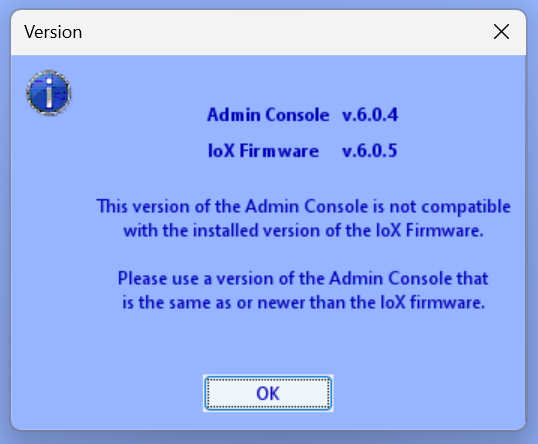
I just upgraded and I'm stuck ... Window opens then closes IoX launcher when you select OK ... I do not understand what this means ... where do I get a different Admin Console ?
-
Thanks for the review @IndyMike I'm glad you were able to find the cause As requested ... my LampLinc B2457D2 BiPhy V.41 & IOLinc 2450 = V.41 One comment, while its clear the code between PLM and ISY has not changed in many years, and a lot of my Insteon installation is pre V.45 ... I never saw this when the 994 was in control. I'm not suggesting this is a EISY issue, just mentioning as it's an interesting point. I plan on swapping the stairwell MD out to a Shelly Zwave solution hopefully this week. And I'll check out the Zooz ....
-
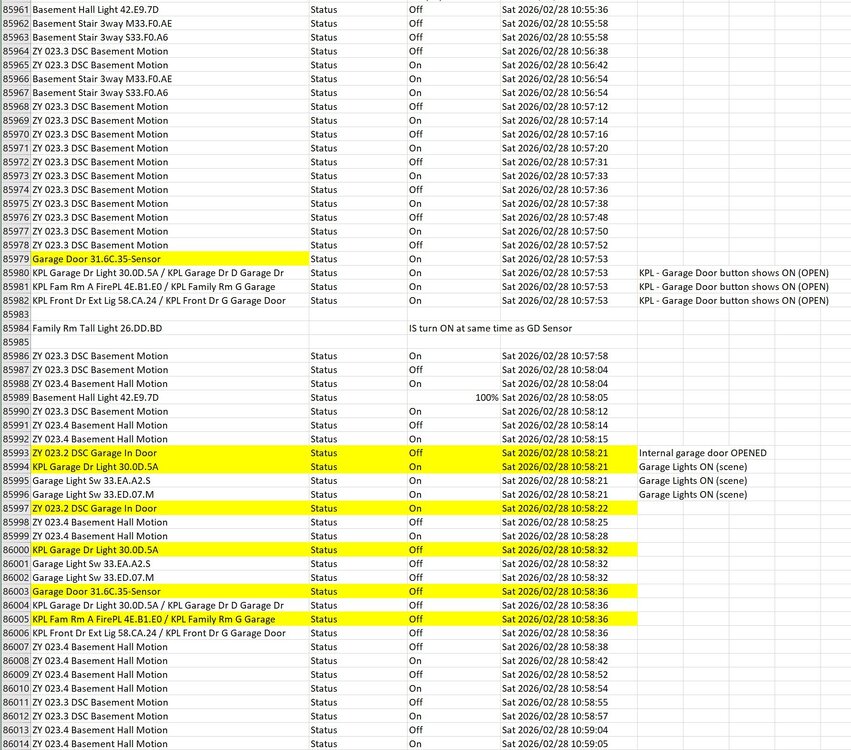
The problem finally triggered today and I said it would post if the issue appeared again ... Attached are the L3 logs and screenshot of the logging. There appears to a a 2 second gap between the 2 logs types ... the event started as per : L3 = Sat 02/28/2026 10:57:51 : [INST-SRX ] 02 50 31.6C.35 00.00.01 CF 11 00 LTONRR (00) Log = Garage Door 31.6C.35-Sensor Status On Sat 2026/02/28 10:57:53 ***Historically, the garage door (IOLinc) or the LampLinc did not show up in the log, today the IOLinc does show, but not the LampLinc While I agree to change things up in respect to the MD, I'm current working a kitchen remodel and as per the BOSS, the kitchen takes precedence. If there is anything notable, I would appreciate the feedback and I will change the MD soonish Thu - Fri 02-27-2026 11.00.56 L3 trace.txt
-
@IndyMike I will look in a few weeks if the messages have returned in the trace ... mean time, "Delays are your friend" which I completely agree on But this program is about as generic as possible with consideration to humans wishing to descend the stairs ASAP preferably with the light ON. Motion is set to report "On Only" & timeout 10 seconds ... so I'm not sure where I could insert a delay here ? Basement Stairs Light On - [ID 005D] If 'Basement Stairs Mot 54.68.42' is switched On And $sBasement_Stairs_Light_Status is 0 Then Set 'Basement Stair 3 Way' On Wait 2 minutes Set 'Basement Stair 3 Way' Off
-
Thank you ... The information always seems to be right in front of you, you don't see it I deleted the disabled programs and re-ran a trace matching MS ON msg's as you did, down to 3 ON msg's. No idea if it helps, but like any protocol, any reduction in messaging helps in general 15:10:04 [INST-SRX ] 02 50 54.68.42 00.00.01 CB 11 01 LTONRR (01) > Motion Sensor On #1 - ISY Triggers Program 15:10:05 [INST-SRX ] 02 50 54.68.42 00.00.01 CF 11 01 LTONRR (01) > Motion Sensor On #2 - ISY Re-triggers Program 15:10:06 [INST-SRX ] 02 50 54.68.42 71.1C.76 46 11 01 LTONRR (01) > Motion Sensor On #3
-
@IndyMike WOW ... ok lots to digest, thanks for providing this analysis .... it will take a while for me to slowly walk through. But let me address this last elephant you identified re: "motion sensor at address 54.68.42 that is used as a control in two programs (0033 and 005D)." Yes [Basement Stairs Mot 54.68.42] is valid and the only "Insteon" motion in active deployment with one associated ACTIVE program. I cautiously respond saying ... I was about to ask how one finds a Program by ID, but I had a learning moment . Copy a program in text mode and in the first line of the program NAME and the program ID > Basement Stairs Light On - [ID 005D][Parent 005C] ... always wondered what that text was for Question ... 54.68.42 in two programs (0033 and 005D) 54.68.42 was found in three programs, the current ACTIVE program and two others that are set DISABLED (my previous TEST samples) Many moons ago, I recall reading that ISY / EISY can still read the program entry set DIABLED, but doesn't execute / ignores ... something like that ??? Based on your diagnostics, a program that is is clearly tagged "Disabled" / Basement Stairs Trigger - [ID 0033][Parent 0040][Not Enabled] COULD and is still be executing .... Is this not a bug ? Another educate me question un-related Where program --- Basement Stairs Light On - [ID 005D][Parent 005C] Parent ID matches program ID of 5D ... meaning its standalone ? Where does "Parent 0040" come from in the disable program ... Basement Stairs Trigger - [ID 0033][Parent 0040] ... where Parent 0040 is also found on other disable programs, but there is no program ID 0040 on my ISY / EISY
-
Hey @IndyMike ... 24 hours of Event Viewer L3 attached ... And as per Murphy's Law, the random event did NOT occur BTW, I understand standard IP protocol and use wireshark to isolate troubles, but was looking for an Insteon protocol cheat sheet ... the old UD wiki is to vague. Could you point me to any doc's ? (I have the original 2006 SmartLabs, Inc design doc, but there no procedure / state charts to review) 24 hour Event Viewer L3.txt
-
Thanks for the descriptive reply, this helps me understand .... Just to clarify .... request to post L3 events log > would this be a general capture (normal MS activation of basement lights ) or specific to the random event ?
-
learning enabled ... I understand a collision @ PLM, but not understanding "All-On" + "Devices that have not had the command removed will be affected" How does one remove the command "All-On" per device ? MS is hardwired to 5v and was factory reset ~ 6 months ago, but days after this random event was still occurring. I'm not convinced it's the MS as root cause ... Since it's always the same devices affected (Lamp, Garage Door, and Garage Light (wife confirmed specifically these 3 only) and there is zero association with the MS / basement lights, we do know that when after 60 second-ish the MS is triggered, then these other 3 devices are affected. Since its not practical to share all my devices and related programs, but there are KPL's with control for this group of devices as well as others .... is it possible for data collision in a KPL ? (and yes the KPL(s) have been reset) .... Back to the question of tools ... should I expect to see messaging in event viewer or is there other tools that I should explore or I'm SOL from a logging perspective ?
-
Appreciate the response and I think I understand what you are suggesting by "instigators", but there are no associations of my basement light control via programs, sensors or KPL's here to my garage door control or a standalone light .... I also discovered today, the garage light was also turned on ... which is new
-
I have a random event which starts when a motion sensor (2844-222) triggers a scene for basement lights, but (not related) my garage door (IOLinc) opens and a light (LampLinc) turns on. This is very rare event occurring once every 4 weeks ... The motion sensor is top of basement stairs and controls basement light scenes ... Post event, looking through LOG (Tools) the motion sensor, the garage door (IOLinc) or the LampLinc do NOT appear when this event log and when I look at the LampLinc status, it shows off state, and If I look at a scene containing the LampLinc, it shows OFF status, but a mini remote button (4 Scene) shows ON associated with the LampLinc I have run Tools / Diagnostics / Event Viewer for weeks hoping to catch what triggers this event ... no luck ... Looking for direction on how to capture / diagnose this random event Cheers
-
At this point, I'm not going to invest in a technology which is not reached any industry deployment standard ... it's just not worth it Maybe I'll spend my time modding an Insteon switch into a laser trip sensor or turn a dimmer into proximity distance switch, something useful But I will keep my eye on matter & UD progression more closely
-
Thanks for the reply and it seems to be a deep subject ... when I first read the spec on Matter, it sounded very simple in as much ... all these companies signing on to provide one command method of coms across a vast offering of hardware .... but they had to make it difficult :-( Specific questions, well it's winter here, snow is deep, stuck inside, thought maybe I could play and just maybe, get something working and a bonus would be voice commands
-
I wanted to continue this thread started by Ristin, but its closed ... so Matter for Dummies II is created I need a Dummies guide to Matter dongle on the EISY. I have a mix of Insteon and z-wave devices, google home (speaker) and / or Alexa Dot It would be nice to a comprehensive guide as per UD of how this should all work
-
Thanks, I will test with some spare switches and report back ...
-
I know what's happening in the program(s), but having trouble describing in a short question ... I have 2 different KPL's which monitor devices on and can shut them off using the KPL button. At each KPL, the button will light up when any devices in the list turns on. If have one KPL for all basement devices and a main KPL for every device connected to EISY. Here's a sample of the main KPL .... if a device is turned on , the KPL light is also turned on, if all devices are off, the KPL will turn off If Kitchen Sink Status is ON or Living Room Light is ON or ..... A long list of every device to monitored .... Then Set 'KPL Front Dr D Mon' On Else Wait 5 seconds Set 'KPL Front Dr D Mon' Off If any devices are ON anywhere in the house, I can turn it off at the main KPL by pressing the button If KPL Front Dr D Monitor Status is Off Then Set 'Kitchen Sink' Off Wait 1 second Set Living Room Light Off etc ... Problem ... Based on my limited understanding of writing programs, it appears in the first program, Else " Set 'KPL Front Dr D Mon' Off " is triggering the 2nd program "If KPL Front Dr D Monitor Status is Off" and running a global off to all devices How do I stop this .... ??? (discovered this when Christmas Lights were manually turned on (LampLinc) during the day and someone turned off the basement KPL, global turns off the LampLinc)
-
Thanks for the direction, I figured out what changed in my enviroment ... IoX launcher dropped the 8443 from the network discovery IP showing Everything that worked before continues to work the same way: IoX will respond to API requests on port 8080/8443 and require the same local username & password
-
apostolakisl, Please explain how this logs me into the eisy via IoX launcher ? Trying to use the legacy login default admin / admin or my backup user / password BTW, the URL does not work >>> http://192.168.1.200:8080 page can’t be found https://192.168.1.200 works perfectly into the UI
-
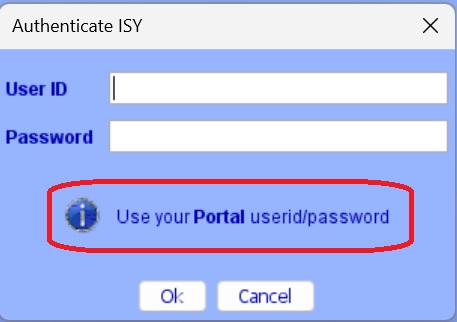
Upgraded the other day and thought all was good after upgrading to 0.7.2 Tried to login today using via IoX Launcher using admin/admin ... nope, then tried logging in with my backup user / pass nope Noted the login shows "Use your Portal userid/password" Question: 1) Why are the local accounts gone 2) In an event that the Portal login fails, how in the "H" will I login to the eisy ?
-
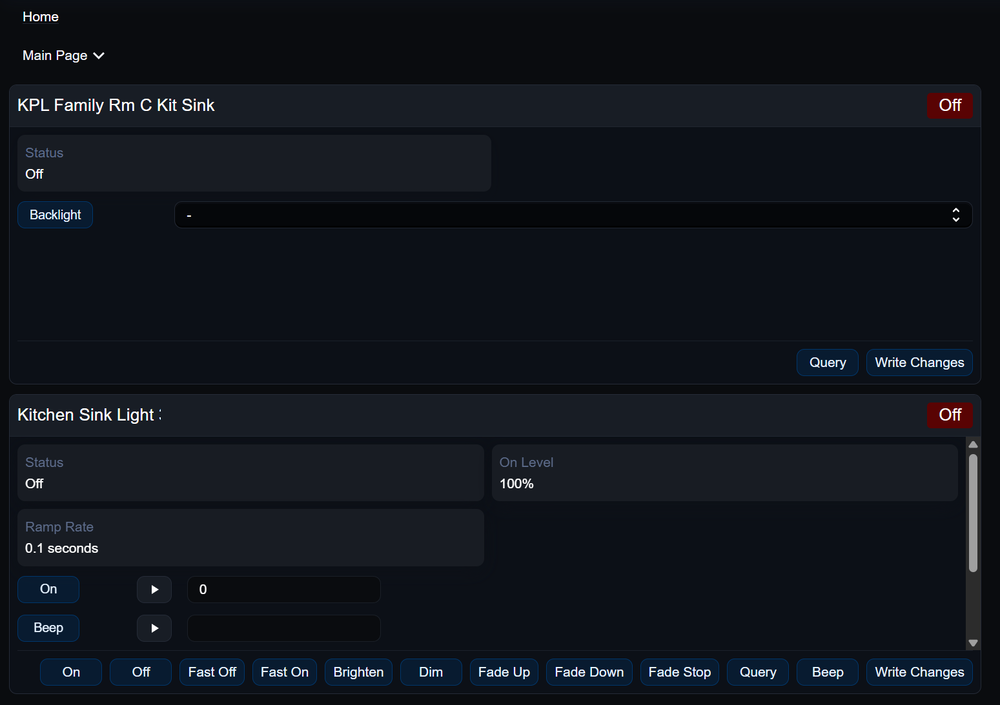
Poking around the new eisy-ui, and I know scenes and program edits are not yet supported ... I have a question about support for KPL buttons For example, Kitchen Sink light and a KPL buttom linked in a scene. Using UD Mobile, open the devices and scenes, select the KPL button, turn the light on / off ... simple I added both my Kitchen light and related KPL button as new tiles into eisy-ui. Manually turning light on / off via either the switchlinc or KPL, both tiles update showing status. But if I turn the switchlinc on / off via the tile buttons, the KPL status does not update. and there are no options to control the KPL button within the tile ? What am I missing here ?
-
check this post out, I've have it set for Christmas starting Dec1 and ending Dec 31 Christmas Timer If Time is Sunset And $sDate_valid is 1 And $iDate_month is 12 Then Set 'XMAS Tree' On The Integer values should look like this

-
One of those items you forget to add ... caught in heavy rain today, no shortcut to open the garage door on my cell. I had a look through other posts and can't find a simple guide to creating a FAV for my garage door opener on UD Mobile. I have the Garage Door Sensor and Relay (IO Link) listed as hardware, I also have Scenes connecting garage door KPL's, but nothing seems to work when adding as a new FAV I found this on Google, but not clear on what in my devices to assign to "select your garage door opener" Step-by-Step Guide to Adding a Garage Door Opener Favorite Navigate to the Favorites Page: Open the UD Mobile app and go to the Favorites screen. Enter Add Mode: Tap the + (plus) icon, which will be located on the Favorites page. Select the Node: Tap on Display Node. Choose Your Device: From the list of devices, find and select your garage door opener. Save the Favorite: Click the Save button to add the garage door opener to your Favorites.


