wrj0
Members
-
Joined
-
Last visited
-
On my eisy, I had to perform the timezone change to another zone and change back. Rebooting or power cycling, did not correct the program logging time problem.
-
Bingo! That did the trick. Thanks @bmercier Why is it that the simplest solutions often seem to escape me? 🙂
-
My Last Run Time and Last Finish Time for programs that run on a schedule or event are showing as 2 hours later than the actual time that the program ran (showing as 2 hours into the future). The programs run on the correct scheduled time or event, but are shown in the summary view as 2 hours into the future. Manually running one of those programs with the 2 hours later time shown in the Summary View, result in the correct time being shown in the eisy Programs Summary view. The System>Configuration current time and location are set and correct. UDM shows the correct time for those programs that show as running 2 hours later in the eisy programs summary view. The eisy was power cycled yesterday. How have I managed to hose this? eisy-ui 1.4.6 IoX 6.1.2_10 UDX 5.1.0 PG3x 3.4.28 mosquitto 2.0.18 mDNSResponder 2881.100.56.0.1 libwebsockets 4.3.3
-
Yep, thanks. Nodes did indeed have the same address as before. And just changing a character in the Comment section, updating and saving, restored the programs into operation without the "Not Loaded" status. All good now.
-
Wireless tags appeared after updating eisy.ui to ver 1.4.6. More in this post.
-
After updating eisy.ui to the recent ver 1.4.6, I found a new entry for my WirelessTags plugin, that included the Monitor Tags button. Enabling that allowed the plugin to find and display my tags and their status. Additionally, the update allowed my Zibgee service to once again find and access my Hue bulbs. Nice! Now, to update all of my Wireless Tag programs to eliminate the "Not Loaded" status.
-
This issue was previously reported in this link Perhaps it's time to tag @Jimbo.Automates
-
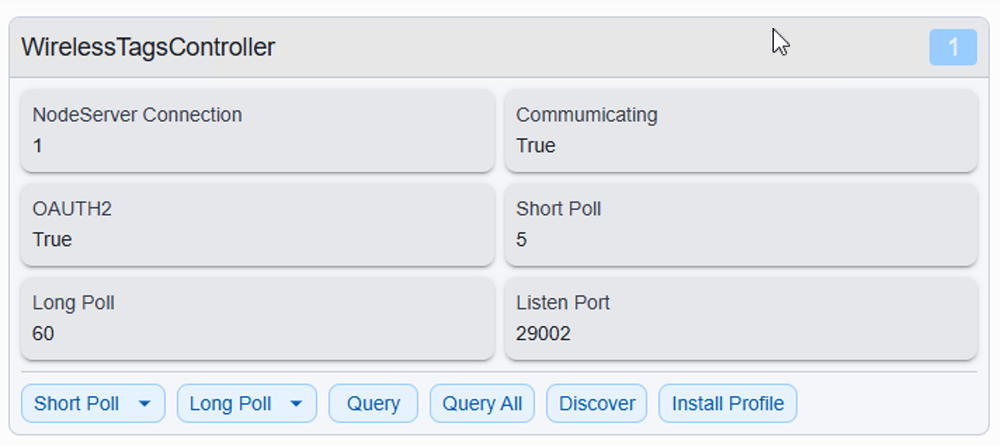
Since migrating PG3 nodeservers to the eisy.ui plugins, my Wireless Tag devices have not reported to the eisy plugin. The Tag Manager is present and appears to be authorized: When the Wireless Tab nodeserver was installed in PG3, there was a Monitor Tag function that had to be enabled so the tags would show up in IoX. I don't find a similar ability in the eisy plugin. Suggestions, please.
-
@Ross Need to select the name set in the Wake On Lan plugin, that you want to wake. In the Wake On Lan plugin, my first Configuration Parameter (name) is U59LAN1. The second field in the Configuration Parameter is the MAC/ip, e.g.,: 7C:83:34:xx:yy:zz/192.168.x.y My test program: WakeU59 - [ID 01BF][Parent 0080][Not Enabled] If - No Conditions - (To add one, press 'Schedule' or 'Condition') Then Set 'Plugins / U59LAN1' Send WOL Else - No Actions - (To add one, press 'Action') #Disabled
Run manually as needed
-
After updating eisy to the 10/16 releases, and migrating Wake On Lan again, that plugin is once again functional.
-
-
I have Wake On Lan ver 1.0.3 installed on my eisy; it's been running fine for a couple of years. Today I performed the "Migrate from PG3" on all of my PG3 nodeservers/plugins. All of the plugins migrated, except for Wake On Lan, which reported: "Migration failed: No valid license found for Wake-On-Lan null edition." Details in PG3>Dashboard>Wake On Lan shows: Wake-On-Lan(2) Current Status: Connected Current Version: 1.0.3 [Production] I have stopped and restarted the plugin. Anything I can do to allow this plugin to migrate? Thanks.
-
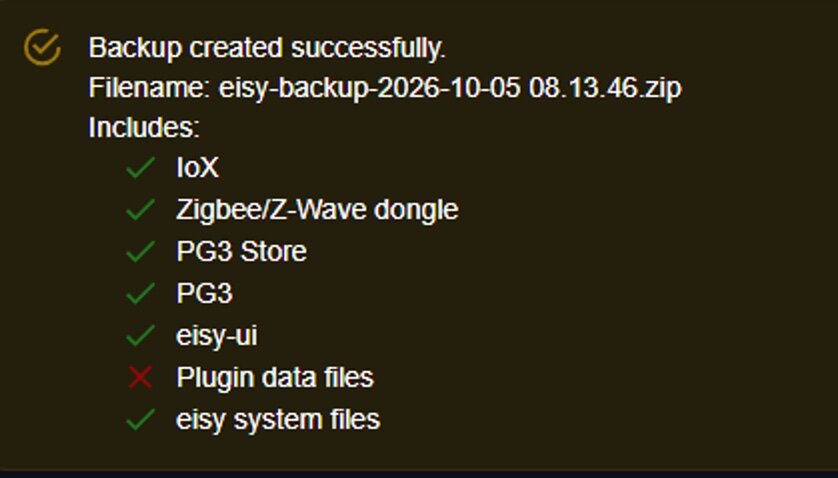
Since the eisy.local page shows "Plugins (Beta)" I had not previously performed the migration from PG3X to eisy. Opening "Plugins beta" showed a tab "Migrate PG3 plugins." After performing that migration, Backup now shows a Green check next to Plugin Data Files. Thanks all for your feedback, comments and suggestions. What an amazing, helpful forum!
-
Not sure migration is my problem; eisy migration from PG3 to PG3X was performed in 2023.
-
Seeing an error when creating a Backup using eisy.local > System > Backup & Recovery. Only noticed this after doing the recent Beta update. loX 6.1.2_7 UDX 5.0.0_4 PG3X 3.4.25 eisy Ul 1.3.9 The backup completes but shows this error: What am I missing or doing wrong?