


sjenkins
Members
-
Joined
-
Last visited
Everything posted by sjenkins
-
Same. Try ISY reboot. Only had this once ever. May be related to the new eisy-ui updates as that does change which piece of the stack owns talking to the portal AFAIK. also yesterday:
-
Ok, the re-write and validation of G2 & G3 is complete. Unfortunately, our sample size in testing is one of each system ; but here we go! The feature set is short but the code clean-up and resiliency should make up for it. polling 60 shortPoll, 600 longPoll (should roll out as default) 60 shortPoll is how often G2 will poll the gateway (same as before but was longPoll) to update (you can try shorter but you may flood the G2 gateway, YMMV) shortPoll also flips the ST cmd for heartbeat, re-starts the G3 client if it fails 600 longPoll is how often G3 will poll the gateway. Has been moved out to 10min as this is really just belt/suspenders for G3. Almost not needed as I have found the sse client is more than able to keep G3 updates accurate. longPoll does nothing for G2 controller ST cmd still tracks heartbeat, easy to monitor in a program ST status is tracking connected/disconnected, basically if the plugin is running number of nodes has been added and can be used as a check for how many shades + scenes you have discovered. G3 , complete re-write of the sse event client which is much much more resilient and less resources shades complete rewrite, should just work scenes G3 activation is now calculated. MUCH quicker and more accurate. Works even when the mobile app is blank. also a complete re-write Take a look at the code if you are interested on GITHUB . I welcome feedback & obviously value bug reports. NOTE!!! - there are a number of profile changes, if you are writing overtop of a current node, you will likely need to hit the load profile button and re-load eisy-ui or the AC. VERSION = '1.13.0' """ 1.13.0 DONE polling rewrite, controller: shortPoll=G2 poll, heartbeat for all, re-start G3 events, longPoll=G3 poll DONE polling rewrite, shade: shortPoll: re-start events if stopped, longPoll: not-used DONE polling rewrite, scene: shortPoll: re-start events if stopped, manually clear G2 scene activate, longPoll: not-used NOTE default & recommend setting shortPoll=60, longPoll=600 DONE major re-write of function and Event routines DONE add number of nodes managed by controller to controller node
-
@GTench, Great to hear ; again thank you for working with me, I needed to know that G2 was working. My G3 system is pretty extensive with three gateways and 14 blinds of 4 different types, so it gets a pretty good test. Well I am going to move the beta to production and hopefully not blow up anyone's system
-
Rewrite of the plugin is complete. If you are wondering "why mess with what is working?", I agree in that principle which is why since taking over the plugin I've kind of been a light touch. Except for the garage node which I started from scratch. I am sensitive to breaking someone's automation. Basically the code was pretty messy. Tough to read & maintain, as well there are some things which have moved forward in the udi_interface library. There was a lot of repetitive code, so I moved functions to a helper utility library, and consolidated all the TEMP nodes into one file. Finally, persistence was moved from *.db files to the provided api of the poly.Data structure. The majority of this should not be breaking or even force you to modify your code. Temperature users may have some changes due to the inconsistent use of precision in the original code. The code should be much easier to maintain, add features, or new nodes. Please take a look in the GITHUB & feel free to make comments. I held off on some other "improvements" which I knew would be breaking. The way changes are made in the UI for temperature are really ugly ; as well the precision setting is better set in the variables used. I could make a new node to clean this up, but I am not clear even on how many people use each node type. Some features which have been added (let me know if there are any more, or new nodes, you are interested in: controller: status follows if plugin is running number of nodes switch: cmd fixed so can be added to scenes TOGGLE generic / dimmer cmd fixed so can be added to scenes persistence was fixed & added to on-level could add TOGGLE if there is interest?? temp consistent behaviour due to one file persistence was inconsistent writing of variables only with changes precision handled more consistently (this may cause some program issues) garage this was a mess ; I started out writing a virtual node and ended up writing a Ratgdo interface. It does both, but likely should be two separate nodes. The clean-up makes that next step possible. This would be breaking to Ratgdo users (if there are any besides me ) sse client re-written, more solid persistence fixed I WILL LEAVE THIS IN BETA (NON-PRODUCTION) FOR ABOUT A WEEK BEFORE MOVING TO PRODUCTION ALSO, REMEMBER - tick the box in configuration to give the plugin ISY access, this lets it write to variables!!!! VERSION = '3.1.20' """ 3.1.20 DONE fix controller ST "status" on at start, off at stop / delete, "control" still heartbeat DONE garage send CMDs, motor, motion, obstruction ; get naming consistent DONE standardize startup sequence DONE rewrite checkParams, Discovery DONE add NumberOfNodes DONE switch/generic/dimmer/temp(R/C): nodes use polyglot persistence, delete old db files DONE swtich cmd TOGGLE add DONE consolidate temp, tempC, tempRC into one module DONE temp variable writing now with shortPoll (only upon change, considers precision) DONE refactor function naming DONE refactor garage, fix persistence, sse client DONE backfeed garage improvements to switch(done), generic(done), temperature()
-
Thanks @bmercier, seeking to understand: so right now when I setDriver(GV0, value), I don't expressly set uom, like: setDriver(GV0, value, uom=#[name I used in EDITORS]) is that what you are thinking? or is it that value is possibly an int() rather than a float() This is part of the api which is rather quiet, as well when to use force=True or not. appreciate your time
-
Its for Virtual devices ; just called 'virtual' in the plugin store. I have been re-writing it as I took over curation of it a bit ago; the behaviour exhibits in both the old production and re-written non-production (you will likely find the re-write much easier to read). The issue shows itself in the temperature devices. If you install it & configure with one device: key value 10 temperature As far as 'configuring' this behaviour, you can see in the profile files there is very little ability to configure beyond a precision variable. Perhaps eisy-ui is ignoring that?
-
@GTench, Well I appreciate your patience ; sorry I was not much help in understanding the issue. Glad it seems to be working now. I have seen before where a battery status has shown 'no status' for some period then returned. That could just be comms between the shades and the gateway. Does the app show the status? Does everything else update and trigger as expected?
-
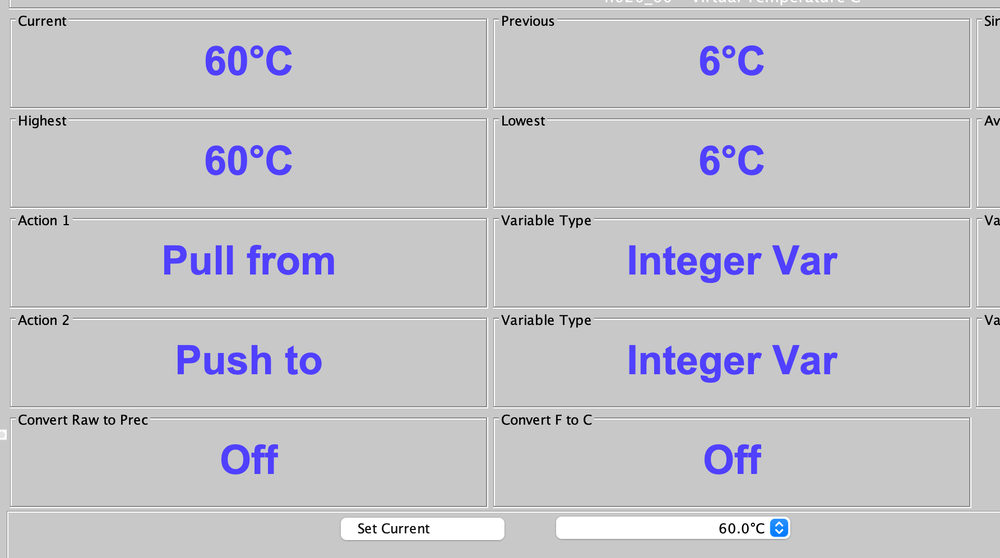
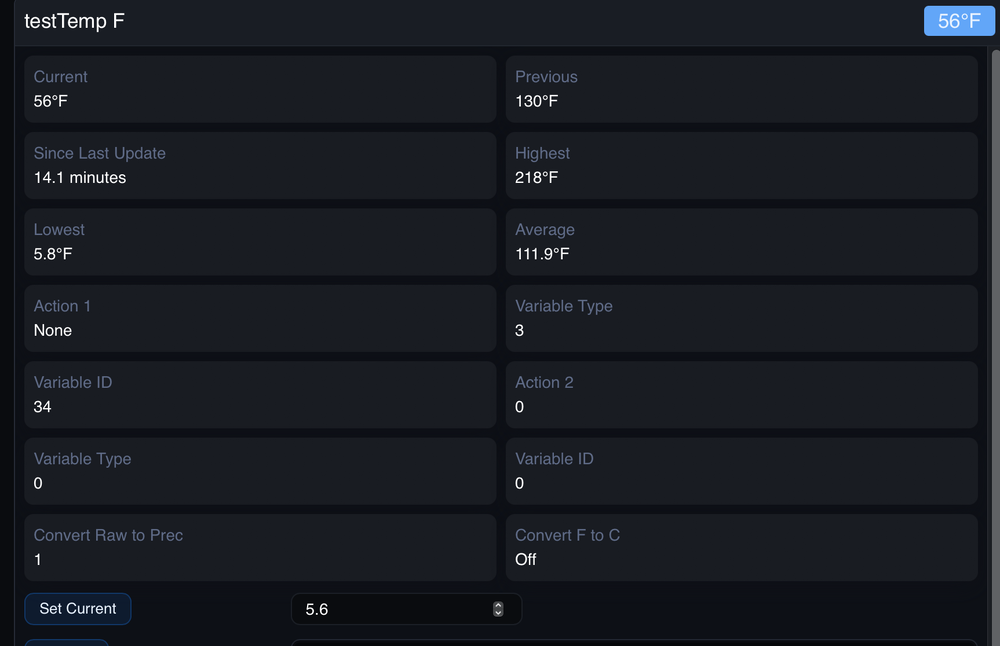
Lost an hour trying to debug this on the Virtual plugin ; until I asked myself if the AC did this.... @bmercier, the precision on display seems to be different between the entry number and the actual in Current versus Set Current: for some reason Set Current in the Eisy-ui is one tenth. Whats interesting, is the number you enter goes in properly but then shows as one tenth down below: correct in AC: Not in eisy-ui:
-
@GTench, So sorry, I had not done a clean install in a bit & there was an error in the profile name for the "number of nodes" name. I need to do a clean install EVERY time I touch the profile files. They don't always effect you if you are installing on top of a node, but will on clean installs. I really would not run two of these plugins at the same time. Manually stop one before running the other. Not because of the EISY, but the gateway can get very grumpy in the G3 ; I imagine the G2 would only be more so being older technology. Its for sure ok to have many installed, ( I have four slots with different versions) just not running.
-
@GTench, The logs look clean right now. I would suggest stopping all your plugins (not just the HD ones) and starting the AC. See if it starts well. If it doesn't then it is not a plugin issue, start looking at your plugins. Try an ISY reset. If it starts up fine then start turning the plugins on one by one until you have an issue. In each case see if you can turn the issue on/off. Get logs in both cases.
-
@GTench, interesting, I have it loading 60 & 600 on installation. I’ll have to look. the 60 is the update cycle for G2. please try that as it’s less likely to overload your gateway.
-
@GTench, Thank you for the logs, I looked at them & in general they look good with no obvious errors. Can you verify you are using a shortPoll of 60 and longPoll of 600? Any chance of a race in your programs? Have you changed any recently?
-
Thanks for all the work ; putting my plug in for the last one on the list (I know you know)
-
the connected / disconnected is a feature of udi by adding: self.poly.addNode(self, conn_status='ST') Allows easy tracking. Not sure when that was added by the UDI boys ; I just added it to this. NOTE: So this means you can use the STATUS of ST to check for connected status. But in addition, this plugin (and many others) use the CONTROL of ST to check for heartbeat. Basically a program which checks in the IF section of a program for ON or OFF of the CONTROL, using the THEN to wait for a period of time, say an hour until setting an error ( I push a message using network to my phone). As the heartbeat goes back and forth the wait is reset and the error message is only set when it stops oscillating. I talk about this in the instructions but the status part is new. The creating widgets for scenes does not make sense to me. So if both are stopped does it work ok? I have not experienced that & not sure how it could effect that. Can you please send me the debug files of both the plugin and the main log of PG3. Might be best to DM them to me. If too big I can give you my email there. thanks.
-
you assume correct remember to tick the box by "Allow ISY access by plugin" and save.
-
@macjeff, the keys, "isy" , "user", "password" has been depreciated for quite a while. With this re-write I added error checking which defaults to flagging keys which are not recognised. In the configuration screen under the shortPoll , longPoll entries is a little tick box "Allow ISY access by plugin", make sure to tick that box. when you use that kind of configuration you need to enclose the dictionary in {}, {"type": "garage", "name": "VirtualGarage1", "ratgdo": "False"} will work fine for you, no limits on the number (within reason) hope that helps, & thanks for testing.
-
@GTench, I was using a new name checking function (which I "stole") from another plugin. Their reasonable choice (which I agreed with) was to cut from the left as that data is not as likely "unique", its the name of the room. You are less likely to end of up with a number of shade/scene names the same. As you do in the production version. I changed it back for now, but I am leaning to keep truncating from the left. Let me know how you think about it. Personally, I have just shortened my names a bit. As far as having more than one plugin running at the same time. The issue may be they are polling from the same gateway. On G3 I normally don't run them at the same time but what I find is the gateway crashes not the ISY. I just checked HTOP with three running and found it was ok ; but that is G3. Can you stop each of the plugins, and run one at a time? Let me know if you see a performance difference with production only, beta only, both. If you only see the performance drop on the beta, please send me debug logs. thx
-
@GTench, Good to go, as I was concerned about, during my refactoring I replaced 'id' with '_id' for G2 scenes. That's all it takes. Someday I will generate tests with my programs ; never really took hold for me. Would help in places like this, where I don't have the hardware to test. Please install in a fresh slot and give it a go. thanks again. PS: also, made a change to fix the noisy start-up before you put in your config gateway
-
@GTench, Made a change which should protect G2 from starting the sse client. Please reinstall.
-
@GTench , looks it didn’t detect g2 properly; It got there & is saying the sse server is not right. Yours doesn’t have one. can you do a restart of the plugin and give me the logs from the beginning until that message starts. I don't need it all just that. I added something to drop out of the sse client if it sees that too. I will look at the detection routine again. thanks for testing. This is the g2 stuff I couldn’t test myself.
-
@GTench, No I just now did a clean non-production install & all was well I have to ask, you updated the config with your gateway IP, right? assuming so, send me your debug logs please
-
@GTench, Sorry for the delay, fixed. The bug was in the discover routine which you have to do a clean install to find & have certain shades. I made a change before my last clean install test. My bad. Should be good to delete, re-install and check out. btw: : to all testers, please tell me if you are G3 or G2 when you give feedback. Thanks again to all!!
-
@GTench, Found a late dumb error in Discovery. Did a quick fix for G3, but give me the night & I will fix it properly.
-
Yes you can, I actually have production, beta, & development local on mine. I don’t tend to run them at the same time as sometimes the gateway gets grumpy. But nothing will blow up. you also can install the beta on top of the production, and then go back to production without your programs getting messed up. I do this sometimes too in my testing cycle. The poly platform is very flexible this way.
-
Should be in the non-production store.


