


jeffreycowart
Members
-
Joined
-
Last visited
-
Is the reboot button under settings the same as holding the power button until red, then pressing again to turn blue? They both are supposed to reboot the eisy, but while on a screen share with Michel, he asked me to physically press and hold the button, then press again. The unit was downstairs so it took me a while to get back and forth. If both reboot the system, why not just press the button?
-
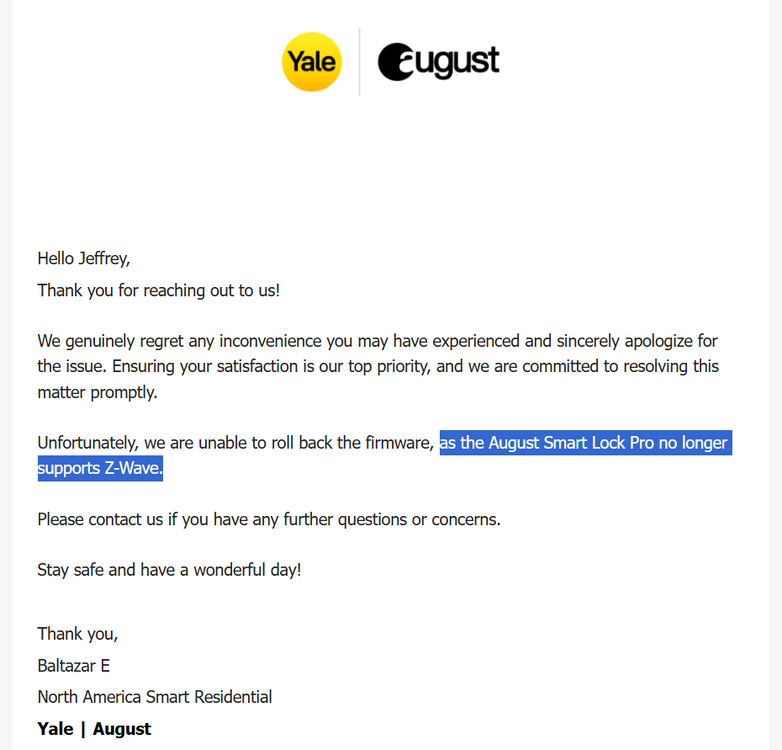
Javi, Thanks again for your support. I reached out to August and it looks like they have discontinued Z-wave support for their ASL-03 August Smart Lock Pro. They make No mention of this on their support site, but I found others on Reddit that got the same response from their support. SO if you run into any August lock issues it is not UD, it is August/Yale which is the problem. Time to find a new lock...
-
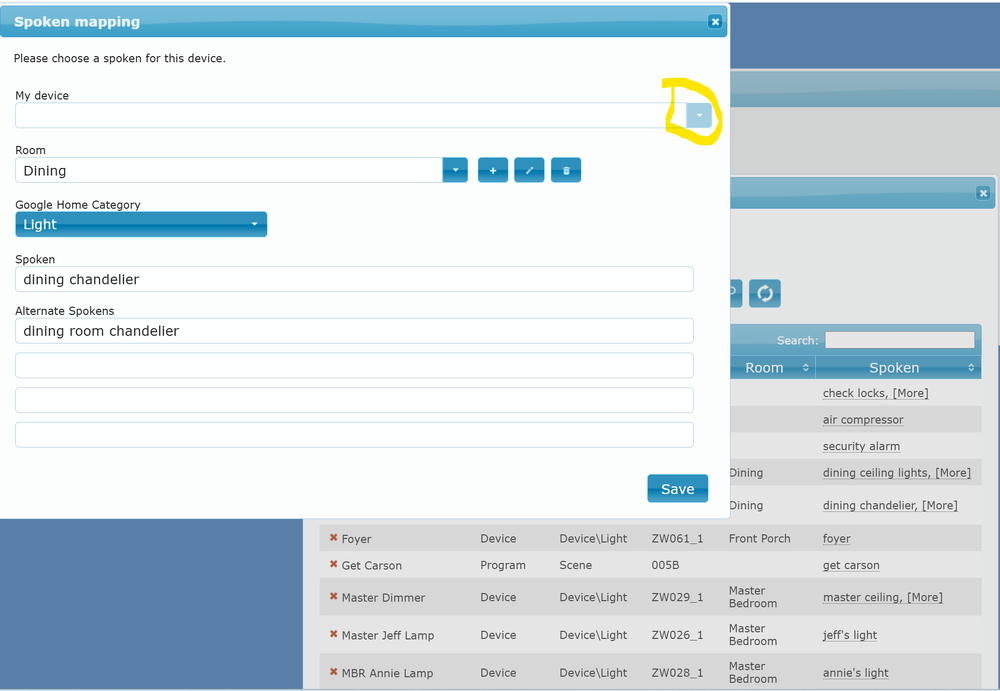
Great, that information helped! I created a brand new spoken entry, and pushed it to Google. Confirmed it worked. Went back to the new spoken entry to see if updating the "My Device" was possible and it is NOT. Which means I did not screw up the spokens migration process, and this problem will happen to anyone migrating Z-wave devices. So, my suggestion to anyone migrating Z-wave to Google Home, would be to download your spoken list, and skip the "Migrate to" step. It fails and you will need to delete all spokens and re-enter them.
-
Guy, maybe I stated my question poorly. If you look at the screenshot, the spoken is there, with the room, type, etc. The only thing wrong is "My Device". Why can't I just update the "My Device" field to point to the correct device. It is not editable. It seems like I should be able to update "My Device" to the new name. I have to delete the spoken completely, set the room, type in the spokens/alternatives, and select my device. There is ZERO point in migrating if you have to delete everything and redo it... I guess its a z-wave problem only, as Insteon nodes don't seem to change. Lastly, the post was to ask others if they had the same issue migrating Z-wave or if I missed as step that might help others.
-
Followed the steps outlined in the guides. The spokens list shows up under my new device, and the old 994 has been removed. Since it was z-wave and all the nodes changed names in the migration, I knew I was going to have to remap them. I wanted to confirm others have this same issue, I cannot simply remap the "My Device" for each spoken, it is grayed out and will not allow to change... So, I have to recreate every entry from scratch?
-
Yes, Ticket #30500. Was closed without conclusion.
-
I am going through the same issue. I use the Homeseer dimmer switch LEDs to update to different colors when deadbolts are unlocked or doors left open. I noticed after migrating my Zwave to eisy (did not go smoothly, Michel had to manually manipulate things for a while to get it to work). I noticed afterwards that eisy was slower to change the LED colors. Even after several heals. Here is what I have been doing. In AC I start a zwave capture, then adjust a lock, wait for all LEDs to update, which can take up to 1-45 seconds, then stop capture. Save the log then throw it into Claude and ask it why device xx is delayed. From the event viewer on level 3, what I can see is that the lock status is updated almost instantly! The configuration change TX requests are sent almost instantly! The response from a few of the devices is what gets delayed. The events run sequentially so one slow device slows down the rest of the commands from execution. What event viewer doesn't show you is what devices are requesting repeatedly. Claude can quickly read the log and tell you which devices are repeatedly not responding quickly. Claude told me to run a heal on certain devices and recommended a particular order. I followed the steps. It did seem to help some, but still not great. I fear that zwave just doesn't migrate well and healing marginally works. I am going to try excluding and including the slow devices to see if that helps them communicate better. Eventually, I will probably wipe and start over.
-
Thanks Javi, but no luck. I sent the zwave capture log to support and the S0/S2 Bootstrap is failing, and it is going through 20 neighbors, even though the lock is 6 inches from the dongle. Even after excluding, factory resetting the lock, and including.
-
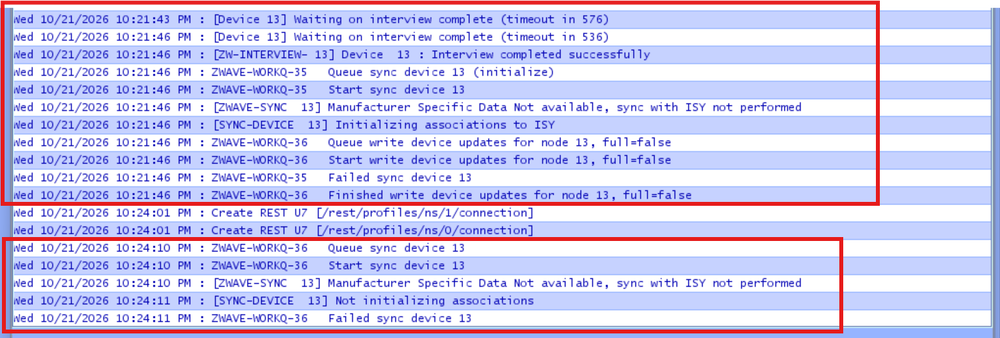
Working on getting moved from isy994 to eisy. My Kwikset Z-wave locks are working. Reporting locked/unlocked is now hit or miss, which sucks, it was more reliable on isy994. Maybe zwave is still optimizing. The August Gen 3 Z-Wave Plus (500 Series). I can get it to add, but it only has the "query" and "write changes" there is no ability to lock, unlock, etc. I have seen some threads, @JimTurner had to go as far as keeping his isy994 running in tandem to operate his August lock. Has anyone connected an August lock ASL-03 successfully and completely to eisy with usb Zooz 800LR Zwave? I know there is a node server, but that is for wifi locks, right? Following @Techman suggestions, I have excluded / included (7-8 times). Factory reset the lock. Included it 1 ft away from the eisy (with Zooz 800lr dongle). Tried every zwave option: turned off validation, turned on compatibility mode, tried to include as only S0. Also included as S0/S2. Update, synchronize with interview. Nothing works. Also turned off Secure Inclusion. It is device 13 shown below. I have approx 65 zwave devices working. Top box is Update with interview, and bottom box is just update.
-
Was freaking out last night as I typed up the situation below. Luckily, I discovered the issue and all is good now, but thought I would still post for anyone else who has my lucky timing... Here was the situation: ISY994 All Z-wave, no Insteon. UI and Firmware on 5.3.4 My ISY994 has been running just fine, until today when I added a Zooz ZAC38 Range Extender. I did my normal process of exclude twice, then included the device using the UD mobile app. I always have it show progress. It added a bunch of nodes, but it seemed like it might have stopped/stalled before finishing. Seems like I usually read something in the progress that tells me it's finished. I waited approx 1 minute and there was no movement, so I clicked the finish button. It asks if I wanted to synchronize, I said yes and it went through it's process (I thought). It then asked me if I wanted to delete 1,5xx old cached values, which I thought was odd, since it is usually a very low number. I said no, then went to the admin console. I get the error: "Initialization Incomplete: Cannot retrieve nodes from the ISY. Would you like to close the Admin Console." First times I said yes. Then tried clicking no, it goes to admin console, but only ISY is at the top no z-wave nodes. Elk is showing status, programs are there, but they are all "unrecognized nodes" I have: Rebooted ISY via UD mobile Unplugged ISY for 60 seconds Removed SD card and cleaned contacts Cleared Java Cache and got a new start.JNLP Excluded new ZAC38 device via UD Mobile Z-Wave Synchronize nodes via the Z-wave drop down. It tried and went through the process twice (status bar showing progress). On second attempt, the status bar just went away. (Below I noticed using the event viewer that one device was flooding the viewer during the sync). Was about to factory reset the Z-wave dongle, thank goodness I didn't. Z-wave continues to work and I can remote control devices via UD Mobile (i.e. turn lights on/off). If I try to synchronize UD mobile it freezes at Z-wave instance 1... After a while it continues with lots of errors: ISY header no response, etc. Since the sync fails, the z-wave devices are still visible and can be used. Through the admin console I was able to open the event viewer. Level 1 nothing special going on. Level 3 one device is providing an "Binary switch report" every second. ISY admin console didn't show as "Busy" in the lower left corner, but it was a constant request. This is a simple On/Off Homeseer HS-WS100 device. That has been in place for approx 7 years. Once I figured out which switch it was, I went and took a look. It had the flashing LED indicator strobing at 1 hz. The switch had gone bad. I removed power to that switch and all was working as normal again! It was basically causing a DOS attack on my system, but switch went bad right as I was adding the Zooz range extender, so I thought that was the culprit. Or the switch was already flooding the network and the add device failed due to network traffic. I have had these Homeseer (same as Jasco/Dragontech) go bad before, but they have never caused a DOS. They just don't work locally or remotely. FYI, these switches can be fixed by replacing a small capacitor on the start circuit. I replaced the capacitor and the switch is back in place working fine now!


-
Thanks Techman. I see you are using a range extender. Do you have a lot of z wave devices? Or are your devices located further from your Eisy? Or do stand alone repeater just work better than switches acting as repeaters? I thought those were for situations where there wasn't a robust mesh network.
-
Techman thanks for asking that question. I don't have a dedicated device like an Aeotec Range extender that I have heard many people mention, but looking at the node details (attached in my first post), I have 30+ devices listed as repeaters. These are all permanent wired devices like Homeseer switches and GE outlets. Many of those devices are within 10 ft of the ISY. The newly tried 700/800 series devices are located in the middle of my environment. All the other switches and outlets communicate 100%, it only these newly introduced 700/800 series devices that don't keep a solid connection. Do my repeaters act differently than something like the Aeotec Range extender 7? I have searched and seen other posts with people running into communication issues with newer series devices. If they aren't fully compatible I won't waste my (or the nice forum members) time trying. I do plan to upgrade to eisy at some point, so wanted to buy newer stuff as I add, but if it won't work I look for alternatives until I'm ready to pull upgrade trigger. Thanks all!
-
Thanks for your reply lilyoyo1. I have been trying the same things you suggested... And read over the zwave tips and tricks posts. They claim to be backwards compatible but 50-80% reliability for on/off commands is not compatibility. I am not concerned with having the 700/800 benefits. I tried both close by ISY exclude/include and close by exclude / final location include. (The devices would not exclude from final locations, had to be close to ISY to exclude). After doing this I synchronized, Repaired links, and updated neighbors and left alone for several days. Behavior is always the same with 50-80% reliability command will go through. With the heal option gone, my understanding is that you do have to give it several days to self heal. Do I need to give it more than several days? I would typically wait 3-5 days between making changes. These are Zooz and Shelly devices, so probably considered in the low cost category. Guess I was just trying to confirm if all 700/800 devices will behave this way with the older ISY994 now that there are no more updates, or if it was these cheaper devices have lower quality implementation... If others are seeing rock solid communication out of 700/800 series devices with ISY994, I will keep trying. If not, I will try to source some older Aeotec relays that are 500 series.
-
Currently using an ISY994 with the 500 series z wave board. Everything works great and its has been super reliable. Rarely ever get an unresponsive device or missed event. Everything is on the latest available version for that device. Currently only have z wave devices (no Insteon). Home consists of probably 40-50 devices mainly Homeseer HS-200 switches and dimmers. Also have some GE outlets. The vast majority are z-wave Plus devices, but there are a few that are not (probably 2-3 at most). I recently tried to add some new devices: Zooz Zen52 which are z wave 700 LR (on latest firmware). Those connected fine, but after connecting the reliability was only about 50% of the time. They would work turning on, but a few seconds later would fail to connect when turning off. Causing the ISY to remain "Busy" while trying to reestablish communication. I put in two of those approx 10" apart. They are within 5-10 feet of Homeseer switches and dimmers. I synchronized, repaired links, updated neighbors and also just gave it time to try to correct itself on its own. Looking under zwave details they both had routes from the ISY and listed the 30-40 other devices as neighbors. BUT it was still a 50/50 shot if they would work when needed. Originally tried including close to ISY. Per Zooz support I tried excluding (had to move back very close to ISY), then readded them in their final location. Took about 20 tries to get them to add in the final location. Made no difference in reliability. So I pulled those out and replaced with Shelly Wave PM2 devices, which are z wave 800. Almost the same exact behavior, except I would say the probability is 80/20 with these devices. I excluded and added them very close to the ISY, then moved to final location. Are others seeing this behavior with newer devices? Is our only course of action to either find 500 series devices or upgrade to Eisy? Or am I doing something else wrong? I attached the ALL Node details for the Shelly Wave PM 2, if anybody sees a blaring issue. Shelly Wave PM2 Node Details
-
I have not had any issues using room aware. I tell GH to turn on/off lights when I am in a room and only lights assigned to that room turn on/off.


