


Bumbershoot
Members
-
Joined
-
Last visited
-
Thanks for the tip, @mmb I had to unplug as well to get the plugins operational.
-
Update the "Init" value of the variable every time you update the variable itself. This will set the value of the variable to the "Init" value across reboots.
-
Thanks, I'll give it a try. I saw the same thing. I use state variables in these programs, and I was able to increment the value, save, de-increment the value, and save again.
-
FWIW, I'm experiencing the same problem with programs that trigger on "SUNSET". I'll know in a couple of hours if my "SUNRISE" programs have the same issue.
-
It doesn't work on the new Golden Gate beta. There might be a work around with an open source version, but the Oracle version doesn't run now.
-
Well, whatever the cause, a good habit of making backups saved the day here. I've got a new PLM on the way, speaking of backups...
-
I had no idea that the PLM would fail in a way that make it lose links. I figured it would fail suddenly and completely due to power supply issues(which it eventually did). I didn't notice it, because most of the complex interactions with the system were by simple programs or through scenes activated by a KPL button press. Most everything seemed to work normally, right up the the PLM failure (and the KPL button presses even after). Anyway, I'll keep up the habit of backing up every time I make a change... Thanks again.
-
@IndyMike, I installed a backup from last winter and got a count of 560 links this time. That looks loads better. The system has been pretty stable for years, as we're comfortable with the way it operates. I doubt we'll see any functional difference, just ISY and related software being slightly out of date, and that's easy to update. Thanks for your help with this! EDIT: By the way, the program that originated this thread now works as intended!
-
That's good information. I just did a PLM count with a quiet house and the count was 160, which is better, but still seems pretty short, given the scenes and devices (two six button KPL's and one eight button). The eight button controls an "All ON" and "All OFF" scene, which has 37 devices included, so it's still low.
-
My mistake. I forgot to hit the "Count" button... I currently have 98 links, and I used to have many hundreds. I'll restore the ISY and PLM and see how it goes.
-
@IndyMike, if I'm understanding you correctly, I could restore an ISY backup that was working prior to the PLM dying, and after that's complete, perform a restore on the PLM? I have plenty of good backups, as I've been scrupulous about backing up whenever I've made a change. I've rebuilt a few scenes, and yes, it's painful to do that, and I've got probably 80 Insteon devices, and roughly 40 scenes. A restore sounds like a good solution, if I understand correctly. Right now, the PLM shows 0 links (after restarting both the PLM and the eISY).
-
No change in behavior after performing the PLM restore procedure to the letter. It looks like the switch sees the new PLM, and I can control it from the AC. I don't understand why the program doesn't work at all. In the screenshot below, the links are the same from both the ISY and switchlink dimmer, and the dimmer appears to see the new PLM.
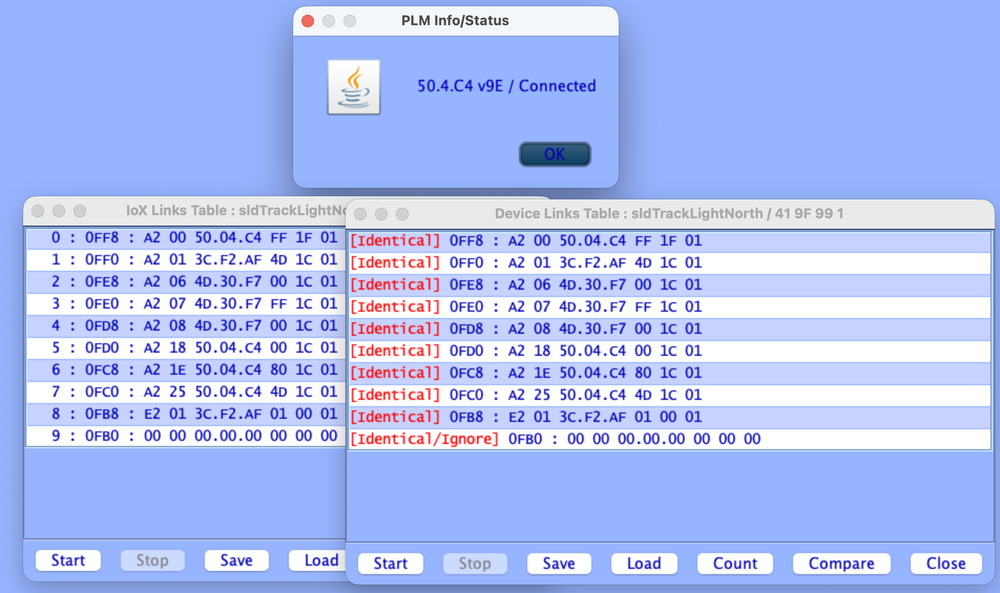
-
I initially did power cycle both the eISY and the PLM. The device restore doesn't resolve the problem. I'll give both devices another power cycle. My old PLM was actually over 10 years old before it failed completely. The system has been stable for years, but the new PLM has way fewer links than I expected, so I'm thinking that the old PLM has been somehow dropping links for some time before it failed (I don't know if that's even possible).
-
eISY running ISY software 6.0.5_10. I did power cycle the eISY a couple of times, but not the PLM as well. I'll give it a try a little later today.
-
Background: I had to replace a PLM recently, and I've had to rebuild several scenes, and 'scnCooking was one of them. The two switchlink dimmers in the "If" stanza of this program are also in a scene that creates a three way for the track lights. I've restored these devices, factory reset them, updated the scenes several times and updated this program several times. For reasons I'm not understanding, this program will not work, as the "Fast Off" for either of these switchlink devices is not captured by the ISY software. I can run the "Then" stanza from the AC and the "scnCooking" is turned off correctly. A fast off does indeed turn off the track lights appropriately, but the program doesn't run. The status of the switchlinks will not update in the AC unless a query is run, then the status is updates. I'm a bit baffled by this. I'd appreciate any insights here. Thanks! CookingFastOff - [ID 0008][Parent 000A] If 'Devices / dirKitchen / sldTrackLightNorth' is switched Fast Off Or 'Devices / dirKitchen / sldTrackLightSouth' is switched Fast Off Then Set 'Scenes / scnCooking' Off Else - No Actions - (To add one, press 'Action')

