


raymondjiii
Members
-
Joined
-
Last visited
Everything posted by raymondjiii
-
I added all of that extra information due to past being asked, or being told, that ... I likely don't have the vpn setup correctly, etc. Test Remote Connection works fine on both. Both have no Local Connection Settings. Somewhere in the code base causes the popup window: Title: Example Text: Example Message (OK Button) I'm sure that was not put there on purpose.
-
both devices are active and have active licenses on the ISY Portal. I mentioned that each house has unique SSID's but both EISYs are ethernet connected. ISY Portal shows that both models are: 5226 eisy (although I know they are different somehow)
-
Two houses, 2 different model EISY's. The houses are connected by a site-to-site VPN. The LAN is different on each house. The SSID's are different on each house. House1 I can control devices but UD Mobile does not show status House2 works fine with UD Mobile For House1, when I go to Settings, Portal Authorizations, I get a "Current Account:" shows my email address and below that I get a "No Requested Services" with a UD Mobile icon. On House2, when I go to Settings, Portal Authorizations, I get a list of 2 entries for the ONE EISY at House1 (one is eisy.localhost:8080 and the other is the IP address of the same EISY.) I realize that "finding" the EISY may go over the VPN. So House2 shows House1's EISY, House1, shows an error of some type. BUT - House2 shows correct status for devices, House1 does not. While on House2 and it shows the 2 entries for the EISY's at House1, "Select Controller" - if I pick either I get a popup window that says: Example Example Message (OK Button) I have tried to sync both devices with wifi turned off. No change. Latest firmware is updated 6.1.1 on House2 and 6.1.2 on House1 House2 has one of the newer models (bought it about a 9 months ago). House1 has an older EISY bought it a few years ago. On both devices Settings --> Accounts lists the correct account. I would just like to get House1 to show current status of devices.
-
The only thing I did was from IOX to "restore device" on a slave switch for a 3-way circuit. The Off from the master was not showing off on the slave. This 3 way circuit was installed over 7 years ago, I cannot believe that I never noticed this before. But the "restore device" actually fixed that. That was it. But then it was insane. I tried so many things but eventually a hard reset on the PLM and yet another reboot on eisy. From there I could see the PLM from IOX and UD Mobile was showing the status of all items. Relatively new USB PLM too. The only thing that's odd and that I get on any computer running IOX is that if I do: Tools --> Diagnostics --> PLM Info/Status - this runs a little window like the "linking" window that runs from 1% to 100% and just continues forever. I don't know what it's doing if anything. I cannot remember looking at the PLM Info/Status for many years so no idea when this started but curious if anyone else has seen this on IOX? I woke up and saw that none of the programs ran over night. On UD Mobile, I clicked the "Insteon" option on UD-Mobile - (Settings Insteon) but I was afraid that was going to reset everything and although I had a backup I didn't want to go down the path if possible.
-
"/ Not Connected" IoX works - but I cannot control anything UD Mobile cannot get the status of any device Tried unplugging both eisy and plm, plug plm back in and then restart eisy - no change.
-
I looked at your Home Automation Roadmap. If you ever get your Yamaha receiver integrated that would be awesome. I tried that device that has the IR emitters - not sure if that was Smarthome or Insteon or what. But I could not get that working with my old ISY. I have successfully used the ChannelPlus units that plug into an electrical box and send the IR signals all over (to the receivers in the house). That was nice when I had cable TV. But I do wish I could get this "other device" (can't remember the name) - to work to change volume, radio station (yes I still listen to FM, about a year ago setup a nice HD FM antenna) and a Sony XDR-FM1 - I mean that device stands by itself. How the hell that thing can pull in signals from "way out" and separate the signal from the noise. I have 3 other units that I want to try to do the mods on. The guy who used to do them "xdrguy" is semi-retired now but I'm on his "wait" list. There's a lot of messing around on that little tuner board and the solder joints like to come off the board which makes it real fun. There's a good chance I'll mess something up on at least one of these units but learn by doing.
-
I'm trying to understand this remote Wifi device. If it's in your house and you have no Internet "network" then how is this device connecting to? I don't care if the device connects back to "its cloud" somewhere (like Feit brand cameras do and you access the cameras at the cloud address) - if it's like that - how does "the cloud" signal make it back into your house where there is no network at all. If it's not running on a cell network I fail to see how this device is going to connect back to its app. Or rather, how "the app" is going to connect it "it". The Feit camera might be connected to "the cloud" and you access it via it's cloud IP address - but the network stream is still going from your house network to said cloud. No home network - nothing is phoning home back to the clould
-
I am going to have the EISY just handle the modem restart. I'm going to let the build in router reboot schedule do it's thing. No way to prove it but I'd bet $5000 that my problem was the modem and weather played a part. Yep, I know the feeling - that's exactly what I was doing....waiting for Sunday to roll around.
-
I've done some speed-tests in the past using a cable splitter (with and without the splitter). Cablevision basically tells you to take the -3.5db (or even the -7db) output from your splitter and not to direct connect the service to the modem. I've had that in the past but in this case I'm not using a splitter yet. It would be nice if these cable service provider modems could allow the end user to look at things. I thought that was part of the whole docsys 3.1 thing. With the fiber modem they purposely disable the "advanced settings" on the portal. I have no idea even what those settings are because you cannot even see them.
-
Right, but my problem was that the network is shot so I don't think this will help when the network goes south. But something like a positive ACK failing to come back to the EISY could indicate the network is not in a good state and trigger the Insteon On/Off module - even stagger the modem and router. Can this even be done though on an EISY - make a simple network connection? My EISY program experience is limited.
-
I'm wondering if an EISY would boot - if it cannot DHCP it's IP address - hopefully it skips that step but I wonder what else is dependent internally on such a connection. Come to think of it...I think there have been cases when the service went out and I had to restart my EISY. The only reason I know is because of UD Mobile.
-
I do not agree with your assessment of having a reboot schedule implies "bad code" - at all. An operating system has memory fragmentation, caching issues. In addition, having a "scheduled reboot" allows for the OS to cleanup. A "scheduled reboot" is not the same as pulling the plug out of the wall. The cable company WILL NEVER have someone come out and do all of these things that you are claiming. I do not have 10+ hours in a row to fight with multiple people as I get thrown around to different people that really have no clue. I'm glad that at least someone has a good cable provider. But what WiFi / LAN is this remote device using? If it's in my house it's using the only Wifi and LAN that are there. I'm not following how a separate wifi device will accomplish the same as your description of ISY with Insteon which is basically what I'm going to do.
-
I don't know what service provider you use. I can't even get a simple answer to a question about my bill. Even if they had such info they would never get it. The only is if one of their techs is in your house but even then some of them are first day on the job.
-
I would love to see a sample of that program that test if things are responding. What Wifi device are you referring to exactly? I'm not following, if your home network is shot how can you communicate with this wifi device?
-
I should add that when I arrived at house#2 I just restarted everything at house#2. Router lights were all good at least. I could have messed around and did some diagnosis but I wasn't there with a computer. Restarting both modem and router(s) UD Mobile was back online with that house's EISY.
-
The router is Synology (full mesh with 3 nodes in the house#2). I consider Synology brand (both routers and NAS) as A++. The VPN is run by Synology's "Site-to-Site VPN" built-in which is using IPSec - both sides are using the same Synology devices and the same VPN config - the VPN is good. The VPN is not the problem - given that UD Mobile cannot access my EISY (at house#2) and pops up a notification that it cannot. If I lost just the VPN then UD Mobile would still see that EISY (at house#2) through UD Portal. I do not use the VPN for UD, I use it for the remote cameras to write back to the NAS nvr in house#1. I do not have any modem lights to look at on the modem - I'm not there to see them. But even if I were, I do not feel that is any guarantee since house#1's fiber modem, the LEDs are not accurate since I've had to reboot that thing about 1 to 2 times a year when all "looks" okay. Interestingly, I am going to swap out Cablevision's modem with my old Arris Surboard (that I used in house#1 before upgrading to fiber). (Fiber is not available at house#2 and wouldn't pay for it even if it were.) I don't recall having to reboot the Arris Surfboard but I had that modem for about 5 years maybe but maybe I did. My main reason for "bringing my own equipment" is to knock down the monthly fee and that the Arris SB is just collecting dust right now. Interesting though that my Honeywell thermostat reported no outage but I suspect it uses very minimal "heart-beat" (not sure if it keeps an open TCP connection). I could at very rare times access a camera or 2. I suspect that the modem, for whatever reason, had downgraded me to a trickle (and not for using excessive bandwidth).
-
I think I am going to add an EISY program that turns off, waits 60s, turns back on - my cable modem - maybe run it twice a week. I have a remote house that is not impossible to drive to but would take a good chunk out of the day round trip. This past week, my EISY at that residence was being reported as Offline by UD-Mobile, and apparently it was as I was not able to access it over my VPN. But, I can't tell if it's the cable modem or the Synology router that is flaking out - I believe it's the cable modem. The cable modem has no interface to access or test or even ping. I assume that turning off the cable modem (with an on/off device) would not cause any grief to my EISY device and it will continue to run just fine on the local LAN for the approx 2 minutes when the cable modem is not available. My hope, is that if it is in fact the cable modem that flakes out then I can avoid a week+ time period with no remote/vpn access. I assume I could also do the same for the Synology router but that has a reboot schedule built-in (and I hope that the reboot is for the entire mesh). Not sure how long it would take UD Mobile to find that it cannot connect to this EISY. Wondering if anyone has had to do something like this?
-
I always thought you got 2 entries per device by default because one was using the device's user and pw and the other using the UD portal name and pw. But on both device's admin console it's: Network-->EISY as the second entry in the tree. (I do see that it can be renamed though). Well, I guess this will remain a mystery maybe on how IoX gets assigned. I could maybe understand for the ones that I add manually - since they are not found on the local LAN, perhaps.
-
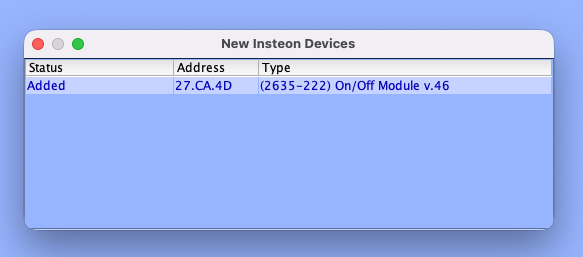
Every time I launch the admin console. I get a popup window "New Insteon Devices" which always shows the same device each time. But it's not new, I've dismissed the window each time I run the app. Other than deleting the device and then trying to re-add it - but I have no idea why this keeps happening. Always appears when admin console starts: But this device is not new - it's always listed and always works properly
-
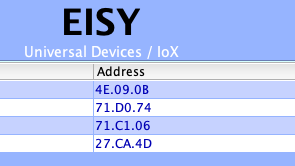
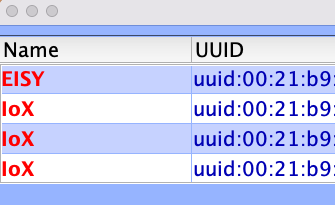
Sometimes under the name column it's labled as EISY and other IoX. This values never change once they are set, but I installed the start.jlnp on another machine, and all 4 are labled as IoX. Just really curious why this is - why it can be either EISY or IoX. Below it shows 4 entries for my 2 devices. (each device has the /desc and the :8443/desc - so four rows makes sense). On another computer they all came up as IoX. The last 2 rows I have to add manually because they are not on my LAN but are reachable via my vpn to other house.
-
This is awesome, thanks!
-
Hi, that's what I have now, but it keeps the order static (light 1, light 2, light 3) and not random. So I created multiple of these programs changing the permutation in each one, then in a main program - use a random value (1, 2, 3) (the number of permutations) then call that one of the programs based on the random value and exit. This way only 1 program ever runs. This works. But if you increase the number of lights beyond 3 then the fan-out of the number of possible permutations grows to be quite large. The key is that I want to randomly iterate over the set of lights - the order of lights activated is random.
-
Hi there, I understand your second message - the repeat while greater than 0 - I do that now. But your first message...the randomness of the order is caused by the conditional? But if everything is currently off then I think nothing would ever activate (deadlock) ? The other thing that I was never sure of is the "IF time is sunset" - what if the other programs have to run multiple times and let's say it's now 5 minutes past sunset - will they ever run again past their first time (does the "IF time is sunset" conditional still stay TRUE if it's 1 minute past sunset ? Would it be: If (time is sunset) AND (if light x OR if light y OR if light z) Maybe not....because the "master" program is enabling them so it's close to sunset...hmm I want to think about this...you apparently have it working so I want to understand the logic (timing of events) Thanks for your response.
-
I have a basic program where I wait Random minutes, turn on Light X then wait Random minutes turn on Light Y, ... etc. I modified this program to create a random value for a variable that serves as the permutation order so that the order of lights coming on differs each day. But once you have more than say 3 lights, the list of permutations gets a bit out of control. I would prefer not to have a set of programs (one program for each light) where they all trigger off of sunset, wait X minutes, do Action Y, because doing this could cause, in theory anyway, all lights to come at the exact same (or even close to) time. Image you have a set of lights, you want to randomly iterate over them one by one, waiting X random minutes before turning it on. You want this to happen sequentially.
-
Yes, that's exactly what I'm saying. "EISY" listed without the port and "IoX" listed with the port. I have never edited (nor wanted to) anything related to this.

