


RRalston
Members
-
Joined
-
Last visited
-
Stop the Presses! Something changed over the last few hours. The notifications are now working for this. Both automatically triggered by an event, or manually triggered. So perhaps there was some sort of sync problem/delay as you suggested for the variables. Rob
-
Hi, sorry, I should have been more clear. I have a couple of programs that send notifications. One of them does so every day at 7:05AM. With the plugin migrated, that notification email apparently is never sent/never received, even if I trigger it manually. The Last Run Time shows it has executed. If I migrate the plugin back to PG3x, the notifications work again. So, the only thing that ever changes is how the plugin is run. I have not changed anything else. Thank you for the assistance! Rob
-
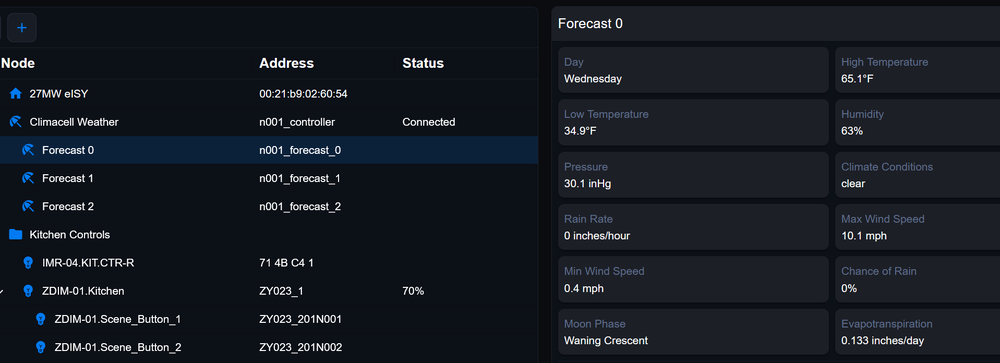
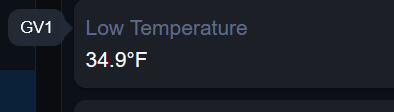
Thanks Bob, here is what I see for one of the nodes, "Forecast 0". I obviously see all of the values on the right, and if I hover over something like Low Temperature, I see parameter name like "GV1". But nothing like "${sys.node.n001_forecast_0.GV1}" as I see under the PG3x instance.
-
I have three PG3x plugins, one of which is Climacell. I want to test migration to the new Plugin (Beta) in eisy-ui, and need some guidance. The plugin migrates without issue, however, I have notifications emails setup that use the parameters that are visible in the PG3x instance of the plugin. When it is migrated, my notifications no longer work, and it is not clear if there are new parameters I need to use for these notifications. If so where do I find them and the correct format? An example from one of my notification emails: Today ${sys.node.n001_forecast_0.GV19} @ ${alert.time12} Current Temp: ${sys.node.n001_controller.CLITEMP} Current Conditions: ${sys.node.n001_controller.GV13} Current Cloud Condition: ${sys.node.n001_controller.GV14} Thanks for any help! Rob
-
Hi, This information is is available, but currently only via the Admin Console. Using X-Ray as you have done, choose "DH Device" and look for "applicationMajor" like the following. Below represents v1.50 of the firmware on this particular device. Integer DATA devices.5.data.applicationMajor = 1 (0x00000001) Integer DATA devices.5.data.applicationMinor = 50 (0x00000032 Rob
-
My battery operated devices from Zooz are ZSE42 leak detectors and ZSE44 Temp/humidity sensors. For at least a couple of years, I have a program triggered anytime the device wakes up, which they do at a default interval, or one that you can set with advanced parameters. Every time the device wakes up, I immediately issue a query. It has not really made a meaningful difference. From my experience, when you see nothing in the admin console or now the eisy-ui, it is a NULL value. This problem is actually bigger than just battery status. Leak detectors should report "dry" or a FALSE water alarm, which they can take days and days to do after an eisy restart, even with the programmatic query. I can of course force it to be read if I manually wake up devices with the button and query from the UI, or trigger an actual "wet" condition, but why in the world should I have to do that nonsense? I have sent leak detectors back to zooz for analysis, always with the same result...."works OK for us, must be a problem with the eisy platform, which they do not officially support. So you are SOL. Your motion sensors likely get triggered on some regular basis which likely helps you, but I hope my leak detectors are never triggered 😁 Rob
-
I did open a ticket, 2 years ago and this never got resolved. It seemed to start with firmware v1.50 for the ZSE42 leak detectors. Ticket info supplied to UD 2 years ago. The ticket is still open. ☹️ Rob Ralstonreplied2 years ago Hi Chris, The ZSE42 is generally working after the upgrade process, but something has changed with regard to Battery Level reporting, as this is no longer available in the eISY, both visually and programmatically for this updated device. I went back and reviewed the 1.50 release notes from Zooz and see this: Firmware: 1.50 Data packets changed to 5-byte to help address inclusion, range or secure inclusion issues Fixed Bug: Issues with battery status display when added using S2 authenticated security on select platforms See Full change log: https://www.support.getzooz.com/kb/article/998-zse42-water-leak-xs-sensor-change-log/ I had seen that "Fixed Bug" before I updated, but since battery level was reporting OK with v 1.40 in eISY, I assumed it only affected other platforms. In the AC, I should see this, with Battery Level Value, as I do for another v 1.40 sensor: Instead I now see this with my v 1.50. No Reported Battery Level Displayed: So I don't know what to do to get this resolved. Not fully understanding, I would have thought the "Update with Interview" would have established any new or changed parameters for eISY to receive. Or, maybe more simply, Zooz still has a bug. Any info I can provide to help I will get. If you find something I can relay to Zooz, I will certainly do so. Thank you, Chris. Rob
-
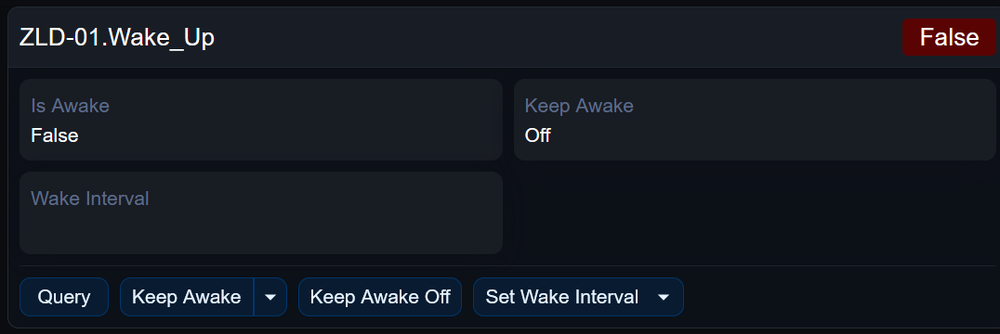
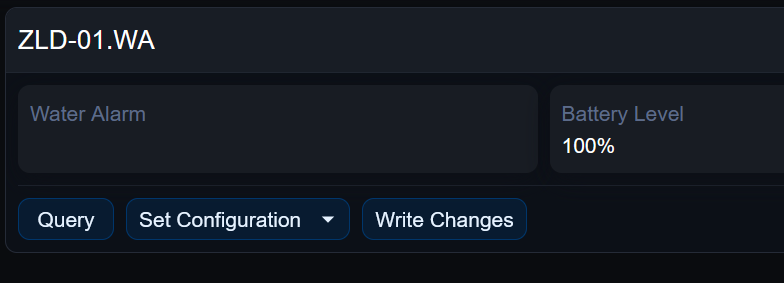
Hello. I have 7 Zooz Zwave battery devices and I was experiencing the same thing. Here is how I fixed each one: With the device zwave button accessible, I selected the "wake_up" node of the device in the web UI and changed "Keep Awake" to True. I then changed context to the main node where the "write changes" button is in the web UI. I then manually woke up the device using the button on the device and then immediately hit "Write Changes" which got the Wake up change to stick. Then, even with Keep Awake as TRUE, for some totally bizarre reason, I still had to manually wake up the device and hit Write Changes multiple times (that is, wake it up, write changes...wake it up, write changes...) until I saw the little "flag" on the device icon get cleared. Finally, I undid the "Keep Awake" by setting it back to Off, then waking up the device manually and hitting write changes. This typically only took one operation. I hope this helps you. I for one find interacting with these battery operated zwave devices very problematic. They work, but the gyrations to do something like the above, let alone other stuff like getting battery level consistently is not fun. I don't know if this is a Zwave general problem or a Zooz or an eISY problem, but I really wish it could be more seamless. Rob
-
Javier from UD support identified my issue so it is now corrected. I had an "&" in two email group names that was causing the issue.
-
@aeroRC did you delete files and apps from the java console first? that should clear up that problem. I upgraded this morning. pretty much every program within the updated eisy-ui shows "Error loading data". However, the same programs appear to be fine within the AC. I have submitted a new ticket for guidance. Rob
-
I don't have the ZSE11, but I do have a number of Zooz ZSE42 Leak Detectors which are also battery operated. My experience with those devices is that there is sporadic reporting of battery status, including sometimes never reporting battery level. I know the battery is OK only because I have a message sent every time the device "wakes up". And when the devices wakes up, I also programmatically have the device queried in the hope of getting the battery data. Rarely happens. The devices work, but Zooz support, while very responsive has typically told me, the ISY/eISY are not an "officially supported" system, so it is "most likely a problem with the eisy". In other words, while responsive, they have rarely been helpful with battery operated devices in particular. It would be helpful if UD would work with Zooz or vice versa to improve many aspects of ZWave support of Zooz products. Rob
-
Hello, Unless I am misunderstanding something, I believe what you really want/need to do is set up remote access via the ISY portal at https://my.isy.io/index.htm It does have a minimal annual fee and also facilitates the new eisy-ui as it matures to a real web interface. Rob
-
@DIYguy Your PLM seems to be behaving differently than mine. When you reset the PLM, did you hold the black button in for about 10 seconds after plugging it in? You may or may not hear a beep during that step. If you did not, do that step again, wait for the light to turn green, then do a more gentle reboot rather than unplugging the eISY. After the reboot, if you then see the PLM connected, do the restore PLM. Hopefully that will buy you some time to get a new PLM. Otherwise, it is unclear to me if it is the PLM or the eISY. More likely to be the PLM, but you may want to open a support ticket to troubleshoot. If you want to order a new PLM, I think you have to go with the USB. That site says serial PLM is discontinued.
-
I have had a serial PLM for many years, and has been connected to my eISY since I upgraded a few years ago. The other day, my PLM just seemed to die, or at least stop working. I have ordered a USB PLM because Insteon site says the serial PLM has been discontinued. Because I won't receive the new USB PLM for several days I started to see if I could get the serial PLM back on line, which I did. However it seems to die again overnight, so I have to repeat the following process pretty much daily: Unplug PLM and wait at least 10 seconds Hold in black button on side while plugging into socket and hold for about 10 seconds while it resets. It is supposed to beep doing this, but mine does not always do that. Wait until the light on side turns green again, which for mine takes many minutes, so be patient at this step. Have a cup of coffee :) Reboot the eISY so it interrogates the PLM at start up. I found this was a necessary step every time Verify the PLM now shows connected and do a PLM restore | Note battery devices like my door open/close sensors must first have the button pressed so the light is flashing. Do the PLM restore. This has been successful many times while waiting for my new PLM. Just did it again this morning. I hope this helps. Roib
-
@toddlock Something does seem right from what you have submitted. You indicated: "Manual email sent from a PC to ##########@tmomail.net works." Doesn't that mean you successfully sent an email which was delivered as a text to your T-Mobile phone? For you to experience "TEST Button Result is always an immediate “Mail server failure." potentially indicates your router/firewall may be blocking those ports. "Mail Server failure" is different from the carrier blocking the action. I don't think you would get any response like that if you were able to successfully connect to the mail server. I have xfinity mobile, which is verizon underneath and I send texts to my phone all the time using "<cell.phone.number>@vtext.com But I also found this in the Wiki related to gmail Configuring gmail Accounthttps://wiki.universal-devices.com/ISY994:Configure_Mail_Server_Settings#SMTP_Errors:~:text=Configuring%20gmail%20Account,-%28NOTE Hope this may help you. Rob


