


Guy Lavoie
Members
-
Joined
-
Last visited
Everything posted by Guy Lavoie
-
Support for scenes and programs hasn't been added yet.
-
First things first: can you see the controller in your router's device table, with an IP address? It should be easy to spot, since the UUID is the network card's MAC address. Was your replacement router configured for DHCP, like your old one? Seeing the device listed in IoX finder doesn't mean it's necessarily seeing the controller.
-
Is the new ZWave device physically distant from your other ones? If so, try moving it closer and try adding it again.
-
Well I'm only trying to get you to compare how things work now vs before the upgrade. Plugins are extensions that you install to add new functionality for things like Hue l8ghts, Elk alarm systems, etc. Sounds like you haven't installed any yet. So maybe you have an issue that was there before the update. You might need to open a ticket to figure out what's up with your controller.
-
Well that doesn't look right. Are the plugins themselves working? You could try rebooting your controller and see if that changes anything.
-
What happens if you try logging into PG3 the old way, through the IoX menus? And logging into the portal via the link on thw UDI web site?
-
Hmm, are you able to get to the IoX login screen the old way with the IoX finder?
-
Well I've made some interesting progress in backup strategy. The fact that I have two Polisys (and the hardware necessary to reflash their SSDs) for testing allowed me to try some of the riskier things that I wouldn't do on a single system that's actively in production. The first was to do a full file backup (unix, IoX, plugins... everything) to a USB stick, and then use that to "clone" the Polisy I took it from to the second Polisy. Worked great. This involves connecting by ssh and running unix commands. This type of backup is good when you're about to do a major change, like an upgrade to a new IoX version, especially if it also upgrades the version of FreeBSD. This has been the case with 6.0.0. Before doing any of this: Please... UDI provides truly great support (almost to a fault, if we think that we can try risky stuff because at worse, they can always bail us out). At minimum, you need to be confident with using unix commands, and be ready to recover using one of their supported methods if you get into trouble doing this (like buying their recovery USB stick). As the saying goes: a lack of planning on your part does not necessarily constitute an emergency on their part. UDI gives us an amazingly open product and great support. Don't abuse it! That said, here is my procedure for making a full cpio unix backup of a controller. Cpio is the name of the unix command (means copy in and out) that we use here. I know that most people use "sudo" commands for this kind of thing. I've worked with unix since 1985 and was used to doing everything in straight "root" login. Sudo didn't exist back in the day! Yes, I'm an old dinosaur. Try it with sudo commands if you feel better doing it that way. To get to a root prompt, login with ssh the usual way (admin@polisy.local) then do: sudo sh and when prompted for a password, enter the admin password. You should then get the "#" prompt. Ok, you'll need a USB stick. I bought some 32 GB sticks for this. First you need to create a filesystem on the stick, partitioned as a single large partition: - insert the usb stick and view disk devices: # geom disk list - note that da0 is the usb stick, should show brand and size. # gpart destroy -F da0 da0 destroyed # gpart create -s GPT da0 da0 created # gpart add -t ms-basic-data da0 da0p1 added # newfs -U /dev/da0p1 Now you have a mountable filesystem that you can copy files to. cd to the root directory (cd /) and create a directory that will be a mount point with a filename that you won't find anywhere else in the system, to make it easy to find in a list. # mkdir abcxyz Finally, mount the usb stick: # mount /dev/da0p1 /abcxyz Verify that its mounted, using just the mount command. You can also see the storage capacity using the df command, which will show you the number of blocks available on both the SSD and the mounted USB stick. # mount # df In unix, filesystems are mounted as subdirectories to the root filesystem. This makes file operations between physical media seamless. It's just another directory. Ok, now for the cpio backup. The trick is to create a file list of everything on the root filesystem, and then have the cpio command get the names of the files to backup from the list. The reason for this two step process is because we need to make a list from the root filesystem, which will by default include the subdirectory where the USB stick is mounted. We then want to edit the list to remove that directory from the file list because if you don't then the backup will try to backup the backup itself, recursively, like a snake eating it's own tail. So create the file list from the root directory, using a unique file name: # cd / # find . -print >/tmp/file_list Now use the vi editor to remove the mount point directory from the file list. Delete any lines that begin as "./abcxyz" in the file, and save the file. Then launch the actual backup, which will back up everything into a single large file with a name of your choosing: # cpio -ov >/abdxyz/my_pre_upgrade_backup </tmp/file_list This cpio command redirects it's standard output to the /abcxyz/my_pre_upgrade_backup file, and redirects it's standard input from the file list we created earlier. the "o" option means output, and the "v" option means verbose, which means it will display the file names it's backing up to the screen (technically, to the "error output" file descriptor). You'll see hundreds of file names scroll by. Once it's finished and you're back to the root prompt. You can verify the presence and size of the backup file: # ls -l /abcxyz You then need to unmount the USB stick, using the umount command: # umount /dev/da0p1 You're done! Now suppose that digital armageddon occurs and you need to restore your system. You at least need to get back to a unix shell prompt. This could involve reflashing the SSD, or connecting a keyboard and screen to a eisy because networking isn't working. Whatever. The first thing you need to do is recreate the mount point if it got lost as part of the disaster: # mkdir abcxyz Now insert and mount the usb stick: # mount /dev/da0p1 /abcxyz Verify that its mounted, using just the mount command. All ok? So now make sure you're in the root directory and logged in as root, because this is going to be a real smash! Cringing is permitted! (remember, I did this on a test system that I could reflash). Launch the restore: # cpio -ivumd </abcxyz/my_pre_upgrade_backup Aside from the obvious "i" for input and "v" for verbose options, "u" means unconditionally overwrite same name files, even if the existing file has a newer modification time, "m" means write back the original modification times that the files had when backed up, and "d" means create any directories needed for the files to restore. This will totally overwrite everything, unix and all, with the files from the backup. Once your back to the root prompt, reboot the controller: # reboot Your controller should be back to how it was when you backed up. Don't use this procedure to change controller types (eg: Polisy to eisy, or other way around) as some files would be different. We're talking about a backup here, not a migration. Also, if you're restoring to a different physical controller, the UUID of the old controller will not be carried over to the new one. The UUID is generated by the startup process, extracted from the controller's network card MAC address. Once again: this is for your information only, and use at your own risk, And...if something happens where you think you'll need UDI to help you, well this isn't the kind of procedure they support. Be ready to reflash your SSD from a image file they provide before getting them involved. On the bright side, I've done this a couple of times and it's worked well 🙂 PS: cpio is a great tool for copying unix directory trees, when multiple files and directories are involved. If you don't need to copy to a subdirectory to your current one, but rather to a directory above or beside yours. You don't need to do the two step directory list thing. Here is an example: suppose you're working on a plugin and you want to make a copy of all the files in it to a new directory as a backup, because you're about to make big changes to it. Let's say that your plugin's home directory is "/home/admin/workspace/plugin-dev/myplugin" and you want to copy everything in it to a new directory: "/home/admin/myplugin_save". Begin by creating the new directory you want to copy to: # mkdir /home/admin/myplugin_save Now position yourself in the directory to want to copy: # cd /home/admin/workspace/plugin-dev/myplugin Make sure you're in it, using the pwd (print working directory) command: # pwd Once that's confirmed, copy everything over to the new directory with the magic cpio command: # find . -print | cpio -pduv /home/admin/myplugin_save Verify that everything has been copied to the new directory 🙂
-
The new login in method is an option (makes going between admin console, PG3 and portal seamless). You can continue logging in using the previous way too, as long as the URL contains the port number (8443) as it always has. Good ole "admin" and your IoX password.
-
Sounds like a ghost node issue. I've seen similar effects with other plugins, where you create new nodes but haven't restarted yet.
-
I'd open a ticket with UDI before doing a factory reset. Can you see it in your router's connected device list?
-
I'd try a factory reset on the switch, then adding it back to your system.
-
Does detecting a single tap work? If you just create a simple program that looks for a control event (on or off) from that switch and do something like increment a variable, does that work? If that doesn't work either, it could be an Insteon signal issue, with the switch itself. Also, can you turn the switch itself on and off from the admin console?
-
No, they don't need to. The alternate login URL (without a port number) to the admin condole is a user convenience, giving you seamless access to the portal and PG3 without needing to re-enter a user id and password.
-
If that's the eisy-ui login screen (black background), then log in with your portal username (usually your email address) and password.
-
The current product (eisy) has all those modules built-in as standard. To use Zwave, you'll need to get either the ZMatter dongle sold by UDI, or get a Zooz 700 series Zwave stick, if you can find one.
-
Two caps in series would be very unusual. The common connection between them must be going somewhere you can't see. If in doubt, replace woth the same part (capacitance and voltage rating). There is generally no harm in exceeding the capacitance and/or voltage rating of an electrolytic cap in a power filtering circuit if it physically fits.
-
Eisy-ui is still in development, and doesn't support editable things like scenes and programs yet.
-
I don't think that's possible. The plugin would have to obtain the value of a variable through PG3 dynamically. Also...what sets the variable? Usually that would be a program. Just have the program also set the offDelay time for the virtual switch.
-
Fair enough...you're wanting to keep it within the realm of scene commands. That's why we're brainstorming. Yes, I'm a program guy. If it weren't for the programmability, I probaby wouldn't be a UDI user! Nothing wrong with having the extra commands for programs either! 😆
-
Now trying out the toggle mode. I'm not quite sure what the "Off" button is meant to do. I'd tend to see it as needing only 3 buttons: Start, On, Off. Start starts the timed toggles, while the other two set the status to On or Off, just like a regular switch. A fancier version could have two Start buttons: Start On to alternate starting with the timed On, and Start Off to start with the timed Off. Just some thoughts.
-
No, I actually derived my explanation from trying it out, as a "black box" discovery process. That's what I figured would be a good independent verification, and part of trying to "break it" 😉 . I did see your initial description, though it's rather cryptic to someone not yet familiar with it: (On (DON) when ST Off/On, ST status set to TIMER, CMD (DON), after DUR (DOF)... I preferred to stick with a cookbook style explanation, using the familiar terms we see for IoX, which should help other people discover and use this meaningful addition to an already useful plugin! Thanks again! But the essence is that it seems to be doing what you intend it to do, and will surely be appreciated. I've been mentioning the Virtual plugin many times as a solution to some user's questions.
-
I'm checking out the various modes. This will be important for your documentation. Let me know if I have it figured out right so far: ondelay switch: The virtual ondelay switch has three possible statuses: Off, Timer, or On. The status of the switch will be updated to "On" after a set delay when it is first turned on by a On command (from a program or scene). During the set delay, the status will be "Timer". The delay in seconds is set by the onDelay parameter, and can be set as a fixed value, or from a variable value. The On trigger is control event based, and will retrigger the delay from zero if a new On control event is received while the timer delay is underway. So a series of On control events will delay the transition from Timer status to On, until the timer is allowed to run out without a new On control event. A forced off (FOff) control event will immediately cancel a ondelay switch that is in the timer phase to Off, or turn it Off if it's On. A Off command will turn the ondelay switch to Off if it's On. An Off command during the timer phased will be ignored. offdelay switch: has the same characteristics as ondelay, with the following differences: It has no On status. It will go from Off to Timer status if triggered with a On control event, and the timer can be retriggered just like the ondelay switch. Once the timer phase expires, it will go back to Off status. This is meant to be used to trigger the detection of it's status going to Off. I'll have to experiment more with the toggle to see exactly how it works.
-
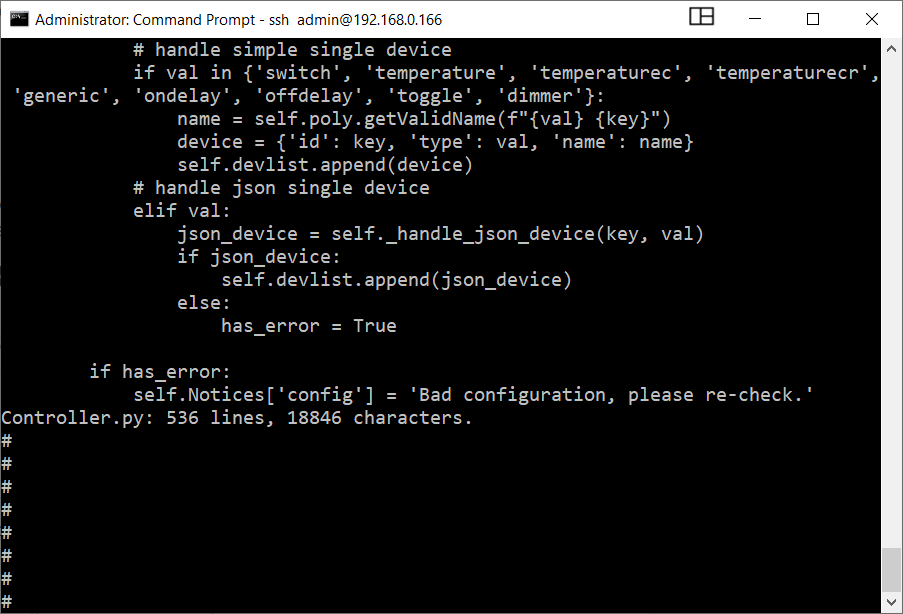
Ok I figured out where the bug is. In the Controller.py file, the new options need to be added to the parameter validation routine: I now have it all working. 😀 Nothing like having new options. Thanks for keeping this great plugin up to date with new features! With the toggle option, we can now add turn signals to our eisy!
-
No, the trick is to add the new motion sensor first, with a temporary name. Then locate the one you want to replace in IoX, right click on it, and choose "Replace with", and select the new one you just added. IoX will do the changes needed in all the programs and device links to replace the old one with the new device, and unconfigure the old one, so you just physically replace it.


