


Guy Lavoie
Members
-
Joined
-
Last visited
Everything posted by Guy Lavoie
-
Have you tried a different LR device, if you have one on hand?
-
The only difference left compared to mine is that I also turned on the fast communications feature. You could give that a try.
-
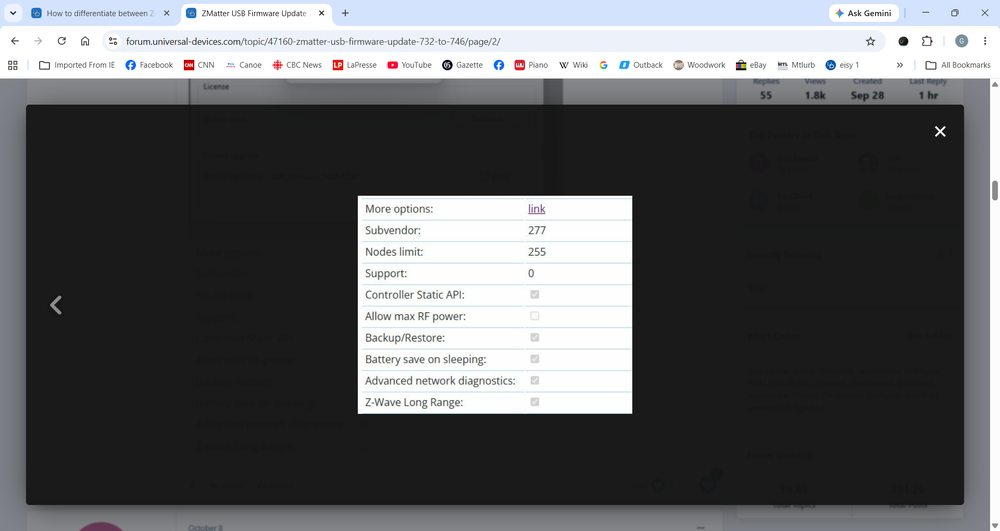
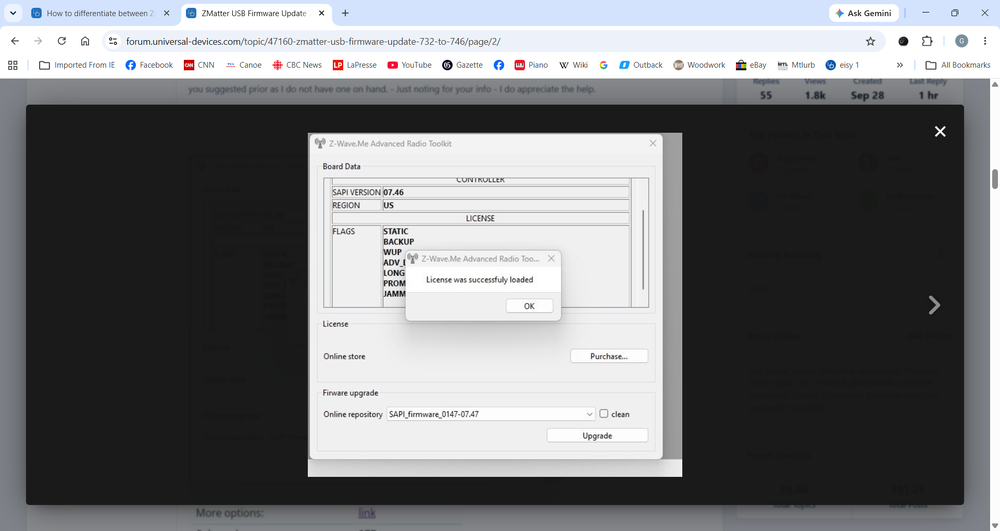
No, I meant in the dongle upgrade screen, that I posted above. Is the Z-wave Long Range box checked? Ah sorry, I hadn't seen the video (I was outside just reading your post on my phone). Looks like it's set ok. Do you have another, different LR module you could try?
-
Ahh nice, you learn something every day 🙂 Thanks! Cleanup done!
-
Ok, just to make sure nothing got looked over. The Long Range box was checked after you finished the dongle upgrade process, right? Did you end up needing to use the Zsniffer tool to enable it?
-
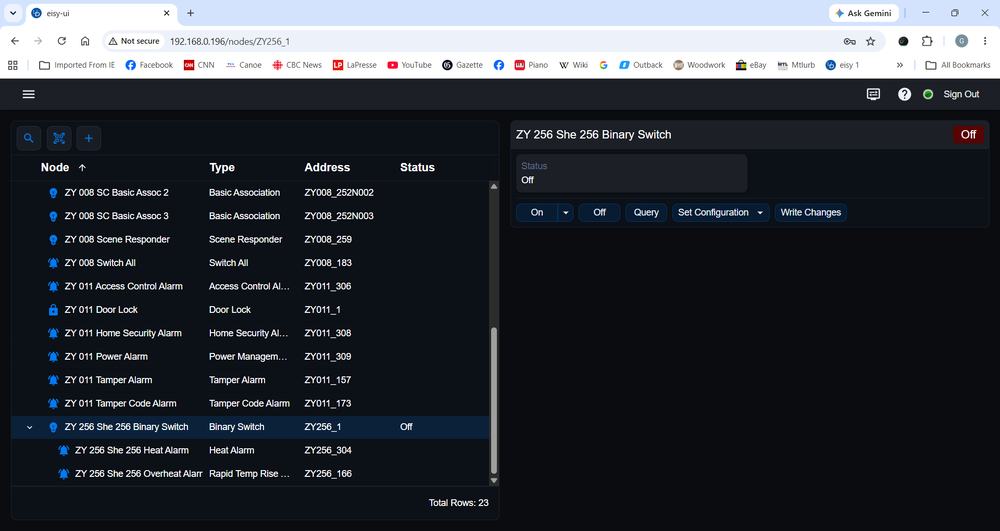
One thing I noticed in experimenting with Z-Wave LR is that for the LR device, the node list shows only the main node by default, with an expandable "subfolder" of the other nodes. I like that. Keeps the node list cleaner. It would be great if eisy-ui did this for other multi node devices, like Z-Wave locks. Below is the screen of my test Polisy, showing the difference between the two. The LR device is showing the secondary nodes as expanded. The lock (ZY 011) would be much nicer with only the main node showing by default and the other 5 nodes in a folder under it. Same with ZY 008.
-
Not that I know of.
-
As you have found out, "Long Range" is actually describing the time and effort needed to get it working... But have you properly factory reset the device you're trying to add first? I had previously added my Shelly device as a regular mesh device, and doing a ZWave exclude wasn't working, So I ended up factory resetting it (pressing the button on it while plugging it in). The fact that the LR radio button is on by default would indicate that your dongle configuration is correct.
-
Is the LR now working?
-
For the procedure, read the forum thread I referenced earlier. Pay attention to the posts written by me and @junkycosmos . For using a Mac, you'll have to figure out the equivalences on your own. @Javi mentions having used a Mac. Read the whole thread before getting started.
-
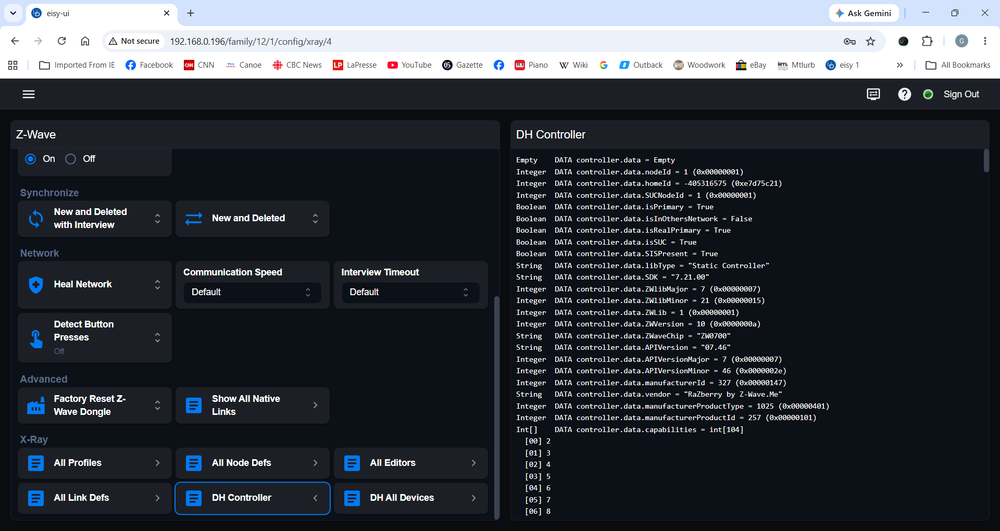
Yes. If it was never updated, your ZMatter dongle is very likely at firmware 7.32. You can see the version in eisy-ui by going into the Z-Wave menu and clicking on X-Ray -> DH Controller. Here's mine after the update, see how the APIVersion = "07.46"
-
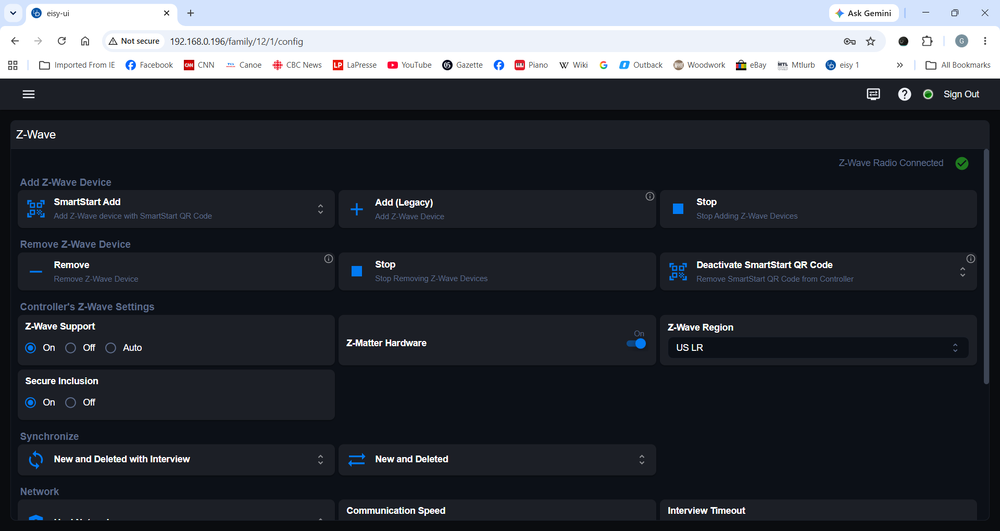
The biggest indication of LR operation is the node number. It should start at 256. I don't know what your Zwave dongle is, I have the ZMatter, so node names are prefixed with ZY. My first (and only) LR device thus has node name ZY256. But you would have to have included it as a LR device, with some setting up. Notice how the Zwave setup screen below shows the Z-Wave Region as US LR: Then there is the dongle firmware update and everything else that needs to be done:
-
Yes, though some of us have color monitors 😆 It would be nice to pick a soothing background color.
-
...and that's why we need the Find/Replace feature added to eisy-ui asap! 😆
-
The usual workaround is to reserve a DHCP address in your router for the eisy's MAC address. Another workaround is to set a second, fixed IP address in your eisy as an alias. This is copied from another post I did a while back: FreeBSD allows you to set more than one IP address for a network interface. The idea here is to let DHCP do it's thing, which keeps UDI happy because the correct default gateway, nameserver, etc settings are acquired. Then you define a second IP address that can be static, as an alias. It only takes one line added to the /etc/rc.conf file. The line is (for a eisy) : ifconfig re0 <fixed IP address> netmask <netmask> alias The terminating "alias" is of utmost importance! For whatever reason it is suggested that the netmask be different than the default one, so I made it smaller. Only thing is that this can sometimes get deleted after a udx upgrade, so you might need to redo it if that happens.
-
Using Admin Console, use the Find/Replace feature to look for any program references to that device. Look through scenes too. Also, do you have anything at all scheduled for that time?
-
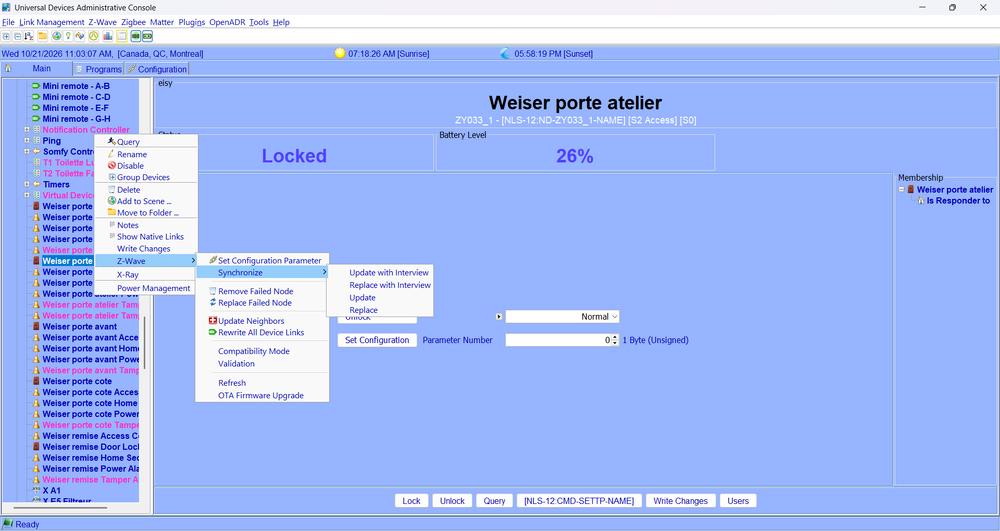
You could always retry a device interview, like this:
-
The only thing missing for me is the Find/Replace function. Once that's added, it will be fully functional for me. After that, it's all about getting used to it.
-
To sort the programs, hover your mouse over the "Program" title bar, and click on the three little dots that appear. You can then choose to sort by ascending or descending order. Yes, it still needs work, but it's getting there.
-
Well in eisy-ui, go into the Nodes list and click on the "+" at the top. You'll be asked if you want to create a new folder or a new group (ie: scene). Similarly, when you're browsing nodes, you can right click on one and one of the choices is "Add to group". Group is the new Scene... Wait until you discover how editable scenes (err...groups) are! You click on the ">" left of the controller name and you can edit every detail (dim level, ramp rate, color, etc) of each responder.
-
Ok, no biggie. All my scenes are named "Scn_xxx" so they appear together. I did like that they appeared at the bottom in admin console. Could be forced if prefixed with a high ascii character.
-
It's been a long year at UDI 😆
-
As @dbwarner5 suggested, I'd also prefer scenes to be under a separate tab, right under nodes.
-
Good idea, a separate Favorites tab.
-
I tried a Zooz to ZMatter migration: it doesn't work, despite the instructions given (make a migration backup, etc) And there is no ZWave backup option when you have the Zooz stick. Truth is, you'll need to re-include your Zwave devices. Though if it's the same physical stick, just moving it over to the eisy sounds like it should work.


