


JRissmiller
Members
-
Joined
-
Last visited
Everything posted by JRissmiller
-
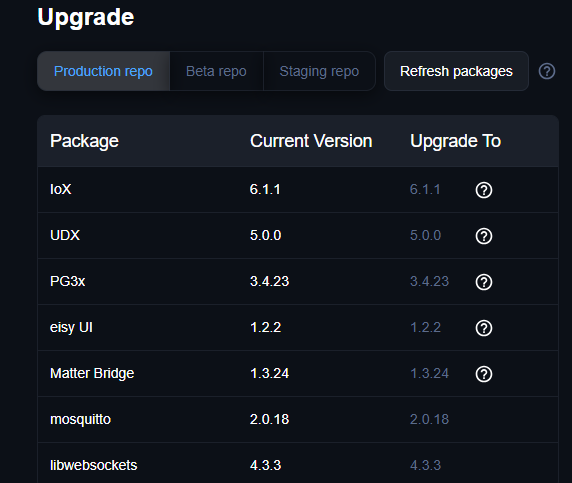
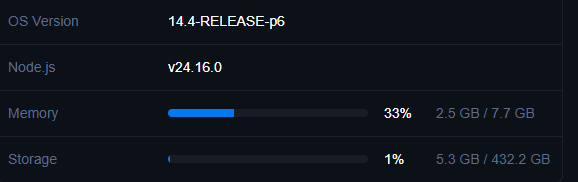
I waited a little, but the upgrade took less than 15 minutes and things look good. I upgraded to an SSD earlier this year and the speed seems evident upgrading to OS 14.4. I haven't dug into everything yet but Hue, Insteon, Yolink, Schlage, and ZWave shades work LiFX may have finally died and I only have 5 devices left because the plugin is no longer supported. [UPDATE]: Had to run Upgrade Dev Packages twice and LIFX is working again! ERROR udi_interface:write: Traceback (most recent call last):ERROR udi_interface:write: File "/var/polyglot/pg3/ns/0021b902615e_5/lifx-poly.py", line 10, in <module> ERROR udi_interface:write: import lifxlan ERROR udi_interface:write: ModuleNotFoundError ERROR udi_interface:write: : ERROR udi_interface:write: No module named 'lifxlan'
-
I see the same thing on my system. I don't recall making any changes for quite some time.
-
The upgrade packages was the missing piece for me. I also pulled the power on the Ecobee and let it reboot. Following these 2 steps and re-installing the Homekit plugin I as able to get things to work.
-
Looking good so far - thank you for the hard work on this. My various Temp sensors are correctly reporting humidity again. I haven't check the one motion sensor yet.
-
@Panda88 I tried to send my logs but I'm not sure they went. I'll try one more time. UD system might be having issues.
-
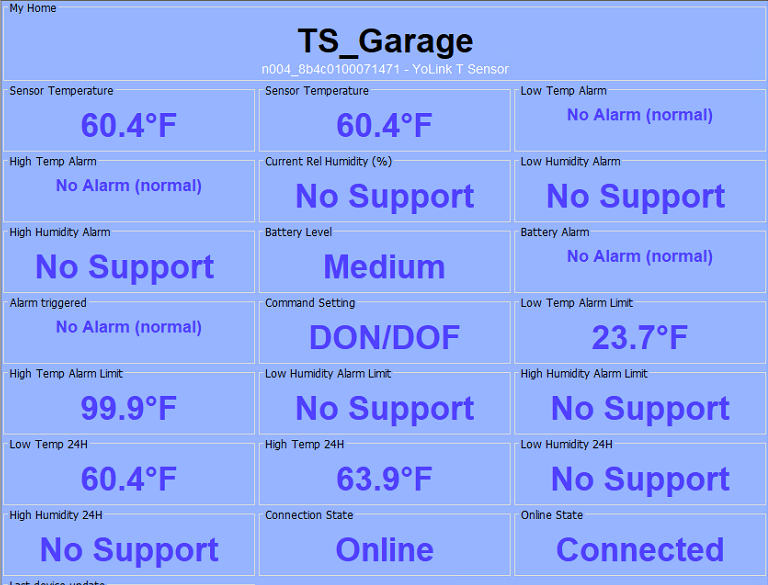
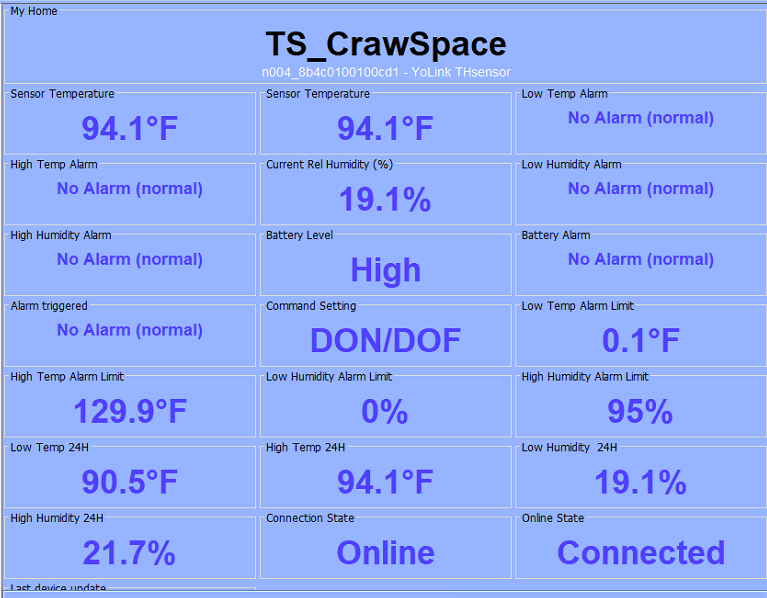
The upgrade installed without issue but some of my T\H Sensors are showing humidity is not supported, and the value always shows as 98. It appears the UOM is being set to 25 on the ones that don't work and is 51 on the ones reporting humidity. I have leak sensors, door open\close, and motion sensors and so far these seem to be working. TS_Garage is not working below but TS_CrawSpace is working like before the upgrade. All my sensors worked properly on the old plug-in.
-
I figured the collective group using the UDI developer pin were probably exceeding the monthly cloud hits. Thought I saw it was 85,000 hits per month.
-
I've had my Ecobee for several years and it has been very reliable! I really hate cloud based stuff because this is what can happen and with little to no warning. If there is no path forward my next T-Stat will be local API based, possibly a Venstar CT, not sure on Z-Wave. The cloud API is returning 500s, during NS discover, which is not a good sign. https://api.ecobee.com:443 "GET /1/thermostatSummary?json=xxxxxxxxxxxxxxxxxxxxxxxxxxxxxxxxxxxxxxx HTTP/1.1" 500 None
-
I ran into the same thing with 32+ devices and if you backup PG you can reverse the changes. There is information in the store warning that this will happen. I figured this is for the best because this plugin is utilizing the new Hue API. The developer is also working on a new plug-in v2.0 that will support the new Hue bridge.
-
Seamless upgrade for me...took ~10 minutes. I did the SSD upgrade a while back so might explain the speed.
-
The Ecobee Thermostat can do this with the node server and a program. I have the T-stat set to directly control the Aprilaire humidifier. I typically manually tweak the percent in UD Mobile.

-
@gzahar Thank you for the assist! Worked for me as well.
-
I have this lock and it has never relayed status on manual lock\unlock events. I use a YoLink door sensor and when the door closes a program queries the lock in 5 minutes and updates the lock status. If you unlock but don't open\close the door the status will be incorrect. Periodically querying the lock for its status will probably not be good for battery life. Below I unlocked manually and nothing showed up in the logs. I then ran a query, which returned unlocked for the status, and then I clicked lock in the EISY and the results are shown below. The command was successfully executed and the status was changed to locked. Sun 05/12/2024 12:01:20 PM : [ZW-TX-A 00161 2.0 ] [ZY002_1] Door Lock Config Get Sun 05/12/2024 12:01:20 PM : [ZW-TX-A 00162 2.0 ] [ZY002_1] Door Lock Config Get Sun 05/12/2024 12:01:20 PM : [ZW-TX-A 00163 2.0 ] [ZY002_1] Battery Get Sun 05/12/2024 12:01:21 PM : [ZW-DONE 00161 2.0 ] [ZY002_1] Door Lock Config Get Sun 05/12/2024 12:01:22 PM : [D2D EVENT ] Event [ZY002_1] [ST] [0] uom=11 prec=0 Sun 05/12/2024 12:01:22 PM : [ZY002_1 ] ST 0 (uom=11 prec=0) Sun 05/12/2024 12:01:22 PM : [ZW-DONE 00162 2.0 ] [ZY002_1] Door Lock Config Get Sun 05/12/2024 12:01:23 PM : [ZW-DONE 00163 2.0 ] [ZY002_1] Battery Get Sun 05/12/2024 12:01:27 PM : [ZW-TX-A 00164 2.0 ] [ZY002_1] Door Lock Set mode=255 Sun 05/12/2024 12:01:29 PM : [ZW-DONE 00164 2.0 ] [ZY002_1] Door Lock Set mode=255 Sun 05/12/2024 12:01:35 PM : [D2D EVENT ] Event [ZY002_1] [ST] [100] uom=11 prec=0 Sun 05/12/2024 12:01:35 PM : [ZY002_1 ] ST 100 (uom=11 prec=0)
-
I have the same problem with the BE469ZP. I have a Yolink open/close door sensor and a program that waits 3 minutes after the door status changes to closed to query the lock. I programmed the lock to auto-lock so this updates the lock status and battery level in EISY. Someone else posted this idea in the forum and it's the only thing that works for me. These locks are quite expensive so it's disappointing we can't get status updates from them.
-
Same here...Thank you!
-
Same problem as the others and EISY is current on everything. Yo-Link did upgrade to 0.9.63, but is disconnected. I agree Yo-Link and this Node server are great to have.
-
Ordered mine a while back and finally received it Monday. Same upgraded hardware note and Rev 2.6 1223. Replacement went smooth including leak sensors and motion sensors. Keypads I had to do Restore Device for some reason, but everything is now up and responding in EISY.
-
Michel determined 5.5.4 has a bug to fix. My Admin password had a $ in it and once we changed that everything came back online. It was a very strange issue and even took a while for him to track down but all is good now.
-
I was having issues with LifX so decided to upgrade to 5.5.4 \ 3.1.20 yesterday morning. I now have the red screen problem in PG3 so I'll issue a ticket. I've tried all the regular fixes - update packages again, power cycle, flush cache, different PC, etc. It appears the ISY UUID can't be found or manually added and related to auth.ns Jan 21 10:12:15 eisy daemon[69112]: 1/21/2023, 10:12:15 [pg3] ^[[31merror^[[39m: Getting IoP UUID failed: Error: connect ECONNREFUSED 127.0.0.1:8080 Jan 21 10:12:15 eisy daemon[69112]: 1/21/2023, 10:12:15 [pg3] ^[[31merror^[[39m: Is the IoX service enabled? The IoX service must be enabaled for PG3 to start. Jan 21 10:12:15 eisy daemon[69112]: 1/21/2023, 10:12:15 [pg3] ^[[32minfo^[[39m: PG3 shutdown complete with code: 0 Jan 21 10:12:31 eisy daemon[69112]: 1/21/2023, 10:12:31 [pg3] ^[[32minfo^[[39m: Starting PG3 version 3.1.20 Jan 21 11:03:48 eisy daemon[2441]: 1/21/2023, 11:03:48 [pg3] ^[[32minfo^[[39m: Making reqeust to socket for /rest/pg3.auth.ns Jan 21 11:03:48 eisy daemon[2441]: 1/21/2023, 11:03:48 [pg3] ^[[31merror^[[39m: uncaughtException: socket hang up Jan 21 11:03:48 eisy kernel: pid 1332 (udx-freebsd-x64), jid 0, uid 0: exited on signal 11 (core dumped) Jan 21 11:03:48 eisy daemon[2441]: Error: socket hang up Jan 21 11:03:48 eisy daemon[2441]: at connResetException (node:internal/errors:711:14) Jan 21 11:03:48 eisy daemon[2441]: at Socket.socketOnEnd (node:_http_client:518:23) Jan 21 11:03:48 eisy daemon[2441]: at Socket.emit (node:events:525:35) Jan 21 11:03:48 eisy daemon[2441]: at endReadableNT (node:internal/streams/readable:1359:12) Jan 21 11:03:48 eisy daemon[2441]: at process.processTicksAndRejections (node:internal/process/task_queues:82:21) Jan 21 11:03:48 eisy daemon[2441]: 1/21/2023, 11:03:48 [pg3] ^[[31merror^[[39m: uncaught ECONNRESET exception: Error: socket hang up Jan 21 11:03:48 eisy daemon[2441]: at connResetException (node:internal/errors:711:14) Jan 21 11:03:48 eisy daemon[2441]: at Socket.socketOnEnd (node:_http_client:518:23) Jan 21 11:03:48 eisy daemon[2441]: at Socket.emit (node:events:525:35) Jan 21 11:03:48 eisy daemon[2441]: at endReadableNT (node:internal/streams/readable:1359:12) Jan 21 11:03:48 eisy daemon[2441]: at process.processTicksAndRejections (node:internal/process/task_queues:82:21) Jan 21 11:03:48 eisy daemon[2441]: 1/21/2023, 11:03:48 [pg3] ^[[32minfo^[[39m: Caught SIGTERM/SIGINT Shutting down. Jan 21 11:03:48 eisy daemon[2441]: 1/21/2023, 11:03:48 [pg3] ^[[32minfo^[[39m: Stopping running node servers...

-
I have the same issue on eisy v5.5.3 \ v3.1.18. I assume since the auto discovery fails the DB object is never correctly created. I added a devlist file using the serial number for mac as recommended for firmware 3.7+ and the node is created. Unfortunately the status is always shown as offline and commands always fail. I created static addresses in my router since mac and serial numbers are no longer the same. 2023-01-14 14:17:10,559 Command udi_interface.interface ERROR interface:_handleInput: _parseInput: node address d073d56ade00 does not exist. {'address': 'd073d56ade00', 'cmd': 'DON', 'query': {}}
-
Michel, Thank you. I will give it a try.
-
I have a Totaline 1-day thermostat and an Insteon 2441V for about a year now. The last couple of weeks I'm seeing random heat on/off events that last only 2 minutes. The short time is because the setpoint minus dead band hasn't been met. So what is possibly causing this odd behavior: ISY994i, Thermostat, Insteon 2441V, PLM, RF noise? I copied the logfile below of the last event which just happened tonight and seems to happen at least once a day. I tried resetting the thermostat and also moved to v4.4.1 firmware but neither changed fixed anything. ISY994i Firmware v4.4.1 Insteon: 2441V Firmware v2.5 Tue 12/15/2015 07:43:34 PM : [iNST-SRX ] 02 50 14.F8.24 00.00.02 CB 11 00 LTONRR (00) Tue 12/15/2015 07:43:34 PM : [std-Group ] 14.F8.24-->Group=2, Max Hops=3, Hops Left=2 Tue 12/15/2015 07:43:34 PM : [D2D EVENT ] Event [14 F8 24 3] [DON] [0] uom=0 prec=-1 Tue 12/15/2015 07:43:34 PM : [ 14 F8 24 3] DON 0 Tue 12/15/2015 07:43:34 PM : [D2D EVENT ] Event [14 F8 24 3] [sT] [255] uom=0 prec=-1 Tue 12/15/2015 07:43:34 PM : [ 14 F8 24 3] ST 255 Tue 12/15/2015 07:43:34 PM : [D2D-CMP 000A] STS [14 F8 24 3] ST op=1 Event(val=255 uom=0 prec=-1) is Condition(val=255 uom=0 prec=-1) --> true Tue 12/15/2015 07:43:34 PM : [D2D EVENT ] Event [14 F8 24 1] [CLIHCS] [1] uom=0 prec=-1 Tue 12/15/2015 07:43:34 PM : [ 14 F8 24 1] CLIHCS 1 Tue 12/15/2015 07:43:34 PM : [iNST-SRX ] 02 50 14.F8.24 3C.49.C7 41 11 02 LTONRR (02) Tue 12/15/2015 07:43:34 PM : [std-Cleanup ] 14.F8.24-->ISY/PLM Group=2, Max Hops=1, Hops Left=0 Tue 12/15/2015 07:43:34 PM : [iNST-DUP ] Previous message ignored. Tue 12/15/2015 07:43:34 PM : [iNST-SRX ] 02 50 14.F8.24 3C.49.C7 46 11 02 LTONRR (02) Tue 12/15/2015 07:43:34 PM : [std-Cleanup ] 14.F8.24-->ISY/PLM Group=2, Max Hops=2, Hops Left=1 Tue 12/15/2015 07:43:34 PM : [iNST-DUP ] Previous message ignored. Tue 12/15/2015 07:45:38 PM : [iNST-SRX ] 02 50 14.F8.24 00.00.02 CB 13 00 LTOFFRR(00) Tue 12/15/2015 07:45:38 PM : [std-Group ] 14.F8.24-->Group=2, Max Hops=3, Hops Left=2 Tue 12/15/2015 07:45:38 PM : [D2D EVENT ] Event [14 F8 24 3] [DOF] [0] uom=0 prec=-1 Tue 12/15/2015 07:45:38 PM : [ 14 F8 24 3] DOF 0 Tue 12/15/2015 07:45:38 PM : [D2D EVENT ] Event [14 F8 24 3] [sT] [0] uom=0 prec=-1 Tue 12/15/2015 07:45:38 PM : [ 14 F8 24 3] ST 0 Tue 12/15/2015 07:45:38 PM : [D2D-CMP 000A] STS [14 F8 24 3] ST op=1 Event(val=0 uom=0 prec=-1) is Condition(val=255 uom=0 prec=-1) --> false Tue 12/15/2015 07:45:38 PM : [D2D EVENT ] Event [14 F8 24 1] [CLIHCS] [0] uom=0 prec=-1 Tue 12/15/2015 07:45:38 PM : [ 14 F8 24 1] CLIHCS 0 Tue 12/15/2015 07:45:38 PM : [iNST-SRX ] 02 50 14.F8.24 3C.49.C7 41 13 02 LTOFFRR(02) Tue 12/15/2015 07:45:38 PM : [std-Cleanup ] 14.F8.24-->ISY/PLM Group=2, Max Hops=1, Hops Left=0 Tue 12/15/2015 07:45:38 PM : [iNST-DUP ] Previous message ignored. Tue 12/15/2015 07:45:38 PM : [iNST-SRX ] 02 50 14.F8.24 3C.49.C7 46 13 02 LTOFFRR(02) Tue 12/15/2015 07:45:38 PM : [std-Cleanup ] 14.F8.24-->ISY/PLM Group=2, Max Hops=2, Hops Left=1 Tue 12/15/2015 07:45:38 PM : [iNST-DUP ] Previous message ignored.


