


Michel Kohanim
Administrators
-
Joined
-
Last visited
Everything posted by Michel Kohanim
-
@apostolakisl , Yes on the list. As mentioned, we need to be very cognizant of token usage ... With kind regards, Michel
-
@apostolakisl , You don't need to look for them. There's a link to each one of them right in the chat. Just click on them: I don't know about legacy notifications --> I don't think eisy-ai knows about them With kind regards, Michel
-
@awysocki Thank you for the correction. Updated the time. We'll probably move it to make sure everyone can vote. With kind regards, Michel
-
Not templates perse, but you can do two things: 1. Tell it to use your github (url) as reference 2. Each chat is tied to a session that you can load. Save your session with a name, then load it. #1 is much more accurate because it's not tainted with everything else in your session (or any compaction). With kind regards, Michel
-
Apologies you also need to upgrade udx and eisyui. With kind regards, Michel
-
Hello everyone, Please checkout Release 2.2.1: Support for OpenAI Response APIs (allow you to choose the reasoning level on some models) Session Management: /sessions - lists the sessions /new-session - starts a new one /delete-session - deletes a session /load-session - loads one of the previous sessions you had /rename-session - renames a session Automatic migration of your plugins to a permanent location in /home/eisy-ai With kind regards, Michel
-
@TJF1960 , Thank you so much for the update, and I am so very glad to hear. We really did spend a lot of time getting it to where it is now, and all your feedback made it even better including session management. In the next release, you will have: Restores the previous session (based on who's logged in) as soon as you login or refresh the browser. The sessions for customer is different than plugin-authoring You will have 5 commands to play with sessions: /sessions - lists the sessions /new-session - starts a new one /delete-session - deletes a session /load-session - loads one of the previous sessions you had /rename-session - renames a session Here's the link to the latest [ README ]. With kind regards, Michel
-
@apostolakisl , Publish from here creates a duplicate (without the path) for publication to the store. You get that button if and only if you're a vetted developer. With kind regards, Michel
-
📅 Friday, November 6, 2026 at 7:00 AM PT We're excited to share where Universal Devices is headed, and everyone is invited. In this session, we'll walk through our vision, the progress we've made, and the milestones ahead, then open the floor for your questions. A big thank-you to our focus group. Their time, candid feedback, and willingness to try things early have directly shaped this roadmap, this roadmap is as much theirs as it's ours. What's on the agenda Introductions Our overall vision Where we are with eisy-ui Where we are with eisy-ai Q&A: your questions, our answers Adjourn Come ready to weigh in. Your input is important to us, so bring your questions and your thoughts. 👉 Register here We look forward to seeing you there! With kind regards, Michel
-
Are you certain you upgraded all packages from the staging repo? Awesome! Would love to hear your feedback as to how we can make the whole process easier. With kind regards, Michel
-
@apostolakisl , Create a directory called secrets and put everything in there. eisy-ai should put that directly in .gitignore. If it does not please let me know. It also searches for key, API_KEY, etc. With kind regards, Michel
-
@michaelrlawrence , You definitely have valid points, and it all boils down to your temperament and budget: 1. Don't feel like tinkering with hardware (you need to reflash the SSD) or do some ssh commands -> eisy 2. Budget below $50 -> polisy 3. Your requirements are as they were with 994 (plus plugins) -> polisy 4. You want audio streaming (YouTube + bluetooth) -> eisy I certainly do not want to discourage you from spending your money here, that said, as a low budget geek myself, I would want to test drive most features on polisy before spending $$$. With kind regards, Michel
-
Make sure you have a section called "plugin-authoring", a provider (claude, etc.), a model, and an API Key. With kind regards, Michel
-
1000000% agree! Each plugin will support its own HTML interface through eisy-ui. That's a given. What do you get when you type /developer? With kind regards, Michel
-
No. With kind regards, Michel
-
@apostolakisl , yes you can now but not in a very near future. For instance, your plugin that has its own port will be blocked very shortly. So, you will not be able to host your own website without us opening it for you. The Webinar will go through all these. @Jimbo.Automates Regarding creating folders in programs and moving programs, we had to draw a line as the token count is already way too high. We can definitely reconsider. Regarding init_values for variables, same issue. Both, great topics for the webinar [ next week ]. With kind regards,
-
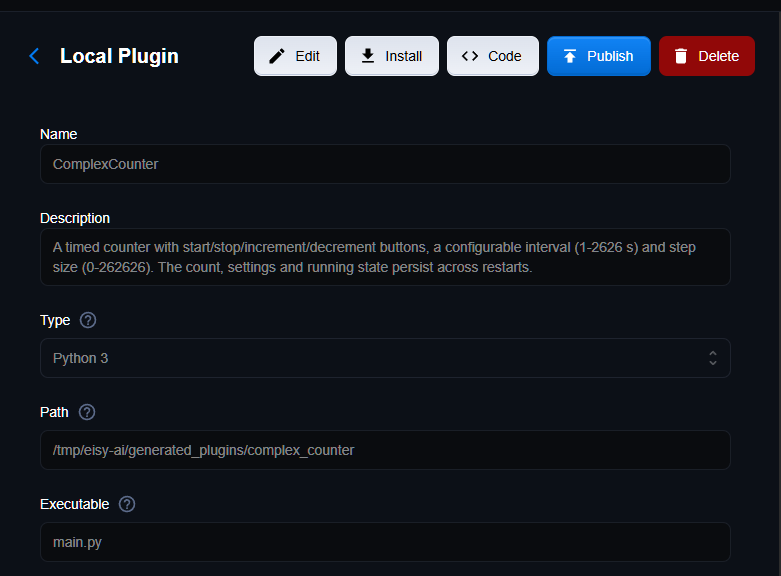
That's precisely Publish does. It copies all the crucial execution info, but you still need to provide the info that's in production BUT not in local such as Readme, license, and other ... With kind regards, Michel
-
@Panda88 , I have no idea what you are referring to. It's quite simple: Click on the Development tab Click on the local plugin Click on the Publish button
-
Hello everyone! Please join our Webinar on Tuesday 11/06/2026 at 7:00AM PST. Registration link is [ here ]. With kind regards, Michel
-
Yes, they will be competing for the same ports. With kind regards, Michel
-
You need to use Menu | Plugins (not PG3). With kind regards, Michel
-
Yes, a lof of things. Just install from the plugin store. With kind regards, Michel
-
lists my generated plugins - or go to the plugin page in the UI and then say: this plugin Load plugin x - same as above. The UI page provides context to everything in eisy-ui. So, when you say "this" it'll check the UI context icons for nodes are unfortunately static and cannot be changed except for those listed. This is going to change soon Yes, I have the same issue with scrolling ... it should be fixed Before you go any further, please make sure you install the new version and copy the files to the new location
-
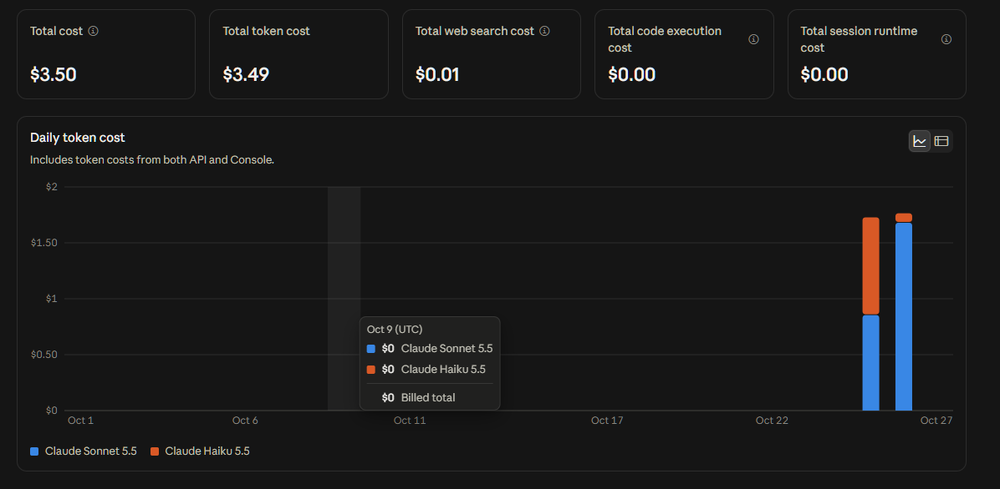
@apostolakisl , by the way, and just for reference, this is how much you spent. Sonnet is the model used for plugin development, and Haiku is for everything else.
-
@apostolakisl , Thank you very much for the feedback, and I am so very glad to hear! Regarding the store, the whole point is to enable developers to develop plugins easily, and let them reap the benefits by supporting it. So, please do not feel guilty as this is just a tool specifically for that purpose. Again, if you are willing to support it, you're welcome to charge for it, and it's totally up to the customers to decide whether or not they wish to pay for it. Regarding code, the new version [ link ] has a file viewer so that you can view the directory, see changes in real time, and edit them. With kind regards, Michel

