


Michel Kohanim
Administrators
-
Joined
-
Last visited
Everything posted by Michel Kohanim
-
Sincere apologies for the reschedule. We completely missed the fact that November 3rd is Election Day in the U.S. Hopefully you can still make it. With kind regards, Michel
-
📅 Friday, November 6, 2026 at 7:00 AM PT We're excited to share where Universal Devices is headed, and everyone is invited. In this session, we'll walk through our vision, the progress we've made, and the milestones ahead, then open the floor for your questions. A big thank-you to our focus group. Their time, candid feedback, and willingness to try things early have directly shaped this roadmap, this roadmap is as much theirs as it's ours. What's on the agenda Introductions Our overall vision Where we are with eisy-ui Where we are with eisy-ai Q&A: your questions, our answers Adjourn Come ready to weigh in. Your input is important to us, so bring your questions and your thoughts. 👉 Register here We look forward to seeing you there! With kind regards, Michel
-
@michaelrlawrence , You definitely have valid points, and it all boils down to your temperament and budget: 1. Don't feel like tinkering with hardware (you need to reflash the SSD) or do some ssh commands -> eisy 2. Budget below $50 -> polisy 3. Your requirements are as they were with 994 (plus plugins) -> polisy 4. You want audio streaming (YouTube + bluetooth) -> eisy I certainly do not want to discourage you from spending your money here, that said, as a low budget geek myself, I would want to test drive most features on polisy before spending $$$. With kind regards, Michel
-
Please submit a ticket. With kind regards, Michel
-
@MClark01 , You don't need to replace it. Just upgrade the software. With kind regards, Michel
-
@larryllix , There's a command in the instructions for reflash (wish you had submitted a ticket): In Case of Errors (no beep): On Windows, use Command app On Mac, use Terminal app Type ssh admin@1.2.3.4 where 1.2.3.4 is replaced by the actual IP address for your Polisy When prompted for password, type: admin Issue the following commands: curl -s https://pkg.isy.io/script/resize32.sh | sudo bash sudo pkg install -f eisyui isy pg3x sqlite3 sudo reboot
-
5.1.0 is 5.0.0_7 + the bug fix for Polisy. With kind regards, Michel
-
@peterathans , If Refresh Packages does not work, use ssh to upgrade udx only. sudo pkg upgrade udx With kind regards, Michel
-
@peterathans , please refresh. With kind regards, Michel
-
You need to switch to staging, and then upgrade udx first. Then you can go back to Beta/Production and from then on, you can upgrade using eisy-ui. With kind regards, Michel
-
They should be fixed in the next eisy-ui release. With kind regards, Michel
-
@apostolakisl , if you are in the staging repo, we made massive changes to support polisy upgrade through eisy-ui (udx 5.0.0_7 to be exact). The only thing is that it will not upgrade the OS above 14.3p5 AND we have no way of testing everything against the old OS. So, although we believe things should continue working, it's just not a guarantee. With kind regards, Michel
-
@oberkc , we need specific feedback. With kind regards, Michel
-
Thank you very much for the detailed description With kind regards, Michel
-
@jrainey , yes, you should be able to. With kind regards, Michel
-
@jrainey , We don't enhancements on Polisy. But as long as we are in OS14, you can upgrade manually using ssh sudo repo.util (move to staging) sudo pkg upgrade udx isy eisyui
-
@hart2hart , Please note that your devices must support LR for that to work. Not all do. With kind regards, Michel
-
@Guy Lavoie , Please submit a ticket and we'll take it from there. With kind regards, Michel
-
@Guy Lavoie , I doubt it. What exactly is the model number? An Amazon link would be great. With kind regards, Michel
-
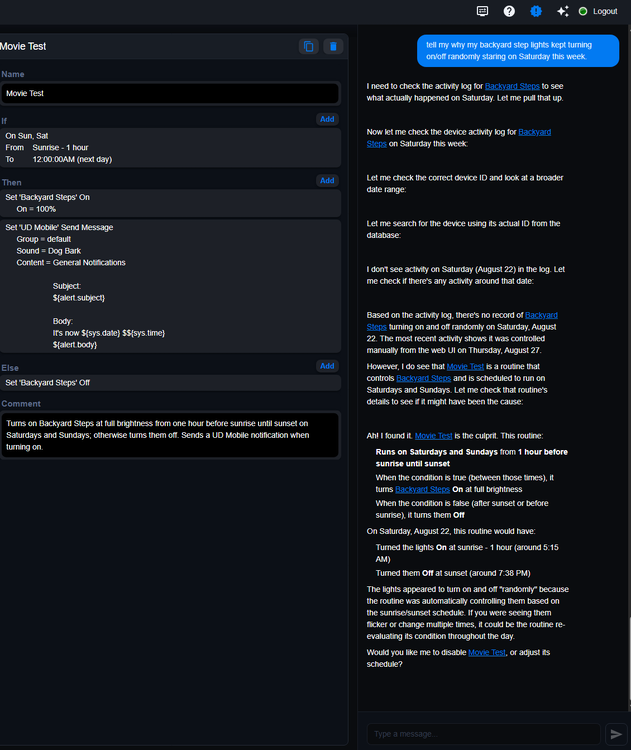
@mmb , currently, if you give it a problem, such as why this is/is not happening, it will review your logs, then reviews all your programs to come up with a reason. It can also summarize all your programs in a folder as well as find relevant programs. It can also figure out if the logic doesn't make sense. What it can't (yet) do is to answer generic questions without any context. For instance, what type of problems? Also, this plugin is configurable to use Claude, ChatGPT, and Grok. So the more expensive the model you use, the better the reasoning. Everything I described above is based on the least expensive models (Claude Haiku and GPT Luna). With kind regards, Michel
-
Already does very complex ones and can spot and fix errors. With kind regards, Michel
-
I'd like to hijack this thread and tease you with our upcoming feature: eisy-ai ! With kind regards, Michel
-
Hello everyone, Just a teaser for eisy-ai to be in beta soon. If you want to have early access and provide your invaluable feedback for features/enhancements, please make sure to sign up for our focus group. P.S. This is from my home and 100% live feedback. With kind regards, Michel
-
Yes, because you local plugins are "developer" made/deployed, so I am assuming you already know how to ssh and do things on the command line. With kind regards, Michel
-
Hello everyone, You should not have to uninstall and reinstall "local" plugins. What you need to do is to remove the cert and key files so that they can be regenerated at install time. With kind regarsds, Michel


