


Michel Kohanim
Administrators
-
Joined
-
Last visited
Everything posted by Michel Kohanim
-
Very detailed explanation based on which we have already fixed the issue and released a new version. NOT! Please submit a ticket and include the logs. With kind regards, Michel
-
Apologies, it's indeed 1.4.13. With kind regards, Michel
-
Hello everyone, We're happy to announce the availability of OS 14.5, IoX 6.1.2_18, UDX 5.5.0, and eisy-ui 1.4.13 for eisy (only). This is a major release that upgrades your OS to 14.5 and brings significant enhancements — especially for eisy-ui and Z-Wave/Zigbee support. Highlightsudx Upgrade Python from 311 to 312 Better upgrade progress notifications/messages Faster boot Better support for Polisy Full eisy-ai support isy Fix for Philips Hue clusters Lat/long and time zone issues especially for those in Canada Fixed majority of Z-Wave restore issues to 800 series eisy-ui Now at 99+% parity with the Admin Console A Redesigned Upgrade ProcedureStarting with OS 14.4, the upgrade procedure has been redesigned from the ground up. Your unit now creates a clone and upgrades the clone first. If the upgrade succeeds, you will reboot into the clone. From eisy-ui | System | Boot Environment, you can choose which partition to boot from, and remove the one that's no longer in use. ⚠️ Warnings | Please Read Before UpgradingIf your FreeBSD OS is below 13.2p11 (check via https://eisy.local:8443/WEB/sysconfig.txt), do not attempt this upgrade; it will brick your system. Instead: Back up your IoX and PG3 Reflash your eisy using our USB reflash stick Do not attempt the upgrade if you are remote from your eisy/polisy and/or using ISY Portal Do not attempt the upgrade over WiFi make sure you're connected to your router via Ethernet This is a major OS upgrade. Please do not touch the unit until it comes back online or prompts you to reboot If your eisy does not come back online within 2 hours, please submit a support ticket Upgrade Procedureeisy-ui Menu | System | Backup & Recover and backup everything. For Z-Wave, you need to back it up separately Menu | System, choose Production Repo, and then click on Upgrade Packages Admin Console: Back up your Z-Wave network, if applicable (Z-Wave | Backup) Back up your IoX (File | Backup IoX) Back up your PG3 Click Upgrade Packages in Admin Console | Configuration tab Do not use SSH to perform the upgrade; this will brick your system. Do not reboot till you are notified. As always, thank you for being part of the community, and please reach out via a support ticket if you run into any issues. With kind regards, Michel
-
@tazman , good catch but it's not sufficient because the device database/routines change. Again the shim is now deciding where to put thing, and not nucore. So, every change we make, you will need to update the shim. Please do not get me wrong: I think it's great advantage to be able to use your subscription. But, it does come with some cons. It's just that you need to weigh the pros/cons of each approach. With kind regards, Michel
-
@tazman , It's connecting to nucore properly BUT, just like MCP, nucore is no longer in charge of cache/prompt management. It's your shim doing everything. Just looking at the results, you're paying about 20x ($2/mil vs. $0.10/mil) more on non-cached tokens on sonnet 5-5. On haiku it's about 10x ($0.10/mil vs. $0.01). With kind regards, Michel
-
@tazman , Yes, sessions are based on the logged in identity. I don't think your shim is logged in. With kind regards, Michel
-
Ah, that's what I thought: it's not using the cache at all. What version are you on? With kind regards, Michel
-
@tazman , thank you. I was referring to your troubleshooting section: Connection timeout / connection refused from eisy specifically, but curl localhost:<port> on the Docker host works fine: test from a different device on the LAN (not the Docker host itself — a hairpin NAT test back to the same box can succeed even when real external devices can't connect). If that also fails, suspect the WSL2 mirrored-networking issue above. Regarding sessions, you don't have to run anything. I don't think you will be able to see session stats because you don't have a logged-in user (the reason for OAuth). But it would be fun to see what you get from the following commands: /sessions /session-stat <id> With kind regards, Michel
-
@tazman , Thank you. A very innovative hack. What I don't understand: 1. Why does the shim need curl to connect to eisy-ai? What is it doing exactly? 2. Have you tried /session-stats to see cache usage? With kind regards, Michel
-
@tazman , I am not sure how you would use "subscriptions" inside eisy-ai. Do you mean API Keys? With kind regards, Michel
-
@tazman , I would love to know about the errors you were getting with OpenAI. We use plain vanilla MCP on a local network. The ONLY issue could be that you might have to put the self signed cert in the keystore. With anything MCP, please note that we are NOT in charge of prompts, caching, or anything else that might optimize token usage. Everything is done with the model including tool calls, cache management, and everything else. So, although you will be using your monthly subscription, it's really not evident (at least in the case of Claude) that you would be saving tokens. @Panda88 , The API Key expired. Sorry. With kind regards, Michel
-
Did you check the log?
-
@DennisC Not entirely true. You cannot publish if you're not setup as a developer. So, a) verify identity b) set you up as a developer. So, right now, non-developer customers do NOT get the Publish button. With kind regards, Michel
-
@Guy Lavoie , Thank you! Please submit a ticket and we'll walk you through it next week. With kind regards, Michel
-
Hello everyone, Version 2.4.2 is released and it's a major improvement for token management for Claude with more than 90% cache hit rate in majority of cases. If you wish, you can also increase token_history_budget to 250K. The only charge will be after 1+ hour of inactivity for a LONG session. Otherwise, it should be smooth sailing. Most interesting thing is /session-stats that gives you a breakdown of everything you need to know regarding your tokens. Here are the release notes: - Compact a Claude session by forking the live conversation. The summarizing request now reuses the turn's own system prompt, history and tools (so the already-cached history is read at the cache-read price) with a final instruction to summarize, and the model sees every tool result; on success the entire history is replaced by that one summary. Any other provider, or a fork that fails, keeps the standalone summarizer (oldest turns summarized, newest half-budget kept), which now also sees one line per tool call with a short result excerpt. `/compact-session` passes the connection context through so it can fork too. - Fix a cache regression on every idle gap: Claude cache breakpoints now all use a fixed 1-hour TTL (tools, every system block, and the conversation, which was hardcoded to 5 minutes), so a pause of up to an hour between turns reads the cache instead of rewriting the whole history. **Upgrade note:** the `cache_ttl` profile option is removed; a leftover `"cache_ttl"` (the example configs set `"5m"`) is silently ignored, so those profiles now cache for 1 hour, where writes cost 2x instead of 1.25x (reads are unchanged at 0.1x). - Remove the installed-plugins list from the plugin-authoring system prompt. It was the last block before the conversation, so any plugin install/start/stop rewrote the whole cached conversation (about 25K tokens in one logged session). The model calls `list_installed_plugins` for live state instead. - Add `/session-stats`: shows what the next request is made of (each system section, the tools, and history split into compacted summary, conversation text and tool calls/results, scaled to the last real request's input total when comparable), the last request's cache reads/writes and hit rate, session totals with an estimated cost for known models, compactions (fork/summary/truncated, before and after), and the last five requests. It makes no model call. Per-request token usage is now recorded for every provider and saved with the session instead of only appearing in the prompt log. New optional profile setting `context_window` (shown as the share of the window used) for models the built-in table doesn't know. - Log (without compacting) when a single turn grows past twice `history_token_budget`: a `would compact mid-turn` warning, a `mid_turn_over_budget` prompt-log line and a counter in `/session-stats`. Compaction is still only evaluated at the start of a turn. - Scrub API keys and tokens out of every log record, including `debug.log`: udi_interface's own handler logged each Polyglot message with the plugin's custom parameters, provider API keys included, which the existing redaction never reached. A logging record factory now removes keys by shape (`sk-ant-`, `sk-`, `xai-`, `gsk_`, `AIza`, `Bearer`) and quoted values after fields such as `api_key`/`client_secret`/`password`. Session persistence is unaffected. Lines written by earlier versions stay in old logs, so rotate any key that appeared in one. - Add the `mdns_search` plugin-authoring tool (a stdlib-only mDNS browser that queries from an ephemeral port so it never competes with the eisy's own responder) and mDNS/Bonjour support in generated plugins (`server_entry.mdns_enabled` wires a handler forwarding to the required `handle_mdns_results` override). - Put a blank line after the history-budget and compaction notices so the reply no longer runs onto the notice's last word. With kind regards, Michel
-
No, there's an API for moves. Next is to have it make a UI ... With kind regards, Michel
-
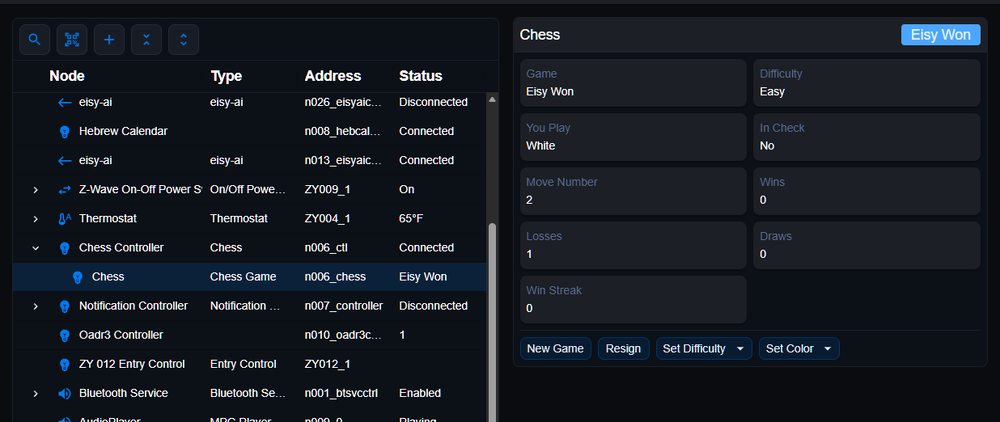
While testing long context, multi-turn, token-gobbling scenarios today, I had it create a chess plugin! And it won! With kind regards, Michel
-
Well, you need to first make it fail by going back and forth between plugins in the same session! With kind regards, Michel
-
@DennisC , Thank you so much for the feedback. A minor issue is that the compaction doesn't summarize tool calls, so you will be seeing something like this after compaction: I told you x, but I was lying ... do you want to verify? Another minor issue is that the compaction happens way too frequently (for me). We are working on both of these issues while keeping the costs down. I shall keep you posted. With kind regards, Michel
-
@DennisC , Good questions: max_turns is no longer used. It does not hurt if you keep it. My suggestions: Customer mode: max_tokens: 20000 history_token_budget: 60000 Developer mode: max_tokens: 64000 history_token_budget: 100000 You can always adjust history_token_budgets if you your conversations are compacted too frequently. With kind regards, Michel
-
Hello everyone, Initial analysis of the new version showed 70% improvement in token/context usage. Added a little more housekeeping, and removes things that made processing more difficult (max_turns), and in one case we got 96% cache hit developing a plugin for Rheem Econet! So, if you have not done so yet, please upgrade to the latest to save on tokens/costs. With kind regards, Michel
-
@Guy Lavoie thank you for the report! Regarding the issue, please submit a ticket. With kind regards, Michel
-
Hello everyone, please upgrade to 2.4.0 ... major improvements in cache management and token usage. With kind regards, Michel
-
@SJK , Need more information to understand what exactly you mean. With kind regards, Michel
-
I cannot reproduce at all. So, it's always giving your program numbers instead of names???? Always? With kind regards, Michel


