


SJK
Members
-
Joined
-
Last visited
-
I had an old thread on this topic, and am still having the problem. With the latest eISY OS release, I saw a note under fixes "Zigbee devices could not be removed". Wondering what was fixed specifically. I am still stuck with 3 Zigbee nodes that I cannot remove from the Zigbee network and yet again, the only solution will be to rebuild my entire Zigbee network (and then nodes, programs, UDM buttons, etc) for the 4th time as each time one of a node becomes unresponsive in the network they never get removed when removing before deleting and then I'm stuck. It's getting old- I'm about to resort to a Hue hub to at least protect that part of the network then figure out some other solution for the rest of the nodes - if I could figure out how to reliably integrate eISY with a separate Zigbee controller.
-
I didn't want to pollute the new release thread with discussions out of the scope for release troubleshooting, so I am starting a new thread. I like all the new functionality for programs- haven't started building/modifying programs in the eISY UI yet though but excited with how it looks. While reviewing, I thought of a helpful feature to speed program debugging- showing true/false status line by line in the program conditions and whether or not the then or else clause is evaluating to true. This should be doable as on the program list you can see true/false status and on the variable pages you can see their values. That would be a big visual clue as to the error in your logic or confirming it's working as intended. Otherwise you have to open multiple browser windows or flip back and forth between pages to step through a program. Secondly it would be great to be able to eventually create variable widgets on the nodes pages like I can with UD Mobile. I don't use the eISY UI at all to interact with my systems because I don't generally directly manipulate nodes - I use state variables for many things to track button presses around the house or desired settings. Example- I don't ever touch a thermostat- each room in the house has a desired state for mode and temperature that is determined by many variables, such as occupancy, home occupancy, window and door status, outside temperature, season, forecast, etc. If I directly change a thermostat on one of these interfaces without first setting an override variable/flag, eISY with just put it back. I do this type of setup for most every subsystem. For lighting, eISY tracks room occupancy based upon motion or manual button presses and runs timers. If I want to turn off all the lights in a room, I'm not turning off each node- instead I've used a UDM variable button action that just sets the occupancy to zero for that room when pressed. And another timer kicks off for HVAC setback in that zone as well. On mobile I can include these state variables and desired settings right along the thermostat display widgets on the favorites section, for example. Then every control surface could just show the nodes page rather than having to update my iPhone UDM build, then export/update to my spouse's phone and kitchen iPad and also track any changes in parallel with eISY UI too.
-
My upgrades went well. On one eISY I had to reinstall all my plugins, the other one was fine (they are the same plugins). Noticed on one eISY (the one I did not have to reinstall the plugins on) is showing the wrong time zone (2 hours ahead) in program last run/next run and variable last updated views. The PG Log (which I am using because I can see it in real time on the site) is showing local time in the one working properly but 2 hours BEHIND in the one with the TZ issues. However on both machines in the AC the time and time zone is correct.
-
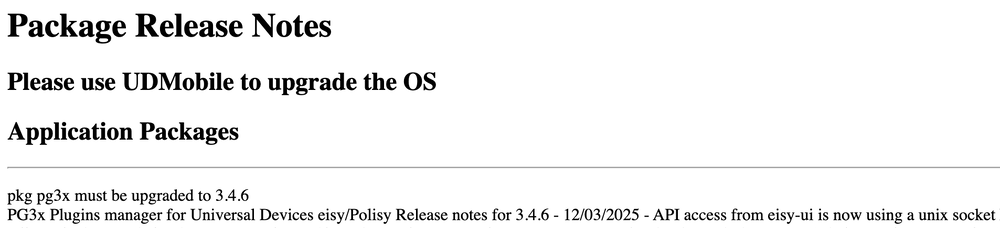
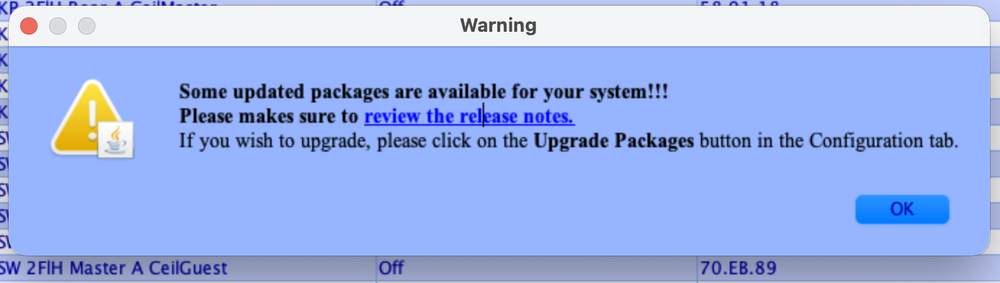
Same issue here. I'm getting update available notifications on UDMobile for both of my eISYs and the same screen in the update firmware. I'm on 6.0.3 and i says upgrade to 6.0.0. In the AC, the release notes say to use UDMobile to upgrade, the dialog says to simply press upgrade packages. Which is correct or does it not matter?
-
Sure- they are a basic Zigbee3.0 device. They are nothing fancy but work pretty much identically to Philips Hue bulbs. You get an on/off node, an x/y/temp node, and a color/sat node. All work exactly like any other ZB3.0 device. My only con is that if they are reset (or powered off for months, like happened with my exterior flood lights) you end up with a new ID (think this is typical of these kind of devices) which makes reprogramming a pain if they are in multiple scenes. Always remove from network first of course. I recommend these for LED strip drivers. They have few models with varying configs. They are inexpensive- no reason not to get the 5 in 1 version that can do RGBWW+CW for strips. They can be configured to whatever strip type you need- RGB, + WW, +CW, etc. They even have constant voltage modes and single color dimming modes or CW/WW modes. Pretty flexible- cannot go wrong here. Just pick the device that meets your needs.
-
I have many of these GLEDOPTO LED controllers. They make a handful of zigbee models. They work fine out of the box.
-
Doing some forum searxihng about orphaned zigbee devices I found an acknowledgment in 2023 that this was a bug and would be fixed within the week, followed by a user stating still not fixed a few months later. Other threads were all closed without any replies or that upgrading firmware fixed it. Perhaps a regression? I'm starting to think that if the controller still thinks the device is there, it's not going to re-pair. But if I cannot delete it, I'm stuck. I'll put in a ticket to ask.
-
I did factory reset them multiple times - screw/unscrew method. They were successfully reset. Turn off the bulb for 5 seconds Turn on for 8 seconds Turn off for 2 seconds Turn on for 8 seconds I have another one of these bulbs planned for another room when I install the pendant- I just tried to link it to the eISY in place of one of the nonresponding bulbs and it instantly paired, confirming it's not a radio interference issue, etc. When I use the Xray function to see the devices in the ZB network- I have 16. I only have 10 devices on this network. There's devices there I don't have and the ones that don't respond and have been removed from the eISY. None function- I get errors if I try to interact with or query them. I have removed them from the zigbee network before removing them from eISY, but they still persist in the all devices table, and if you do a synchronize new and delted with interview they come back. How do I permanently remove them from the network? Not sure this has any actual bearing on the actual problem, but seems odd I cannot remove anything ever.
-
I use some Tuyo clone things for window candles- the ones that you splice into the power cord. Something like those old Sonoff Zigbee basics. Also a couple of Sonoff USB on/off switches for the Lectrofans. All of those items are working just fine as well. I use no hub or nodeserver for the hue devices- they are linked directly to the eISY using the ZMatter dongle. Same for the other devices mentioned above.
-
I have a handful of Hue bulbs (and some other Zigbee devices) on my eISY. Within the past week 2 of the hub bulbs stopped working. These are the fancy lightguide glass bulbs. First the one in the master bedroom pendant stopped responding, then a day or so later, the one in my daughter's bedroom pendant. I factory reset them but they will not re-add to the eISY. First I tried an update/interview, then the reset with removal from the eISY, but again, will not re-pair. The lights work with bluetooth on my phone. (They aren't dead). I set up the hue app to verify that they still function. They are only maybe 2 months old? I doubt the zigbee radio is dead- they failed nearly simultaneously. No power failures or surges etc- I use whole house surge suppression and we have relatively "clean" (stable) power here. The only interim change is upgrading to 3.9.1 and turning on Matter support. I have no matter devices, and I did try turning it back off without any luck. But this issue didn't temporally appear- I updated to 3.9.1 a week or two after it came out, and this issue started a week ago. My zigbee network is fine- other devices work, including the other hue bulbs in the house. The regular 60 and 75w A type bulbs are still doing their thing- including those in the same rooms. This isn't a range or interference issue- nothing else has changed and again, everything else just works. (Side note- have the Polisy running a separate Zigbee network on a separate channel for exterior/window devices- completely separate radio frequency, should not have any issues there- have been happily co-existing since the fall). Any thoughts? I have no idea what to troubleshoot next.
-
not enough info in the post to troubleshoot, but here's a few starting points: 1) You have the towel bar 2 hour off program currently running while towel bar AM is also true- check out why (if it's a simple logic of if towel bar on, wait 2 hours then off, that would explain it.) 2) Check the date/time/timezone at the top of the AC to ensure it is still set correctly 3) Are the devices themselves responding? Turn it on/off at the device and see if it works manually and that it's status is reporting correctly in the AC Reply back with that stuff first (Is it plugged in, etc)
-
The new 5.9.1 release and the instruction/admonition to ensure you have good backups before proceeding got me thinking. Do I understand the complete backup strategy? I didn't find the complete answer here so thought I'd ask. Obviously there's the "backup IoX" menu item. Used to take a long time- now it's incredibly fast and makes a small zip file- too small... Makes me wonder what's not included. What does the backup IoX file include? All programs? All configuration tab items? Per the migration guide it seems like an all-in-one backup. But IIRC my migrations in the past were not smooth (but there were version and hardware differences- was not a straight like for like restore) requiring a fair amount of re-work. Topology file? (Good to have, not a restorable item but contains some very valuable information) PLM links table? I've found a few of those files lying around my backup folder and cannot figure out how to do that again if needed. As above- do I backup my programs separately? (Even if included in the main file)- a good idea in case a partial restore is needed due to a programming misadventure? If I export the root folder of my programs- are all included or just that root folder? File size seems really small given the amount of programs I've built. Variable definitions? Main file I'd expect? Z-wave- don't use it but see there's a separate procedure to backup a Z-wave network. What about ZigBee? Matter? Polyglot- has it's own backup system. Any caveats there? UDMobile is relatively straightforward, obviously a separate step. I have multiple production devices- no spare equivalent test devices- not interested in blowing up my controllers to f-around and find out on my own if my backup is complete at this stage. What does everyone do?
-
More sonoff devices- Water leak sensor is recognized as a water leak sensor class device by IoX with multiple parameters but water leak detection events are not received. https://sonoff.tech/product/gateway-and-sensors/snzb-05p/
-
Sonoff ZBMINIR2 on/off switch. Currently able to be added as a Zigbee device, on/off works, but no ability to configure/mange device settings such as detached mode, inching mode, trigger mode, power reset state. My use case is to sense a local switch for Hue bulbs to toggle on/off state without powering off bulb entirely (originally wired it as a local failsafe switch/if we ever sell the house and revert to "dumb" wiring). A whole lot cheaper than another insteon switch with a disconnected load. https://www.zigbee2mqtt.io/devices/ZBMINIR2.html https://sonoff.tech/product/diy-smart-switches/zbminir2/
-
I currently have zero Z-wave devices at this location so could live with that. Too many scenes with each devices a member of multiple scenes to accommodate on insteon PLM. Attached article not too helpful- one network manager per network- but I'm looking at making multiple independent networks - or at least that would be fine as I see no need to make both see each other. It does mention "start network and join/leave network" so presumably each controller should set up their own independent network - otherwise how would interference between neighbors be prevented? Found this: https://www.rfwireless-world.com/Tutorials/Zigbee_tutorial.html which mentions each controller starts its own personal area network- so I can see on my eISY this in X-ray of the network: Integer DATA controller.data.defaultPanId = 27238 (0x00006a66) I would assume that if I bought another ZMatter dongle it would create a different network ID- either randomly or upon detecting a collision with an existing network but that is a something one of the UD developers would have to confirm.


