


macjeff
Members
-
Joined
-
Last visited
Everything posted by macjeff
-
Started today. Yesterday was fine. Showing UV index 0 every single day. Data feed issue? Not home so cant get log but checked with two locations and same thing.
-
how would you send the temperature to alexa as annoucement. I would have to send the node address of the temp
-
I am trying to duplicate a skill that is gone from alexa. I could ask for a temp and it would tell me. The temp is in EISY but any way to pass it to an alexa annoucement? I know how to pass it to a notification which is what I might do but would be nice to ask alexa.
-
yes same app. Going to PM you in case you want me to share info
-
Have a theory. I have intellicenter. The login to that is my email with password. So I think its looking for a different login which I dont have. Any other ideas let me know!! Devices we have Intelliflo Colorsync Intellichlor - controlled by Intellichem Intellichem UltraTemp Smart Valve for Slide Alll work fine in their app and on their intellicenter2 website. Jeff 2026-08-24 10:18:26.673 Thread-3 (custom_params_handler) udi_interface INFO pentair:authenticate: Pentair Cloud authentication successful2026-08-24 10:18:26.875 Thread-3 (custom_params_handler) udi_interface INFO pentair:discover_devices: Pentair account returned 0 device(s) 2026-08-24 10:18:26.875 Thread-3 (custom_params_handler) udi_interface.node DEBUG node:setDriver: controller:Pentair Cloud Reporting set ST to 1 to Polyglot 2026-08-24 10:18:26.875 Thread-3 (custom_params_handler) udi_interface.node DEBUG node:reportDriver: Updating value to 1 2026-08-24 10:18:26.881 Thread-1 (send_thread) udi_interface.interface DEBUG interface:_send: PUBLISHING {'set': [{'address': 'controller', 'driver': 'ST', 'value': '1', 'uom': 25, 'text': None}]} 2026-08-24 10:18:26.912 MQTT udi_interface.interface INFO interface:_message: Successfully set controller :: ST to 1 UOM 25 2026-08-24 10:18:27.073 Thread-3 (custom_params_handler) udi_interface.node DEBUG node:setDriver: controller:Pentair Cloud No change in ST's value 2026-08-24 10:18:37.888 MQTT udi_interface.interface DEBUG interface:_message: QUEUING incoming message shortPoll 2026-08-24 10:18:37.888 Command udi_interface.interface DEBUG interface:_parseInput: DEQUEING shortPoll 2026-08-24 10:18:37.888 Command udi_interface.interface DEBUG interface:_handleInput: PROCESS shortPoll message {} from Polyglot 2026-08-24 10:18:38.129 Thread-5 (poll_handler) udi_interface.node DEBUG node:setDriver: controller:Pentair Cloud No change in ST's value 2026-08-24 10:19:37.891 MQTT udi_interface.interface DEBUG interface:_message: QUEUING incoming message shortPoll 2026-08-24 10:19:37.891 Command udi_interface.interface DEBUG interface:_parseInput: DEQUEING shortPoll 2026-08-24 10:19:37.891 Command udi_interface.interface DEBUG interface:_handleInput: PROCESS shortPoll message {} from Polyglot 2026-08-24 10:19:38.087 Thread-6 (poll_handler) udi_interface.node DEBUG node:setDriver: controller:Pentair Cloud No change in ST's value 2026-08-24 10:20:37.892 MQTT udi_interface.interface DEBUG interface:_message: QUEUING incoming message shortPoll 2026-08-24 10:20:37.893 Command udi_interface.interface DEBUG interface:_parseInput: DEQUEING shortPoll 2026-08-24 10:20:37.893 Command udi_interface.interface DEBUG interface:_handleInput: PROCESS shortPoll message {} from Polyglot 2026-08-24 10:20:38.165 Thread-7 (poll_handler) udi_interface.node DEBUG node:setDriver: controller:Pentair Cloud No change in ST's value 2026-08-24 10:21:37.894 MQTT udi_interface.interface DEBUG interface:_message: QUEUING incoming message shortPoll 2026-08-24 10:21:37.895 Command udi_interface.interface DEBUG interface:_parseInput: DEQUEING shortPoll 2026-08-24 10:21:37.895 Command udi_interface.interface DEBUG interface:_handleInput: PROCESS shortPoll message {} from Polyglot 2026-08-24 10:21:38.106 Thread-8 (poll_handler) udi_interface.node DEBUG node:setDriver: controller:Pentair Cloud No change in ST's value
-
which devices does this effect? Mine is KP125. I will wait for a fix but if more than a week or two I may buy some devices that dont have the issue. So far all of my other devices seem to be working (maybe not updated firmware yet) but they are different models.
-
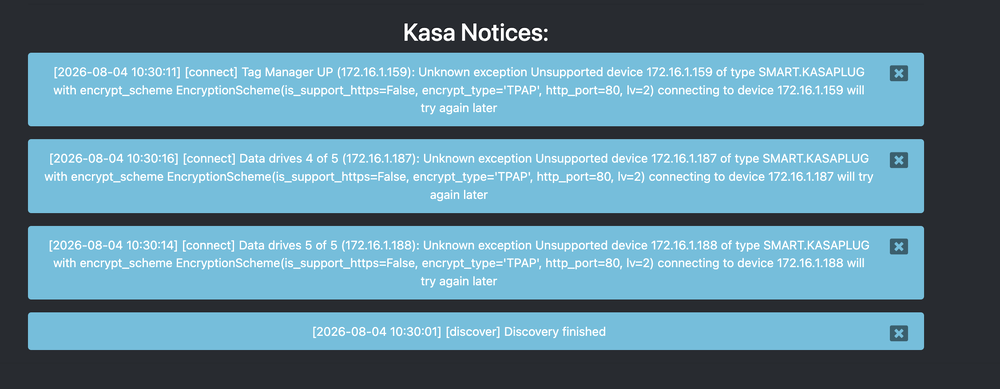
See screenshot. All my kp25 and other devices working fine. these broke in one of the last updates. I have been away for a while and did not realize these stopped working until today. Sent logs to Jimbo
-
On every restart it tells me that the profile was rebuilt, restart admin console in the messages section of config. I did restart it. How can I fix? Log attached (rebooted since then and same thing if you need another log) Notification_6-29-2026_85914_AM.zip
-
all good!!! THANKS!!!
-
fyi- I can add it to then and else. Its just not in the IF section
-
I even deleted the nodeserver and added it again. Its not showing up at all in the list of devices. I leave on a trip on Thursday AM. If by any chance you fix before that it would be great. I can install off the non-production if needed. I just want it to work while i am on vacation if possible. thanks!!
-
I have a query in my programs at 12:00:01 as sometimes it grabs the date later. I have a program that runs at 12:02 that needs the date. Its been working every day but today the date did not change so I looked. My query program does not have timedata as an option anymore. It actually changed to something else. Can you add that back in? Jeff
-
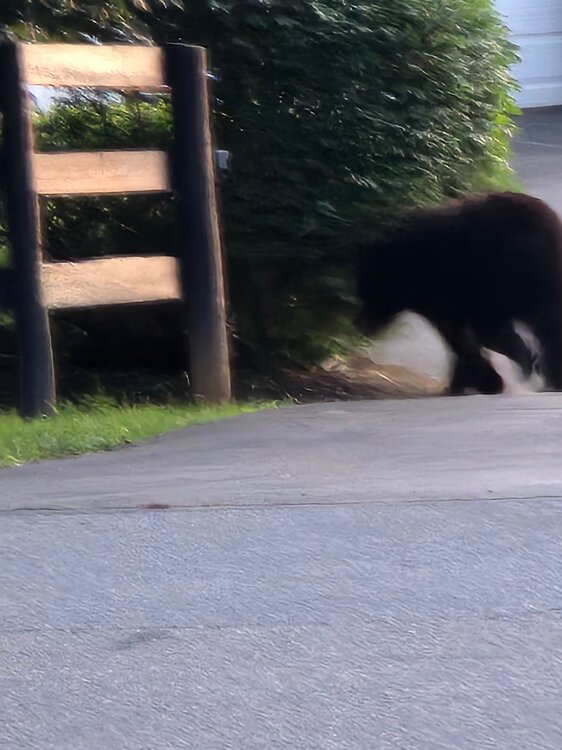
Luckily I did not go out to see if it was the UPS man. Neighbor took the picture. Also got camera footage or him running around the backyard. No idea what he was after other than to promote the EISY and YOLink. LOL btw. The outdoor motion sensor is fast and works great. Better than the insteon one and surprisingly faster even though its cloud based not local. Jeff
-
Look what the driveway motion (look closely on fence post) picked up in my driveway this AM. He was trying to wake me up since Alexa announces someone is in your driveway!!!! Jeff
-
First off topic a little- THIS NODESERVER IS GREAT. I am now addicted and my wife might kill me when she sees the bill. I replaced all my insteon leak sensors with Leak Sensor 4. So simple to setup and worked great. For those who used the old insteon ones, there is a program you had to run to let you know if it stopped communicating. At least 1-2 times a week with 15 leak sensors I would have to go push the button to wake them up. I also replaced my insteon motion sensors. Now to the mouse traps..... THEY WORK!!! Some notes. DONT leave sensitivity on 10. It will catch a car driving by. I lowered to 5 and a slug walked on it and it registered. (remember I have them under a fake rock that covers my septic where Voles and Mice were). Also dont put too close together because the sound of one kicks off another. Not the trap but the vibration. The issue is Voles, unlike mice, are bigger and seem smarter. They tend to get the peanut butter in the trap without getting hit. I did get 2 bigger Rat traps I put next to these so in this case I want the vibration to let me know. Today I had a strange thing. Probably too much information but you may find this interesting. I went out to find curled around the trap perfectly not to touch the sensors was what I thought was a big slug. It was not. It was a snake that chatGPT identified as a young rat snake. It was causing the trap to register. I put on gloves and tried to get him to move but he really liked my trap to the point he let me force the trap to snap (without hurting him) and then he moved out of the trap and just hung around. Not agressive at all. So I guess nature sent me a mouse trap. I just hope he does not find out how they work. Overall- I am not returning these and like them. The show up in the EISY and I wrote a program to alert me via alexa when a trap goes. Possible upgrades- Is there a way when I need to service the traps to write a program (a scene) to turn them all off and then back on? I dont see a way. 2. Does API allow you to adjust sensitivity? I may be able to write a program to up sensitivity at certain times, even seasons using TimeData.
-
Yes. All working. I killed the old plugin now. THANKS
-
I changed things around since I last posted so that I only had 4 plugs that did not work. I purchased a 4 pack of KP125M and they work great. Simple setup compared to the older ones and the homekit 25. The KP125 is also homekit but uses Matter as the default. So except for the surge strip I have been running fine with the new version. I left the OLD veision on another slot so that I could have access to the surge strip. So if you fix that later, as you said, that would let me get rid of the old version of the plugin. For now the OLD version is set to false for auto discovery, and I deleted all nodes. The surge strip and the new version (3.3.6) has everything else and working. Sorry, but I cant test the old switches because I gave them away.
-
that worked!!! Thank you!!!!!!!!!
-
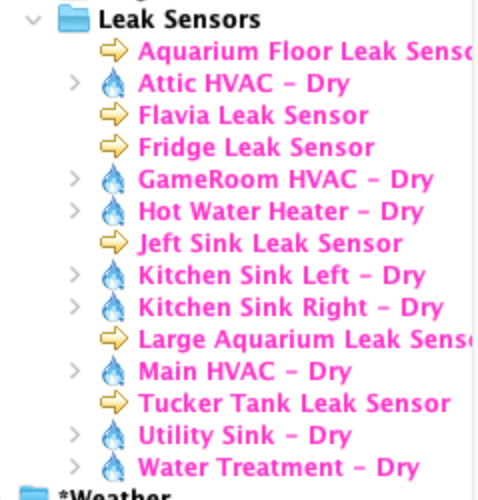
the ones in the picture with the water drop are INSTEON LEAK SENSORS. The ones with the arrow are the ones Leak Sensor 4 from YoLink **** CONFIRMED- Irrigation uses the same icon so you probably have to set them as irrigation?
-
I got a bunch of Water Leak Sensor 4's Work well, but a request. The old Insteon leak sensors had a water drop icon in EISY. Can you add that for these? Jeff
-
Your correct. I read further and of course you need a hub, but the other part is a weather resistant cover for the vibration sensor and a snap trap adapter which works with any small mouse trap (Even the platic kind with the teeth). The brains is just the vibration sensor with a weather cover. Sorry I missed that. I did order some. I will report back. Also, if you have existing vibration sensors they do sell just the snap trap adapter. *** A cheap mouse trap comes with the kit and the stand along adapter, but I would recommend a better one. they list the max size on the site.
-
I have some fake rocks and we have what are called Voles that build nests to get out of the rain and cold. Like huge mice (almost Rat size) that eat roots. They literally ate the entire root structire of my roses causing the bushes just to call over. I installed traps (poison did not work) and get one about every month. The pain is having to lift the fake rocks to check. This seems to be my solution---- YoLinkTrapeezee Smart Mouse Snap Trap Kit. Hub is includedThe easy solution to your mouse problem - Trapeezee lets you know instantly when a mouse has been caught, allowing you to reset your trap quickly.Does it support it and if so can I chip in (or give access to my account) to add support? Meanwhile I am going to buy them as I can use in their app.
-
As you said in a previous message, I bought the LOCAL version of the plugin. However, my devices came with a free speaker hub which is not supported. Everything is working fine with the speaker hub. Should I get a local hub? Can I use both hubs? Will I see a huge difference with local? I assume it would be faster in addition to not working when the internet is down. I use my outdoor motion sensor to trigger alexa but through the EISY so if internet is down, Alexa would not be triggered anyways. So I dont see much advantage other than the cloud being slower. With that said its a matter of seconds before Alexa says someone is in your driveway.
-
Kasa 6 port power Strip HS300 HW 1.0 FW 1.0.21 works with old KASA but not with beta version. All the other devices that were failing I am replacing with newer ones. I had 3 new ones and replaced 3 of the 6 already. So the only thing I am worried about is for now I have to run 2 versions of the plugin (old version just for power strip) and if you update KASA it will auto update the next time I reboot and I will lose that. UNLESS you name it as a Kasa V2 or something so its a different server. Here is amazon link- https://www.amazon.com/Kasa-Smart-Power-Strip-TP-Link/dp/B07G95FFN3/ref=sr_1_11?crid=2MWV325DVW41S&dib=eyJ2IjoiMSJ9.apRwjLLxaDW3zx_U0vHopt-ZBbqi3gNUh9IP8WOAa3OxJv6VmPFtGPTOKAV44awua7ksvyfHtjh_5ae32aC3CsUrTBJxKaUjDM2KQiJ7P7hHHAdgFojhp_nJB9cPSBJ1zcDo_omYiFF5g25AGjnKyyZ7-y6u152DU-Wuk96dPUQTMPM4GUcdh_q7P6UfYDtLX2nT0dZoor4VWpOnGnfbT2dnvShVnQvRMl8kXd4fzpQSOfopRnnR2xXpLjevwyO6Hqehyqi9jF-bRF57uXsjRS2eVtIZBa2-WaTn4-JPKh4._73lbizZ502-7s2r_UlrotW7Ru1s1u1CqxksaHlG6gQ&dib_tag=se&keywords=kasa%2Bplugs&qid=1778625888&sprefix=kasa%2Bplugs%2Caps%2C111&sr=8-11&th=1
-
also the surge strip only shows 1 node so I cant control the individual ports. Its an older one. Is there one you support now?


