


gdntx
Members
-
Joined
-
Last visited
Everything posted by gdntx
-
When you determine something truly not working as expected, open a ticket to report the bug. My sunset programs weren't executing. Through a ticket Michel and team have been very responsive, found bugs and published a version for me to test. It is improving fast. Someone above noted they weren't running the beta. With EISY-UI you need to get to the beta, it is becoming feature complete, and they need the testing and feedback to fix what's broken.
-
As noted by @Ross fixes are on the way. I was able to test a future release yesterday to confirm for the developers. Keep an eye on the Beta repo for the next versions and they will likely be in there.
-
I was provided an update to an EISY component and can confirm the Sunset bug is fixed in the next release. My program ran fine tonight. I poked around at a few other things. I could now edit and save a program just fine, so quite a few updates coming in the next releases.
-
Got a reply to my ticket already, it is a known bug being worked on.
-
I opened a ticket so it is documented. I tried updating - changed to Sunrise, the program wouldn't save. I change it back to Sunset and the save goes away, it recognized that is what I already have set. I know it's beta and they are working on updates, so it'll work out in the next release or two I'm sure. Just wanted them officially be aware.
-
Sunrise is working well, it's just sunset. Per other posts there are additional releases coming quickly to get the EISY UI engine and GUI up to speed.
-
Well oddly I'll have to say I can't find a time and date in the eisy-ui now that I go looking for it. I have to think that it is however, because that screen shot from after running the "then" updated to the current local time that I ran them at.
-
Yes - runs perfect. I had avoided doing so tonight for troubleshooting, but did just as you note and all the lights came on as expected. So it appears the issue is the SUNSET trigger. The last Run Time and Finish Time also updated.

-
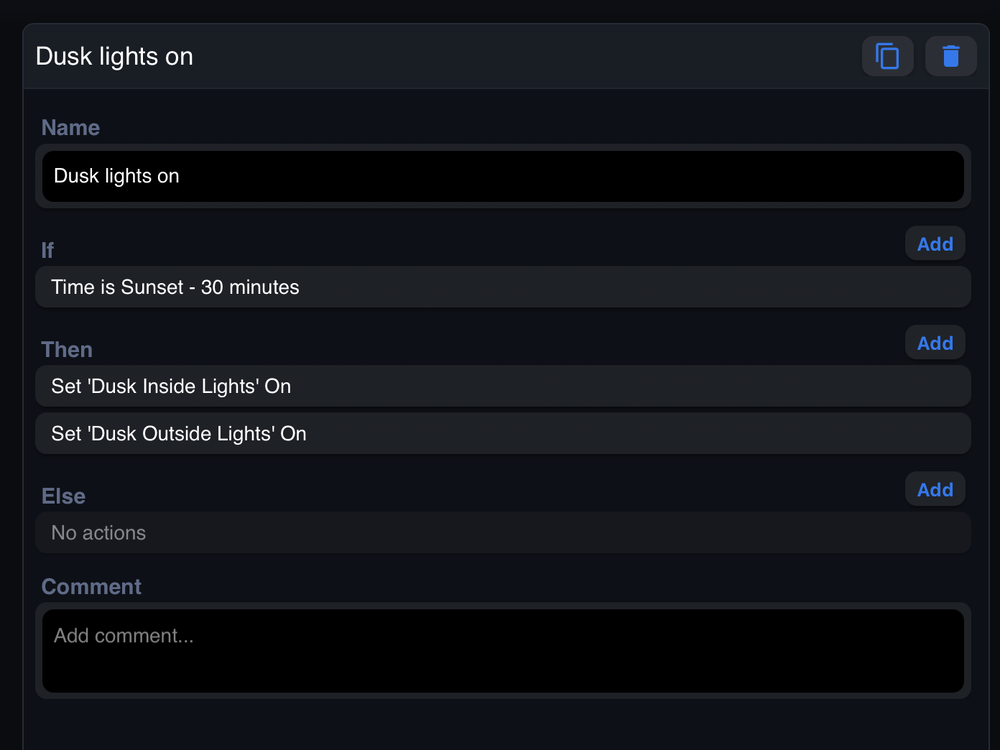
I know this likely needs a ticket, so I'll open one in a bit, but thought others may have experienced the same or have some insight. I've got an EISY and am using the new GUI (not IOX). I upgraded a couple of nights back to all of the latest code releases. I have a Program that runs a couple of scenes every night, 30 minutes before Sunset. Its worked for years. After the upgrades it is not running. I have looked through a few of the logs, but don't see any errors and it seems like our list of logs has exploded. Anyone have a quick insight where to look for an error or what might have gone wrong? From the programs listing it shows a next run time for tomorrow at about 30 minutes before sunset, but there is no "Last Run Time" nor "Last Finish Time" documented in the EISY-UI. I've right clicked to copy the program and I get the next dialog box, but it won't paste, so maybe another GUI error? I have Alexa connected and have spokens set up for this Program, it will run and did last night, if I ask Alexa to run it. Any insights?

-
By the way - to fix the issue, I rebooted my EISY.
-
I had similar problems replacing a switch last week. Seems the java console has some issues. Open the relatively new "UD Mobile" app on your smart phone and I bet you'll see the switch. Might have been able to see the old one there too.
-
This sounds like a familiar problem. Are you in the Java console? If so, it was changed some time back, but not well documented. The Write Changes button doesn't do much. After making your adjustment, click on the actual button "On Level" or "Ramp Rate" after making your adjustments. It will write your changes.

-
Likely issues with the scene - if ISY gets the command from Alexa, Alexa did its part and triggered. Its up ISY and your switches to react to and execute the scene.
-
Alexa has been pretty solid for many years for setting up and using the spokens. I don't think I could live without it. Having said that, I'm tired of Amazon having all of my information. As soon as the new Apple TV is out, I'm upgrading and going to attempt to move to HomeKit as the heart of my automation to get rid of Alexa. I've had HomeAssistant in place for about a year, but have done very little with it. I did investigate enough to find it has an integration back to ISY and can be used for voice commands. Home Assistant will likely be what I use to pull in more devices in the house - alarm, Sonos, etc and enhance my routines beyond lighting which has been my focus for many years.
-
No add ons running against my EISY other than Mobilinc Pro. I opened a case. No issues found so far, but next time it hangs, I'll check with SSH before I reboot. If I can connect, Michel has given me some commands to check a few things. Looks like trying to ensure systems are still running - isy, udx, and checking ports. I had another problem tonight, in the Java console. I had to replace a switch. Went through the normal motions, add switch, replace switch, and it appeared to work, but no matter what I did it would not show up in the list of switches, making it look like it had not worked. Every time I opened the Java console, it showed up in a dialog box saying new switch. I opened UD Mobile and it was there fully replaced and operational. It operated in my programs and macros. I finally rebooted the EISY (it had only been a couple days) and it now shows up - new switch, fully replaced the old one.
-
Ddi you have any feedback? Open a case? You are not alone, there are other threads. I'm running the new beta. Mine has locked up or stopped running a handful of times since upgrading. The next time it happens I need to remember trying SSH before pulling the plug to see if the device and base OS are active and it was just ISY/Insteon that failed.
-
My device just hung overnight again. 100% unresponsive (I do wish I had tried SSH before unplugging, but didn't think about that at the time)I had previously looked for OS dumps as noted above and didn't have any. I just opened ticket 28286 with UD.
-
I've come to research and note the same thing. I've had to reboot 4 times as it is unresponsive from all aspects, the App, Alexa, etc. It is usually pretty dang hot - I unplug and let it boot back up and all is good. The first time was about a month ago and I found the 0.7.2 update, so I updated and it has happened twice again in the last 2 weeks. Figured there might be others in the same situation. I've not made updates, no new programs or fundamental changes - only the new GUI. Guessing I'll open a ticket if nothing comes of this thread. Seems more like a runaway process on the device causing it to heat up and become unresponsive.
-
Yep - glad things are back up. Working in IT I get what it takes to have a major outage anytime, let alone a holiday. But, tongue in cheek, let's just say - AUTOEXTEND.
-
Is the firmware in the PLM undateable? I've searched and looked on Insteon's page and I don't find any instructions on how that is done. I have a new PLM and EISY, so I shouldn't need to update, but just curious for sometime in the future to keep the system all tuned up and running well.
-
I saw a RATDGO forum over at Home Assistant. You might find more help there.
-
What "Span" size did you use to get 3 wide? I can't seem to get 3 icons to one row.
-
Does BSD have a cron tab? Set up a weekly reboot from the OS.
-
I believe the way the Portal and all components work you don't ever truly have to worry about this - you can use DHCP. The portal knows your Eisy by Mac address and how to find your home network. There is magic that allows the portal to connect. I'll call it magic, because I don't fully know what protocols are used and how it allows the traffic into your home network. Maybe someone will clarify that for me too. What I can note and help with is how to get a static IP address for the Eisy if you prefer the static. I used to do that by hardcoding the IP in my ISY and turning off DHCP, but I've learned is that a "Reservation" in the router seems to be preferred these days. So I've switched to the reservation when I upgraded to Eisy. If you pull up the console for the router, look for Advanced Config, then LAN you'll find the IP reservation section. You'll see all connected devices and will show the Mac address of each including your Eisy. Find the Eisy, select it and add the reservation - choose the static IP address you want and assign it, save it. Then reboot your Eisy. It will always get that same IP address now when rebooted.
-
Ford Pass was down this afternoon too for a while - did AWS or which ever provider have a bigger outage?


