


someguy
Members
-
Joined
-
Last visited
Everything posted by someguy
-
when I added the V3 skill, I looked for the V2 skill to remove it and it was nowhere to be found. Perhaps there is a way to find it and remove it? and by the way; its actually "after November 4".
-
yes, I'm looking for my elk screen to show the status of lights as a percentage but also to have buttons right next to that that will allow me to turn the device on or off.
-
I am still working on this, in my spare time. I am still finding devices turned on when ISY thinks they are off. This has been happening for years, really. I previously figured that my ISY/Polisy/Eisy this was just a communication issue: the ISY would try to turn the device off and the device just didn't get the message. I am now noticing that they are on when it seems that no one (and no program) actually turned them on. as I look into this further, I find that they are all similar devices with similar Insteon Addresses: of note, the one called "BB Fan" is one that I swapped to a new switch and it hasn't happened since. My current thought is that something is sending an on to them and I haven't been able to confirm what it is yet. I theorize that it is an alexa, but I also wonder, although seemingly extremely unlikely, that it could be a miscommunication through the REST system. the reason I believe this is because of the similarity of their addresses. I made some programs to occasionally check the devices for being on when the Eisy thinks they are actually off and then I'll look in the "Error Log" as suggested above by @kclenden and see what I can figure out. any other thoughts?

-
here is the info from the error log for the same time. my light went on, according to the event log at "Monday 10/13/2025 04:59:20". Mon 2025/10/13 04:59:00 0 -170001 [HTTP:8-5] Mon 2025/10/13 04:59:00 0 -170001 [HTTP:8-5]: GET-->/rest/ns/1/nodes/n001_87521/report/status/CLITEMP/67 Mon 2025/10/13 04:59:00 0 -170001 [HTTP:8-5]: GET-->/rest/ns/1/nodes/n001_87521/report/status/HEATIX/67. Mon 2025/10/13 04:59:00 0 -170001 [HTTP:8-5]: GET-->/rest/ns/1/nodes/n001_87521/report/status/WINDCH/67. Mon 2025/10/13 04:59:00 0 -170001 [HTTP:8-5]: GET-->/rest/ns/1/nodes/n001_87521/report/status/CLIHUM/87. Mon 2025/10/13 04:59:00 0 -170001 [HTTP:8-5] Closing socket normally Mon 2025/10/13 04:59:02 0 -170001 [HTTP:7-5] ??J Mon 2025/10/13 04:59:02 0 -170001 [HTTP:7-5]: GET-->/rest/ns/14/nodes/n014_controller/report/status/ST/1 Mon 2025/10/13 04:59:02 0 -170001 [HTTP:7-5] Closing socket normally Mon 2025/10/13 04:59:03 0 -170001 [HTTP:9-5] Mon 2025/10/13 04:59:03 0 -170001 [HTTP:9-5]: GET-->/rest/ns/10/nodes/n010_controller/report/cmd/DON Mon 2025/10/13 04:59:03 0 -170001 [HTTP:9-5]: GET-->/rest/ns/10/nodes/n010_t531672041584/report/status/S Mon 2025/10/13 04:59:03 0 -170001 [HTTP:9-5]: GET-->/rest/ns/10/nodes/n010_t531672041584/report/status/V Mon 2025/10/13 04:59:03 0 -170001 [HTTP:9-5]: GET-->/rest/ns/10/nodes/n010_t531672041584/report/status/C Mon 2025/10/13 04:59:03 0 -170001 [HTTP:9-5]: GET-->/rest/ns/10/nodes/n010_t531672041584/report/status/G Mon 2025/10/13 04:59:03 0 -170001 [HTTP:9-5]: GET-->/rest/ns/10/nodes/n010_rs_j46n/report/status/ST/68.8 Mon 2025/10/13 04:59:03 0 -170001 [HTTP:9-5]: GET-->/rest/ns/10/nodes/n010_rs_f9s2/report/status/ST/69.7 Mon 2025/10/13 04:59:03 0 -170001 [HTTP:9-5]: GET-->/rest/ns/10/nodes/n010_rs_8qcz/report/status/ST/68.9 Mon 2025/10/13 04:59:04 0 -170001 [HTTP:9-5] Closing socket normally Mon 2025/10/13 04:59:43 0 -170001 [HTTP:8-5] Does this tell us "who" turned on the light?
-
okay, my light went on at around 5am, for unknown reason. here is a snip from my log. does this tell anyone why it turned on? the light that turned on was: 48.15.F2. also: my PLM is 71.17.AC by the way. Mon 10/13/2025 04:59:20 : U7 Rest: submitCmd([48 15 F2 1],[DON],[<NULL>]) Mon 10/13/2025 04:59:20 : [INST-TX-I1 ] 02 62 48 15 F2 0F 11 CC Mon 10/13/2025 04:59:20 : [INST-ACK ] 02 62 48.15.F2 0F 11 CC 06 LTONRR (CC) Mon 10/13/2025 04:59:20 : [INST-SRX ] 02 50 48.15.F2 71.17.AC 2F 11 CC LTONRR (CC) Mon 10/13/2025 04:59:20 : [Std-Direct Ack] 48.15.F2-->ISY/PLM Group=0, Max Hops=3, Hops Left=3 Mon 10/13/2025 04:59:20 : [D2D EVENT ] Event [48 15 F2 1] [ST] [204] uom=100 prec=0 Mon 10/13/2025 04:59:20 : [48 15 F2 1 ] ST 204 (uom=100 prec=0) Mon 10/13/2025 04:59:20 : [D2D-CMP 000B] STS [48 15 F2 1] ST Converted values Event=80 Condition=80 prec=0 I appreciate any help.
-
I kind of gave up. I'm selling my tesla in a couple of months. if you would like my help, then I'm happy to get back into trying to fix this (mostly because it may help you and other people). but if I'm the only one with this problem then I'll give up. FYI: I did try installing the nodeserver in a different slot and went through the process and it still didn't work.
-
I’m having a similar problem: my bathroom light goes on at random times in the middle of the night (which wakes me up). I recently upgraded to Eisy, I’m on 6.0.0 and I also upgraded to “Alexa plus”. I’ve been following this thread to see what @jlloyd_UD figures out. i will run my event viewer at night at some point and see if i can figure out “who” is to blame. I have a comment for @IndyMike: if I just go into the portal and remove a device from the Amazon echo list, does it instantly remove the echo/alexa control of that device? I’m thinking not. I’ve had many devices that have duplicates and many challenges with trying to remove these duplicate devices.
-
I only have one system that inputs devices into the alexa. it is the Eisy portal. if I delete everything off of the portal in the alexa settings, will that delete things from the Alexa? it doesn't seem to do so. I'd like to delete everything and start over from scratch to clean it up.
-
@DennisC I'm not sure that variables will tell me what I would want to know in the way I envision. I'll try emailing jimbo automates.
-
I have many duplicate devices. some are even duplicated as devices and scenes. they aren't readily available to delete. some verbal calls to alexa will get a "I have more than one devices with that name, please give them different names..." but when I look in the list, there is either none or only one device with that name.
-
I have a bunch of duplicated items inside of my Alexa. I've tried many different things, like combining things into groups and they still work very spotty. I called echo customer service and they would only walk me through deleting devices in my alexa. I need a "delete all" like there used to be on the windows access. I've thought of canceling my whole amazon account and starting over but then I'd lose my purchase history, etc. any suggestions or discussion would be appreciated.
-
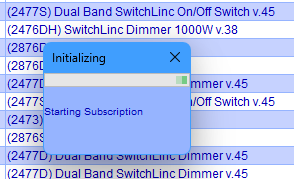
here is the solution for the original problem of this thread, the "starting subscription" error: this solved my problem and this solution was given to me by @BenoitMercier.
-
@macjeff I did the upgrade yesterday so its been 12 hours. the "starting subscription" is still "initializing" and has been doing so for 30 minutes or more. UD mobile seems to know the status of the devices but does not have ability to control any of them. I already tried a reboot of the Eisy from UD mobile and it did reboot but the "starting subscription" persists.
-
after following instructions, including updating java, rebooting the Eisy, deleting java data, etc. when I log into the admin console, it comes up and connects. I can see all of my nodes, but the process of the Admin Console starting up gets stuck at "Starting subscription". any suggestions? I have not done a complete power down and reboot (as instruction suggest) because I am not at home for a time.
-
I'm having a (albeit small) problem with using "Alexa Plus": when I ask it to turn on my kitchen lights, which are connected through Eisy to the Portal to Alexa. "I'm not quite sure what went wrong with the kitchen lights". THE LIGHTS WORK, but I get this message every time. any suggestions? I submitted feedback to Alexa Plus but that may not accomplish anything.
-
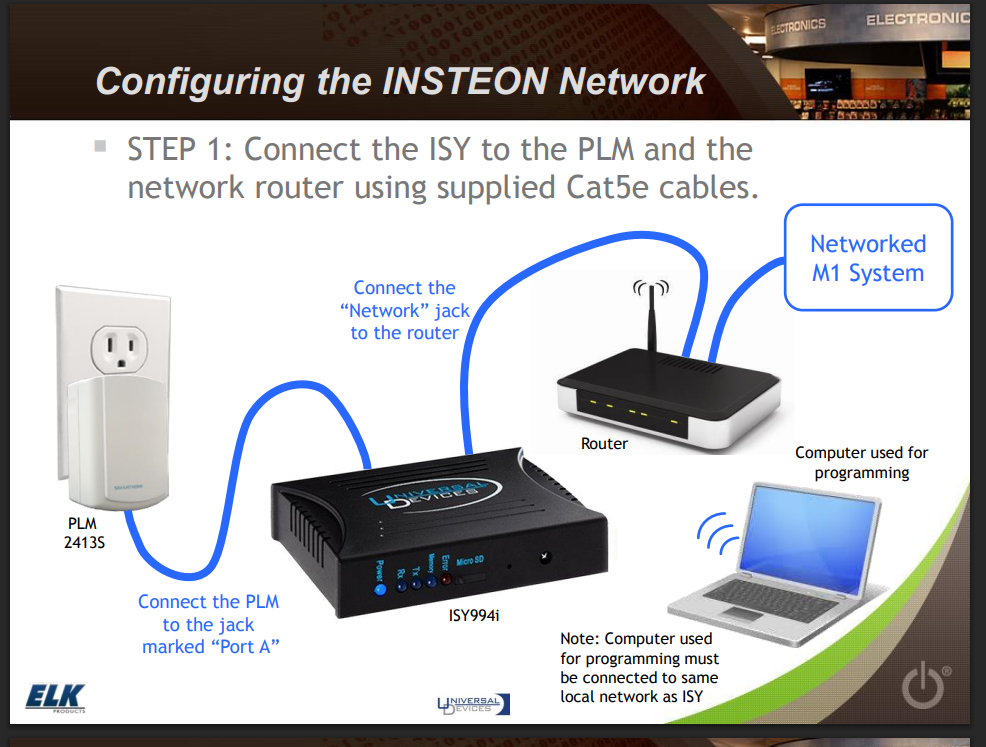
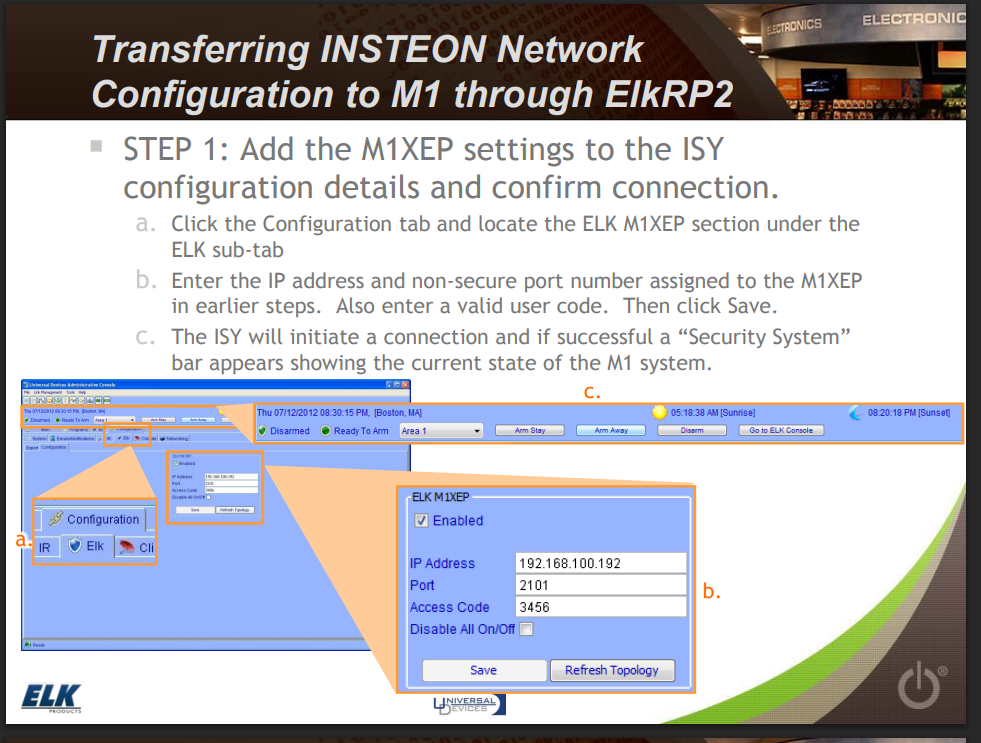
another XSP? do you mean the "Elk-M1XSP" device? if so, are you saying that this could be connected to another PLM?!? I didn't know that this was possible. I found some older info on elk's website that shows that the Elk M1 connects to the PLM through the internet connection: it also shows this elk tab (which I think was an extra purchase for ISY in the remote past... but this is gone: I'm hitting a roadblock. Is there anywhere I can get more help with this? should I submit a ticket and expect help from UDI?
-
I tried this, and it does work to display about 30 or so characters on the old-style keypads, but it does not display anything on the Elk 7TS keypad (which is where I want to show status of devices). any other suggestions?
-
where is the "display on keypad" feature? is that something in Elk or is it in ISY? i dont think the PLM can talk to the Elk system itself. my Keypad connects to the Elk M1 through an ethernet connection (or wifi).
-
@apostolakisl yes, I understand what you are suggesting and it makes sense. what I'm trying to accomplish is to have a use for the new keypad I bought: Elk 7TS touchscreen "keypad" I'd like to have the screen show the current status of a few lights so that I can see that they are off when I go to bed (and turn them off if I desire to do so). This is why I want Elk to know what the status of lights are in ISY.
-
I appreciate any help i can get here.
-
I updated to the newest version (0.2.10) and it is still not working, again. I tried re-authenticating it and that hasn't helped either. any suggestions?
-
I’m looking into using yolink. If I want to use it with local API, what do I need to do? Is there a certain hub I should buy? Thank you.
-
Does anyone have any suggestions as to how to get this sorted out?
-
well, I tried re-authenticating it. then I checked the webhook and now, it is working! I'm not sure what changed but, Thank you!!
-
I just tried out the new TeslaEVStream nodeserver and I get all of the nodes but they are all devoid of data. any suggestions?


