


GTench
Members
-
Joined
-
Last visited
Everything posted by GTench
-
@sjenkinsYes everything appears to be working normally. Thanks for your help. You were correct about the app. it did not show status either. I refreshed the battery status and it now appears in both the app and your plugin. I suspect the AC lockup issue that occurs with both plugin versions installed might just be a problem with the AC
-
@sjenkinsOK thanks. No matter what I do/try I cannot get the AC programs tab to open if I have both the production and beta versions installed at the same time in different slots even with one or the other stopped - the AC just freezes; so I deleted the beta version and installed the beta version into the production slot. This seems to be working o.k. I can open the AC programs tab and a test of one of my programs worked successfully. I can also manually open and close a shade from the AC. I notice one of my shades battery status says "no status". All the other shades show battery status
-
@sjenkinsJust a follow up. I tried manually opening and closing one of the shades from the AC using both the beta and production versions once I identified the shade using the number and that worked ok. Both beta and production were installed. I still cannot load programs with both beta and production installed.
-
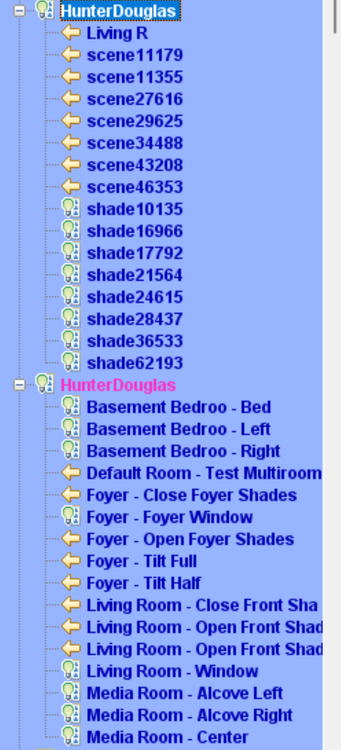
@sjenkinsI was thinking of biting the bullet and just install the beta version as a replacement for the production version and test it that way but first I thought I would see if I could manually operate the shades from the beta version in the AC; however, I noticed that the names are not correct now. Just wondering if you changed anything.
-
@sjenkinsOK sounded like a good idea. Stopped all plugins except the HD ones then started the AC. Still had the same problem. Did an update and reboot from the AC. Restarted the AC but still have the same issue
-
@sjenkinsI set both versions to 60 & 600. Still locks up loading wigets for scenes
-
@sjenkinsI am using 5 and 60 for the production version and 10 and 120 for the beta version (that is what was defaulted to at installation). I tried 5 and 60 with the beta version but still the same results No change to the hunter douglas programs; minor tweaks to a few lighting and sprinkler programs. All programs seem to be running correctly.
-
@sjenkinsHere are the log files. I reinstalled the beta plugin, then stopped both the production and nonproduction versions in PG3. I then opened the AC but when I go to the programs tab I get the same freeze/lockup issue with create widgets for scenes. I am guessing that I might not have the issue if only the beta version is installed but I am a bit reluctant to try as it will likely create issues with my existing programs HunterDouglas_9-18-2025_102658_AM.zip pg3_9-18-2025_102839_AM.zip system_9-18-2025_102926_AM.zip
-
@sjenkinsI don't have a preference as to how the name is formed. Whatever you decide is fine by me. Some observations: having both node server versions installed and just stopping stopping either one by itself still results in a AC lockup/freeze at "creating widgets for scenes" when the beta version is running, it shows as connected in the AC and disconnected in the AC after it is stopped when the production version is running, it shows as true in the AC and also shows as true in the AC after it is stopped
-
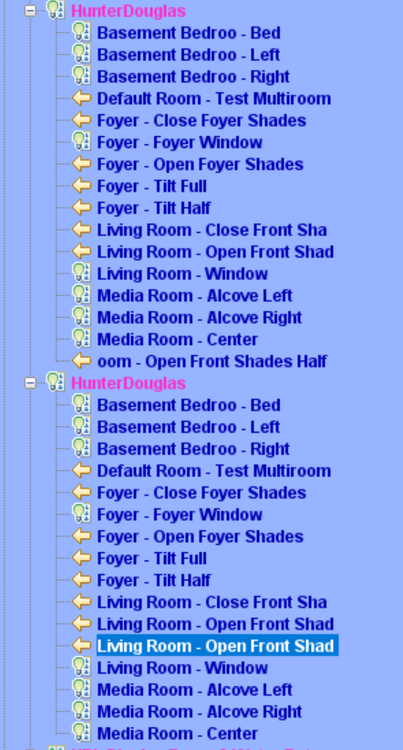
@sjenkinsOK I see 17 nodes loading into PG3 same as in the production version but if I open the AC I see this The top one is from the beta version. The last entry there should be "Living Room - Open Shades Half Way". Looks like you are truncating the beginning of the string instead of the end of the string? Also, I cannot get programs to open properly with both plugin versions installed. It mostly loads but then locks up or is too busy to respond and I have to kill the task
-
@sjenkinsOK. Here is the log file. Thanks again for creating the plugin. The production version has been running flawlessly. I find it much more convenient to use it than to use the cell phone app HunterDouglas_9-16-2025_102529_AM.zip
-
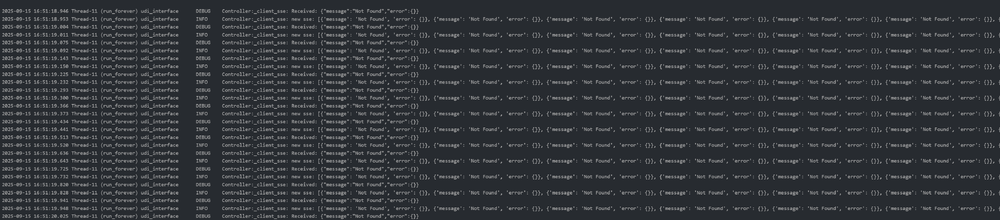
@sjenkinsAlso...I cannot open my programs in the AC. It gets to creating widgets for scenes and freezes. I had to delete the non production version in order to access my programs. Is the large log file possibly causing this?
-
Yes. I copied the one used in the production version It says log file too large. Here is a snipit

-
@sjenkins Did a delete and reinstall but still not seeing shades. Version is still 1.13.0. Is this still the previous one?
-
@sjenkinsInstalled and configured it but it is only showing 1 node in PG3 even after a couple of restarts. The production version shows 17 nodes. I have not checked in the AC yet
-
@sjenkinsthanks, good information to know. I will install and test G2
-
Thanks... found it. Can I have both the production and nonproduction versions installed at the same time but in different slots?
-
@sjenkins is 1.13.0 in the plugin store? Just wondering how to get at it Gary
-
@Panda88My vote would be for 2 versions with possible migration to one version in the future when testing is complete and things look stable. I would likely migrate to the local version at some point but currently I make use of Yolink direct connect for anything that are critical for me to be internet independent like leak sensors. Really liking the reliability and battery life of yolink devices. Gary
-
@smorgasbordI have 3 Velux skylights myself. I would be curious to look at the pdf if you don't mind posting it
-
@sjenkinsOpen and close work correctly on my G2. Have not tested with 1.12.6 yet but should be fine as you indicated that you did not touch G2. If there is an issue I will report back. Gary
-
@Panda88I did more testing from the AC trying and retrying various messages and everything worked fine. I wanted to try testing from some of my programs but I found that when both the production and test Yolink plugins are installed, the AC will not show any programs at all. I had to delete the test plugin to have my programs visible again. I suspect I will need to adjust my programs because of the changes you made (play message button) but this is not a big deal for me. If you feel comfortable putting 1.4.26 in the production store, I will test the programs on it but I don't anticipate any problems. Otherwise I could try installing just the test version and deleting the production version to test the programs but this will be more work
-
@Panda88 I only see he 1.4.26 test version not 1.4.29 (typo?) but 1.4.26 works fine. To test I have multiple messages created in the plugin (TTS0, TTS1, TTS2, etc.). In the AC I go to one of the Yolink speaker devices/nodes. I then use the dropdown to select the first message then play it. I repeat with a different message then again with a third message. I then go back to the first message and try it again. It now plays correctly. Before it would stay locked to the last message played. I found previously that it was only the first message (TTS0) that I could not cycle back to. I could cycle back to other messages just not the first one but now I can in 1.4.26
-
@Panda88I just installed YolinkTest 1.4.26. I tested changing between messages in the AC and that works fine there. I noticed that the AC now shows a "Play Message" button and the select message button has been removed. Thanks for all your work on this plugin. I am quite pleased with the consistency and reliability of yolink especially their wireless devices. I found their leak sensors to be very reliable; the zwave ones that I tried a year or so ago not so reliable
-
@Panda88thanks, you were right. I just restarted the server and all devices enrolled ok. I tested sending messages to the speaker. I find that I can successfully change back and forth between messages an the AC EXCEPT for the first message (TSS0)...puzzling. Once the first message is played it cannot be reselected and played again after another message is selected and played but only for the message associated with TSS0. This might also be the case in the production plugin but I did not test it there I have both the production and the test plugin installed but even though nodes show up in the AC for both plugins, I can only play messages from the test plugin.


