


GTench
Members
-
Joined
-
Last visited
Everything posted by GTench
-
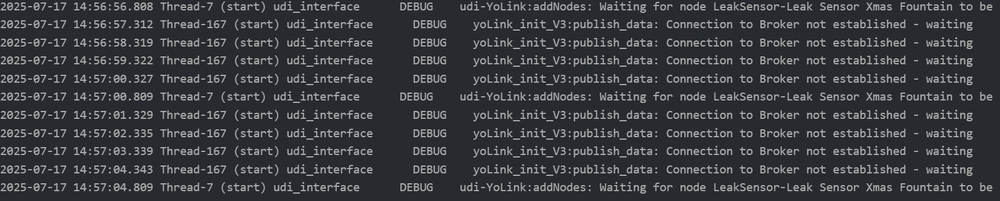
@Panda88OK thanks. I installed it but it seems to stall out and be caught in a loop trying to enroll one of my leak sensors. It successfully enrolled 9 others prior to this. This leak sensor shows fine in the yolink app and the production version of the plugin. I tried restarting the plugin with the same result. Here is a snippet from the log file
-
@Panda88 Right now the only way I can get around this problem is to restart the Yolink plugin which is a bit frustrating. Since I did not have this problem with the previous version, just wondering if there is any way to revert back to the previous version of the plugin
-
Just wondering if you had a chance to look at this issue yet
-
OK thanks... I appreciate it
-
Basically what I noticed is that once a message has been selected, you cannot go back to it after another message has been selected. It sticks with the last message played. You cannot reselect an already played message once you have played another message. This behavior just started with v22. This worked fine with previous version. I don't see that I can add a message as part of the "play" command. It looks to me like you need to use the "select" command first. I guess what is puzzling me most is that everything was working fine prior to V22
-
OK. I did a Yolink restart, then in the AC selected play message and it played the correct one. I then changed the message in the AC (select message) and played it. this newly selected message played correctly. I then reselected the first message and when I played it, the second selected message still played. Here is the log file. After a bit more testing it looks like I can select other messages and they will play correctly but once a message has been selected and played it cannot be reselected and played again after another message is played. Looks like a message is locked out for reselection once it is played YoLink_7-5-2025_14940_PM.zip
-
@Panda88I notice something odd that just started happening with the latest version. I have a message that plays through the speaker hubs saying "Someone is at the front door". This works fine after a restart of the Yolink node server but sometime later the behavior changes to saying " Basement fridge or freezer door is open" which is another one of my messages that was selected and played later in the day. If I go into the AC and play any message on the speaker hub screen it always plays the same incorrect message even when I select a different message to play from the AC. If I restart the Yolink node server, everything then works ok until some time later after another different message is played. It seems to me that the message selection gets stuck and will not continue to update. The first time or two that a message is selected in the AC after a node server restart it works ok but then it gets stuck and won't play a different select message, just plays the one that is stuck. Gary I don't know if this helps but here is a log file when it fails to change messages 2025-07-05 10:47:13.368 MQTT udi_interface.interface DEBUG interface:_message: QUEUING incoming message command 2025-07-05 10:47:13.368 Command udi_interface.interface DEBUG interface:_parseInput: DEQUEING command 2025-07-05 10:47:13.368 Command udi_interface.interface DEBUG interface:_handleInput: PROCESS command message {'address': '8b4c1604002268', 'cmd': 'MESSAGE', 'value': '0', 'uom': '25', 'query': {}} from Polyglot 2025-07-05 10:47:13.368 Command udi_interface INFO udiYoSpeakerHubV2:setMessage: udiYoSpeakerHub setMessage 2025-07-05 10:47:13.368 Command udi_interface DEBUG udiYolinkLib:my_setDriver: my_setDriver : GV4 0 None 2025-07-05 10:47:13.368 Command udi_interface.node DEBUG node:setDriver: 8b4c1604002268:SpeakerHub master bathroom Reporting set GV4 to 0 to Polyglot 2025-07-05 10:47:13.368 Command udi_interface.node DEBUG node:reportDriver: Updating value to 0 2025-07-05 10:47:13.368 Command udi_interface INFO udiYoSpeakerHubV2:setMessage: udiYoSpeakerHub setMessage 0 Someone is at the Front Door 2025-07-05 10:47:13.377 Thread-1 (send_thread) udi_interface.interface DEBUG interface:_send: PUBLISHING {'set': [{'address': '8b4c1604002268', 'driver': 'GV4', 'value': '0', 'uom': 25, 'text': None}]} 2025-07-05 10:47:13.414 MQTT udi_interface.interface INFO interface:_message: Successfully set 8b4c1604002268 :: GV4 to 0 UOM 25 2025-07-05 10:47:59.499 MQTT udi_interface.interface DEBUG interface:_message: QUEUING incoming message command 2025-07-05 10:47:59.499 Command udi_interface.interface DEBUG interface:_parseInput: DEQUEING command 2025-07-05 10:47:59.499 Command udi_interface.interface DEBUG interface:_handleInput: PROCESS command message {'address': '8b4c1604002268', 'cmd': 'PLAY', 'query': {}} from Polyglot 2025-07-05 10:47:59.499 Command udi_interface INFO udiYoSpeakerHubV2:playMessage: udiYoSpeakerHub playMessage 2025-07-05 10:47:59.499 Command udi_interface DEBUG yolinkSpeakerHubV3:playAudio: SpeakerHub - playAudio 2025-07-05 10:47:59.499 Command udi_interface DEBUG yolinkSpeakerHubV3:playAudio: playAudio: {'method': 'SpeakerHub.playAudio', 'targetDevice': 'd88b4c1604002268', 'token': '36D6FD222DDB834F455F516C82A6412A', 'params': {'tone': 'Tip', 'volume': 10, 'repeat': 0, 'message': 'Basement Fridge or Freezer Door is Open'}} 2025-07-05 10:47:59.499 Command udi_interface DEBUG yoLink_init_V3:publish_data: Publish Data to Queue: {'method': 'SpeakerHub.playAudio', 'targetDevice': 'd88b4c1604002268', 'token': '36D6FD222DDB834F455F516C82A6412A', 'params': {'tone': 'Tip', 'volume': 10, 'repeat': 0, 'message': 'Basement Fridge or Freezer Door is Open'}} 2025-07-05 10:47:59.500 Thread-3821 (transfer_data) udi_interface DEBUG yoLink_init_V3:transfer_data: Starting publish_data: 2025-07-05 10:47:59.500 Thread-3821 (transfer_data) udi_interface DEBUG yoLink_init_V3:time_tracking: time_track_going in: 1751726879500, d88b4c1604002268, {'d88b4c02000a9794': [], 'd88b4c02000aac97': [], 'd88b4c02000aa795': [], 'd88b4c02000a98dd': [], 'd88b4c02000eb8a5': [], 'd88b4c02000a9751': [], 'd88b4c02000a9c43': [], 'd88b4c02000aaca9': [], 'd88b4c010005aaf5': [], 'd88b4c02000eb8dd': [], 'd88b4c02000a9776': [], 'd88b4c0200037958': [], 'd88b4c020003794a': [], 'd88b4c02000aa808': [], 'd88b4c01000c2e21': [], 'd88b4c160400190b': [], 'd88b4c1604002268': [1751726560223, 1751726638698, 1751726757672, 1751726778691, 1751726798312], 'd88b4c1604002182': [], 'd88b4c1604003e76': [], 'd88b4c010008a200': [], 'd88b4c02000797cf': [], 'd88b4c040006a122': [], 'd88b4c01000abf03': [], 'd88b4c010005482d': []} 2025-07-05 10:47:59.501 Thread-3821 (transfer_data) udi_interface DEBUG yoLink_init_V3:time_tracking: Adding 0 delay to t_now 1751726879500 = 1751726879500 to TimeTrack - dev delay=0, all_delay=0, dev2dev=0 2025-07-05 10:47:59.501 Thread-3821 (transfer_data) udi_interface DEBUG yoLink_init_V3:time_tracking: TimeTrack after: time 1751726879500 dev: d88b4c1604002268 delay: 0 - {'d88b4c02000a9794': [], 'd88b4c02000aac97': [], 'd88b4c02000aa795': [], 'd88b4c02000a98dd': [], 'd88b4c02000eb8a5': [], 'd88b4c02000a9751': [], 'd88b4c02000a9c43': [], 'd88b4c02000aaca9': [], 'd88b4c010005aaf5': [], 'd88b4c02000eb8dd': [], 'd88b4c02000a9776': [], 'd88b4c0200037958': [], 'd88b4c020003794a': [], 'd88b4c02000aa808': [], 'd88b4c01000c2e21': [], 'd88b4c160400190b': [], 'd88b4c1604002268': [1751726638698, 1751726757672, 1751726778691, 1751726798312, 1751726879500], 'd88b4c1604002182': [], 'd88b4c1604003e76': [], 'd88b4c010008a200': [], 'd88b4c02000797cf': [], 'd88b4c040006a122': [], 'd88b4c01000abf03': [], 'd88b4c010005482d': []} 2025-07-05 10:47:59.501 Thread-3821 (transfer_data) udi_interface DEBUG yoLink_init_V3:transfer_data: publish_data: yl-home/a2c4d5280e864c3fa820376edc5c5d59/d88b4c1604002268/request - {"method": "SpeakerHub.playAudio", "targetDevice": "d88b4c1604002268", "token": "36D6FD222DDB834F455F516C82A6412A", "params": {"tone": "Tip", "volume": 10, "repeat": 0, "message": "Basement Fridge or Freezer Door is Open"}, "time": "1751726879501"} 2025-07-05 10:47:59.500 Command udi_interface DEBUG yoLink_init_V3:publish_data: publishThread - starting 2025-07-05 10:47:59.590 paho-mqtt-client-a2c4d5280e864c3fa820376edc5c5d59 udi_interface DEBUG yoLink_init_V3:on_publish: on_publish 2025-07-05 10:47:59.721 paho-mqtt-client-a2c4d5280e864c3fa820376edc5c5d59 udi_interface DEBUG yoLink_init_V3:on_message: on_message: {'method': 'SpeakerHub.playAudio', 'targetDevice': 'd88b4c1604002268', 'token': '36D6FD222DDB834F455F516C82A6412A', 'params': {'tone': 'Tip', 'volume': 10, 'repeat': 0, 'message': 'Basement Fridge or Freezer Door is Open'}, 'time': '1751726879501'} 2025-07-05 10:47:59.721 paho-mqtt-client-a2c4d5280e864c3fa820376edc5c5d59 udi_interface DEBUG yoLink_init_V3:on_message: Message received and put in queue (size : 1) 2025-07-05 10:47:59.721 paho-mqtt-client-a2c4d5280e864c3fa820376edc5c5d59 udi_interface DEBUG yoLink_init_V3:on_message: Creating threads to handle the received messages 2025-07-05 10:47:59.721 Thread-3822 (process_message) udi_interface DEBUG yoLink_init_V3:process_message: Received message - Q size=0 2025-07-05 10:47:59.721 paho-mqtt-client-a2c4d5280e864c3fa820376edc5c5d59 udi_interface DEBUG yoLink_init_V3:on_message: 1 on_message threads starting 2025-07-05 10:47:59.721 Thread-3822 (process_message) udi_interface DEBUG yoLink_init_V3:process_message: process_message : {'method': 'SpeakerHub.playAudio', 'targetDevice': 'd88b4c1604002268', 'token': '36D6FD222DDB834F455F516C82A6412A', 'params': {'tone': 'Tip', 'volume': 10, 'repeat': 0, 'message': 'Basement Fridge or Freezer Door is Open'}, 'time': '1751726879501'} 2025-07-05 10:47:59.721 Thread-3822 (process_message) udi_interface DEBUG yoLink_init_V3:process_message: process_message for d88b4c1604002268: {'method': 'SpeakerHub.playAudio', 'targetDevice': 'd88b4c1604002268', 'token': '36D6FD222DDB834F455F516C82A6412A', 'params': {'tone': 'Tip', 'volume': 10, 'repeat': 0, 'message': 'Basement Fridge or Freezer Door is Open'}, 'time': '1751726879501'} yl-home/a2c4d5280e864c3fa820376edc5c5d59/d88b4c1604002268/request 2025-07-05 10:47:59.722 Thread-3822 (process_message) udi_interface DEBUG yoLink_init_V3:process_message: porcessing request - no action: {'method': 'SpeakerHub.playAudio', 'targetDevice': 'd88b4c1604002268', 'token': '36D6FD222DDB834F455F516C82A6412A', 'params': {'tone': 'Tip', 'volume': 10, 'repeat': 0, 'message': 'Basement Fridge or Freezer Door is Open'}, 'time': '1751726879501'} 2025-07-05 10:47:59.847 paho-mqtt-client-a2c4d5280e864c3fa820376edc5c5d59 udi_interface DEBUG yoLink_init_V3:on_message: on_message: {'code': '000000', 'time': 1751726879811, 'msgid': '1751726879501', 'method': 'SpeakerHub.playAudio', 'data': {}, 'targetDevice': 'd88b4c1604002268'} 2025-07-05 10:47:59.848 paho-mqtt-client-a2c4d5280e864c3fa820376edc5c5d59 udi_interface DEBUG yoLink_init_V3:on_message: Message received and put in queue (size : 1) 2025-07-05 10:47:59.848 paho-mqtt-client-a2c4d5280e864c3fa820376edc5c5d59 udi_interface DEBUG yoLink_init_V3:on_message: Creating threads to handle the received messages 2025-07-05 10:47:59.848 Thread-3823 (process_message) udi_interface DEBUG yoLink_init_V3:process_message: Received message - Q size=0 2025-07-05 10:47:59.848 paho-mqtt-client-a2c4d5280e864c3fa820376edc5c5d59 udi_interface DEBUG yoLink_init_V3:on_message: 1 on_message threads starting 2025-07-05 10:47:59.848 Thread-3823 (process_message) udi_interface DEBUG yoLink_init_V3:process_message: process_message : {'code': '000000', 'time': 1751726879811, 'msgid': '1751726879501', 'method': 'SpeakerHub.playAudio', 'data': {}, 'targetDevice': 'd88b4c1604002268'} 2025-07-05 10:47:59.848 Thread-3823 (process_message) udi_interface DEBUG yoLink_init_V3:process_message: process_message for d88b4c1604002268: {'code': '000000', 'time': 1751726879811, 'msgid': '1751726879501', 'method': 'SpeakerHub.playAudio', 'data': {}, 'targetDevice': 'd88b4c1604002268'} yl-home/a2c4d5280e864c3fa820376edc5c5d59/d88b4c1604002268/response 2025-07-05 10:47:59.848 Thread-3823 (process_message) udi_interface DEBUG yoLink_init_V3:process_message: porcessing response: {'code': '000000', 'time': 1751726879811, 'msgid': '1751726879501', 'method': 'SpeakerHub.playAudio', 'data': {}, 'targetDevice': 'd88b4c1604002268'} 2025-07-05 10:47:59.849 Thread-3823 (process_message) udi_interface INFO udiYoSpeakerHubV2:updateStatus: updateStatus - speakerHub 2025-07-05 10:47:59.849 Thread-3823 (process_message) udi_interface DEBUG udi_interface:write: SpeakerHub update data {'code': '000000', 'time': 1751726879811, 'msgid': '1751726879501', 'method': 'SpeakerHub.playAudio', 'data': {}, 'targetDevice': 'd88b4c1604002268'} 2025-07-05 10:47:59.849 Thread-3823 (process_message) udi_interface DEBUG yolink_mqtt_classV3:updateCallbackStatus: SpeakerHub - updateCallbackStatus : {'code': '000000', 'time': 1751726879811, 'msgid': '1751726879501', 'method': 'SpeakerHub.playAudio', 'data': {}, 'targetDevice': 'd88b4c1604002268'} 2025-07-05 10:47:59.849 Thread-3823 (process_message) udi_interface DEBUG yolink_mqtt_classV3:updateCallbackStatus: Method detected 2025-07-05 10:47:59.849 Thread-3823 (process_message) udi_interface DEBUG yolink_mqtt_classV3:Status: Status : {'code': '000000', 'time': 1751726879811, 'msgid': '1751726879501', 'method': 'SpeakerHub.playAudio', 'data': {}, 'targetDevice': 'd88b4c1604002268'} 2025-07-05 10:47:59.849 Thread-3823 (process_message) udi_interface DEBUG yolink_mqtt_classV3:Status: code selected 2025-07-05 10:47:59.849 Thread-3823 (process_message) udi_interface DEBUG yolink_mqtt_classV3:updateCallbackStatus: Do Nothing for now 2025-07-05 10:47:59.849 Thread-3823 (process_message) udi_interface DEBUG udiYolinkLib:my_setDriver: my_setDriver : GV0 10 None 2025-07-05 10:47:59.849 Thread-3823 (process_message) udi_interface.node DEBUG node:setDriver: 8b4c1604002268:SpeakerHub master bathroom Reporting set GV0 to 10 to Polyglot 2025-07-05 10:47:59.849 Thread-3823 (process_message) udi_interface.node DEBUG node:reportDriver: Updating value to 10 2025-07-05 10:47:59.849 Thread-3823 (process_message) udi_interface DEBUG udiYolinkLib:my_setDriver: my_setDriver : GV1 1 None 2025-07-05 10:47:59.849 Thread-3823 (process_message) udi_interface.node DEBUG node:setDriver: 8b4c1604002268:SpeakerHub master bathroom Reporting set GV1 to 1 to Polyglot 2025-07-05 10:47:59.849 Thread-3823 (process_message) udi_interface.node DEBUG node:reportDriver: Updating value to 1 2025-07-05 10:47:59.850 Thread-3823 (process_message) udi_interface DEBUG udiYolinkLib:my_setDriver: my_setDriver : GV2 0 None 2025-07-05 10:47:59.850 Thread-3823 (process_message) udi_interface.node DEBUG node:setDriver: 8b4c1604002268:SpeakerHub master bathroom Reporting set GV2 to 0 to Polyglot 2025-07-05 10:47:59.850 Thread-3823 (process_message) udi_interface.node DEBUG node:reportDriver: Updating value to 0 2025-07-05 10:47:59.850 Thread-3823 (process_message) udi_interface DEBUG udiYolinkLib:my_setDriver: my_setDriver : GV3 0 None 2025-07-05 10:47:59.850 Thread-3823 (process_message) udi_interface.node DEBUG node:setDriver: 8b4c1604002268:SpeakerHub master bathroom Reporting set GV3 to 0 to Polyglot 2025-07-05 10:47:59.850 Thread-3823 (process_message) udi_interface.node DEBUG node:reportDriver: Updating value to 0 2025-07-05 10:47:59.850 Thread-3823 (process_message) udi_interface DEBUG udiYolinkLib:my_setDriver: my_setDriver : GV4 0 None 2025-07-05 10:47:59.850 Thread-3823 (process_message) udi_interface.node DEBUG node:setDriver: 8b4c1604002268:SpeakerHub master bathroom Reporting set GV4 to 0 to Polyglot 2025-07-05 10:47:59.850 Thread-3823 (process_message) udi_interface.node DEBUG node:reportDriver: Updating value to 0 2025-07-05 10:47:59.850 Thread-3823 (process_message) udi_interface DEBUG udiYolinkLib:my_setDriver: my_setDriver : GV5 0 None 2025-07-05 10:47:59.850 Thread-3823 (process_message) udi_interface.node DEBUG node:setDriver: 8b4c1604002268:SpeakerHub master bathroom Reporting set GV5 to 0 to Polyglot 2025-07-05 10:47:59.850 Thread-1 (send_thread) udi_interface.interface DEBUG interface:_send: PUBLISHING {'set': [{'address': '8b4c1604002268', 'driver': 'GV0', 'value': '10', 'uom': 107, 'text': None}]} 2025-07-05 10:47:59.850 Thread-3823 (process_message) udi_interface.node DEBUG node:reportDriver: Updating value to 0 2025-07-05 10:47:59.851 Thread-1 (send_thread) udi_interface.interface DEBUG interface:_send: PUBLISHING {'set': [{'address': '8b4c1604002268', 'driver': 'GV1', 'value': '1', 'uom': 25, 'text': None}]} 2025-07-05 10:47:59.851 Thread-3823 (process_message) udi_interface DEBUG udiYolinkLib:my_setDriver: my_setDriver : ST 1 None 2025-07-05 10:47:59.851 Thread-1 (send_thread) udi_interface.interface DEBUG interface:_send: PUBLISHING {'set': [{'address': '8b4c1604002268', 'driver': 'GV2', 'value': '0', 'uom': 25, 'text': None}]} 2025-07-05 10:47:59.851 Thread-3823 (process_message) udi_interface.node DEBUG node:setDriver: 8b4c1604002268:SpeakerHub master bathroom Reporting set ST to 1 to Polyglot 2025-07-05 10:47:59.852 Thread-1 (send_thread) udi_interface.interface DEBUG interface:_send: PUBLISHING {'set': [{'address': '8b4c1604002268', 'driver': 'GV3', 'value': '0', 'uom': 25, 'text': None}]} 2025-07-05 10:47:59.852 Thread-3823 (process_message) udi_interface.node DEBUG node:reportDriver: Updating value to 1 2025-07-05 10:47:59.852 Thread-1 (send_thread) udi_interface.interface DEBUG interface:_send: PUBLISHING {'set': [{'address': '8b4c1604002268', 'driver': 'GV4', 'value': '0', 'uom': 25, 'text': None}]} 2025-07-05 10:47:59.852 Thread-3823 (process_message) udi_interface DEBUG udiYolinkLib:my_setDriver: my_setDriver : GV20 0 None 2025-07-05 10:47:59.852 Thread-1 (send_thread) udi_interface.interface DEBUG interface:_send: PUBLISHING {'set': [{'address': '8b4c1604002268', 'driver': 'GV5', 'value': '0', 'uom': 107, 'text': None}]} 2025-07-05 10:47:59.852 Thread-3823 (process_message) udi_interface.node DEBUG node:setDriver: 8b4c1604002268:SpeakerHub master bathroom Reporting set GV20 to 0 to Polyglot 2025-07-05 10:47:59.853 Thread-1 (send_thread) udi_interface.interface DEBUG interface:_send: PUBLISHING {'set': [{'address': '8b4c1604002268', 'driver': 'ST', 'value': '1', 'uom': 25, 'text': None}]} 2025-07-05 10:47:59.853 Thread-3823 (process_message) udi_interface.node DEBUG node:reportDriver: Updating value to 0 2025-07-05 10:47:59.864 Thread-1 (send_thread) udi_interface.interface DEBUG interface:_send: PUBLISHING {'set': [{'address': '8b4c1604002268', 'driver': 'GV20', 'value': '0', 'uom': 25, 'text': None}]} 2025-07-05 10:47:59.880 MQTT udi_interface.interface INFO interface:_message: Successfully set 8b4c1604002268 :: GV0 to 10 UOM 107 2025-07-05 10:47:59.968 MQTT udi_interface.interface INFO interface:_message: Successfully set 8b4c1604002268 :: GV1 to 1 UOM 25 2025-07-05 10:48:00.008 MQTT udi_interface.interface INFO interface:_message: Successfully set 8b4c1604002268 :: GV2 to 0 UOM 25 2025-07-05 10:48:00.065 MQTT udi_interface.interface INFO interface:_message: Successfully set 8b4c1604002268 :: GV3 to 0 UOM 25 2025-07-05 10:48:00.112 MQTT udi_interface.interface INFO interface:_message: Successfully set 8b4c1604002268 :: GV4 to 0 UOM 25 2025-07-05 10:48:00.171 MQTT udi_interface.interface INFO interface:_message: Successfully set 8b4c1604002268 :: GV5 to 0 UOM 107 2025-07-05 10:48:00.213 MQTT udi_interface.interface INFO interface:_message: Successfully set 8b4c1604002268 :: ST to 1 UOM 25 2025-07-05 10:48:00.268 MQTT udi_interface.interface INFO interface:_message: Successfully set 8b4c1604002268 :: GV20 to 0 UOM 25
-
looks like that's working... thanks
-
@Panda88Have you uploaded it yet. I am not seeing it as an available update I see it now
-
Here is the log file from a restart. It says my devices are unsupported YoLink_6-29-2025_125003_PM.zip
-
I only see 1 node in PG3 and I don't see any Yolink devices in the Admin Console. I have restarted PG3 Yolink a number of times
-
@Panda88I set it to 10 and added a 10th message then did update. I think I was on 15; the update moved me to 21. Yolink still showed up in the AC but only 1 node was there. I tried a restart but stlll no nodes. I then set count back to 9 and removed the 10th message and restarted (twice) but there is still only 1 node (YoLinkSetup)
-
@xlurkrI am using 4 speaker hubs with one yolink hub and one node server. They are scattered throughout the house on different floors. They announce for things like packages at front door, back shed door open, gate open etc. I believe that I leave a few seconds delay between sending the same message to each speaker hub but not sure if this is necessary (just a precaution to prevent confusion - like 2 people speaking at the same time). I only wish the node server could allow for more than 9 possible messages. @Panda88any chance for this; does the local hub allow for more than 9? Gary
-
@bmercier still not seeing icons under favorites for Yolink devices with eisyui-0.5.1.pkg . Node listing says they are connected
-
Interesting. I see errors when I click on Zwave but not insteon or Yolink or other node servers like weatherflow. Here is what I see in the console

-
I have the same issue as @sjenkins Not sure if this is exactly what you mean but I opened the nodes screen in eisy.local, selected a non Yolink node (shows properties correctly) then selected a Yolink node (no properties shown) but I do not see any error message Not sure if this is at all related but I notice when I add in a Yolink node server, the Yolink devices show up scattered among all existing nodes in the AC. That is, they are not automatically grouped under a Yolink master node
-
@bmercier this is what is in my Java Console

-
Just get a spinning pointer then nothing. The AC does not open at all. The 8443 added manually works with Iox login. The 8443 that was automatically added works with portal login. The 8080 that was added manually just does not work/respond
-
@bmercier I don't see the popup in the Java console. It just appears over the AC. Also 8080 does not work for me either
-
I have the same issue as @sjenkins If I login to default connection on AC with portal login, AC loads but I get these messages popping up every 20 seconds or so Creating the manual one works fine with local user name / password

-
@bmercier thanks. I originally downloaded from the link to my pc but I then thought curl might just be simpler. Since it did not install, I used pscp earlier this morning to copy it from my PC and that worked fine; I had not posted it though.
-
@bmercierI downloaded the file using curl -s https://universaldevices-my.sharepoint.com/:u:/g/personal/benoit_universal-devices_com/eisyui-0.4.0.pkg -O
-
@bmerciernow I get eisyui does not exist in /etc/rc.d or the local startup directories (/usr/local/etc/rc.d), or is not executable @bmerciermissed this before admin@eisy ~]$ sudo pkg install -f eisyui-0.4.0.pkg Password: Updating FreeBSD-base repository catalogue... FreeBSD-base repository is up to date. Updating FreeBSD-udx repository catalogue... FreeBSD-udx repository is up to date. Updating udi repository catalogue... Fetching meta.conf: 100% 179 B 0.2kB/s 00:01 Fetching packagesite.pkg: 100% 10 KiB 9.9kB/s 00:01 Processing entries: 100% udi repository update completed. 14 packages processed. All repositories are up to date. pkg: archive_read_open_filename(/usr/home/admin/eisyui-0.4.0.pkg): Unrecognized archive format pkg: No packages available to install matching 'eisyui-0.4.0' have been found in the repositories [admin@eisy ~]$ sudo service eisyui restart
-
@bmercier thanks. I downloaded it but get "insufficient privileges" when I try to install it. Gary
-
Yes, I will wait for the hub too.


