


bob123
Members
-
Joined
-
Last visited
Everything posted by bob123
-
Hopefully will get some time this weekend to attempt the migration from polisy to eisy and just moving the zooz dongle is all I need to do.
-
The zwave devices show up as ZW. I’m not looking to migrate to a new zwave device. Simply want to unplug the zooz dongle from the polisy and plug it into the eisy. Not sure of the steps involved to have it be recognized and hopefully use what’s in the backup I restore from the polisy. In the original post, there is a step to enable Insteon support after restoring the backup. Is there a similar step for zwave?
-
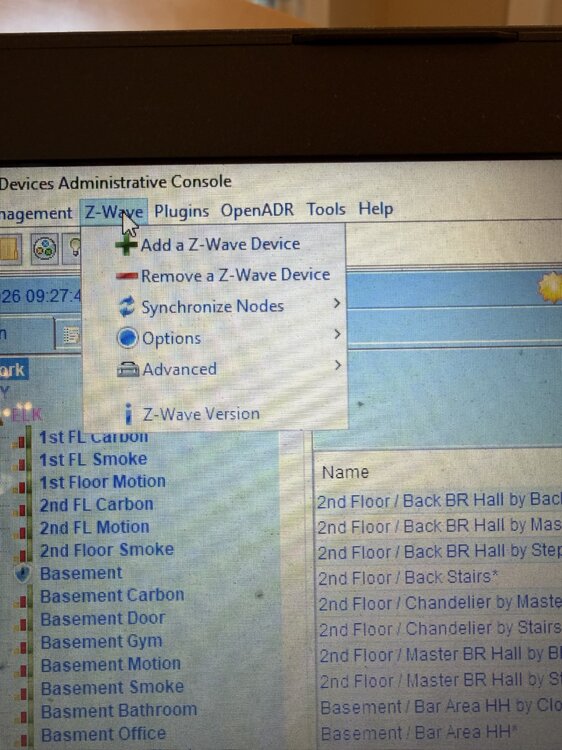
I think the backup option only exists if you use zmatter.
-
Thanks Javi. There is no option to backup zwave if using a zwave stick. I am on IoX 5.9.1. I’m assuming it is included automatically in the polisy backup. i am thinking that a number of users on zwave will be going through a similar conversion given that the zmatter board is not available. I purchased the eisy to not go through the hassle of upgrading the polisy and have a safe fallback in case of issues. Having to reset the zwave stick would be painful as would require rebuilding my zwave network.
-
My polisy has a zooz zwave stick. The wiki does not explain how to transfer that to the eisy. It only describes transferring to a zmatter stick, not moving existing zwave hardware. Will the polisy backup (there is no separate zwave backup when using a zooz stick) restore full zwave configuration to the eisy by simply plugging in the zooz stick.
-
My SmartThings integration to ecobee is still working.
-
I am seeing the same problem with my ecobee nodes
-
A few years ago, I configured network resources to directly communicate with Sonos and control line-in. Was a bit complex to setup, and used some pre-existing network resource files from the wiki. https://wiki.universal-devices.com/ISY-994i_Series_INSTEON:Networking:Network_Resources It still functions correctly with no issues.
-
Thanks so much. That worked.
-
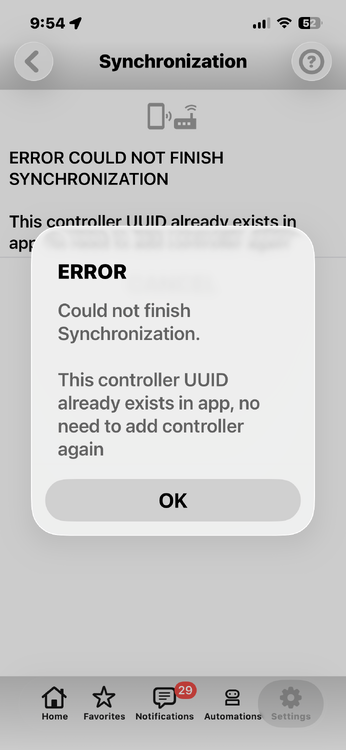
I am trying to syncronize udm as I added some new devices. Keep getting an error popup and it fails. My polisy is on v5.9.1. Anyone else have this issue? Below image pops up immediately after starting Sync
-
I have a similar issue except my polisy is on 5.9.1 (did no upgrade to 6 yet). The default ElK commands display numbers instead of the labels. On the default ELK tile, the Commands for Set Armed Status displays a list of numbers. Makes it almost impossible to manage arming and disarming from the phone -
-
I also had an early-release Polisy. It required some UD support sessions to get it running initially - I had waited a couple of years from when I purchased it to actually turning it on. I was fully up to date (5.8.4 and 13.2) when I attempted the upgrade. It totally bricked. Used the usb adaptor to reflash the ssd which brought it back to limping mode. Required a few hours of Michel’s magic to get it fully running and upgraded.
-
Good luck with the SSD drive. Michel worked his magic tonight and got my polisy back in the game.
-
My polisy bricked also after the upgrade. I've been working with support (Michel) to try and get it back to life. You should file a support ticket.
-
Thanks - I submitted the ticket. This controls my house, so not happy.
-
Add another bricked polisy. Very annoyed. Backup up everything. Ran update from the admin console. Waited over an hour. Solid green left-most LED on the Polisy. Does not show up on my unifi router as a device, so no IP address to ping or ssh to. The polisy was hardwired ethernet. I had a reserved IP address, so followed the prior threads and unreserved it on the router before updating. Tried power cycling. Same single LED is on. What do I do now?
-
Thanks @Javi
-
@Javi - any insight into the issue based on the error message
-
Here’s a screenshot. It’s a 6th gen ipad on iPadOS 17.72

-
Thanks. Definitely using the portal to connect. I looked at the wiki- it might be outdated as I can view the api key on both devices (dated 8/11/23 so not recently modified), but not sure what to do next as differences in current UI.
-
I’ve been using UD Mobile on my iPhone since it was first released. It’s an outstanding interface to my automation. I recently tried to use the installed UDM on my iPad. It all works okay, except the for notifications. When I hit the notifications icon, I get ERROR. The operation couldn’t be completed. No APNS token specified before fetching FCM Token. Tried deleting the app, restoring from a fresh backup of my iPhone install. Any help appreciated.
-
I was using the free version knowing I would not be close to 8 messages a day. Have not seen a reoccurrence since upgrading.
-
Thanks. I am on the free version of the notification server, but average about 1 notification a week. This was the first notification I had received in a while. I will purchase the full version, as that’s going to be easier than figuring this out.
-
Got the following notification in UDM. Reached max daily message count, please upgrde to standard edition. Does anyone know what is generating this notification or what it means? The misspell on ‘upgrade’ is how the notification reads. Thanks
-
I had this same issue with a yale lock. I removed the lock from the door and placed it very close to my Policy. Then removed and added it back to the zwave network. Solved the issue.


