


photogeek54
Members
-
Joined
-
Last visited
-
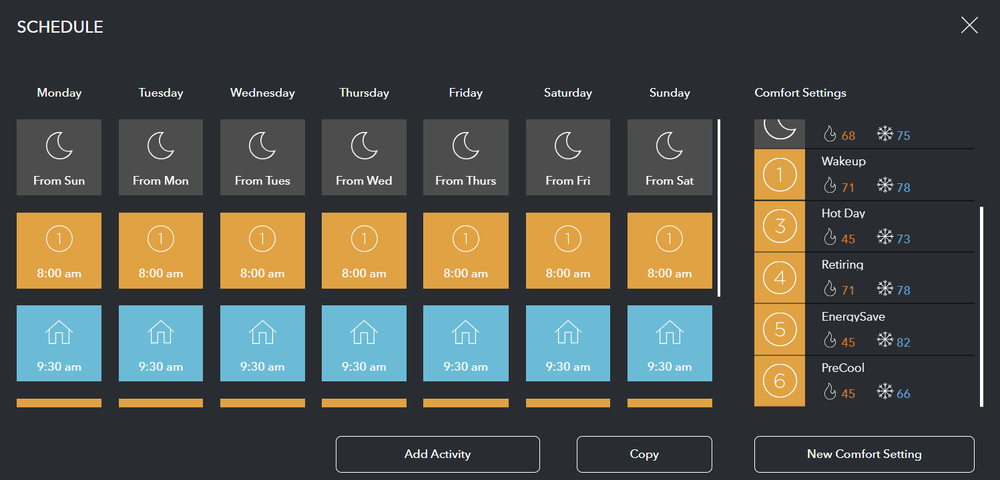
Looks like ecobee pg3 plugin lost my Climate program labels again, I assume it does this each time I upgrade? Anyway I migrated homekit and ecobee to EisyUI and am not sure where to add these Climate program labels including the heatsetpoint and coolsetpoint like it had in pg3? [object Object],[object Object],[object Object],[object Object],[object Object],[object Object],[object Object],[object Object],[object Object],[object Object]
-
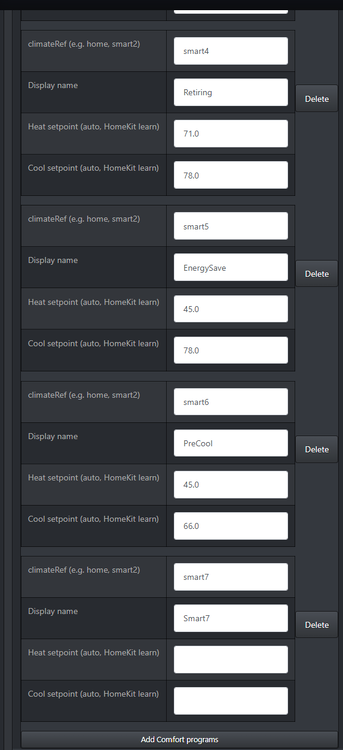
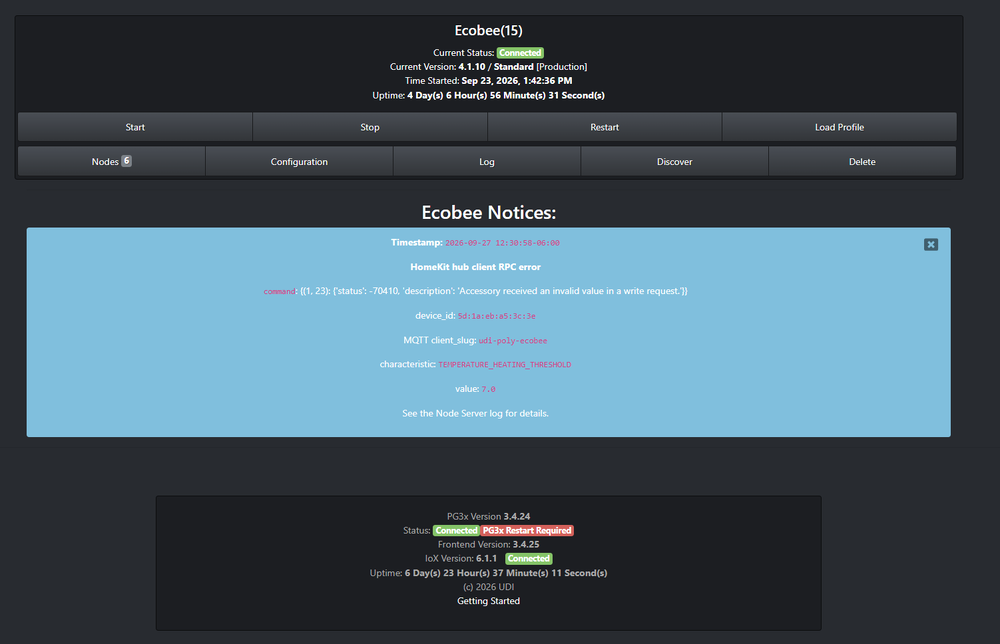
After updating to the latest system releases my ecobee plugin is working again. However I'm getting some errors from the plugin that I don't understand. I have renamed smart5 and smart6 (see below) to PreCool and EnergySave . Whenever I set the climate type to either PreCool or EnergySave I get an error, see further below: I attached text from the debug log ecobee debug log.txt
-
It would also be helpful if we could choose where the backup gets stored like it didn’t admin console. The default download directory is a very cluttered and not permanent place
-
Jimbo, Hoping you’ve had time to look at my ecobee issue sent on aug 10, I might have updated more recently than that but I’m not sure . Still can’t access my ecobee. Thanks
-
Jimbo, that was Peter. I Sent a direct message to you about my issues.
-
No admin console has showed the same temperature all this time, never changes. Hopefully the debug logs I sent will help.
-
Jimbo, The reason I also asked about why I can't update homekit to the latest version is because I wondered if that had anything to do with my ecobee plugin stopping working, the plugin hasn't worked for a few weeks now and the normal restarting tricks haven't worked. I've included a debug package. Ecobee_8-10-2026_14941_PM.zip
-
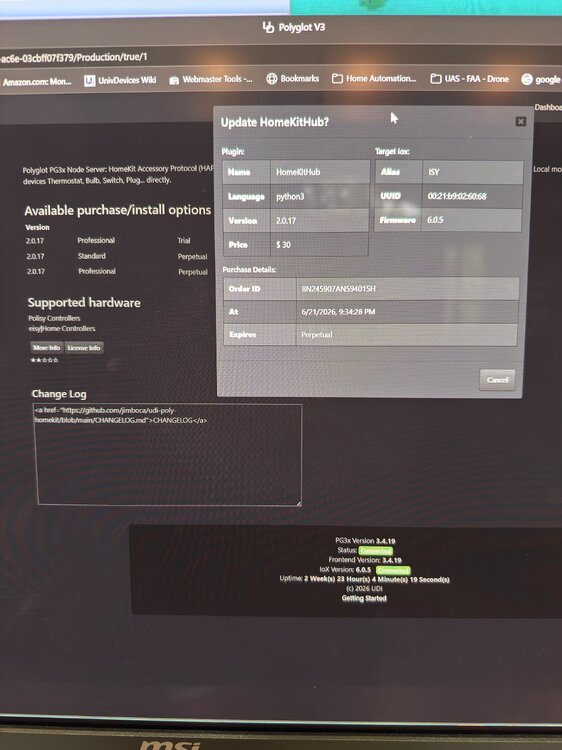
I would expect a button here to update but there is only "cancel"
-
I'm on 1.0.1 using to get to my ecobee. I see there is a 2.0.17 standard version but when I click update nothing happens. I already paid the $30 for v 1.0.1
-
I was guessing that would be the reason, too bad, yes the extra precision really helps the math in my programs. HA sounds interesting but I’m afraid my systems are already too complex so I’d rather not add another system.
-
The previous ecobee plugin read temperature to the tenth (.1) degrees (70.1, 70.2, 70.3). The current one reads temperature only to integer degrees (70,71,72) is there any way to get back that functionality?
-
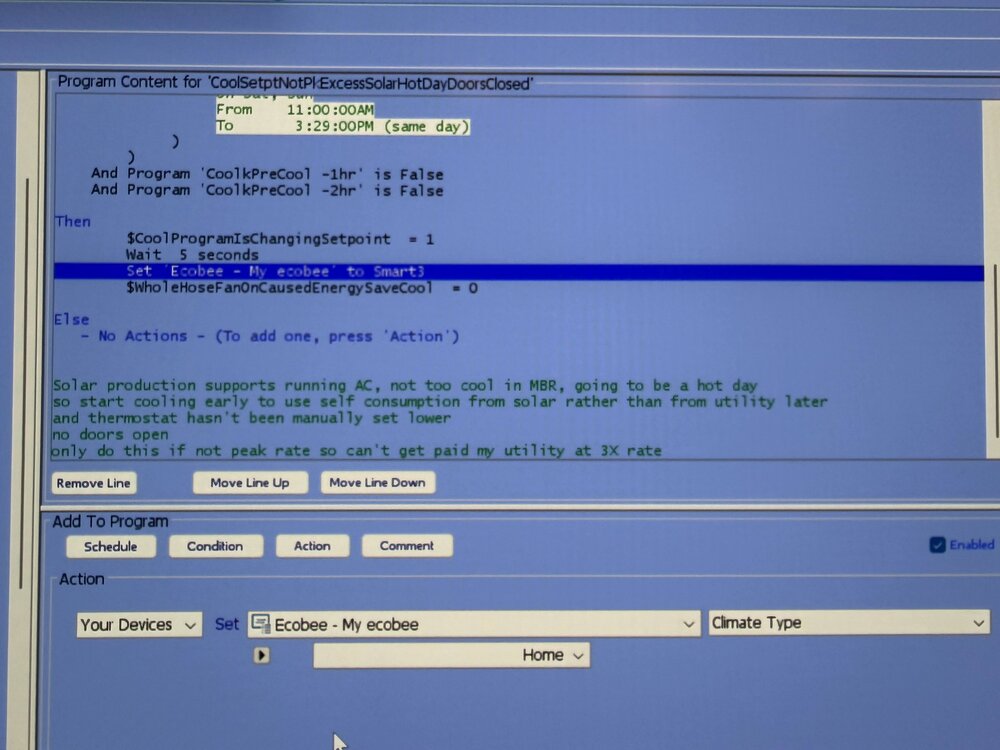
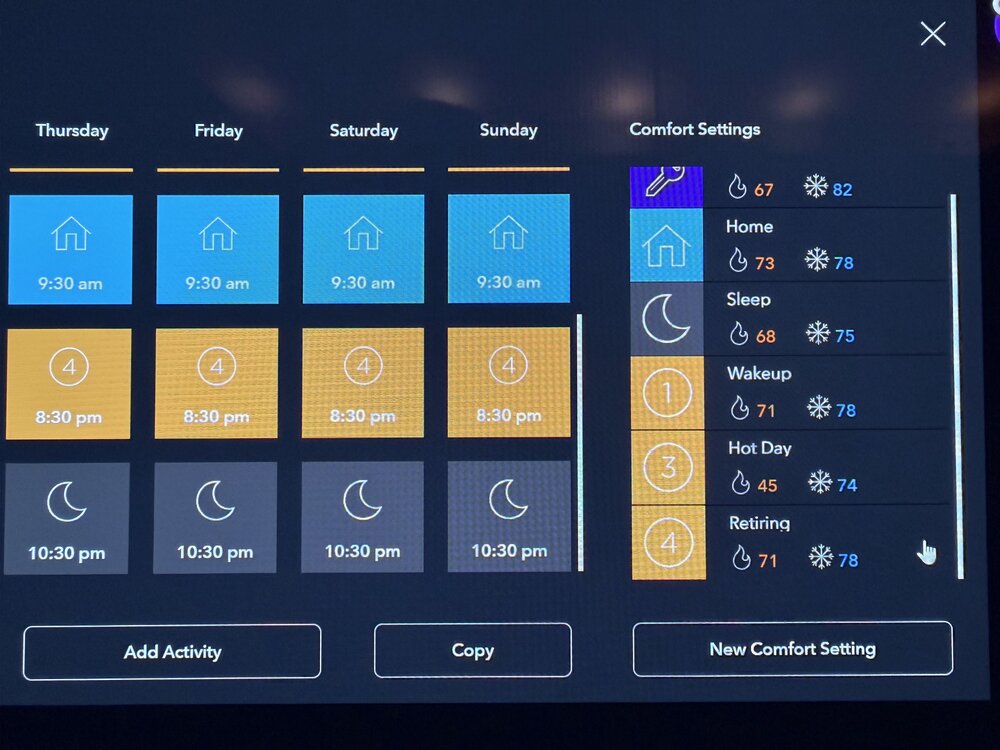
So I updated my programs to use the new ecobee plugin and there are a few things that look strange. I have added 3 new climate types to my ecobee, "wakeup", "hot day" and "retiring". In ecobee I only see one additional climate type it calls "smart1", not sure which of those it is and 2 missing. In one of my programs it is trying to set climate type to "smart3" but the action below for that row calls it "home". I've attached photos.
-
got production udi_poly_homekit and ecobee to work! remember to restart admin console after configuring and starting each Other than ecobee, will the homekit plugin allow me to access any other apple home devices like apple TV or apple home knowing if I am home or away?
-
Trying to setup ecobee plugin from the beta store. I upgraded packages to get the latest software like was suggested. The configuration instructions are overwhelming: Install and configure udi-poly-homekit first (PG3 store): pair your Ecobee(s), then enable the hub MQTT transport (mqtt_enable and broker settings in that plugin; see its PROTOCOL.md). MQTT is the preferred transport for new installs and is the default of hk_transport here — point both plugins at the same broker and matching *_hub_slug. WebSocket (ws_host / ws_port and optional ws_token) remains supported as a fallback when MQTT is not available. This nodeserver’s HomeKit mode talks to that hub only; it does not replace it. Missing backend param: the plugin seeds a default once: homekit for a fresh NS (no OAuth, no api_key, no saved Ecobee tokens/PIN in customdata, no extra nodes yet); cloud if Polyglot OAuth is enabled for this NS, api_key is set, customdata has tokenData / pin_code, or the NS already has nodes besides the controller (legacy upgrade). If backend is already stored in PG3, it is never changed by seeding. Ecobee cloud (REST API): Ecobee has cut off UDI / Polyglot Cloud access for this integration. Cloud mode only remains viable if you use your own Ecobee developer application key that you registered before Ecobee stopped honoring requests for the old shared keys, and you configure api_key / PIN flow as documented for local Polyglot. Do not rely on historical OAuth or UDI-provided keys for new setups. can you give a simplified verbose example of what we should enter, especially in the homekit plugin? I do not have a personal API key for ecobee. Thanks
-
The Ikea Matter thread devices are amazingly low cost so I really want to get them all to work and plan to buy more. $7.99 for a motion sensor, wow. The successful devices are: Kajplats E26 1100 lumen bulb: I added it to Apple Home and then use the sharing code to add it to Amazon Alexa and then used another Apple Home sharing code to add it to UD mobile. I had to start with a factory reset bulb and then worked quickly to add it to the 3 systems. Grillplats mini smart plug: used same technique as above. Unsuccessful devices: Billresa switch: above technique added it to Apple Home and Amazon Alexa but can't add to UD mobile. Just times out. MYGGSPRAY motion sensor: added to Apple Home and Alexa but UD mobile says can’t find thread border router. Tried sharing codes from Apple Home and Alexa. Anyone else have luck with these devices?


