


EVictory
Members
-
Joined
-
Last visited
Everything posted by EVictory
-
SJenkins, Below I have attached my modified 1wire2mqtt.py python program and 1wire2mqtt.cfg files. I have changed my IP addresses to 0.0.0.0. 1wire2mqtt.cfg1wire2mqtt.py Thank you for your help. -Emile
-
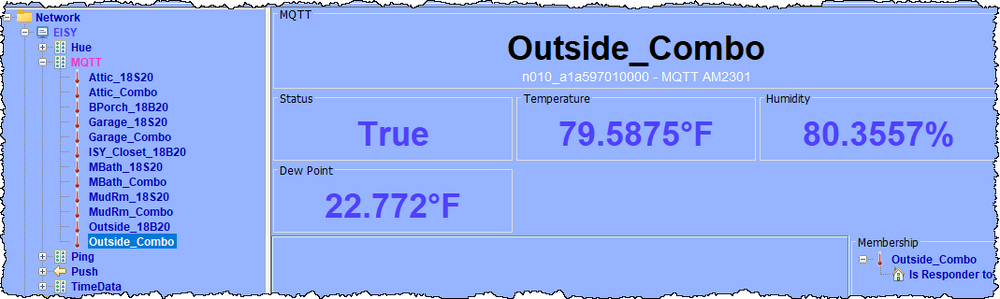
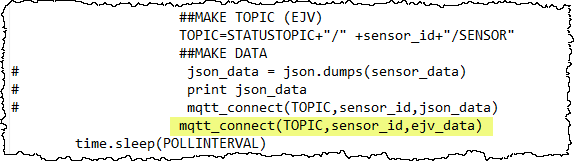
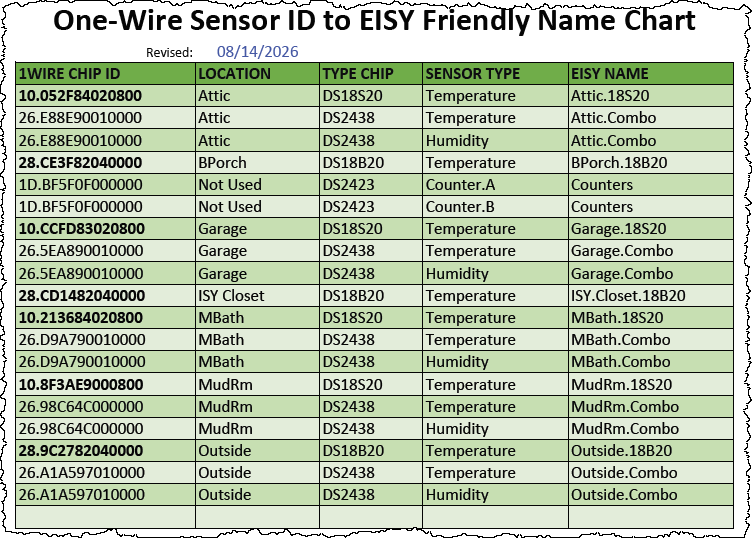
SJenkins, The extra double quote and comma was keeping the TempHumid type from working. Now all of my temperature and humidity boards are being received by the MQTT plug-in! Thanks for your help. I would be more than happy to share anything about my setup. To that end, attached below is a write-up I did back in 2020. (Before retiring, one of my IT related jobs was writing technical documentation.) I converted it to PDF to upload here. Please note that some of the hyperlinks to vendor sites within the PDF no longer work because the company(s) are no longer in business. Raspberry Pi 2 and RPI3 V2 Board - 2020, 11-02B.pdf I first implemented this 1-wire system back around 2013. If I was starting over today, I do not know if I would choose 1-wire. At the time, there were not a whole lot of options for temperature and humidity sensors that I could tie into ISY. One goal I wanted back then (and still desire today) is to not have battery-powered devices. I did that years ago with devices and got real tired replacing batteries all the time. That being said, there are so many more options for sensors today. I mentioned NodeLink in my earlier posts. Technically, I do not need NodeLink anymore. The minimum I would need are: Same Raspberry Pi hardware with RPI3v2 Hat OWFS (1-Wire File System) installed on RPi. (NodeLink used OWFS under the hood.) My modified 1wire2mqtt python program. I still have some work to do with the modified 1wire2mqtt program to clean it up. I am afraid my python coding is at a pretty low-level. You mentioned being able to see the JSON in MQTT Explorer. Unfortunately, I am not using JSON to publish the MQTT. I am building a string in a variable called ejv_data. Then, I just publish the string variable. All of the commented-out print lines were used to troubleshoot the changes as I went. You can see why the extra double quote and comma was easy to miss. To get double quotes in the string at all, I had to use single quotes to delineate the ends of the string, which then allowed me to embed double quotes. As you can see above (commented-out lines), the original 1wire2mqtt program used JSON but I do not understand how it works. Rather than try to figure out how to use the JSON method, I choose the brute force method because I was trying to keep the number of things I did not understand to a minimum. Thank you for your help. - Emile Victory

-
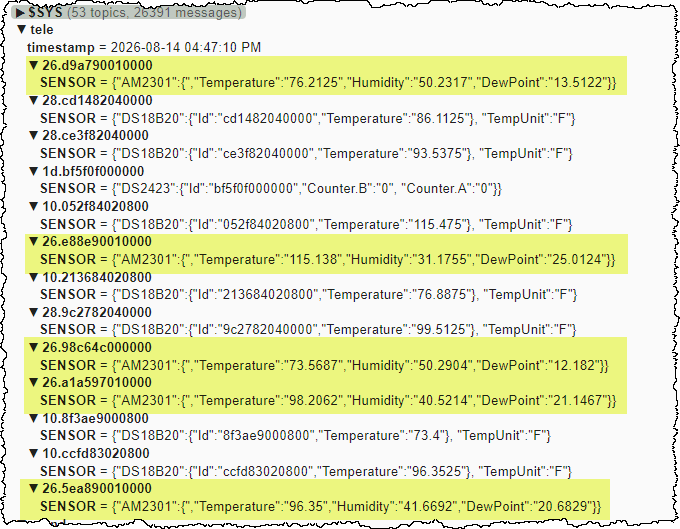
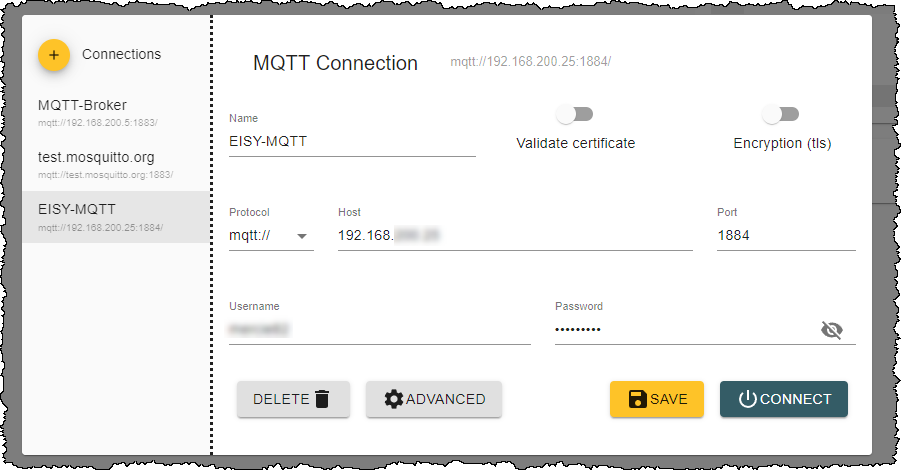
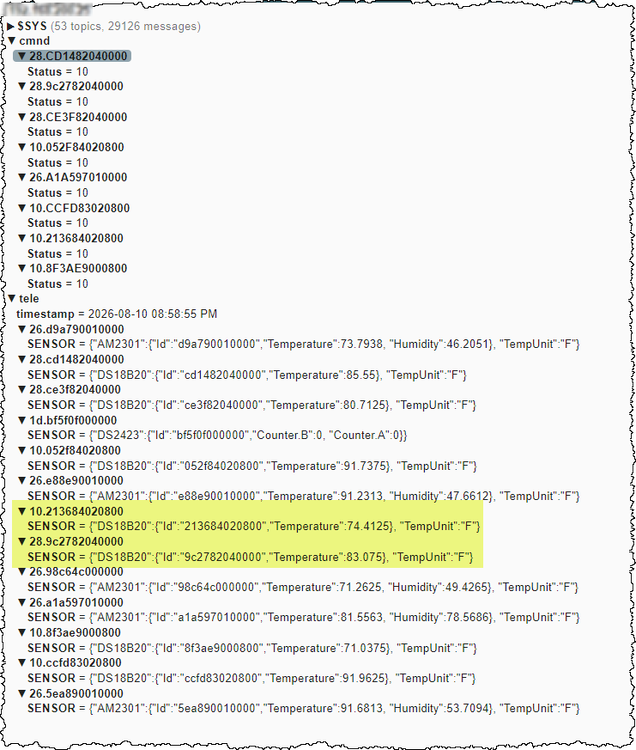
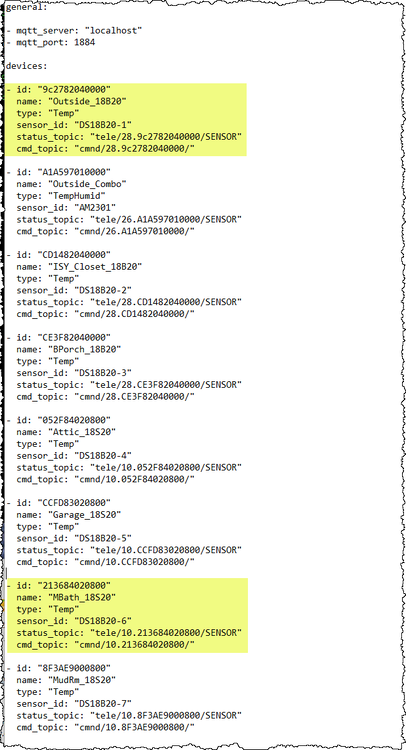
SJenkins, I have had success on one of my two problems areas. The reason all but two of the Temp/DS18B20 type sensors did not work came down to capitalization used in the YAML file. This does NOT work: - id: "CE3F82040000" name: "BPorch_18B20" type: "Temp" sensor_id: "DS18B20-3" status_topic: "tele/28.CE3F82040000/SENSOR" cmd_topic: "cmnd/28.CE3F82040000/" However, this does work: - id: "ce3f82040000" name: "BPorch_18B20" type: "Temp" sensor_id: "DS18B20-3" status_topic: "tele/28.ce3f82040000/SENSOR" cmd_topic: "cmnd/28.ce3f82040000/" I had the hex letters in the 1wire IDs capitalized when they needed to be lowercase. Now, all seven of my DS18B20 and DS18S20 sensors are reporting with the MQTT plug-in. PROBLEM #2: My second problem has to do with reading temperature and humidity from my DS2438 1wire sensors. The 1Wire PC board I am using incorporates a DS2438 1wire chip and a HIH-4021-004 humidity sensor for reading humidity. It also has a DS18S20 1wire temperature sensor (which I now can read correctly). Several years after I built and installed the PC boards around my house, the author of NodeLink figured out that you can also read temperature from the DS2438. This means that each PC board has two temperature sensors (the DS18S20 and the DS2438). I would like to also read in the temperature and humidity from the DS2438 chip into EISY, mainly to get the humidity data. My approach for the DS2438 sensor is the same as with the DS18x20 sensors. That is, I will modify the 1wire2mqtt python program to report DS2438 data in the exact same format that the MQTT plug-in expects for the TempHumid / AM2301 device. My issue is that I am not sure how to format the MQTT data for the TempHumid sensor. The screenshot below is what TriLife had sent me last year for the Temp/DS18B20 MQTT data. The above helped me to arrange the data to be published to the MQTT broker. (If you look through my posts from last year, you will see I started out with the 1wire data being published in a completely different arrangement.) For example, it looked like the MQTT plug-in was expecting the TempUnit value of C or F for each sensor. Well, that was not readily available as output in the OWFS system as this is set globally in OWFS and is not available for each sensor. To work around this, I just added the fixed string of "TempUnit":"F" to the end of each sensor published. That is, the F for fahrenheit is hard coded. TriLife's information also gave me a clue that I needed to nest everything under SENSOR in {} brackets and list the ID and temperature within {} brackets (i.e., the nesting). Based on the JSON sample you sent in your reply, I took a guess at the correct MQTT format. Below is an MQTT dump (using MQTT Explorer) of what I have tried today. The yellow highlighted lines are the DS2438 1wire sensors. NOTE: I first tried a version where I had the Id info like for the DS18B20 sensors, but it did not work either. Within my 1wire2mqtt python program, I replace the DS2438 device type with AM2301. Also, the DS2438 as used with NodeLink does not support reporting dewpoint. However, since dewpoint can be calculated if you have temperature and humidity, I added code to the 1wire2mqtt python script to calculate the dewpoint and report it for each sensor. The above MQTT format does NOT work for the TempHumid type in the MQTT plug-in. Is there anyway to get a sample of the MQTT data output for the TempHumid/AM2301 sensor? Ideally, this will be a screenshot like above using the (free) MQTT Explorer program or output like what TriLife sent me last year. I need to see exactly what the published data looks like for the TempHumid type. I could have the nesting all wrong, could be missing required info like the TempUnit:F info needed for the Temp type, etc. Note: I find the free MQTT Explorer program very helpful in trouble shooting MQTT issues. When you launch the program, you get a screen similar to below. You select the MQTT broker on the left, provide the IP address, port, and login credentials then click on CONNECT. You then are presented with a browser like window shown above. The data changes as new data arrives in the broker. Thank You, Emile Victory VCS-Humidity & Temperature Board 2.pdf

-
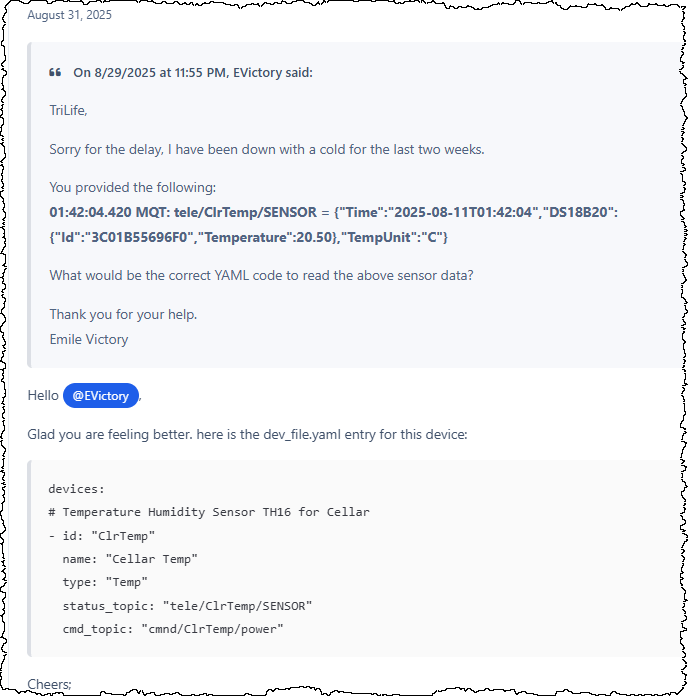
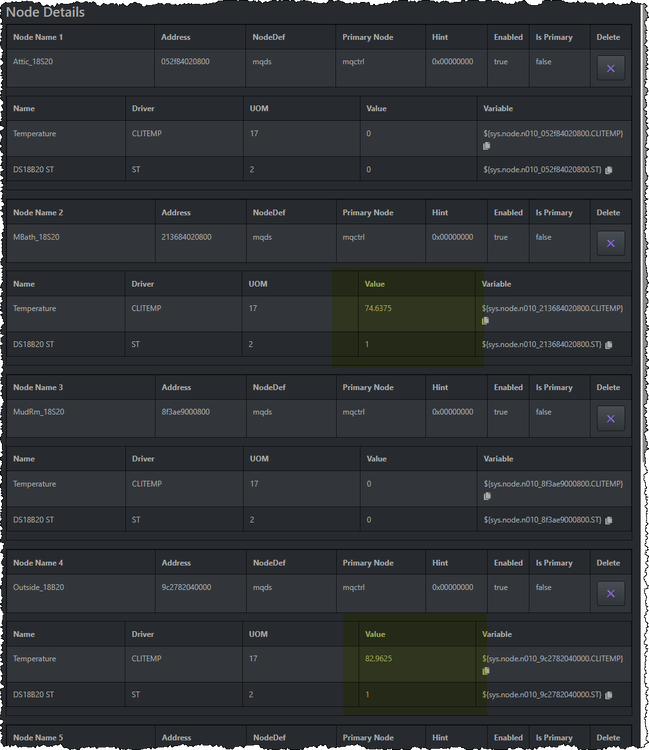
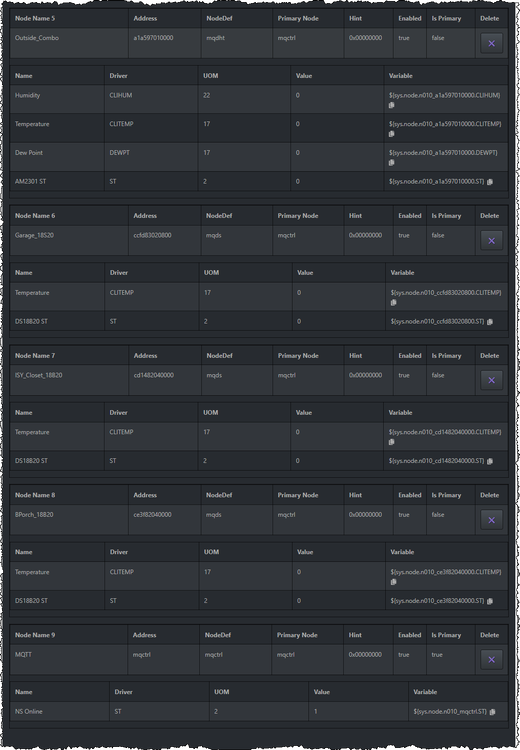
BACKGROUND: I upgraded from an ISY994 to the EISY last summer. I had posted on 7/17/2025 and 7/22/2025 regarding using the MQTT plug-in to parse 1Wire sensor data from my NodeLink server running on a Raspberry Pi over to the EISY. I dropped the project when I figured out how to get the NodeLink working directly in the EISY and PG3. However, the NodeLink communications seems to cause a heavy burden on the EISY -- I get a lot of 'System Busy' pop-ups. This eventually causes the EISY to not be able to read device REC files, which caused me to have to delete several devices from EISY, factory reset them, and load them back into EISY. REFERENCES: NodeLink: https://forum.universal-devices.com/forum/113-nodelink/ 7/17/2025 Post: https://forum.universal-devices.com/topic/45372-questions-using-mqtt-on-eisy/ 7/22/2025 Post: https://forum.universal-devices.com/topic/45389-using-mqtt-plugin-for-non-sonoff/ 1wire2mqtt: https://github.com/unlo/1wire2mqtt MQTT Explorer: https://mqtt-explorer.com/ REVISITING MQTT: I have decided NodeLink is causing more problems than it is worth. I have stopped NodeLink from talking with my EISY which has stopped the 'System Busy' pop-ups. Hence I am revisiting using the MQTT plug-in. I still have NodeLink running so that it's underlying OWFS (OneWire File System) is available. I am using a modified OWFS-to-MQTT python program (1wire2mqtt) to control how the 1-wire data is presented to the EISY MQTT broker. My strategy is to use the 1wire2mqtt program to present the data to the MQTT plugin in a format the plug-in can already handle. Below is a snapshot of the last entry in my 7/22/2025 post. I had asked TriLife for a sample of what a Sonoff/Tasmota Temperature sensor publishes to mqtt. Then I asked him what the Devfile would look like to access that data. From the information above, I was able to modify the 1wire2mqtt python program to publish my 1wire data in a compatible format. Below is the results shown with MQTT Explorer. Next, I setup my MQTT plug-in's devfile to access the MQTT data. Below is the contents of my devfile.yaml file. I have had some success. Two of the eight devices are working in the MQTT plug-in. Below are snapshots from the PG3 MQTT nodes screen. PROBLEMS: 1. As you can see, two of the DS18B20 sensors are working (highlighted in yellow). One of these is a DS18B20 device and the other is the older DS18S20 device. (The DS18B20 has selectable 9 to 12-bit resolution where the DS18S20 is 9-bits only.) I modified my 1wire2mqtt python program to present both as DS18B20 devices. However, I cannot figure out why the other five DS18B20 type sensors are not working. I have examined the MQTT Explore output closely and cannot figure out what is wrong. Can you help? 2. The second problem is I am trying to access both temperature and humidity data from a DS2438 1wire device. I have manipulated the 1wire2mqtt python program to present these as AM2301 devices and am using the TempHumid type in my devfile.yaml. I have no idea if the MQTT data is in the expected format for the plug-in. If you could supply me with an example of what the MQTT data looks like for the TempHumid type like TriLife did for the Temp type, this would be a tremendous help? I am running v0.40.2 of the plug-in. Thanks, Emile Victory
-
TriLife, Sorry for the delay, I have been down with a cold for the last two weeks. You provided the following: 01:42:04.420 MQT: tele/ClrTemp/SENSOR = {"Time":"2025-08-11T01:42:04","DS18B20":{"Id":"3C01B55696F0","Temperature":20.50},"TempUnit":"C"} What would be the correct YAML code to read the above sensor data? Thank you for your help. Emile Victory
-
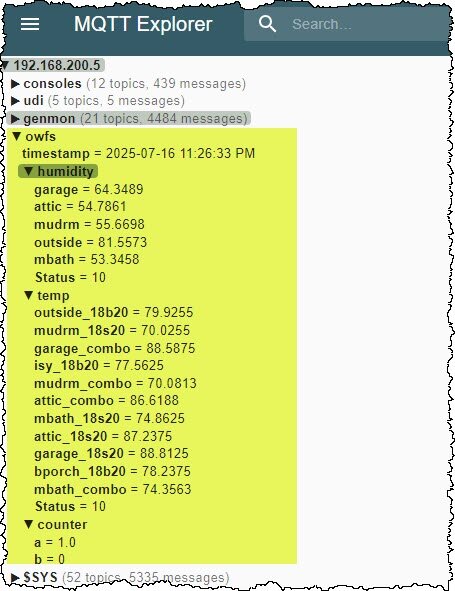
TriLife, No, I have not made any further progress. Allow me to layout my situation. I do not have any of the sonoff devices your plugin was originally built to support. I am not a professional programmer. Over my carrier, I have dabbled in various programming and scripting languages at a novice level, starting with basic (50+ years ago) up to python in the last few years. SJenkins included a snip-it of python code but I am afraid it did not help me understand how the MQTT data should be formatted. I was able to modify a python script I found to read 1-wire temperature and humidity values from the OWFS (one wire file system) running on a raspberry pi and publish them to an MQTT broker (Info on OWFS). The screenshot below shows the results of my efforts. From what I have learned so far, I now believe my MQTT temperature / humidity data is not laid out as expected by your plugin. What would really help me understand what is needed is to see an MQTT Explorer screenshot of what the 'Temp' and 'TempHumid' types are expecting (with all relevant branches of the tree fully expanded). In connection with #4 above, I would like to see the corresponding YAML code that successfully reads the 'Temp' and 'TempHumid' types illustrated in #4 above. My plan is to attempt to modify my python script to publish the data in the way that matches what the plugin expects. At this time, all I am trying to do is read the temperature and humidity data and make it available to EISY for use in programs. I am not doing any writes back to the RPi. Thank you for any help you can offer. Emile Victory
-
SJenkins, Thanks for your help. Are you suggesting that I restructure the way I publish the 1-wire data to the MQTT broker so that it is similar to below? ▼ owfs timestamp = 2025-07-23 05:24:22 AM ▼ outside_ds18b20 temperature = 78.8125 humidity = 80.7931 ▼ garage_ds18b20 temperature = 86.4525 humidity = 60.4421 ▼ bporch_ds18b20 temperature = 77.9 In the above, I listed other sensor data such as humidity. The 1-wire board I use for most locations includes a DS18B20 (or DS18S20) temperature sensor and for humidity it uses a HIH4021-004 humidity sensor and a DS24382 1-wire device to send humidity over 1-wire. The author of NodeLink (io_guy) found the DS24382 also had a built-in temperature sensor. Later versions of his OWLink and NodeLink captured this second temperature as well. This is why my MQTT has two temperature devices listed for the some locations (Example: garage_18s20 and garage_combo). Is the following the correct way to setup the yaml to read the above? devices: - id: "Outside_ds18b20" sensor_id: "outside_ds18b20" type: "Temp" status_topic: "owfs/outside_ds18b20/temperature" cmd_topic: "owfs/outside_ds18b20/POWER" - id: "Outside_ds18b20" sensor_id: "outside_ds18b20" type: "TempHumid" status_topic: "owfs/outside_ds18b20/humidity" cmd_topic: "owfs/outside_ds18b20/POWER" TriLife mentioned that I may need to use 'sensor_topic' instead of 'status_topic'. I have not seen sensor_topic mentioned on the PG3 configuration page or the github repository. Is there a place that documents each 'type' and their corresponding requirements? I would think the different types would each have different requirements. Sincerely, Emile Victory
-
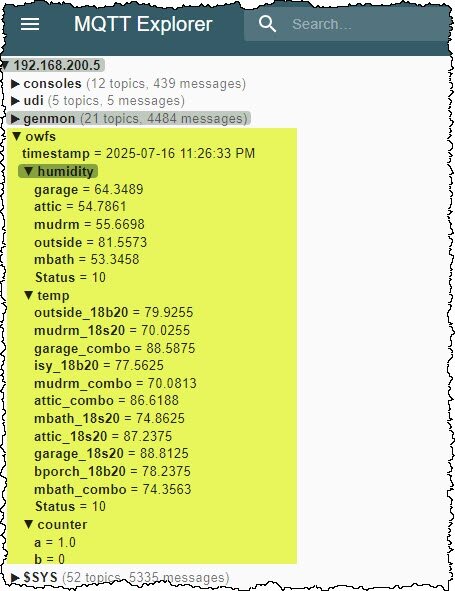
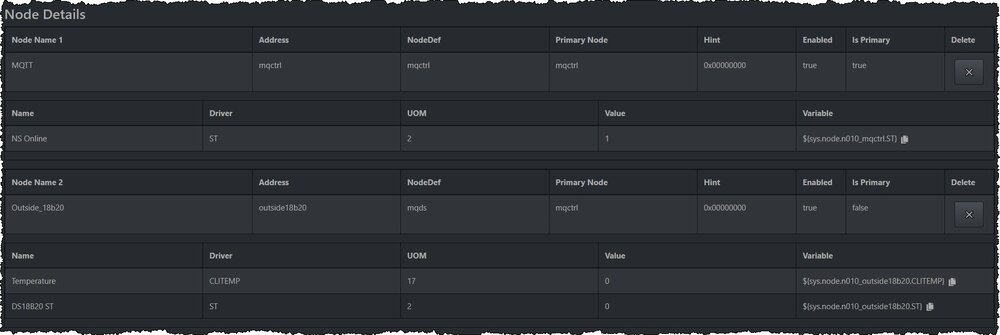
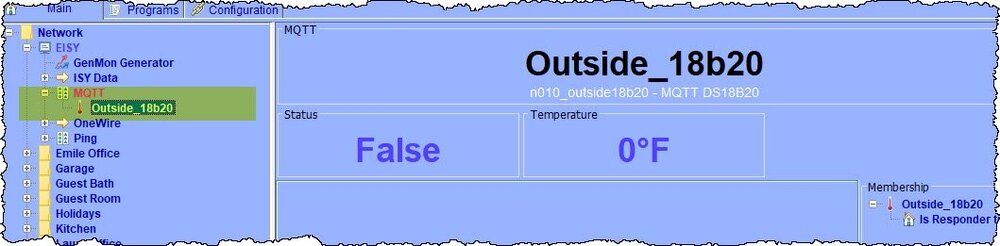
I had posted last week but later figured out how to get my old PG1 NodeLink node server working, so I cancelled my request for help. NodeLink provides 1-wire data and GenMon data to EISY. I am posting again because I would like to learn more about your MQTT plugin for applications other than sonoff devices. Since my earlier post, I have found out how to access files on the EISY using SFTP. I am now able to use 'devfile' to control the MQTT plugin. I would like to use the MQTT plugin to replace the old NodeLink as the latter creates a lot of traffic on EISY. I also have future RPi projects in mind where I can have an RPi post data to a MQTT broker. I need a MQTT plugin that can receive the MQTT data and make it available to EISY. I have an RPi running the OWFS (one-wire file system) for a series of 1-wire devices (humidity & temperature sensors and a counter). This RPi also runs the NodeLink (PG1 era) node server mentioned above. On this RPi, I added a python script to read the 1-wire values from the OWFS system and post them to my MQTT Broker as 'strings'. Below is a screen shot from MQTT Explorer showing my 1-wire sensors. My script only posts the string values representing the numeric data for each sensor. DEVFILE Example: For testing, I created a .yaml file containing the lines below for just one temperature sensor. devices: - id: "Outside_18B20" sensor_id: "outside-18b20" type: "Temp" status_topic: "owfs/temp/outside_18b20" cmd_topic: "owfs/temp/POWER" PG3: PG3 shows two nodes. The first is the MQTT and the second is the Outside_18B20. The EISY shows the Outside_18B20 device but it has a value of 0. Here are my questions: 1. Is my example yaml correct? If not, what do I have wrong? 2. I think the type of 'Temp' is probably incorrect as it appears to apply to a particular sonoff 18B20 temperature sensor and not my simple string in my MQTT broker. Does your MQTT plugin have a way to display my simple string data shown in MQTT Explorer above? 3. Another way to do this is for me to change my python script to publish additional data so as to mimic what the 'Temp' type is expecting. Is there an example of the MQTT data needed by the Temp type? 4. What are the requirements for the Analog and Raw types? 5. This is not a question but a comment. I continue to receive the following two notices in PG3. My MQTT broker runs on a RPi and does not use a username and password. So, those fields are blank in your MQTT plugin configuration page. Sincerely, Emile Victory

-
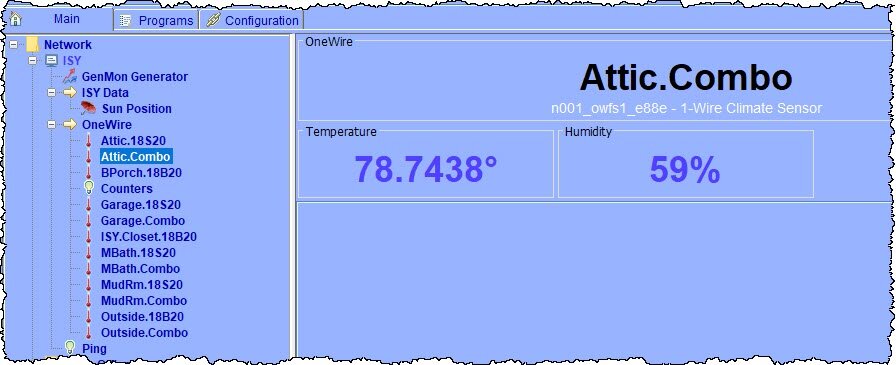
Please disregard my earlier help request on the MQTT node server. Yesterday I migrated my ISY-994i over to an EISY. I had previously used a PG1 level node server called NodeLink to communicate with my OWFS (OWLink) and my GenMon. I was under the impression that these would NOT work in EISY and PG3, which is why I was trying the MQTT node server. However to my surprise, I found that if I added the port (:8080) to the end of the ISY IP address, the old NodeLink node server started communicating with PG3 and EISY as an unmanaged plugin. Below is a screen shot of an Attic humidity and temperature sensor in EISY. I will keep your MQTT plugin (node server) in mind if I try out sonoff devices. Sincerely, Emile Victory

-
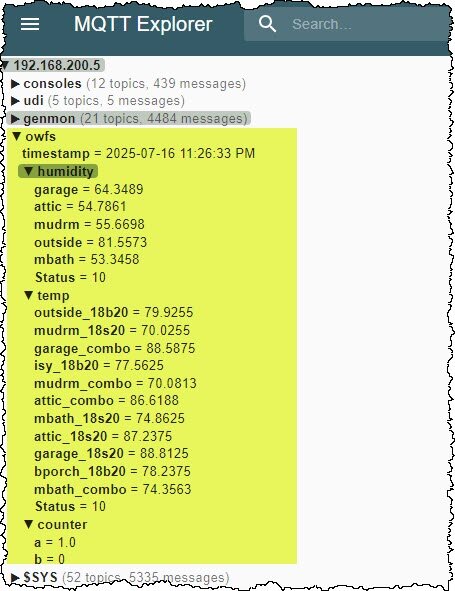
I am a long time user of ISY 99i and 994i but just upgraded to EISY with PG3 built-in. I have installed the MQTT node server on PG3. In my application, I just want to read values from a broker and will never be writing data back. I have a few questions. 1. Since this is on EISY PG3, I cannot access the EISY file system. Does this mean I cannot use the devfile option to store my configuration file on EISY? 2. I have an RPi running OWFS for a series of 1-wire devices (humidity & temperature sensors and a counter). I modified a MQTT python script to read the values from the OWFS system and post them to an MQTT Broker as strings. Below is a screen shot from MQTT Explorer showing my 1-wire sensors. My script only posts the string values representing the numeric data for each sensor. What Type should I use to display my string data? I have tried analog, temp, and raw but cannot get the values to appear in ISY. 3. What are the requirements for the ANALOG and RAW Types with regards to sensor_id, status_topic, and cmd_topic? 4. I have looked at https://github.com/Trilife/udi-mqtt-pg3x/blob/0.40/POLYGLOT_CONFIG.md and have read the Configuration Help in PG3. Is there some place I can additional information on how to configure each device? --- Below is an example of my devlist line. [{"id": "outside_18b20", "sensor_id": "outside_18b20", "type": "Temp", "status_topic": "tele/owfs/temp/outside_18b20", "cmd_topic": "cmnd/sensor/POWER"}] Sincerely, Emile Victory
-
I have figured this out. The problem was that I needed to add the Java Runtime Parameter -Xmx512m to my Java. I had done this in the past due to slow response but had not realized the setting is removed when you upgrade from one version of Java to the next. Now that this is figured out, I am upgrading to a faster micro SD card. I am going to try a SanDisk Industrial 16GB card at 50/80mb/s. The Industrial grade supposedly is tougher card. Thanks to all that offered help. This forum is awesome.
-
I am running malwarebytes AV and I disabled it and firewall on all attempts. This is standard practice anytime I upgrade firmware. Yes, I am using the ZIP file and not decompressing it. Yes, I always download the launcher, dashboard, and admin jnlp files along with the firmware. Yes, I tried clearing the java cache, all three boxes as always. I am on a Windows 10 Pro PC. Have used this PC many times to do upgrades in the past. I have had the replacement SD card for a few years which is why I used the FS command to format it during the rebuild. Right now, I suspect the SD card. I do have new Sandisk cards on order. They will arrive Tuesday I will try it with a brand new card. This one has me stumped.
-
The replacement SD card is a PNY 16GB SDHC device. I have had this card for a year or two. I have ordered two SanDisk Industrial 16GB cards but they will not arrive until Tuesday. I mention this in case this card is not fast enough.

-
I am attempting to upgrade from firmware 5.3.1 to 5.3.4. The process proceeds to about 9%, then I get the two popups in the attached image. BACKGROUND: My ISY is a 994i/IR Pro (with 500 Z-Wave). I do not have any Z-wave devices yet. Today I noticed the ISY was not functioning (programs were not running). Visual inspection revealed the red Error LED was flashing (memory LED OK) which indicates the SD card had failed. I then went through process to replace the SD card. 1. Connected with TELNET and did FS command to format SD card. 2. Then logged into admin console and loaded firmware 5.3.1, which was the level of the last good backup I have. 3. After loading firmware 5.3.1, I then restored my last good backup. 4. At this point the ISY appeared to be working. I then made a few changes that were not in the last backup file. For example, I had changed three Motion Sensor II's from battery power to AC power. (I removed the Battery node). 5. After making a few minor changes, I performed another backup. 6. After this, I attempted to upgrade the firmware to 5.3.4 and received the 2 errors. WHAT I HAVE DONE: 1. I read on this forum that I may need to reboot the ISY. I rebooted via the admin console but still received the 2 errors. I then rebooted by cycling the power to the ISY but still received the 2 errors. 2. I downloaded the 5.3.4 zip file again from this forum but still received the 2 errors. 3. I downloaded the 5.3.3 zip file and tried upgrading to it. I got the same 2 errors. \ Does anyone have any ideas?

-
Thanks for all of the suggestions. Everyone was on track. I had an extra dimmer module that I added to my ISY. I was then able to fully control it and it DID post its manual activity to the ISY. This confirmed that the issue had to do with the PLM's links table. I did as suggested. I restored factory defaults to the PLM (hold in button while powering up). I then restored the PLM from the ISY. This worked! Smarthome has the 2413S as unavailable and I have read the threads where SH indicates it has been discontinued. I also read that at least two people were able to order PLMs in September before they went unavailable again. I have four PLMs where this one is the newest. All of the others were replaced because of issues. I have an electronics background so I replaced the electrolytic capacitors on two of the older PLMs and also on this newest one on Saturday thinking that was the issue. My older PLMs have not been tried and may or may not work. I also have a 2413U left over from an old Houselink. When taking it apart, I noticed the main board looks the same as with the 2413S's main board. It looks like the only difference is the seral vs the USB daughter board. I read the thread where someone made a USB to serial adapter out of a Raspberry Pi zero. Has anyone tried installing a serial daughter board in a new 2413U? What are you doing about failing PLMs and replacing them?
-
My ISY is a ISY 994i/IR Pro running v5.3.1 firmware and UI. My PLM is a 2413S v9E and shows as Connected. About 5 days ago I lost power for a bit. When power came back, I noticed none of my motion programs were working. I tried powering off the ISY and PLM. Then powering on the PLM, waiting a minute, then powering on the ISY. This made no difference. At first I thought it was just effecting my motion sensors (several 2844-222's). The motion sensors do appear to be sending. In one hallway, I have two motion sensors where either sensor will directly turn on the hallway light. By directly I mean I have the motion sensors linked directly to the light for ON activity. Normally, either motion sensor turning on will also trigger a program to turn off the light after a few minutes. Motion does turn on the light but the light never goes off. (My program never gets tripped - I checked.) All of my other rooms with motion sensors, the ISY normally receives the motion ON and triggers a program. None of these motion programs are working. But then noticed it is not limited to just motion sensors but the ISY seems unable to see any insteon device activity. For example, if I manually turn ON a wall switch, the ISY does not see the change and will not trigger any programs tied to that switch. The strange thing is I can query any device and they are updated as expected. My motion sensors are connected to wall power (no batteries). If I query one of them, the ISY is updated. If I manually turn ON a light at the wall switch, the ISY does not see this. If I then query that light switch in the admin console, its status will change. Programs that trigger off of a keypad link button action, never run. However, if I also have a light linked to that button, the light does turn ON with the keypad link button press. The ISY is able to control devices. For example I can turn a light ON/OFF from the admin console and scheduled programs do turn devices ON/OFF. I have set debug level to 'Details' and have used the Event Viewer to monitor traffic. I never see an event coming in from devices. If I manually press a wall switch, nothing is received by the ISY in Event Viewer. Yet if I query a device from the admin console, I do see two way communications in Event Viewer. That is, I see the query be sent and the device respond back. This is very strange. Any ideas?
-
Kevin, I am working on re-doing all of my consoles to use Buster (instead of Stretch) and the latest version of SoftConsole. To this end, I upgraded my oldest console with a Raspberry Pi 3 B+ to take advantage of the built-in wi-fi. (The USB Wi-Fi adapter I was previously using on the model 2 Pi was not not working every now and then.) I installed SoftConsole from scratch using pisetup.sh. I found the Adafruit 3.5" screen was not configured correctly upon completion. I got it working by referring to old documentation I had and to another SoftConsole also running an Adafruit 3.5" touchscreen. However, I thought you may be interested in what I found. During the pisetup questions, I indicated I wanted a 35r touchscreen. However, after setup finished the /boot/config.txt file contained the following: # --- added by adafruit-pitft-helper Thu 23 Jul 2020 10:20:27 PM CDT --- dtparam=spi=on dtparam=i2c1=on dtparam=i2c_arm=on dtoverlay=pitft28-capacitive,speed=64000000,fps=30 dtoverlay=pitft28-capacitive,rotate=0,touch-invx=true,touch-invy=true # --- end adafruit-pitft-helper Thu 23 Jul 2020 10:20:27 PM CDT --- To get the SoftConsole to work with the 3.5" screen, I changed this to the following as this is what was used on my working 3.5" SoftConsole. I decided to just comment out the original dtoverlay lines. # --- added by adafruit-pitft-helper Thu 23 Jul 2020 10:20:27 PM CDT --- dtparam=spi=on dtparam=i2c1=on dtparam=i2c_arm=on dtoverlay=pitft35-resistive,rotate=0,speed=20000000,fps=20 #dtoverlay=pitft28-capacitive,speed=64000000,fps=30 #dtoverlay=pitft28-capacitive,rotate=0,touch-invx=true,touch-invy=true # --- end adafruit-pitft-helper Thu 23 Jul 2020 10:20:27 PM CDT --- I think the pisetup program may not be handling the 3.5" screen setup correctly. Thought you might want to know. PS: I noticed you had the 2.8" screen using a speed of 64000000 and frames per second of 30. What is the best speed and fps settings for a 3.5" screen? Am I missing anything? -Emile
-
Kevin, That fixed it. I added a line to the touchdefinitions file containing the new definition. Having been in IT for many years, I am well aware how 'updates' can have unintended consequences. Thanks for your quick help.
-
Kevin, I have had a Softconsole running for several years using a 7" touchscreen from the raspberry foundation. My screen connects to the RPi with a flat ribbon cable and it is in landscape mode. The micro SD card in this softconsole died (ie, became unreadable). Therefore, I have been attempting to build the softconsole from scratch using a new SD card and the latest version of buster. I am having trouble getting the softconsole to run correctly and it appears to have something to do with the 7" screen. I have ran pisetup twice now with the same results. The 7" screen shows the desktop while booting but either continues to show the desktop are goes dark, once softconsole starts. If I do a 'sudo systemctl status softconsole', the service appears to be running. (See below). No Console.log file is generated. pi@console-22:~ $ sudo systemctl status softconsole ● softconsole.service - SoftConsole Loaded: loaded (/usr/lib/systemd/system/softconsole.service; enabled; vendor preset: enabled) Active: active (running) since Tue 2020-07-21 22:44:24 CDT; 1s ago Process: 1702 ExecStartPre=/bin/sleep 5 (code=exited, status=0/SUCCESS) Process: 1703 ExecStart=/home/pi/consolestable/runconsole.py (code=exited, status=0/SUCCESS) Main PID: 1704 (python3) Tasks: 1 (limit: 2068) CGroup: /system.slice/softconsole.service └─1704 python3 console.py Jul 21 22:44:18 console-22 systemd[1]: Starting SoftConsole... Jul 21 22:44:24 console-22 softconsole[1703]: Starting using directory: consolestable Jul 21 22:44:24 console-22 systemd[1]: Started SoftConsole. I then stopped the service and attempted to manually start the softconsole as shown below. After both attempts to install with pisetup, I got the 'touchscreen device cannot be found' error and also the file not found error for the .HistoryBuffer/hlog file. During the pisetup questions, I specified a pi7 screen with the power connector on top (flipped screen). When the 7" screen does show the desktop, it is flipped as requested. pi@console-22:~ $ sudo systemctl stop softconsole pi@console-22:~ $ sudo python -u ./consolestable/console.py pygame 1.9.4.post1 Hello from the pygame community. https://www.pygame.org/contribute.html 07-21-20 22:46:17 Console ( 1764) starting in /home/pi/consolestable Traceback (most recent call last): File "./consolestable/console.py", line 182, in <module> utilities.InitializeEnvironment() File "/home/pi/consolestable/utilities.py", line 107, in InitializeEnvironment ts = Touchscreen(os.path.dirname(config.sysStore.configfile)) File "/home/pi/consolestable/touchhandler.py", line 160, in __init__ self._f_device = io.open(self._touch_device(), 'rb', self.EVENT_SIZE) File "/home/pi/consolestable/touchhandler.py", line 308, in _touch_device raise RuntimeError('Unable to locate touchscreen device') RuntimeError: Unable to locate touchscreen device exitlogging 07-21-20 22:46:17 Exiting with history trace (0) 07-21-20 22:46:17 Suppressing History Buffer Dump for Exit Trace Process AsyncLogger: Traceback (most recent call last): File "/home/pi/consolestable/logsupport.py", line 225, in LogProcess with open('/home/pi/Console/.HistoryBuffer/hlog', 'a') as f: FileNotFoundError: [Errno 2] No such file or directory: '/home/pi/Console/.HistoryBuffer/hlog' During handling of the above exception, another exception occurred: Traceback (most recent call last): File "/usr/lib/python3.7/multiprocessing/process.py", line 297, in _bootstrap self.run() File "/usr/lib/python3.7/multiprocessing/process.py", line 99, in run self._target(*self._args, **self._kwargs) File "/home/pi/consolestable/logsupport.py", line 253, in LogProcess with open('/home/pi/Console/.HistoryBuffer/hlog', 'a') as f: FileNotFoundError: [Errno 2] No such file or directory: '/home/pi/Console/.HistoryBuffer/hlog' pi@console-22:~ $ Do you have any idea what I am doing wrong? -Emile
-
Kevin, The dir(wiringpi) returned a short list and len(dir(wiringpi)) returned 8. So, wiringpi was corrupt. Uninstalling wiringpi and reinstalling it fixed the issue. After reinstalling wiringpi, there were 203 items returned by dir(wiring). I did update pip and removed homeassistant as maintenance measures. After all of this, I was able to start SoftConsole!!! Thanks so much for your help. I think SoftConsole is a great piece of software. I will be retiring in about two months. After retirement, one of my projects is to rework all of my SoftConsoles where I rethink all of the screen layouts and leverage MQTT. Below are two pics of my control center in the utility room. At the top is an 8-port network switch, the ISY, and network patch panel for incoming network. At bottom is modified PC power supply and home brew power distribution for ISY, network switch and all the RPis. In middle (shown below) are three RPis. One on right is my Ubiquiti wireless access point controller. The second RPi from right has PolyGlot installed. The third RPi has an RPI3 1-Wire Host Adapter hat (Sheepwalk Electronics) installed. On the third RPi I run NodeLink by Automation Shack. I have 1-wire temperature and humidity sensors installed in bathrooms, in the attic, under the back porch, etc. NodeLink makes these values available in ISY. I can add several more RPis to the right and second from right positions by stacking them.


-
Kevin, I moved the previousversions directory, deleted the versioninfo file, and manually downloaded again. As expected, the download worked this time. I received the on-screen messages you indicated and have attached the stagelog.log file from the new previosversions directory. However, when I try to start softconsole I get the same messages on screen about wiringpi has no attributes (see attached screen shot). The Console.log file remains unchanged since yesterday, so I do not think softconsole is getting far enough to initialize it. All throughout stagelog.log file there are notes about pip. Also, I do not use a homeassistant. You are using pip version 10.0.1, however version 20.1 is available. You should consider upgrading via the 'pip install --upgrade pip' command. Should upgrade pip? I will look into setting up a pi with mosquitto. stagelog.log

-
Kevin, Thanks for your response. Sorry for the delay. 1. This SoftConsole has RPi 2 Model B v1.1, an Adafruit PiTFT 3.5" touchscreen, a PiFace Shim real time clock, and a USB WiFi. Raspbian is Stretch. 2. wiringpi is 2.60.0 3. The fetch line is the last line in the comsole.log file. This looked odd to me as well. It is as if the updated started but never finished. It may have hung during download. I started update from the maintenance screen. Then left it and went into kitchen, got coffee, talked with wife, etc. When I came back to console about 10-15 minutes later, the console was unresponsive. That is, it would not respond to touch. That is when I removed power, counted to 10, restored power. Not sure what happened. We did have a power outage two nights ago where whole house generator ran for about 2 hours to provide power. I have noticed that sometimes electronics do not like generator power. At any rate, I do think something happened during update where it never finished. 4. Tried sudo python ./domanualdownload.py and it showed sha already matches. Tried sudo python -u console.py again but still get black screen. I notice the screen is black (not powered) as opposed to lit but displaying black where you can still see light behind screen. On power up, the screen does light up and displays raspbian X GUI briefly. 5. I am still using darksky. I have three softconsoles but all three show same weather data. I have not played with MQTT yet. What are you using for MQTT server?
-
Kevin, This morning I attempted to upgrade one of my three softconsoles to the latest v3.6.1. I believe my previous version was v3.5.1. I selected Download Stable from the maintenance screen and button briefly changed color. I left the console alone for a quite while to give it time to download but it never responded. I eventually manually rebooted it. Now, the softconsole will not start. I logged into RPi using Putty and attempted to manually start the soft console. I have included a screen shot of errors shown in Putty. Below are the last 8 entries from the console.log file. It shows my fetching new version as the last entry. 05-16-20 09:49:51 Sev: 3 Long term: Humid and Partly Cloudy generically shortened to: Humid&Partly Cloudy 05-16-20 09:49:51 Sev: 4 Long term: Mostly cloudy throughout the day. 05-16-20 09:53:07 Sev: 4 ISY Extra info in event: ST/Status/139/1D 6D 8C 1/NoneOrderedDict([('fmtName', 'Temperature')]) 05-16-20 10:40:18 Sev: 4 Long term: Mostly cloudy throughout the day. 05-16-20 11:07:32 Sev: 3 ISY: busy for 22.1313 seconds 05-16-20 11:30:44 Sev: 4 Long term: Mostly cloudy throughout the day. 05-16-20 11:36:03 Sev: 3 Entering Console Maintenance 05-16-20 11:36:33 Sev: 3 New version fetch(currentrelease) I am not sure what happened but it looks like it hung attempting a download. Do you have any ideas on how to recover?

-
@Michel Kohanim, I am having a similar backup issue. I am on 5.0.16B. When I try to backup, I get 'Could Note Create the Zip File' and 'Could Not Retrieve File /CONF/NODES/4F9553.REC' errors. I can telnet in and delete this file. Is it safe to delete this REC file? -Emile
-
I have no softconsoles running buster yet.


