


FloridaGary
Members
-
Joined
-
Last visited
Everything posted by FloridaGary
-
Below is my step by step process to migrate from my Polisy Pro on 6.0.5 to eisy lite. I welcome any feedback if I’ve missed something. Back up Polisy IoX and PG3x; record node servers. Set up and update eisy lite while Polisy remains operational. Shut down Polisy and disconnect its power. Move the Insteon USB Stick to eisy lite. Restore the regular Polisy IoX backup on eisy lite. Enable Insteon Support and reboot if required. Test devices, scenes, programs, and schedules. Handle PG3x, Portal, and UD Mobile separately if applicable. Save fresh backups and keep Polisy as a fallback.
-
-
I have a Polisy Pro currently on version 6.0.5. After reading related threads, it is my understanding that I can update to 6.1 using the admin console, but are all future updates requiring SSH? If the above is correct, can I configure a new eisy | lite controller with a saved backup from version 6.1.0?
-
-
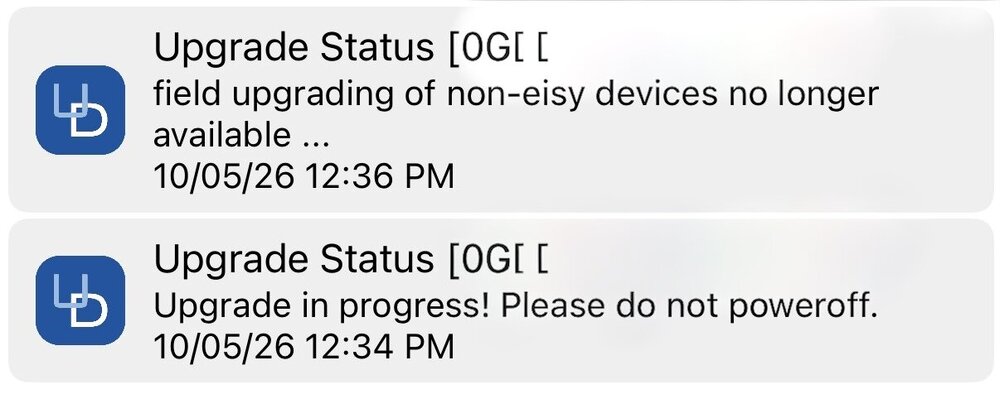
Just attempted to update my Polisy Pro from v.6.0.5. Within 2 minutes of starting the upgrade, I received the following message in UD Mobile: Am I not able to update?
-
Disregard. I found the issue. User error.
-
Just updated and deleted files in Java, grabbed the latest version of iox Finder and unable to access account. Added the url and it is not found. Any suggestions?
-
@Geddy It worked! Thanks again.
-
@Geddy Thank you. Your guidance helped me set up a new schedule within the mobile app. By 10pm Eastern tonight, I’ll know if it worked. Thanks again for your help. Much appreciated.
-
I am on a Polisy Controller 5.9.1 and using version 1.4.3 on the UD Mobile App. The Insteon controller I am trying to schedule shows up on Apps Home Tab and Favorites tab, but when I go to My Schedules under the Automations tab, I do not see the Insteon controller that I simply want to schedule on-off hours, but I can control it manually from the app. What am I missing? Yes, I have tried re-syncing 3 times.
-
Same here. Happy New Year all!
-
In the Admin Console, I have 4 “Customized Content” entries under the Customizations tab. Three (3) are for my Leak Detectors and One (1) for UD Mobile. I eliminated One (1) entry. Each customized content has an ID number, 1,2,3,4 and 5. When I removed #4 of 5 entries, should the last entry ID# change from #5 to #4 to continue working? Or, it doesn’t matter?
-
Received a message today about an update package available. After trying to download, the Polisy box continued a loop of one solid light followed by the following 2 blinking lights, 2 beeps and then back to one solid light and 5 beeps. I have tried: 1. Software Reboot - No change 2. Power-cycled the Polisy box - No change 3. Tried to Factory reset - No change The loop continues as stated above. Any thoughts or just submit a ticket to UD?
-
Slot 2 was just deleted and all should be good. As far as I can remember, when I installed the paid version last summer, it must have kept both running?
-
@Jimbo.Automates - Sorry for the incorrect sub-forum. This is the first time I’ve been back to this forum since the 3rd week of Oct 2023 when a health scare changed my world temporarily until this month. Now I’m catching up with life after 8+ months. I just found this post on 10/31 that may be the reason I’ve experienced this problem and after updating for the first time this year. https://forum.universal-devices.com/topic/42262-paid-plugin-node-server-not-starting/ I appreciate your assistance and will try to correct. (Admin-Feel free to move this to the appropriate sub-forum.)
-
IoX and PG3x are up to date. In the Admin Console, noo1 controller shows "Connected" and REST status "Running", while noo2 controller shows "Connected" and REST status "Not Running". I am a novice with Node Servers without any previous issues using them, but not sure how to resolve this. Any help is appreciated. Thanks!
-
Same here. Feit bulbs and no issues for years. Dimmed at 50% and no flicker.
-
Update: So far, none of my Insteon controlled devices have turned on as scheduled. This has never happened with any previous update. All can still be controlled manually and with Alexa. Update: Apparently I had to reboot more than once to fix above. Scheduled lighting is now working.
-
Just updated Polisy Pro from 5.6.4 to 5.7.0. No issues with the Admin Console, PG3X or Mobile. Running all Insteon devices.
-
@Techman Thanks for the link. I’ve had this issue since upgrading to 5.6.4.
-
Ok. I am able to access Polisy using either option, so thanks for clarifying.
-
@Javi Now that my mobile issue is resolved, I decided to update Polisy to 5.6.4. When opening the IOX Finder, Polisy shows up but then an error box appears that says “Not Found” although it is listed correctly. I click on OK and a 2nd Polisy shows up with the correct uuid, but with a local Polisy url. How do I delete it?
-
Thanks Javi. For some reason, my local network was showing under System Network Relations. I removed it and all is good. Thanks for the help.
-
Answers to your questions are listed above. It’s not accepting my user ID and/or Password. No issues connecting when disconnected from WiFi.
-
UD Mobile has been working fine all morning, but just suddenly received an error message. IP address is set. What am I missing? System: Home ERROR: No LOCAL IP ADDRESS is set for the system. System name: Home

