


dbwarner5
Members
-
Joined
-
Last visited
Everything posted by dbwarner5
-
I dont think it will work. I have a J8+ which is a generation or two older and it does NOT work with the plugin . The plug in has never been updated from the time it was introduced about 3-5 years ago with the then current model. I too just purchased a 705 for a second home and wish it would work. But the app does fine, but its not integrated so if I am not home and my security system is armed in AWAY mode, then the Roomba sets off the alarm due to inside motion sensors, so the EISY changes the status to STAY during cleaning. BUT w/o integration, its a "clock" based process, not an actual and I need to manually keep roombas run time in sync with my Eisy program time triggers.
-
Funny, beginning sometime in the last few days, suddenly ELK is reporting actual statuses vs numbers again in UDM..So they must have fixed something on their end, as I haven't done any updates on purpose, but dont know if the UDM app on iPhone did an automatic update or not. Progress for LOCAL. connections. Remote connections also fixed ELK status, but Z-wave devices and about ¼ of my Insteon devices still dont report statuses automatically.
-
@wuench @gschoffstall My FAVORITE way to log in is a direct log in that skips the whole Finder thing.. Faster, simpler, local, and quick. Run http://1<your eisy ip>:8080/admin.jnlp in a browser. A file will get downloaded called Admin.jnlp. Put that file somewhere like on your desktop. One click and you are immediately taken to the sign in page where you sign in with your local username / password, NOT the portal one. (ie admin admin in gschoffstall's case) Easiest, least advertised, least documented method to sign in. Only works when you are local though.
-
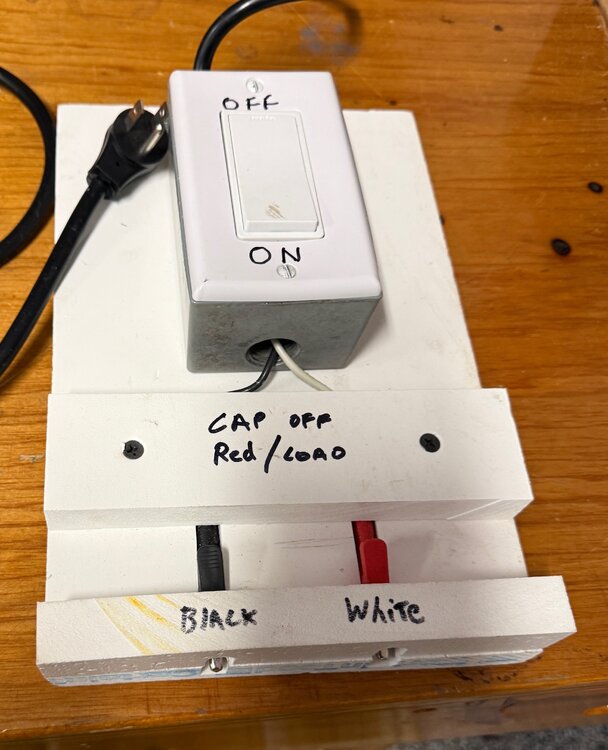
@Kentinada I finally got around to getting apicture of the device I built to easily and relatively safely hook up new switches to add / test etc. Here it is.. The alligator clips are "recessed" so I dont accidentally touch them while testing. for what its worth...
-
@PAstrachan in addtion to geddy's advice, have you right clicked on the program itself and selected Run Then.. and Run else and see if outside light turns on and off as expected? Occasionally, I have found a program just needs you to click on one of the items and select Update and then Save. This refreshes the program in the Eisy and then it will work just fine.
-
@brockp Bummer.. learned that lesson after losing about 10 favorites like you did. all with custom colors / actions / icons. Now I do a backup EVERY time I make a change.. Simple enough to do, once you get Into the habit. Using an iPhone, so backups go to my iCloud Files / Downloads and then occasionally I go in and delete old ones. Probably have 20 in there right now. Files are small so there is minimal impact.
-
do you have a backup of UDM? I have found that can happen when you make changes to devices. If you have a recent back up, do a restore, and then a sync and see if they come back.
-
Sure . that's a work around.. BUT WHY DO WE NEED ONE? this has been a known problem since late October. It fixed itself for a while and then broke again with the last updated. And NOTHING works right if you are remote... no zwave status, lots of Insteon blanks... I am sorry to say, but I am reaching the conclusion that UDI has bitten too much too fast and when they fix one thing or add a new feature / complexity, they break something else. I am running out of time to do "work arounds" and will keep waiting of fixing, imploring UDI to stop advancing until they are stable again.. It's been 2+ years of instability on all fronts.
-
@Javi I know you are aware but its been two months now and UDM has not worked properly since the 6.0.x upgrades. -Remote access does not fill status of zwave, nor ⅓ of my Insteon devices and ELK reports numbers vs status -Local access also has elk reporting numbers vs status, with the other issues above working. Is there a plan to fix this? I will be remote from my house for an extended period of time (snowbird!) and rely on UDM as a quick way to check things. Currently it is NOT able to serve that purpose after your hard work for many years to get it working. Thanks.
-
@Javi as many people here, I am the Home Automation manager and make things like UDM usable for my spouse. However I also want to Lock her version so she cant accidentally change anything. I have "locked" her copy on her phone in hte settings tab, but find it only locks the items on that page. It does NOT lock the individual favorites on the many screens I have developed. Is this intentional? If not, it's not working. Seems like it should lock down the whole app for view and on/ off etc adjustments only. thanks.
-
@PB11 in the AC, right click on the program you want to copy and go tot he bottom, copy to clipboard. Then paste into the body of your post
-
@scholarwarrior The way I accomplish what you want is pretty simple. I set up a "trigger program" that runs the actual THEN or ELSE of the program I want to run. This trigger program is what I put in the Favorites in UDM... It will cycle back and forth between true and false. example below.. it checks itself to determine which to run. If it ran false last time, it will be false and a press will run the THEN, making it true.. Vice versus, if it ran true last time, a press will test it as false and run the false. Naples Pool Stop LD - [ID 0335][Parent 01A5][Not Enabled] If Program 'Naples Pool Stop LD' is False Then Run Program 'Pool Emergency Stop' (Then Path) Else Run Program 'Pool Emergency Stop' (Else Path)
-
@apostolakisl I can imagine your frustration. I have motion sensors, scene and light as shown below. They all work as expected. JH Have you tried to to delete the variable and start over completely? Be sure you are also deleting in Alexa any old devices/variables when you do that. This may also be causing Alexa some confusion.

-
After clearing your Cache, try to connect to it directly via http://<your eisy ip address>:8080/admin.jnlp This will download an AC shortcut called Admin.jnlp. Clicking on that should take you directly to a sign in screen versus the AC launcher. This will eliminate quite a few of the possible "in-between" issues. However, it sounds like your Eisy may be locked up .
-
This may be too simple, but have you tried a separate "trigger" program for use in UDM ? I use simple programs like this in UDM. They provide status and each click runs toggles between the THEN and the ELSE, providing hte trigger for the target program. In your case the THEN would run the Then of your ON program. The ELSE would be to run the THEN of your OFF program. Naples Pool Stop LD - [ID 0335][Parent 01A5][Not Enabled] If Program 'Naples Pool Stop LD' is False Then Run Program 'Pool Emergency Stop' (Then Path) Else Run Program 'Pool Emergency Stop' (Else Path)
-
@Techman This has been an ongoing issue since 6.0. Elk plug in was doing the same. Then it fixed, and now is broken again. Also, remote connections thru UDI servers also are having problems reporting status of devices, unless the dashboard is opened (basically a query). This is a known problem @Javi is working on. Local connections though, my zwaves are reporting correctly. Are you on EISYUI 0.8.5? Run https://eisy.local:8443/WEB/sysconfig.txt and then scroll down and see if you have: eisyui-0.8.5 Name : eisyui Version : 0.8.5 If not, try the following: open AC, run upgrade packages, verify you have 0.8.5 and then back at UDM, do a backup and then do a sync and see if it solves your problem.
-
I have been using the Yale yrd120 since 2016 in a very northern climate. I have three of them and have never had a problem. I do have cheap plugs randomly around Yale_Real_Living_Brochure_8.5x11_099800.pdf house to help with the signal as they are separated from the EIsy by quite a distance. I use Kwikset with Samsung Smarthings at a second house and have had continuing problems with them from corrosion to them randomly going into a locking mode and not stopping unless you get a screwdriver and remove the batteries! Good luck!
-
@Javi I upgraded to EisyUI0.8.5. UDM acted very strange. Had to do several restores and Syncs to get it to work properly, even locally. That is now ok. UDM remote though is reporting elk properly, but no Z-wave and now various Insteons no longer report status as well. Opened AC thru my.iso and it is the same as UDM remote: no zwave status and various Insteons no longer reporting status.
-
@Javi By the way, , I have EisyUI 0.8.4. Will do another packages upgrade tomorrow and see if anything changes.
-
@Javi I tested UDM on remote connection. 1) opened app. Elk nodes all blank. 2) I opened a door and the elk node immediately reflected its status in words as expected 3) I shut the door. and again it reflected the status correctly 4). changed pages on UDM app and went back to page with the above door and status remained correctly filled 5) Quit the app and reopened it. Blank status again.
-
yes those are all true.. if you read my post above, you would see that it works just fine locally.. It's when the UDI server gets involved, things dont work. I would not be getting values locally if what you asked was not true
-
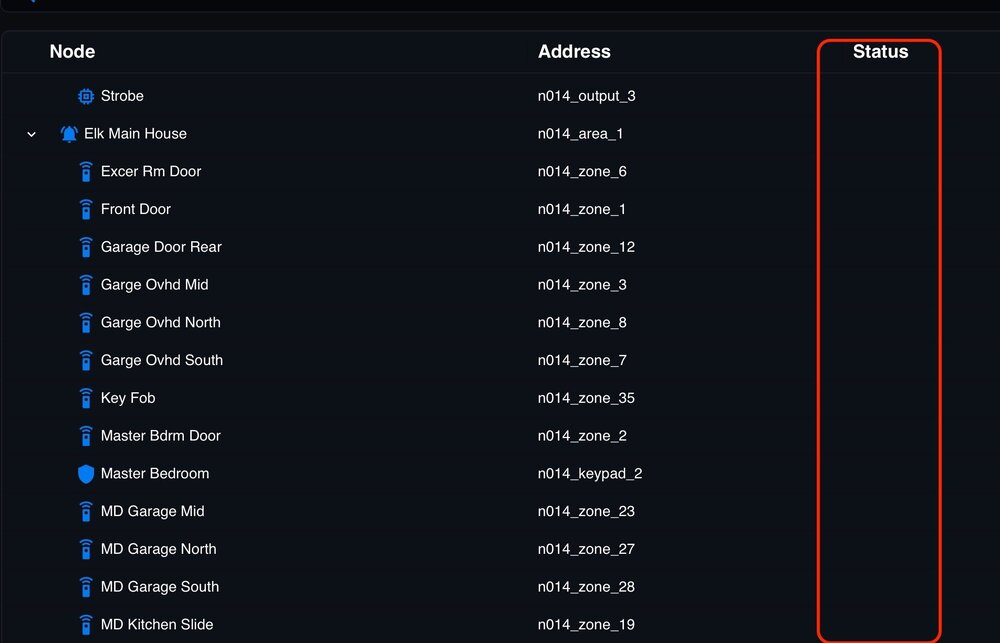
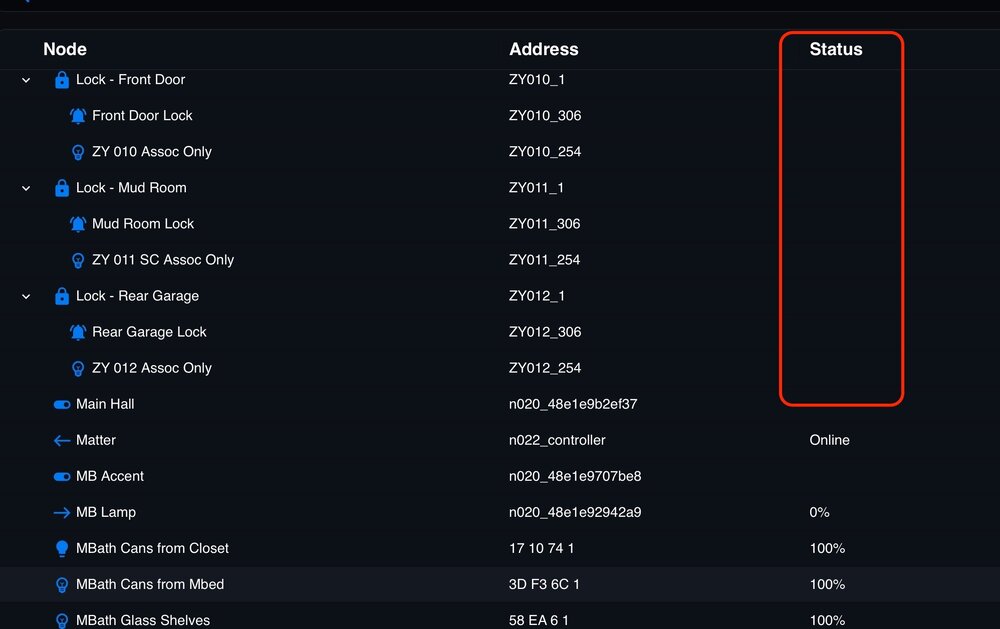
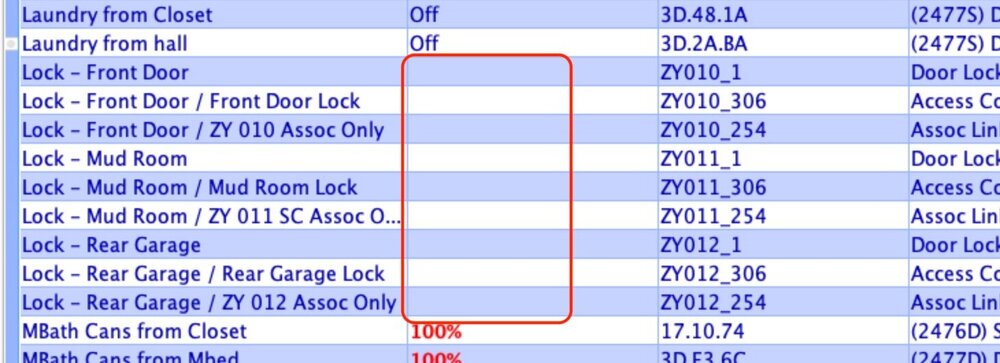
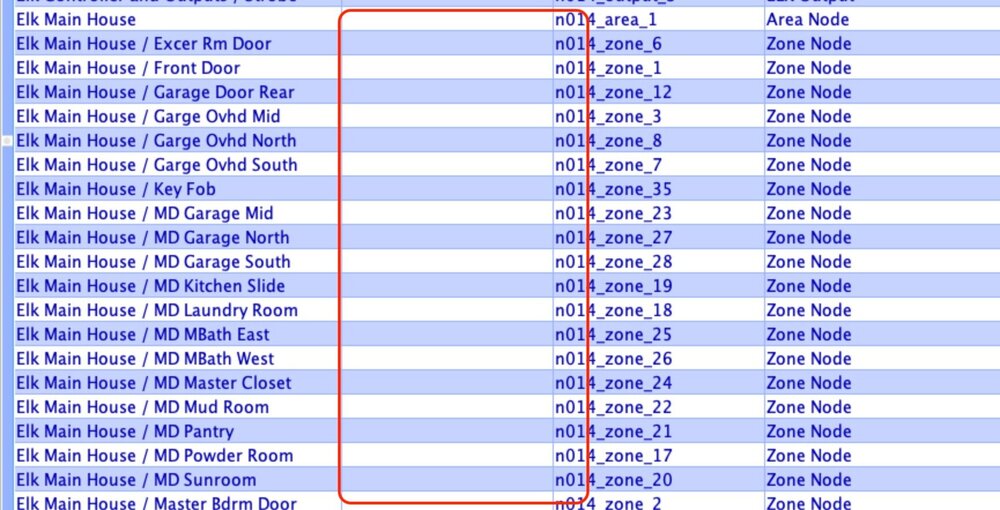
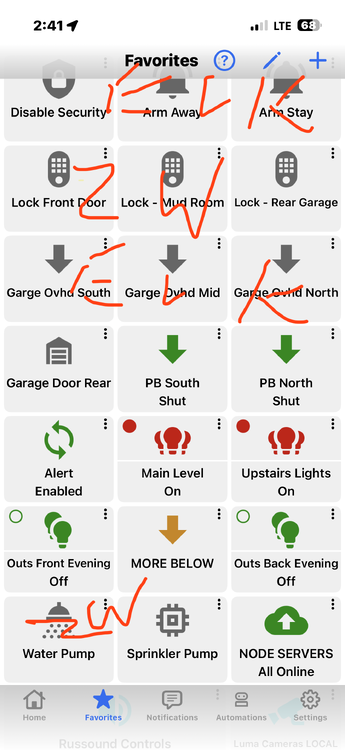
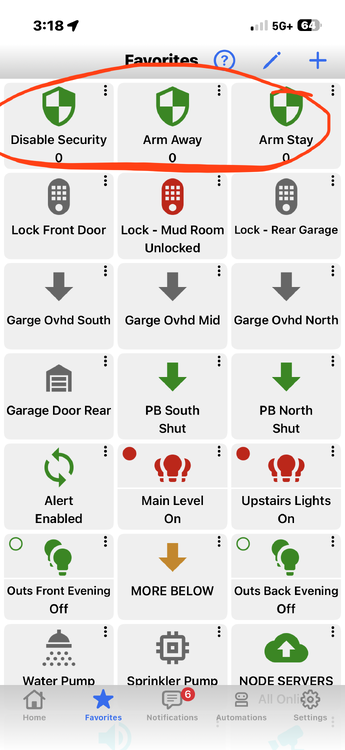
@Javi @DennisC Clarification of this ongoing problem with UDI's portal connections affecting ELK and ZWave status not being reported unless query is run. This has been documented since the end of October in this thread and is as yet unresolved. UDM Local WiFi connection: -Working as expected; Elk reports names for status ie: armed away vs a number ie 1 AC Direct Connection: No issues, works as expected. UDM REMOTE connection: -When NOT on local wifi, UDM does NOT report Z-wave or Elk status in favorites or EIsy devices, unless the dashboard for the device is opened. See screen shot below of my top favorites page. Some items are ELK and others are z-Wave.. all greyed out unless I open the dashboard of each device, with ELK only reporting numbers, no status. New UI: -same issue with elk and zwave not populating status. See screenshots below. AC Through http://my.isy.io...: -same issue with elk and zwave not populating status. See screenshots below Current System versions: IOX 6.0.3.3 UDX 4.2.0 UDM 1.4.9 Libwebsockets 4.3.3 tpm2 tools: 5.6_2 IOX Matte Bridge: 1.3.24 Mosquito 2.0.18 PGX 3.4.6 Elk Plugin: 3.10.15
-
However, please note that with the update, Elk will report status in names vs numbers but that remote access to UDM is still not populating these statuses of Elk or Z-wave devices unless you "open dashboard" of each device.
-
@someguy , Javi was referring to a firmware update. 4.03 has been released and has fixed the elk reporting issue, but not UDM working remotely through their server. You can find out more about the firmware update. Update Packages in AC is the way to update, and most people are having success with it, albeit the usual sign in challenges with Java (clearing the cache, re downloading the matching AC etc) UPDATE: oops. typo.. meant 4.20 above.
-
took me two times but they look like they finally went away! thanks!


