


Jimbo.Automates
Members
-
Joined
-
Last visited
Everything posted by Jimbo.Automates
-
Ok, I was confused because you said "fan state is on, but the program rarely is triggered". What do you mean by "same temperature"? I thought this was about fan state? If AC is not showing proper temperature, fan state or ... The please confirm you have checked the Healthy Hub Checklist
-
The HomeKitHub implementation was targeted to get Ecobee Thermostats working again since Ecobee removed access to their API. But the intent is to support other devices as well. Please restart the plugin then wait a few minutes, then go to the Plugin's Log page and click "Download Log Package" then email that to me at JimBo.Automates@gmail.com and reference this thread.
-
Sorry I am not sure, but I would assume so. But the handling of comfort settings with the HomeKit method is not as nice as the original API, but nothing I can do about that.
-
If AC is showing proper status then it sounds like a programming or notification issue?
-
Please retry the pairing then download log package and email that to me Jimbo.Automates@gmail.com and let me know the IP address of the thermostat.
-
Thanks @bmercier So for those having the issue you will have to delete and reinstall, sorry about that but we had to change the name of the plugin and early adopters got bit.
-
I have two Chamberlin LiftMaster side mount openers which are great, so quiet, and the work perfectly with Konnected BLAQ. I'll be releasing the plugin for these very soon.
-
Let try to get you upgraded to the latest and see if that solves the issue, hard to debug an old version. You may have to repurchase and ask for a refund, hopefully Michele or Benoit will respond to the other post. Again, sorry for the delay, for some reason I'm not receiving notifications for this forum...
-
Sorry for the delay, didn't get a notice that I was mentioned. @Michel Kohanim & @bmercier , This was due to changing the plugin name after it was released. Do these guys have to repurchase and ask for a refund?
-
I have no idea, I don't handle Kasa firmware Mine was a KP125M., you can review the link I posted to see what devices are mentioned that others have found. I confirmed the fix works but it will require a couple new packages installed which will have to be done manually, or hopefully included in the next eisy update. I had to push a minor fix to python-kasa so hopefully they'll accept it and make a release soon. If you are worried about others then turn off auto upgrade for now.
-
Yes, latest firmware updates will break, looks like they are working on a fix: https://github.com/python-kasa/python-kasa/issues/1590 Kasa is so annoying since it's an undocumented/unsupported API...
-
Yes that's what it looks like. I'm curious how others are handling this. I've modified my logic and it seems to be working so far.
-
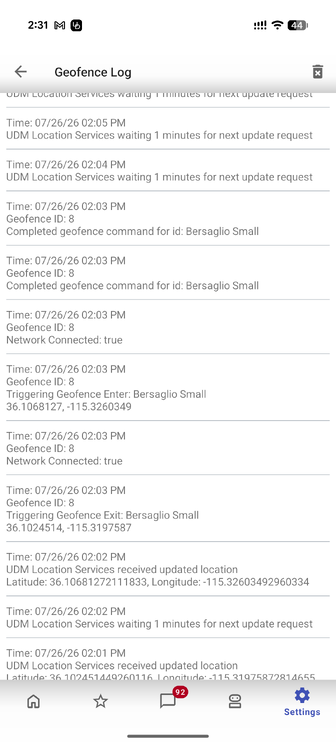
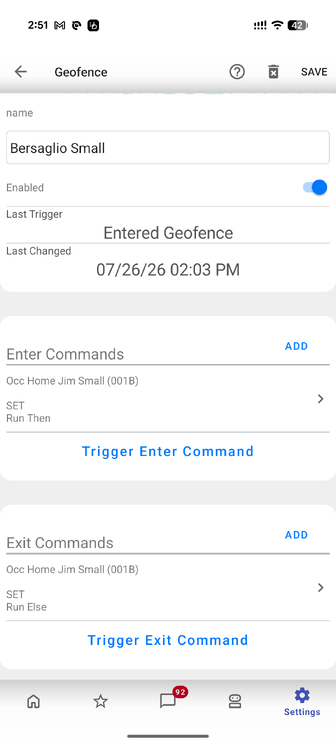
I've been trying setup my GeoFence's to set Home/Away for each person at our new home and thought I finally got it but still having issues when Android bounces me out even though I am still inside. I neglected to save the home/away programs I had prefected at our old home before leaving everything for the new owners. I have a 200 radius set, which I know on the small side, but I really want to know when the device is not home, and typically the bounces are way outside a large fence anyway. I've researched Android location issues and tried to improve accuracy to no avail. The screenshot of UDMobile GeoFence log shows there was a quick bounce putting me out then right back in, to try and null these out I have it run the same program then/else so if the "out" triggers, and kicks the "else", then the "in" triggers and kicks the "then" and both have a 2 minute delay, I thought the second trigger would kill the first and keep me in? But this doesn't seem to be working. The program is: Occ Home Jim Small - [ID 001B][Parent 001F][Not Enabled] If - No Conditions - (To add one, press 'Schedule' or 'Condition') Then Wait 2 minutes $s.HS.Home.Small.Jim = 1 Else Wait 2 minutes $s.HS.Home.Small.Jim = 0 This is called by UDMobile to set Home/Awayand the screenshot for the GeoFence setting is here which run those programs. But after the out/in shown in the log the s.HS.Home.Small.Jim stays at 0. I'm probably going to work on a Firewalla plugin to see if it's device connection status helps with this, but would prefer a solution with GeoFence.
-
The Camect Plugin 3.1.3 is released. See the README and CHANGELOG for more information If you have issues are requests please check Camect PG3 GitHub Issues to see it has already been listed. To discuss issues with everyone post a new thread in this sub-forum to confirm before creating a new issue, then reference that thread in the issue if you create one.
-
It should work, but my meter was upgraded to one that Flume did not support, and now I no longer even live there and I had a MoenFlo installed at my new home so I haven't used the Flume in a long time. If there are issues I will try to help but as far as I know it should work.
-
There is no option I am aware of. The best option would be for @Javi to add support in UDMobile but we'd have to work thru how to configure this on the IoX side.
-
Found some issues on my production instance fixed in PG3 Plugin for Kasa TP-Link 3.3.27. See the README and CHANGELOG for all information.
-
The PG3 Plugin for Kasa TP-Link 3.3.25 is released. See the README and CHANGELOG for all information since 3.3.23
-
MoenFlo Plugin 1.0.2 released to beta and production see CHANGELOG
-
Yes, I had considered making mine free because I really write them all to work for my system, but supporting and helping other users, adding enhancements requested by users, and most of all occasionally painful debugging of issues on other peoples systems was the main reason I charge a small one time fee. Now it helps pay for my Cursor usage which helps get things fixed and enhanced faster!
-
Just released 2.0.15 which has more improvements on searching for devices...
-
Are you running the lastest HomeKitHub Version 2.0.14? That one had some improvements to the code which helped another user find their device. and there are some other issues mentioned here: https://github.com/jimboca/udi-poly-homekit-hub/blob/main/DEBUGGING.md#d-accessory-not-visible-on-the-lan-mdns
-
Sorry, that was a change in a library I referenced Fixed in 3.3.23
-
The PG3 Plugin for Kasa TP-Link 3.3.23 is released. See the README and CHANGELOG for all information since 3.3.13 release. All known issues are resolved. If you have any other issues please discuss on a new post in this sub-forum, and if no resolution is found create an issue at https://github.com/UniversalDevicesInc-PG3/udi-poly-kasa/issues and reference the forum thread.
-
HomeKitHub 2.0.13 released for Standard and Professional: https://github.com/jimboca/udi-poly-homekit-hub/blob/production/CHANGELOG.md Please see OP for all the information on this Plugin.


