


bpwwer
Moderators
-
Joined
-
Last visited
Everything posted by bpwwer
-
I see the disconnects in the log. The error is: Unexpected MQTT disconnect. Reason code: Unspecified error. So no real information about why. The MQTT connection is managed by a common interface library that is used by all the plug-ins so it's probably not something the plug-in is doing that's causing it. I also see quite a few "meross:send_to_broker: Timeout waiting for respsonse from device", which means the Meross broker isn't responding, at least not within 15 seconds. I could increase that, but 15 seconds seems like more than enough time for the broker to respond. I have not found that the connection to the Meross broker to be all that reliable. Does that log include you changing the level of the light? If so, do you know approximately what time you were doing that. The log is fairly long so searching through the whole thing looking for a level change is a bit more than I want to do right now.
-
I don't see anywhere in the plug-in code where it would send an off command before sending the level command. When you execute the command to set the level, it just sends the command to set that level to the device. I haven't tried doing any level changes from the plug-in, but I do have a bulb that is now part of a scene in one room of my house, which is why I made a few changes lately so I could get that working correctly.
-
re-install to get version 1.0.2. I added the missing module so it should start properly now and show the add printer button at the bottom
-
Doesn't say restricted, so I tried again, and this time it worked without any errors. Go figure.
-
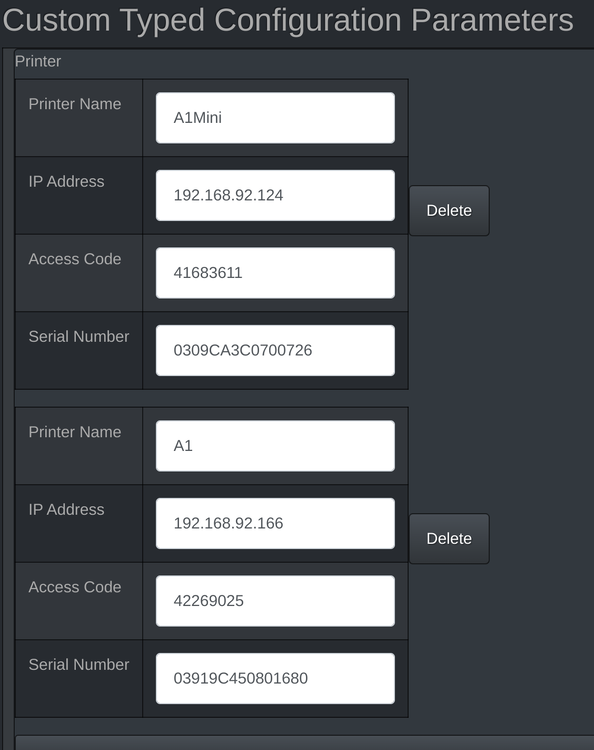
You don't have the configuration correct. The Bambulab plug-in uses the custom typed parameters, not the custom parameters. If you scroll down below the custom parameters, you see the custom typed parameters. Use the Add button to add a new printer. This is what mine looks like for my two printers
-
-
I'm getting the same errors with my API key. I don't run the WeatherBit plug-in normaly and only start it for debugging purposes and I got the error with the first query I made. I don't think it's a problem of exceeded limits. Maybe they are simply trying to force people off the free plan.
-
I'm not sure how the app works, but when you click On or Off in the console, IoX sends the command to the plug-in and plug-in process and sends the command to the device. If the device changes state, the plug-in will see that change in state and pass that state change back to the console. Since the console isn't reflecting the state change, either the device is not sending the updated state to the plug-in or the console is not seeing the state change when the plug-in sends it. A couple of things you can check. In PG3, if you look at the nodes tab, it will show what the plug-in thinks the state of each node value is. if the ST value is getting set correctly, then the device is sending the update and the plug-in is seeing it. The PG3 log should show lines for all the messages going back and forth to the IoX. So again, when you change the state on or off, you should see a line where PG3 makes a request to IoX with the new state. If that's failing, you also see those failures in the PG3 log. For the scene, it sounds like you may need to re-create the scene, link not found seems to imply a corrupt scene. I do have a MH bulb in a scene and it continues to work as expected.
-
You may have to re-install the plug-in.
-
admin console -> configuration -> install development packages
-
The error indicates that one of the python library modules that the plug-in depends on is missing. Since you recently switched to a new machine, I suspect that you need to install the dev packages on that machine to get the required modules installed.
-
Some do it already, but the how is not standardized so how it works for each plug-in is going to be different. In my case, I have a number of plug-ins that don't need any type of control interface so each node represents a device (say a light switch or networked bulb). For those types of plug-in's I'd have a new node that does nothing but report the interface status or add the interface status to each node. I don't find either design compelling, plus it would be a bit more than a minor change. Even with plug-ins that have a controller type node, there's no standardized way to report that. The logical choice would be to report it as the node's status, but that is typically used now to report the status plugin, not it external interface. You're probably thinking it's just a couple of plugins that need this, but there's something like 188 plugins the store and some of those are no longer being actively maintained. So it's a pretty major effort for everyone to do this. I know I have very little time right now to do major plug-in development, I'm struggling just to bugfix/updates when needed. I proposed something similar to what @Goose66 wrote above while we were doing PG3 development, but it would take a bit of effort to the develop the IoX side and other issues were a much higher priority. I agree that this would be the right direction, but with so many plugins having to be changed the existing methods would have to remain in place and the conversion could take quite a while. That's assuming UDI has the resources available to do the IoX side of the implementation.
-
This program worked for me. If $picoon is 0 And 'Caseta Test Devices / Test_Pico - Middle' is switched Button Pressed Then $picoon = 1 Set 'Office / Office:Ceiling Cans' On Else Set 'Office / Office:Ceiling Cans' Off $picoon = 0 It triggers on the middle button of a 3 button pico and toggles an Insteon controlled light on/off with each button press. It simply uses a variable to keep track of the current state instead of trying to do that with programs. The variable can just be an integer variable since we're not triggering on the variable. As an aside - This only works with a Pico remote. Caseta switches don't send button press events. I have a case where I want a Caseta dimmer switch to also control an Insteon lamp. To do that I have to trigger on the dimmer switch status and then send the commands to the Insteon device. It's not ideal as there's a pretty large delay between the button press and status change.
-
I don't know for sure. The plug-in uses the rain value in field 12 for rain (both local and remote) and field 19 for nearcast rain. That implies that they should be separate and you should not be seeing nearcast values at all if you're using just local. But, it is certainly possible that they update field 12 with nearcast values at some point.
-
@Techman Looks like the disconnect and re-connect was caused by the MQTT broker. It disconnected from the plug-in and the plug-in then properly re-connected. There is a nearcast node that is created when you configure the plug-in to get it's data from the server vs. from the local hub. WeatherFlow only provides the nearcast data via the server feed. That data is supposedly separate fields in the data stream, but I can't control what they push out in the feed. Since historical rain data is only available from the server, when the plug-in starts, it makes queries to get the historical data and populate those values. Once it's running, it pulls the current rain data from the feed and updates the historical values as appropriate.
-
That is interesting. I bet whatever micro-controller that is in the remote can't do floating point so they had to approximate the conversion formula.
-
RE: temperature range/step. That makes sense. It looks like internally it works with Celsius and just converts & rounds for Fahrenheit values. We could just hard code the editor range to match, but as we discussed above, that may not work for other mini-splits. I was looking the Home Assistant code and they pull the range from the device capabilities and use that. That's what I'd like to do here too. The only issue I see is that the editor profile is global so what happens if someone has two different units with two different ranges.
-
Opps, that's the problem with not testing. I just pushed out a new version with the fix.
-
Ok, version 2.0.12 should have working target temperature adjustment. It should also have a new driver value for the filter change flag. I did remove the redundant commands. RE: power display The plug-in and IoX send numeric values back and forth for all drivers. The plug-in sends IoX a map of numeric values to strings for things that it wants to display as text. For power, it maps 0 to Off and 1 to On (this is in the profile/NLS file). When the admin console starts (and I'm assuming the same for UD Mobile), it queries IoX for the profile files, including that mapping. Each application then has to apply that mapping when it displays the driver value to the user. If it doesn't have the mapping, it will just display the actual numeric value. This means that UD Mobile probably doesn't have the mapping file, but I don't know much about how UD Mobile works so it could also be something else. But the issue is likely on the UD Mobile side. In some rare cases, errors in the profile file can make it past the admin console parser but not the UD Mobile as they are written in different programming languages and have different parsers for those files.
-
The brighten / dim need to be renamed, those are for temperature up/down and that's what's not currently coded to do anything other than log a debug message. So if you try those and then check the log (with debug level set), let me know what the log messages say. I think I see the problem with the quiet fan mode, that should be fixed now. I'll just update the change log with the changes so anyone upgrading has the opportunity to see what changed before upgrading.
-
It's not running on your computer that's running the Admin console. That is just acting as a display for the your eisy/polisy. The plug-in is running on the eisy/polisy. When I enter your API (from post above) in my installation, it works fine. Make sure you don't have any extra spaces before or after the configuration values as that will cause problems.
-
@Freddy Kilowatt I just pushed out version 2.0.11 with the changes. I don't have the temperature adjustments working (temp up/down). It should log a debug message with the info needed to make those work, so if you can capture that message when you try bumping the temp up and down, that would be great. I didn't work on adding the filter change yet either. If I didn't screw it all up, I'm expecting the fan mode and main mode to work. It should now display the temp in the upper right instead of on/off.
-
I'm not surprised that commands aren't working. They need to be added to the nodedef and mapped in the plug-in to functions to handle them. Most should map to the existing functions. I might have to add some debugging messages to see what gets sent to the plug-in in some cases. I'm not sure why the fan mode isn't displaying something. I thought I had that right so it would display. It might be the status name. The plug-in is using CLIFSR and it probably should be using CLIFS. CLIFSR is fan running state vs. CLIFS is the fan mode. I think it's showing on/off instead of the temperature because the plug-in status is showing power on/off. I believe the thermostat status should be it's current temperature. I just checked the Insteon thermostat nodedef and, yes has the current temperature in the ST driver and doesn't use CLITEMP at all. I'll go ahead and make all these changes and we can see it gets a little closer.
-
I don't think MODES is even needed anymore since we don't need to translate what IoX sends us and we can use that value directly. We only need to translate that value to the string that Sensibo needs. I had an idea about fan mode. I wonder the built in modes for UOM 68 can be extended with NLS. So I tried that. If it works, it should now show up in the thermostat specific view. I also removed GV2 and replaced it with the heat and cool setpoint status names (CLISPH, CLISPC). Both of these map to the Sensibo target temperature. What's missing from the Sensibo is the current operating state. CLIHCS / UOM=66. I don't know if that information is available in the Sensibo API. I can see where limiting the temperature range to what the fujitsu supports would be nice, but since we don't know of that's correct for any other mini-splits, it's probably better for it to be more generic. It might be worth adding the "shouldCleanFilters" into the plug-in. Seems like that could be handy. Does that show up in the data updates that the plug-in sees? maybe in acstate?
-
I wouldn't expect the AC to look any different, but I'm surprised that the UD mobile doesn't. Here's what i see for a normal thermostat on the IOS version. I wouldn't expect the Sensibo node to display like that unless it used the same type of nodedef/editor/nls profile files. I understand it's a bit of challenge to make changes without being a developer, but you seem to understand how to work around that with the diff's and such that you've provided already. I can make the changes, but since I don't have any Sensibo devices, I can't test that the changes do what I think they should. But if that's easier for you, I can do that and release an updated version. I looked at the fan modes and it's missing both "low" and "strong" so it doesn't seem like a good fit. The Insteon thermostat fan modes are just on and auto so that's even worse. I went ahead and made the changes to the editor for mode so you can re-install version 2.0.9 and see if that works


