


bpwwer
Moderators
-
Joined
-
Last visited
Everything posted by bpwwer
-
He has 3 different Nuheat plugin repositories. The python one is at least 2 years older than the two javascript based versions. The version I've been maintaining is based on the private version and I've made updates to it since then. Oh, looking at the python version more closely, that looks like a PG2 node server, not PG3. Yes, I can update the store entry/db or if you want to take it over, UDI can switch the developer field in the database to you.
-
if you go to the polyinterface github, there are instructions in the Oauth2.md file on how to add oauth2 support into a plugin. https://github.com/UniversalDevicesInc/udi_python_interface.git except that the Nuheat plugin is written in javascript and I don't think the javascript interface got any of the updates for oauth2. It does have some basic support, but it's not documented. I think @simplextech was really the only developer that created plugins using javascript so that interface isn't nearly as well supported as the python interface. If the plugin needs a re-write anyway, maybe it makes sense to switch to python. Do you have a Nuheat thermostat? Or were you able to get credentials without one?
-
Umm, I seem to have lost the memory of sending you an email. I'm a bit confused.
-
@Panda88 If you figure anything out, let me know. The plugin interface does have the ability to do oauth authentication which is what the new API needs, I believe.
-
I personally would do a package upgrade from the admin console first. That way the Polisy is running the very latest supported versions of everything for the Polisy. Then do the manual ssh package upgrade to get the new eisy-ui and it's dependencies. And, yeah, back up first. I sometimes forget to do that and it's not always ended well.
-
@bmercier Is this the right place to report issues with the integrated plugins feature?
-
PG3 (and PG2) are standalone web apps. Prior to this new beta release if eisy-ui, eisy-ui simply integrated the PG3 main menu into it's menu structure and made calls to the PG3 web app to manage the plugin (formally node servers). PG3 did plugin management (install/remove, start, stop, configure) by making calls to IoX. eisy-ui also makes calls to IoX for integrated nodes (insteon, z-wave, zmatter, etc.), programs, variables and such. So this beta is basically just combining them so it's one common layer that communicates with IoX instead of two. The PG3 look and feel will change to match eisy-ui but the functionality will be mostly the same. Way back when we were developing PG3 we talked about the eventual goal being a combined PG3/Admin console web app. It's great to see that finally happening.
-
My home is and has been running on a Polisy with version 5.91 pretty much since 5.9 came out. None of upgrades since have added anything that would make any difference to how I use it. I use the admin console or the PG3x interface no more that 3 or 4 times a year. For the most part it just runs and does what it's supposed to. For something that's controlling things in my home, I tend to try and not break things. Upgrades sometimes (not often) break things. Moving to 6.1.1 and eisy-ui is a big change, I'm still trying to decide if it's worth the risk.
-
I'm not sure I understand what this means, at least to me. I've never used "developer mode", my primary development environment was running a local version of pg3 under my account so I had access to everything. In that environment I have 24 plugins listed in my local store. I have two development/test environments, one on a Polisy and one on an eisy. I also have plugins in local stores associated with the production installations of PG3x. When I have to debug plugins running on a production installation of PG3x, I just use sudo to access the files and logs. Never had a need for "developer mode". It sounds like none of this will be usable with eisy-ui and that I'll have to potentially re-create 50+ local store entries if I want to continue developing, debugging and maintaining my plugins.
-
So maybe the API keys are compatible? That certainly wasn't the case in the past when they updated the API. The plugin (current version) is not making calls to the 4.0 API, it's simply able to use the API key you generated with the 3.0 API calls. I had assumed that wouldn't work (base on the previous update) so I didn't test that. I do have it partially working with a newly generated key and the 4.0 API. Thanks for the update!
-
Disconnected typically means it crashed on startup or did not start at all. Possibly it wasn't fully installed. The PG3x log may have some information about what is happening when it attempts to start the plugin. 1.0.13 is a fairly small change that UDI had me make, in my testing the change didn't change anything. I was able to install and run it on 6.1.1 but the IoX refuses to let it connect and get the "inventory" information. UDI is trying to determine why.
-
I'm looking at making the API version a configuration option. Two versions would be another option, but it has some disadvantages as it could result in someone having to buy both. There's also a good chance that they'll change things again given that they've now changed API's about every 2 years since I wrote the plugin. I used my existing account (that has a 3.0 subscription) to subscribe to the 4.0 API. Even though both subscriptions are active, apparently I can now only generate API keys for 4.0. And the really nice thing about their API keys is that you have no way of knowing what key is for what version unless you put something in the name of the key. Sorry, I'm only a little frustrated with OpenWeatherMaps.
-
I believe that the One Call subscriptions are only valid for the specific API. The plug-in is using the One Call 3.0 API and does work with a One Call 3.0 subscription. I just verified that. I would not expect a 4.0 API key to work with the 3.0 API given all the issues I've seen and the 401 response you are seeing matches that. OpenWeatherMap has been a bit of pain for the past couple of years. I switched the plugin over to use the 3.0 API when they said the previous (2.5) API was going away. But it looks like you can still use the 2.5 API. Now they have the 4.0 API which is incompatible with the 3.0 API which means I have no good options yet again. If I leave the plugin alone and working with only the 3.0 API, anyone that gets a 4.0 subscriptions can't use it as it doesn't look like you can get a subscription to the 3.0 API anymore If I switch the plugin to use the 4.0 API, all existing users setup will fail until they get a new subscription and key for the 4.0 API. I'll have to give this some thought.
-
@simplextech isn't around anymore and isn't maintaining his plugins. He passed them all over to me and I do my best to maintain them. I don't have any way to reproduce this issue as I don't have the hardware or an account. But if you can switch the logging level to debug, restart the plugin, download the log and send it to me (a PM is fine), I'll take a look at it.
-
All plugin troubleshooting starts with the plugin's log. That's the main way that plugin authors can have the plugin report information about what it's doing and, in many cases, what has gone wrong. Bring up the plugin details for the SonosST in PG3x. Look at the Log tab. From there you can look at the log and set the verbosity of the messages. You list a number of things that you have been trying to do with mostly failing results. It is likely they are all related so I'd start by concentrating on one thing. Try this: Restart the plugin switch to the log tab to view the log Try one of the things that doesn't work while watching log. Do you see any errors? If you don't see any errors. Switch the log verbosity to debug level and repeat the steps above. If you need help interpreting the log output, Download the log file and attach it here. I'll take a look at it.
-
As the person responsible for most of that design I'd like to understand what it is about the interface you find difficult to use and any other feedback. I'm no longer responsible for the development and maintenance of PG3x but your feedback may help the current developer understand what changes could be made to improve it.
-
There isn't a query, because the Lutron hub pushes updates to the plugin, the plugin doesn't request updates. The plugin does an initial request to get the device information, but that's not the same as requesting device status.
-
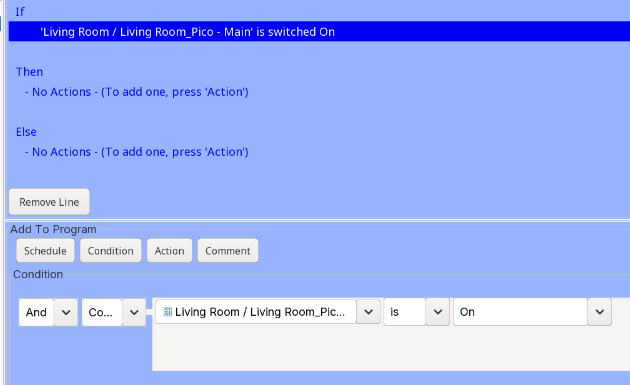
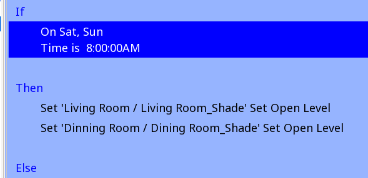
Correct, Pico devices have no status. They only send commands (button presses). The -Favorite node is special. I tried to make that somewhat useful in groups/scenes. The screen shot shows the if clause for my Pico that is controlling 2 shades. But, if I understand what you want to do, that doesn't really help. It's saying that when the open button is pressed, do something. I believe you want to trigger the shades without physically pressing the pico's button, correct? Something like what's in the second screenshot. And as you noticed, the two command are executed sequentially by the IoX, it doesn't have the ability to simultaneously send two commands. The other option is use the Lutron app and create a scene with both shades in that scene. The plugin will create node for the scene and you can trigger the Lutron scene to activate. You'd need different scenes for different shade positions/settings, but the shades should then be in sync. IoX was originally developed to work with the Insteon protocol so for most other protocols, there are compromises. The different companies also patent parts of their protocols so other companies can't do things exactly the same way.
-
The short answer is, you can't. Lutron's protocols don't provide that capability. The plugin can't send commands as if they came from a specific device. Pico's simply send button press commands to the hub and then the hub sends command to the device(s) linked to that. The plugin should also see that button press and you can use that in a program to trigger other events -- if control pico-main is on then do something. The top button of the 3BRL is the on button (regardless of what engraved on the remote). You can also have a program that sends open/close commands to the shades, but you'd need something to trigger that. I believe you can also put the shades in a group and have some other device trigger commands (be the controller) for that group. But you can't send commands to the Pico and Pico's have no status. They are very simple, when the button is pressed, the button press command is sent to the hub. The hub programming determines what happens when it gets that button press event. The node would have to know the topology of the hub to know what the Pico on/open button was linked to and then have a button/command to send the on/open command directly to those devices. I don't believe the hub will share that topology info and if it can, it hasn't been reverse engineered to know how it would work. The -Favorite node is tied to the favorite button on the Pico and you can set how you want the plugin to treat that. The "Sends Command" setting is what the plugin will translate the Pico's favorite button into something that IoX can understand. Again, this would be used in programs. If set the button to "ON" then in a program you can use "if control pico-fav is on" do something.
-
The httpx read timeout error appears to be it trying to get connection info for slot 0. As far as I know, there is no slot 0. But UDI changes since I last worked on pg3x may be responsible for this. In any case, this is not related to your issue. The restart at 12:33:13 and what follows at 12:33:37 is strange. But again, not related to your issue. The log does show that the plugin was started last at 12:56:28 and that it started successfully. But then at 12:56:44 it logs: Is client running? /var/polyglot/pg3/ns/0021b9026000_1/logs/debug.log does not exist. So is the plugin still showing disconnected and its log file is empty? If that's the case, you'll have to submit a ticket to UDI as there's nothing in the PG3x log file that shows any issue with the plugin starting. They'll have to dig deeper into the system to figure out why the plugin isn't starting.
-
The plugin is running (or should be) on the eisy and the eisy's ip address in your case is 192.168.1.100 and will always be active when eisy powered up and running. From your screen shot of PG3x, the plugin is not running (status: Disconnected). The question that needs to be answered is why didn't the plugin start? You said you level the Station Name blank. What you enter here is what the node in the IoX node list will be named. By leaving it blank, the name will default to "unknown". Try this: With the log level set to debug, like what your screenshot is showing Restart (or Start) the plugin. The log file should start populating If the log doesn't start populating, that means PG3x was unable to start the plugin. The reason should show up in the PG3x log file so go click the "Log" button at the upper right of the screen. Depending on what plugins are running, this log may be capturing a lot of messages, so click the autoscroll to turn that off and then scroll back and look for error messages related to AmbientConsole. When the plugin is running, it will start a server listening on port 7501. When the plugin is not running, there's nothing listening on port 7501 so the connection is rejected.
-
This information is coming from eisy -> Plugins -> Configuration -> [slot range] -> slot with AmbientConsole installed right? Are you changing the port number in that "Plugin Configuration" form? If so don't. That is configuring the connection between the plugin and IoX. All current plugins do that automatically. Changing anything there will just break things. In fact, just ignore that whole menu. The only plugin configuration you do is from PG3x. From the dashboard, click the plugin's Details button. From there, click the Configuration button. From there you can configure the port # and the station name. It should default to port 7501 and the name is just a string you want it to use for the node name. All plugins also have built in logging facilities. You'll see that option from the plugin's details page. To debug issues with a plugin, you should set the log level to debug, restart the plugin and then examine the log. If you need help, posting the log here or PMing it to the plugin's author is the best way to get support.
-
That seems to re-enforce the idea that something is going wrong with the plug-in logging when eisy rotates the log at midnight. By increasing the poll time or reducing the log level you just reduce the chance of it happening. With 10 second polling and debug log the plug-in does generate a lot of messages so Benoit's theory doesn't contradict the above. We (me/UDI) don't recommend normally running with debug level logging unless trying to actually debug an issue. But that can end up being a bit of catch 22. Having the debug log can really help if something does go wrong but having it on all the time can also use a lot of disk space and slow things down as Benoit says.
-
The log doesn't show anything unusual. The plugin stops sending updates after about a minute and then after about 7 minutes it disconnects. There's nothing in the log to indicate why those two things happen. My best guess is still that something with the daily log rotation is causing the logging mechanism used by the plugin (well, all plugins really) to hang. Since the plugin can't write to it's log and nothing unusual shows up in the PG3x log, I don't really know what to try at this point. My development/debug environment is different from the production environment so I don't think I can even reproduce this in that environment. I'm not sure how UDI is doing the daily log rotation for the plugins but if they can have you turn that off for this plugin, we should know something in a couple of days. Either the plugin will not fail every few days, or if it does, the log my now have some information about why since it's not being rotated.
-
That's interesting. At least for the first 30 seconds, the plugin is sending data to IoX and appears to be working even though it's not writing anything to it's log. Is there a point in the PG3x log where the requests for slot 5 stop? The lines that look like this: IoX Request: [Try: 1] [00:21:b9:02:65:8a] :: - http://127.0.0.x/rest/ns/5/nodes/.....And are there any messages that would indicate why? Now I'm wondering if the daily log rotation is somehow causing the logging mechanism in the plugin to fail and after some amount of time, it finally hangs or blocks. You're polling every 10 seconds, right? It looks like in this case, that's happening at 0, 10, 20, 30, 40, 50 seconds and the daily log rotation happens at 0 seconds too. I believe the times it polls will depend on when the plugin is started so checking what times the poll is happening and see if the failure is only happening when the polling starts at 0 seconds. If there's a correlation there, this might be something UDI needs to look into.


