


BJB2757
Members
-
Joined
-
Last visited
-
Thank you! That worked, I set the min setpoint delta to 2 degrees:) -Barry
-
Jim, my Ecobee is set to require a minimum of 2 degrees between the heat and cool setpoints. But the plug-in seems to be enforcing a 3 degree minimum delta between hot and cold. Is this something that can be changed? Thanks:) -Barry
-
Got it working, thanks so much!
-
"The Homekit and Ecobee plugins have been released to beta, but require an update of IoX that is not available yet" This is great! For those of us who are considering being less adventurous, any idea when the new IoX will be availbale?
-
@bpwwer I set the log back to 'info' 10 days ago, and things have been working flawlessly since then. In other words, when I first posted I had an issue that was easy to reproduce, and now I don't have the issue at all. Something else (other than the log setting) that I changed 10-12 days ago must be at play. I did clean up some code that had been hitting the plug-in a few times in quick succession. Possibly my old code was causing a timing issue as you suggested., If I run into the issue in the future, I'll try adding a short 'wait' in between calls. Meanwhile, for now the issue is closed. Thank you again for your help!!
-
Bob, thank you so much. An unexpected result. An hour after seeing your post, I set the logging level to debug, and restarted the plug-in. Things ran flawlessly for almost 2 days, which was weird because it had not gone that long in recent times. So an hour ago I set the logging level to 'info' and restarted the plug-in. Ten minutes later I once again had the error that I posted above. I guess the good news is that I now have a work-around, i.e. keep the logging level set to 'debug'. Any thoughts? Thanks again for offering to help -Barry
-
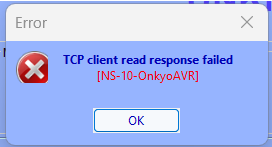
I've used this plugin for a long time, and it's been super-reliable. BUT recently - possibly after a recent Eisy upgrade - the plug-in has been working perfectly only after it is restarted. At some point after it is restarted, it seems to hang. One crisp symptom is that the 'Update' button works flawlessly after the plugin is restarted, but then a short while later (usually less than an hour), when you click on 'Update' you get a "TCP client read response failed" error. My system is on the latest production version of everything, and I've tried deleting the plugin and reinstalling it in a new slot. Something must be corrupting the plugin? Any ideas as to what might be causing this? I love this plugin, in part because it's the only plugin that lets you directly set a specific listening mode (e.g. Dolby Atmos).
-
That worked, thanks for fixing it! My Alexa routines triggered by the 'motion detector' are now working once again:)
-
My email also spontaneously stopped working approximately 24 hours ago.

-
It would be great if there was a 'virtual device' that you could add to the Harmony, and include it in every activity. You could then program any available buttons on the Harmony remote, to trigger a function on the virtual device. The virtual device could be connected to a node server, and you could have ISY programs watch the corresponding nodes for button presses & and then do anything you wanted. I have zero idea how to create such a virtual device & get Harmony to allow us to add it to a Harmony activity. But other than that, the right person could probably implement this pretty easily I'm guessing? Or maybe such a virtual device for the Harmony already exists??? Or is this essentially what the Hue Emulator node server already does? I will try it.
-
OK thanks, good to know I’m not missing anything. Some other people have said that functionality is not consistent with all the different nodes that are now possible. But still it would be nice if at least you could copy scene attributes for Insteon, so we’d at least have the same functionality as before. Sent from my iPhone using Tapatalk
-
Does "copy scene attributes" exist in 5.3? I don't see it.
-
I'm an "auto" diehard. My ISY sets the thermostats to 70 heat/74 cool when we're home, sets back to 66 heat/78 cool when we're not home, and 64 heat/80 cool (vacation mode) when we've been out for more than 20 hours. "Home" is based on my cell phone being within the geo fence, or any of the motion sensors being triggered within the prior hour (I don't rely on the geo fence for my teenagers). Also have some other functions, e.g. there is an "on the way home" mode that gets triggered when I leave my office (plus any time I'm driving in the direction of the house) so that it's nice and warm (or nice and cool in the summer) by the time I arrive, and stuff like that. It's rare that I override the automatic settings by pressing the buttons on the front of the thermostat, or by asking Alexa. It's hard to say which I enjoy more: configuring this stuff, or benefiting from the completely hands-off automatic nature of it:) -Barry
-
That's good, that's good. Maybe one refinement for the third case: when the current temp is smack in the middle of the two old setpoints (which could definitely happen if the temp readings are discrete, e.g. heat is set at 70.0, current temp is 72.0, cool is set at 74.0), then check and see which of the NEW setpoints it is closer to. -Barry
-
Thanks a lot. Although that's a bit of a heavy lift given my knowledge level... -Barry


