


kclenden
Members
-
Joined
-
Last visited
Everything posted by kclenden
-
Those things will affect the Device Links Table. If he does the two steps I outlined above, he'll know definitively whether a factory reset and restore modem is likely to help. Though it doesn't show now (only hours shown), earlier the times of his messages where he said he was doing the PLM restore, and that it didn't work was only 16 minutes. If that's really all the longer it took, based on my experience, either he has a small installation or he has the best communication between devices that I've seen, or something isn't going write with the restore. Part of the "Restore Modem" process clears all of the links in the new PLM and writes new links based on the copy stored on the eISY. If the eISY's copy of the PLM Links Table has been corrupted then when it writes them to the new PLM the new PLM won't have correct links. Doing a restore from IoX/ISY backup is the only way to fix the eISY's copy of the PLM table, so if I have a failed "Restore Modem", I always do a restore from backup before trying again. Though given the scene test results he posted, the eISY is sending out a scene command, and if the devices have the appropriate responder records in their links table, they'll respond regardless of whether the PLM Links Table is corrupted, or not. In theory, that is, as I haven't actually tested it.
-
The ISY/eISY "Scene Test" is basically a worst case "torture test" scenario. In my experience, it's not uncommon for a scene to completely fail the "Scene Test", but work just fine in real life. Also, since getting my eISY a year ago, every one of my scene activations shows "Link responder for aa bb cc not found" for each device in the scene. This message did not appear when using my ISY. Nobody on the forum, that I know of, has been able to explain the message, and since all my scenes work fine, I've never asked UD what it means. Each of your Insteon devices keeps a list of the devices it will communicate with. One the devices every Iis the PLM. So when you replace your PLM, it's necessary to tell all of your Insteon devices to replace the ID of your old PLM with the ID of your new PLM. That is what the "Restore PLM" process does. It generates a lot of activity on your powerline, so if the communication with any of your devices is marginal, it's possible the the old PLM ID won't get replaced with the new PLM ID, and in that case, that device will not respond to your new PLM. Also, if you have any battery operated devices, they won't be updated unless they have been put in the SET mode, and unfortunately they only stay in the SET mode for a couple minutes, and the Restore PLM can take longer than that before it gets to the battery operated device. Once the Restore PLM is done, you should look at a couple things in the Admin Console" Tools->Diagnostics->PLM Info/Status: Make note of the xx.xx.xx that appears before the "/ Connected". That is the address of your PLM. It should appear in the Device Links Table of every one of your devices. Tools->Diagnostics->Show Device Links Table (can also be found by right-clicking a device->Diagnostics->Show Device Links Table): Every device should have an entry that begins with "A2 00 xx xx xx" and "E2 01 xx xx xx", where xx xx xx is the address of your PLM. If the device belongs to any scenes, it should have entries that begin with "A2 yy xx xx xx" where yy is the scene number and xx xx xx is again the address of your PLM. Based on the "Scene Test" results you posted earlier, each of the devices in your "FAMILY - KP (Room)" scene should have an entry that begins A2 24 xx xx xx, and each of the devices in your "OFFICE - KP (Room)" scene should have an entry that begins A2 35 xx xx xx (where xx xx xx is the address of your PLM) or they will not respond to those scenes.
-
TLDR: I don't think your problem is your hardware or cables. For now, the only thing I know to do is write a program to query a device that is never ON and then alert you if it gets turned on AND/OR automatically turn off all your devices. See below for something you might be able to do to confirm that your ALL ON was an eISY-to-PLM communication error. When I upgraded from an ISY to an eISY, my observed instances of ALL ON events increased dramatically. Because of that, as @IndyMike indicated, I did some troubleshooting that led me discover communication errors between the ISY/eISY and the PLM. Having a couple Event Viewer logs from my ISY days, I compared the error rate between ISY/PLM communication and eISY/PLM and found the error rate to be about 7-times higher with the eISY/PLM. Errors went from about 0.1% to close to 1%. Not all errors cause ALL ON events, but the more communication there is, the more errors that occur, and seemingly the greater the chance of an error that causes an ALL ON event. Having an upcoming scheduled vacation, I didn't feel comfortable leaving the house with the eISY running knowing that all my lights could come on randomly and blaze for who knows how long. So I created a program that queries a specific Fanlinc every five minutes. If the fan is on HIGH, then it increments an ALL ON counter and sends an OFF command to a scene that contains all my Insteon devices and then sends me a text message. Then I went on vacation. So far it has counted 8 ALL ON events since then, or about one every six weeks. I didn't come back to this issue until a couple weeks ago. In that time, I've tried a couple things: Switched my PLM from the serial version to the USB version. This made absolutely no change in the quantity of communication errors that I see between the eISY and the PLM. When you learn more about the USB PLM, this isn't surprising since the USB PLM has a USB-to-Serial converter inside the PLM, so the PLM is still receiving serial communication. Wrote a relay/logging program that runs on my laptop to receive serial communication from the eISY and pass it on to the PLM while logging the data to a file. I did this because I wanted to see if the eISY was reporting one thing in the Event Viewer but actually passing corrupted data to the PLM. Turns out the eISY is sending correct data but for some reason the PLM is misinterpreting it. Updated the relay/logging program so that I can slow down each byte of communication that comes from the eISY before sending it on to the PLM. @IndyMike indicated that he uses the "CD" command on the ISY, but as he surmised the eISY does not have such an option, so I'm doing it the hard way. I haven't had time yet to evaluate the impact of slowing down communication on eISY/PLM errors. I have another vacation coming up shortly, so no guarantees when I'll get back to this. The eISY has logging capability that the ISY does not. For this reason, you may be able to confirm what caused your ALL ON. Try the following: Click TOOLS->LOG VIEWER In the Log Viewer window, change from Matter Log to Debug Log Type (INST-TX-I1|INST-ACK) into the "Filter" box and click the Use Regular Expression checkbox Leave "Tail Lines" and "Max Result Lines" at their default of 25,000 and 2,000 and click GO Scroll up to see if you see data from around the time you think the ALL ON happened If you do, you can either copy and paste the results (click the clipboard icon) into a text file and then share that with @IndyMike or me and we can look for corrupted communication, or you can try looking for INST-TX-I1 and INST-ACK pairs that don't match. In my experience, ALL ON events involve the sixth byte changing from 0F to CF and the command in the seventh byte changing from whatever it was to 11, but any corruption is suspicious. If you don't see data from Wednesday at the top of the window, you'll need to either increase the "Max Result Lines" or the "Tail Lines" and click GO again. On my system, I have to increase "Tail Lines" to 90,000 and "Max Result Lines" to 4,000 to see data from Wednesday, but I may have more or less communication going on than you. I don't know if there is a maximum number of lines captured in the log file before it resets, but I do know that if you reboot the eISY the log file starts over. So if you're going to look for a smoking gun of an ALL ON event, you should do it sooner rather than later.
-
I've lost track, but if each of your random ON has an associated REST command, then our deep dive into eISY / PLM communication will be of no help. If I recall correctly, your error log did not show a corresponding IP address which would seem to indicate a process internal to your eISY. Do you have any node servers loaded in PG3?
-
I've run my scanner against Event Viewer logs from both my eISY and my old ISY994. There were no differences in the layout of the log. So I'm curious what you're seeing that is significantly different. I have the same thing happen on my eISY. My scanner takes that into account and attempts to match up the proper ACK. As a failsafe, my scanner quits looking for an ACK after ten seconds and retires the INST-TX-I1 and marks it as a NoAck. This means that even if a barrage of communication causes confusion, the scanner will naturally get back into synch with INST-TX-I1 / INST-ACK pairs. Agreed. I'm actually surprised that it caused an ALL-OFF. My understanding is that devices are supposed to look at the "To Address", in this case 00.11.00, and only act on the message if it's addressed to them. Still, the CF byte indicates a standard group broadcast message so that must be the key. If you're trying invalid message sequences, you might also try (02 62 0F.19.00 CF 11 00) which was one of my ALL-ON events. Ironically that is a corruption of this command (02 62 21 68 01 0F 19 00) which is a status request sent to my fan controller by the program that I wrote to detect ALL-ON events.
-
I had never noticed them while using my ISY either, but after creating a log scanner and running it against Event Viewer Logs from my ISY days, they are present, just at a lower frequency than with the eISY. In limited testing, the mismatches appear to have occurred roughly 1 out every 642 times on my ISY, so it's not too surprising that you'd miss them. I never saw "LINK INFO" tags when I was using an ISY. They just started with the eISY. They show up when a SCENE command is sent. They don't appear to harm anything as scenes react as expected. I've seen posts from other people on the forum asking about them, but no one ever posts an answer. I migrated from an ISY to an eISY so I don't know if they're an artifact of that, but I did try removing a device and readding it to the eISY and it had no effect on the "LINK INFO" that appears for it. I'm not highlighting them. My scanner merely shows everything that appears in the log between the opening INST-TX-I1 and closing INST-ACK tags. I use a lot of scenes, so a high percentage of the communication between my eISY and PLM is scene commands. I think that's why they're prevalent in the log above, but I have seen eISY / PLM miscommunication in my logs for direct device commands as well. Yes, I was sitting at my desk when it happened, so I'm sure that was the cause of the ALL-OFF. I have also physically witnessed an ALL-ON and have it captured in an Event Log as well. I'm also not sure if these are the infamous ALL-ON / OFF from the past, but since I do find mismatched communication in my old ISY Event Viewer logs, it seems like it could be a plausible theory. Eventually, I will get to that kind of experimentation . . . Eventually, I will be opening a ticket with UDI and providing any info I have accumulated. I'm hoping to have log scans from more than just my setup. Hopefully other forum users will create Event Viewer logs and scan them. I'd definitely like to have someone that is using a USB PLM scan one of their logs. I'm heading off on a two-week trip starting tomorrow, so realistically, I won't finish my analysis and open a ticket with UDI for at least a month. Happy to send you my program, with the usual caveat that it's not fully tested yet, and only runs under Windows. Of if you'd rather just send me your log, I can scan it and post the results.
-
Here's the output from the log scanner that I wrote when run against a six day period Event Viewer Log. The last mismatch shown actually caused an All Off event. What is listed is the actual Event Viewer Log lines prefaced by the log line # so that you can easily go to the corresponding line in the log file (which I've attached). 1683 Thu 10/09/2025 05:02:50 AM : [INST-TX-I1 ] 02 62 00 00 20 CF 13 00 1685 Thu 10/09/2025 05:02:50 AM : [LINK-INFO ] Link for responder 20 77 13 1 not found 1687 Thu 10/09/2025 05:02:50 AM : [LINK-INFO ] Link for responder 20 85 C3 1 not found 1689 Thu 10/09/2025 05:02:50 AM : [LINK-INFO ] Link for responder 22 AD 9A 1 not found 1691 Thu 10/09/2025 05:02:50 AM : [LINK-INFO ] Link for responder 4D D3 B1 1 not found 1693 Thu 10/09/2025 05:02:50 AM : [LINK-INFO ] Link for responder 4F 84 D8 1 not found 1695 Thu 10/09/2025 05:02:50 AM : [INST-ACK ] 02 62 00.00.20 00 13 00 06 LTOFFRR(00) 4111 Thu 10/09/2025 12:10:00 PM : [INST-TX-I1 ] 02 62 00 00 20 CF 13 00 4113 Thu 10/09/2025 12:10:00 PM : [LINK-INFO ] Link for responder 20 77 13 1 not found 4115 Thu 10/09/2025 12:10:00 PM : [LINK-INFO ] Link for responder 20 85 C3 1 not found 4117 Thu 10/09/2025 12:10:00 PM : [LINK-INFO ] Link for responder 22 AD 9A 1 not found 4119 Thu 10/09/2025 12:10:00 PM : [LINK-INFO ] Link for responder 4D D3 B1 1 not found 4121 Thu 10/09/2025 12:10:00 PM : [LINK-INFO ] Link for responder 4F 84 D8 1 not found 4123 Thu 10/09/2025 12:10:00 PM : [INST-ACK ] 02 62 00.00.20 CF 00 00 06 (00) 4435 Thu 10/09/2025 12:53:35 PM : [INST-TX-I1 ] 02 62 00 00 20 CF 13 00 4437 Thu 10/09/2025 12:53:35 PM : [LINK-INFO ] Link for responder 20 77 13 1 not found 4439 Thu 10/09/2025 12:53:35 PM : [LINK-INFO ] Link for responder 20 85 C3 1 not found 4441 Thu 10/09/2025 12:53:35 PM : [LINK-INFO ] Link for responder 22 AD 9A 1 not found 4443 Thu 10/09/2025 12:53:35 PM : [LINK-INFO ] Link for responder 4D D3 B1 1 not found 4445 Thu 10/09/2025 12:53:35 PM : [LINK-INFO ] Link for responder 4F 84 D8 1 not found 4447 Thu 10/09/2025 12:53:35 PM : [INST-ACK ] 02 62 00.00.13 00 13 00 06 LTOFFRR(00) 17351 Fri 10/10/2025 07:14:08 AM : [INST-TX-I1 ] 02 62 00 00 20 CF 13 00 17353 Fri 10/10/2025 07:14:08 AM : [LINK-INFO ] Link for responder 20 77 13 1 not found 17355 Fri 10/10/2025 07:14:08 AM : [LINK-INFO ] Link for responder 20 85 C3 1 not found 17357 Fri 10/10/2025 07:14:08 AM : [LINK-INFO ] Link for responder 22 AD 9A 1 not found 17359 Fri 10/10/2025 07:14:08 AM : [LINK-INFO ] Link for responder 4D D3 B1 1 not found 17361 Fri 10/10/2025 07:14:08 AM : [LINK-INFO ] Link for responder 4F 84 D8 1 not found 17363 Fri 10/10/2025 07:14:08 AM : [INST-ACK ] 02 62 20.CF.13 00 13 00 06 LTOFFRR(00) 23301 Fri 10/10/2025 09:49:33 PM : [INST-TX-I1 ] 02 62 00 00 1B CF 11 00 23303 Fri 10/10/2025 09:49:33 PM : [LINK-INFO ] Link for responder 22 8B F1 2 not found 23305 Fri 10/10/2025 09:49:33 PM : [LINK-INFO ] Link for responder 23 B3 D4 1 not found 23307 Fri 10/10/2025 09:49:33 PM : [LINK-INFO ] Link for responder 23 BB 88 1 not found 23309 Fri 10/10/2025 09:49:33 PM : [LINK-INFO ] Link for responder 23 B3 A2 1 not found 23311 Fri 10/10/2025 09:49:33 PM : [LINK-INFO ] Link for responder 24 A3 6A 1 not found 23313 Fri 10/10/2025 09:49:33 PM : [INST-ACK ] 02 62 00.00.1B 00 11 00 06 LTONRR (00) 32277 Sat 10/11/2025 05:27:05 PM : [INST-TX-I1 ] 02 62 00 00 20 CF 13 00 32279 Sat 10/11/2025 05:27:05 PM : [LINK-INFO ] Link for responder 20 77 13 1 not found 32281 Sat 10/11/2025 05:27:05 PM : [LINK-INFO ] Link for responder 20 85 C3 1 not found 32283 Sat 10/11/2025 05:27:05 PM : [LINK-INFO ] Link for responder 22 AD 9A 1 not found 32285 Sat 10/11/2025 05:27:05 PM : [LINK-INFO ] Link for responder 4D D3 B1 1 not found 32287 Sat 10/11/2025 05:27:06 PM : [LINK-INFO ] Link for responder 4F 84 D8 1 not found 32289 Sat 10/11/2025 05:27:06 PM : [INST-ACK ] 02 62 20.CF.13 00 13 00 06 LTOFFRR(00) 32753 Sat 10/11/2025 05:35:23 PM : [INST-TX-I1 ] 02 62 00 00 20 CF 13 00 32755 Sat 10/11/2025 05:35:23 PM : [LINK-INFO ] Link for responder 20 77 13 1 not found 32757 Sat 10/11/2025 05:35:23 PM : [LINK-INFO ] Link for responder 20 85 C3 1 not found 32759 Sat 10/11/2025 05:35:23 PM : [LINK-INFO ] Link for responder 22 AD 9A 1 not found 32761 Sat 10/11/2025 05:35:23 PM : [LINK-INFO ] Link for responder 4D D3 B1 1 not found 32763 Sat 10/11/2025 05:35:23 PM : [LINK-INFO ] Link for responder 4F 84 D8 1 not found 32765 Sat 10/11/2025 05:35:23 PM : [INST-ACK ] 02 62 00.CF.13 00 13 00 06 LTOFFRR(00) 65617 Mon 10/13/2025 11:20:29 PM : [INST-TX-I1 ] 02 62 00 00 20 CF 13 00 65619 Mon 10/13/2025 11:20:29 PM : [LINK-INFO ] Link for responder 20 77 13 1 not found 65621 Mon 10/13/2025 11:20:29 PM : [LINK-INFO ] Link for responder 20 85 C3 1 not found 65623 Mon 10/13/2025 11:20:29 PM : [LINK-INFO ] Link for responder 22 AD 9A 1 not found 65625 Mon 10/13/2025 11:20:29 PM : [LINK-INFO ] Link for responder 4D D3 B1 1 not found 65627 Mon 10/13/2025 11:20:29 PM : [LINK-INFO ] Link for responder 4F 84 D8 1 not found 65629 Mon 10/13/2025 11:20:29 PM : [INST-ACK ] 02 62 20.CF.13 00 13 00 06 LTOFFRR(00) 70855 Tue 10/14/2025 06:52:57 AM : [INST-TX-I1 ] 02 62 00 00 20 CF 13 00 70857 Tue 10/14/2025 06:52:57 AM : [LINK-INFO ] Link for responder 20 77 13 1 not found 70859 Tue 10/14/2025 06:52:57 AM : [LINK-INFO ] Link for responder 20 85 C3 1 not found 70861 Tue 10/14/2025 06:52:57 AM : [LINK-INFO ] Link for responder 22 AD 9A 1 not found 70863 Tue 10/14/2025 06:52:57 AM : [LINK-INFO ] Link for responder 4D D3 B1 1 not found 70865 Tue 10/14/2025 06:52:57 AM : [LINK-INFO ] Link for responder 4F 84 D8 1 not found 70867 Tue 10/14/2025 06:52:57 AM : [INST-ACK ] 02 62 00.CF.13 00 13 00 06 LTOFFRR(00) 72313 Tue 10/14/2025 03:21:45 PM : [INST-TX-I1 ] 02 62 00 00 20 CF 13 00 72315 Tue 10/14/2025 03:21:45 PM : [LINK-INFO ] Link for responder 20 77 13 1 not found 72317 Tue 10/14/2025 03:21:45 PM : [LINK-INFO ] Link for responder 20 85 C3 1 not found 72319 Tue 10/14/2025 03:21:45 PM : [LINK-INFO ] Link for responder 22 AD 9A 1 not found 72321 Tue 10/14/2025 03:21:45 PM : [LINK-INFO ] Link for responder 4D D3 B1 1 not found 72323 Tue 10/14/2025 03:21:45 PM : [LINK-INFO ] Link for responder 4F 84 D8 1 not found 72325 Tue 10/14/2025 03:21:45 PM : [INST-ACK ] 02 62 00.00.20 00 13 00 06 LTOFFRR(00) 74689 Tue 10/14/2025 06:05:15 PM : [INST-TX-I1 ] 02 62 00 00 2A CF 13 00 74691 Tue 10/14/2025 06:05:15 PM : [INST-ACK ] 02 62 00.CF.13 00 11 00 06 LTONRR (00) 76515 Tue 10/14/2025 08:43:16 PM : [INST-TX-I1 ] 02 62 00 00 1B CF 11 00 76517 Tue 10/14/2025 08:43:16 PM : [LINK-INFO ] Link for responder 22 8B F1 2 not found 76519 Tue 10/14/2025 08:43:16 PM : [LINK-INFO ] Link for responder 23 B3 D4 1 not found 76521 Tue 10/14/2025 08:43:16 PM : [LINK-INFO ] Link for responder 23 BB 88 1 not found 76523 Tue 10/14/2025 08:43:16 PM : [LINK-INFO ] Link for responder 23 B3 A2 1 not found 76525 Tue 10/14/2025 08:43:16 PM : [LINK-INFO ] Link for responder 24 A3 6A 1 not found 76527 Tue 10/14/2025 08:43:16 PM : [INST-ACK ] 02 62 00.CF.11 00 11 00 06 LTONRR (00) 76609 Tue 10/14/2025 10:19:39 PM : [INST-TX-I1 ] 02 62 00 00 29 CF 11 00 76611 Tue 10/14/2025 10:19:39 PM : [LINK-INFO ] Link for responder 22 8B F1 2 not found 76613 Tue 10/14/2025 10:19:39 PM : [LINK-INFO ] Link for responder 23 B3 D4 1 not found 76615 Tue 10/14/2025 10:19:39 PM : [LINK-INFO ] Link for responder 23 BB 88 1 not found 76617 Tue 10/14/2025 10:19:39 PM : [LINK-INFO ] Link for responder 23 AF 3D 1 not found 76619 Tue 10/14/2025 10:19:39 PM : [LINK-INFO ] Link for responder 23 B3 A2 1 not found 76621 Tue 10/14/2025 10:19:39 PM : [LINK-INFO ] Link for responder 24 A3 6A 1 not found 76623 Tue 10/14/2025 10:19:39 PM : [VAR 2 25 ] 0 76625 Tue 10/14/2025 10:19:39 PM : [VAR 2 25 ] 302 76627 Tue 10/14/2025 10:19:39 PM : [INST-ACK ] 02 62 00.11.00 CF 13 00 06 LTOFFRR(00) Total Mismatches: 13 No Acks: 7 Matches: 429The cable from my eISY to PLM is about four feet long. I've also scanned logs from when I was using an ISY, and while the mismatches are less frequent, they still appear. The cable between my ISY and PLM (different than the eISY PLM) was the one that came with the ISY. ISY-Events-Log.v5.9.1__Wed 2025.10.15 12.32.50 AM.txt
-
A couple shots in the dark: Some of the KeypadLincs can be changed between 6 and 8 button mode. Perhaps your 6-button is now acting as an 8-button. Try pressing to the left of the ON button to see if it controls the main load. If it does, then it's acting as an 8-button keypad and you'll want to change it back to 6-button. Some of the later KeypadLincs included an option to disconnect the main load button from the physical load. Perhaps this option got set during one of the power bumps. My memory is really murky on this, and some searching didn't turn up much other than this: https://forum.universal-devices.com/topic/32407-detached-load-control-on-kpl/
-
Does it seem like you're seeing these devices be randomly On more often now that you're using an eISY than when you were using an ISY? Since switching from an ISY to an eISY I have been having significantly more All-On events and some All-Off events. I actually captured two instances of an All-On event and one instance of an All-Off event in an Event Viewer Log. In all three cases, what I saw was the eISY send the correct message to the PLM, but the PLM echo back a corrupted message where the FLAGS portion of the message had been changed from a Direct message to a Broadcast message. Besides causing All-On / All-Off events, messages corrupted by the PLM could cause individual devices to randomly go On / Off. Because of that learning, I wrote a program to scan through Event Viewer logs to check for instances where the message echoed back from the PLM did not match what was sent by the eISY. An Event Viewer log that I recently created over 7 days shows 71 instances of mismatched messages. That's not as bad as it looks because the eISY can send multiple messages to the PLM before receiving an acknowledgement so some of those 71 instances are merely the fact that my program isn't yet sophisticated enough to match up acknowledgements that come back out of order. However, a quick scan through the mismatches would seem to indicate that at least 50% are true mismatches. I plan to enhance my program so that it can handle out of order acknowledgements and not report them as mismatches. Not knowing whether these mismatches are being caused by the eISY or the PLM, I found an Event Viewer Log that spanned 7 days from Sept 2020 when I was still using an ISY. Running my scanner against that file only showed 10 mismatches, of which 5 were actual mismatches. This is relevant for multiple reasons: The Event Viewer log was created by a different hub (ISY vs eISY) using a different PLM The number of mismatches from the eISY log is roughly 7X more than the eISY log which matches my observational experience of an increase in All-On events since using the eISY If there really is an increase in mismatches when using the eISY vs the ISY, it could indicate that the speed of the device sending messages to the PLM is a contributing factor, and that the path to a solution lies in the communication code that sends messages from the ISY/Polisy/eISY to the PLM If these mismatches really are errors, the ISY/Polisy/eISY should track and report them Both PLMs that I used to create the Event Viewer logs are Serial devices. It would be very helpful to be able to scan an Event Viewer log that was created using an USB PLM. All of the above is based on my understanding that when the ISY/Polisy/eISY sends a message to the PLM, the PLM should echo that message back exactly with just an "06" appended. If my understanding isn't correct, then everything above is garbage. I'm interested in your thoughts. I will be collecting more Event Viewer Logs from my system to try to really quantify the number of times the PLM echoes back a corrupted message. While I think my reasoning is sound that having scanned a log created by an eISY with a new PLM, and one from an ISY with an old PLM means that my hardware is not at fault, perhaps I am missing something. With that in mind, eventually I'm hoping to enlist some of you to capture an Event Viewer log over several days and then either send it to me to scan, or use my program to scan it yourself. If we acquire enough data to indicate that something weird is going on with the communication between the ISY/Polisy/eISY and the PLM, then we can submit it to UD in hopes that it will allow them to track down the root cause.
-
How did you change the state of your switch? The log shown above is not consistent with changing the state of the switch from the Admin Console. Were you changing the state by manually pressing the switch? These would be commands that the eISY is sending to the device. Since they work, it implies that at least one half of the link combination between the eISY and device is intact. The fact that you're not receiving status updates from the devices when they are manually activated implies that the other half of the link combination between eISY and device is not intact. When you add a device to your eISY network, at least four links are created. The first two links allows the eISY to control the device. The other two links allow the device to control the eISY. One link stored in the PLM tells it that it can control the device. This is called a controller link. A corresponding link is stored in the device that tells it that the PLM is allowed to control it. This is called a responder link. The exact same thing happens with the device. One link (controller) is stored in the device that tells it that it can control the PLM. Another link (responder) is added to the PLM that tells it that it can be controlled by the device. Depending on the type of device (e.g. keypad, motion sensor), many more links will be created between the PLM and device. Also, when you add devices to scenes, links are added to both the PLM and device. The fact that you can query and turn on/off devices from the eISY tells you that the PLM has a controller link for the device and that the device has a responder link for the PLM. Since you're not receiving status updates from the device it implies that either the device is missing a controller link that allows it to control the PLM or the PLM is missing a responder link that tells it that it can be controlled by the device. Since you're having problems with more than one device, it seems more likely that the missing links are in the PLM as opposed to several devices. If the PLM is missing links, it can be caused by many things, but generally falls into several areas. The PLM hardware is failing - Replacing or repairing the PLM fixes this. An electrical anomaly caused the PLM to corrupt its links table - Using the restore PLM command should fix this. Too many devices have been added to the eISY Insteon network or to scenes. The PLM links table can only hold so many links (~1000). If the PLM links table is full when a new device is added or a device is added to a scene, sometimes links for existing devices/scenes are overwritten by links for the new device/scene. The fix for this is to either remove Insteon devices from the eISY network, or to reduce the number of scenes being used, or reduce the number of devices that are included in scenes. I'd recommend doing "Tools->Diagnostics->Show PLM Links Table" followed by clicking the "Start" button. You want to do this at a time when nothing else is happening on the eISY or Insteon devices as activity can cause the link listing to abort. Because of this, you'll want to list the PLM Links Table several times so that you know you got a complete listing. When you have a complete listing, click "Save" and save the listing to a text file. This will allow you to use a text editor to search for the appropriate links for the devices that are not reporting status updates.
-
Like the previous discussion, I tried installing the AVServer plug-in but it remains disconnected. I can see in the log that it tries to startup every 30 seconds. It appears to be missing a module (xmltodict), which is strange because it is included in the "requirements.txt" shown on the guthub site. Below is what appears in the log every 30 seconds. How do I resolve this? 2025-10-16 01:50:35.871 MainThread udi_interface INFO polylogger:set_basic_config: set_basic_config: enable=True level=30 2025-10-16 01:50:35.871 MainThread udi_interface INFO __init__:<module>: UDI interface initializing 2025-10-16 01:50:35.871 MainThread udi_interface INFO __init__:<module>: User=None 2025-10-16 01:50:35.871 MainThread udi_interface INFO __init__:<module>: Home=/var/polyglot/pg3/ns/0021b902702f_9 2025-10-16 01:50:35.871 MainThread udi_interface INFO __init__:<module>: Node Server Path=/var/polyglot/pg3/ns/0021b902702f_9 2025-10-16 01:50:35.872 MainThread udi_interface INFO __init__:<module>: PG3INIT=eyJ1dWlkIjoiMDA6MjE6Yjk6MDI6NzA6MmYiLCJwcm9maWxlTnVtIjo5LCJsb2dMZXZlbCI6IklORk8iLCJ0b2tlbiI6InBadHhIKGw4RGU1dCptSHEiLCJtcXR0SG9zdCI6ImxvY2FsaG9zdCIsIm1xdHRQb3J0Ijo4ODgzLCJzZWN1cmUiOjEsImlzUEczeCI6dHJ1ZSwicGczVmVyc2lvbiI6IjMuMy4yMSIsImlzeVZlcnNpb24iOiI1LjkuMSIsImVkaXRpb24iOiJGcmVlIn0= 2025-10-16 01:50:35.872 MainThread udi_interface INFO __init__:<module>: Loading interface module 2025-10-16 01:50:35.912 MainThread udi_interface INFO interface:<module>: Loading MQTT module 2025-10-16 01:50:36.392 MainThread udi_interface INFO interface:<module>: MQTT module loaded 2025-10-16 01:50:36.603 MainThread udi_interface INFO __init__:<module>: Loading udi_interface module 2025-10-16 01:50:36.604 MainThread udi_interface INFO __init__:<module>: Loading node module 2025-10-16 01:50:36.604 MainThread udi_interface INFO __init__:<module>: Loading custom module 2025-10-16 01:50:36.604 MainThread udi_interface INFO __init__:<module>: Loading isy module 2025-10-16 01:50:36.604 MainThread udi_interface INFO __init__:<module>: Loading OAuth module 2025-10-16 01:50:36.605 MainThread udi_interface INFO __init__:<module>: UDI interface initialized 2025-10-16 01:50:36.605 MainThread udi_interface INFO __init__:<module>: UDI Python Interface for Polyglot version 3 3.3.18 Starting... 2025-10-16 01:50:36.608 MainThread udi_interface ERROR udi_interface:write: Traceback (most recent call last): 2025-10-16 01:50:36.608 MainThread udi_interface ERROR udi_interface:write: File "/var/polyglot/pg3/ns/0021b902702f_9/udi-av-poly.py", line 8, in <module> 2025-10-16 01:50:36.608 MainThread udi_interface ERROR udi_interface:write: from nodes import AVController 2025-10-16 01:50:36.608 MainThread udi_interface ERROR udi_interface:write: File "/var/polyglot/pg3/ns/0021b902702f_9/nodes/__init__.py", line 6, in <module> 2025-10-16 01:50:36.608 MainThread udi_interface ERROR udi_interface:write: from .av_controller import AVController 2025-10-16 01:50:36.608 MainThread udi_interface ERROR udi_interface:write: File "/var/polyglot/pg3/ns/0021b902702f_9/nodes/av_controller.py", line 8, in <module> 2025-10-16 01:50:36.609 MainThread udi_interface ERROR udi_interface:write: from nodes.node_factory import NodeFactory 2025-10-16 01:50:36.609 MainThread udi_interface ERROR udi_interface:write: File "/var/polyglot/pg3/ns/0021b902702f_9/nodes/node_factory.py", line 3, in <module> 2025-10-16 01:50:36.609 MainThread udi_interface ERROR udi_interface:write: from ssdp.ssdp import SSDP 2025-10-16 01:50:36.609 MainThread udi_interface ERROR udi_interface:write: File "/var/polyglot/pg3/ns/0021b902702f_9/ssdp/ssdp.py", line 10, in <module> 2025-10-16 01:50:36.609 MainThread udi_interface ERROR udi_interface:write: import xmltodict 2025-10-16 01:50:36.609 MainThread udi_interface ERROR udi_interface:write: ModuleNotFoundError 2025-10-16 01:50:36.609 MainThread udi_interface ERROR udi_interface:write: : 2025-10-16 01:50:36.610 MainThread udi_interface ERROR udi_interface:write: No Module named 'xmltodict'
-
Sort of. That is the only command in the lines that you posted. All the other lines are status updates. I think the fact that it doesn't show an IP address means it wasn't an external device that issued the command, but rather something running on your ISY/Polisy/eISY. I'm not really fluent in node servers (or whatever they're called now), but the line seems to indicate that whatever plugin is in slot 10 of your Polyglot3 setup is involved. If you launch Polyglot V3 and go to the "Dashboard", look for the plug-in that ends in (10). Updated: You can also find out what's in slot #10 via "Plugins->Configure->[01] to [20]->[10]..."
-
Your Event Log shows the ISY attempting to get the status of 35 devices over the course of about 13 minutes. In every case, it doesn't hear even a single peep back from those devices. During that time, it does, however, hear unprompted from two devices. Interestingly, one of the two devices it hears from is a device from which it earlier attempted to get a status update. My conclusion from this is that the PLM never actually sent the status requests. This could be a result of a hardware problem or a corrupt PLM Links Table. These two statements should not be able to exist side-by-side. Start the Event Viewer and set it to Level 3. Then do "Tools->Diagnostics->Show PLM Links Table" followed by "Start". If you post the resulting log that may allow for more troubleshooting.
-
The PLM is really just another Insteon device. Every Insteon device has a Links Table. This table tells it who it will respond to, and who it can control. When you add an Insteon device to your ISY two* links are added to the PLM Links Table (a controller and a responder link) and two links are added to the device Links Table (a controller and a responder). Without these links, the PLM and device would simply ignore each other and your ISY would not be able to control or receive status messages from a device. * It's possible more links are added depending on the type of device. For example, a 6-button keypad will have links added for each button.
-
The log available via "Tools->Error Log" should be able to tell you the IP address of whatever device is sending the random "rest" commands. After you save it, open it with a text editor and use the date/time to find the ON command that arrived via a "rest" command and the line above should show you the IP address of the device that sent the command. Here's an example of when I used a "rest" command from the browser of my desktop to get the value of one of my state variables. Mon 2025/10/13 06:32:58 AM 0 -170001 [HTTP:6-9] ::ffff:192.168.2.166:2259->64288 Mon 2025/10/13 06:32:58 AM 0 -170001 [HTTP:6-9]: GET-->/rest/vars/get/2/25 Mon 2025/10/13 06:32:58 AM 0 -170001 [HTTP:6-9] Closing socket normally
-
I seem to recall some people mentioning that the "Insteon Support" checkbox became unchecked after an update. So you might goto the "Configuration" tab and make sure that the "Insteon Support" checkbox is indeed checked.
-
Upgrading to an eISY is a nice way of supporting UD. I did that earlier this year when UD sent out a notice that eISY prices would be going up because of tariffs. For that reason, I have a decommissioned ISY 994i PRO. It was purchased in Jan 2013, and used through July of this year. It's yours for the price of shipping (~$8 in USA), if you want it. It's on v5.3.4, so I think you'd need to upgrade your existing ISY first before you could create a backup that could be restored to it.
-
The Event Viewer log you posted does not show a communication issue. I'm 99.9% sure you'll get the same result with the new switches. Guy is correct, there is a limit, though it depends on whether you have the PRO model, or not. Given your result, I'm guessing you don't have the PRO model which means your limit is much lower. Here is a link to a discussion from 2019 which I think covers your issue:
-
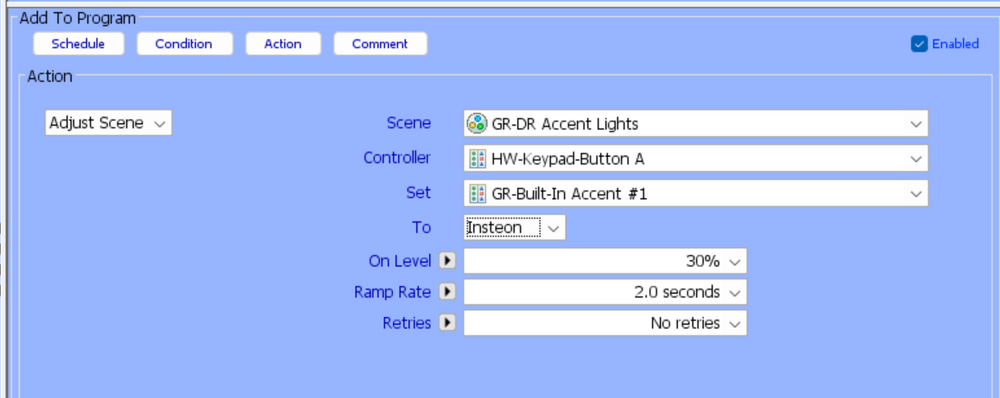
You are adjusting the on-level for each device when it is locally controlled (i.e. when you press the SwitchLinc button). What you want to do is modify the on-level for the device when it is activated by a scene controller. So, in the example above, the on-level for "GR-Built-In Accent #1" would be set to 30% when the scene is activated by the controller "HW-Keypad-Button A". In your case, you would want "Set" to be "Master Bath Sink Lts - Load" and the "Controller" to be "Master Bath Sink Lts - Ctl".
-
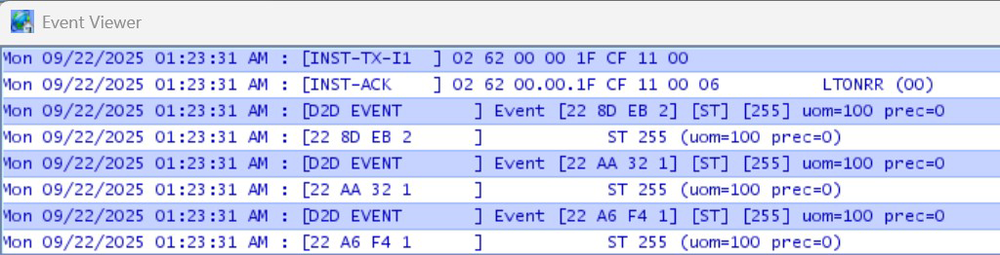
This is only half correct. When a scene is activated, the command that activates it is an SA ALL-Link Broadcast message. After an SA ALL-Link Broadcast message is sent, the device sending it can, but doesn't have to, send individually-addressed cleanup messages. Those cleanup messages act as a second notice to devices that the broadcast message was sent, and causes the devices in the scene to respond with an ACK or NAK message. Importantly, the eISY/Polisy/ISY does not send individually-addressed cleanup messages after it activates a scene, so devices do not respond with ACK/NAK messages and the power-line is not overloaded with communication. So programmatically activating a scene from the eISY/Polisy/ISY will not overload the power-line with cleanup messages between devices. You can see this in the Event Viewer at Level 3. Here's the result of activating a scene from the Admin Console. The scene has three devices: two SwitchLinc 2477S and one KeypadLinkc button. You can see one command (first line) that goes from my eISY to the PLM and one command (second line) that goes from the PLM to the devices. Lines 3-8 are not actually power-line communication, but merely the eISY logging the fact that it has changed the state of the three devices in the scene based on the fact that it sent the scene command. Importantly, you don't see a second [INST-TX-I1] message from the eISY with a cleanup message, and there are no [INST-SRX] responses from the scene devices with an ACK/NAK. I said only half correct above, because device to device scene activation (e.g. if I press the Keypad button to activate the scene instead of activating it from the Admin Console/Program) does involve cleanup messages. If the scene has a lot of responders, this can tie up the power-line for a while, but this generally doesn't cause a problem because I can only push buttons so fast. It does mean, though, that if you have a program that is activated by a scene controlling device, you need to be aware of that and control how quickly the program starts sending out power-line commands.
-
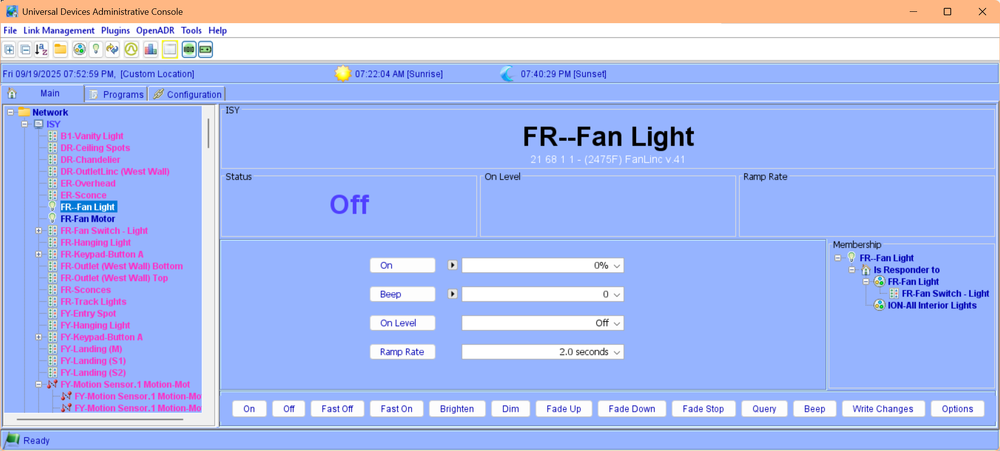
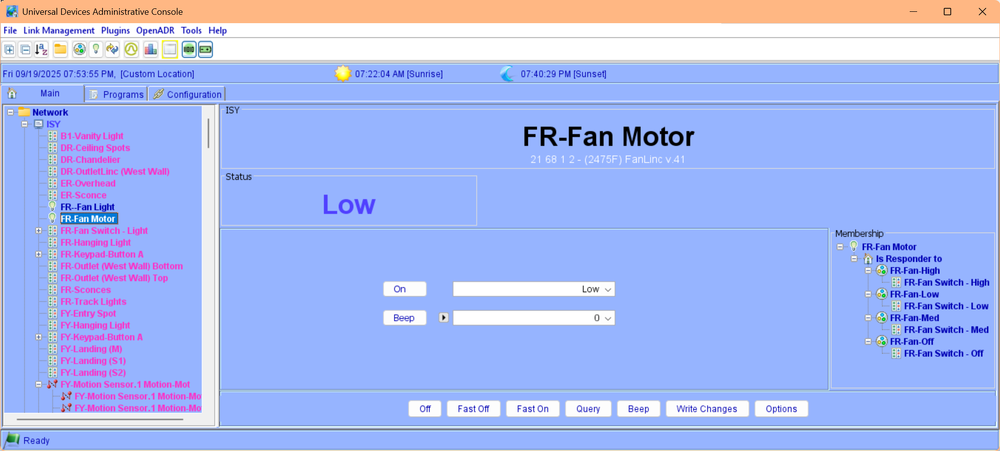
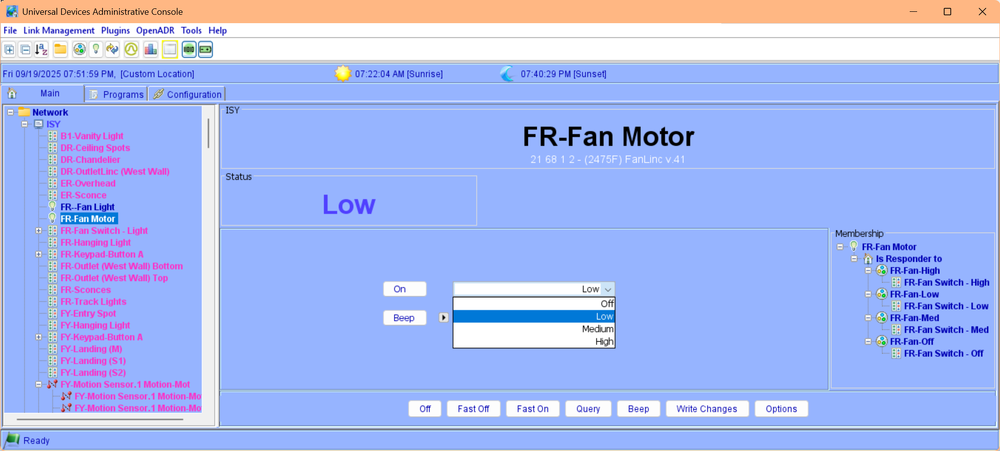
According to my notes, I purchased my Fanlinc in 12/2013 and installed it in 03/2014. Haven't had any issues with it. I have it linked to a keypad so it is quite easy to use.
-
Before climbing a ladder to reset the Fanlinc, if you're just looking at the "Log" and not the "Event Viewer", then you might try opening the Event Viewer and setting it to Level 3 a little before sunset. That should allow you to see all the communication that is happening when your Lamplinc turns on. At least all the communication that your PLM can see. Another thing to do would be to run Tools->Diagnostics->Show Device Links Table and post the results here. That will tell us the address of all the devices that can control the Lamplinc.
-
I'm confused. Your last statement indicates that you are making the adjustments using an API Rest command (by calling an ISY program). That is only one level of abstraction away from what you're apparently trying to accomplish. In both cases, you'd still need the ISY, right? Or am I missing something?
-
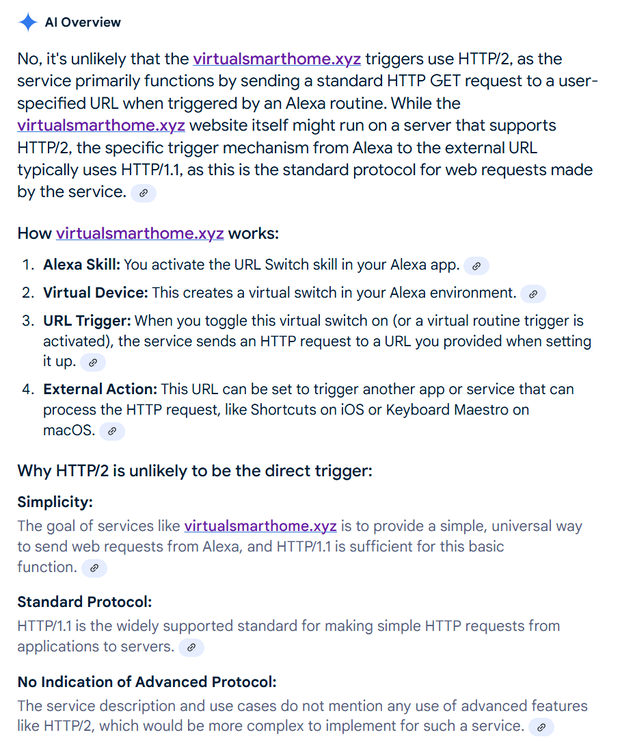
Interestingly our robot overlords do not agree: Now mind you, I trust Michel more than any AI, but maybe he meant HTTPS vs HTTP as opposed to HTTP2 versus HTTP1.1?
-
That makes sense since its status was OFF before it received the "FF" command. I only asked because your screenshot was cutoff at the [INST-SRX] line. If there is a [D2D Event] record or a record with the device's address within [] that follows the [INST-SRX] line, that tells you how the Polisy interpreted the [INST-SRX} line.


