


larryllix
Members
-
Joined
-
Last visited
Everything posted by larryllix
-
I am not sure the ISY would handle a card larger than 16MB. It could only use a max 2MB of partition size as it used the old standards. Only format the SD card inside ISY to be sure. It should be automatic from there. IIRC it was FAT. Try a smaller SD card size if you have an older one laying around. ISY originally came with a 2BG SD card.
-
No. eisy.local results in a Not Found error in the browser. My bookmark https://my.isy.io/index.htm works fine for ISY Portal though. That would be an assumed port 443 then. My bookmark http://192.168.0.165:3000/dashboard works OK for PG3x also.
-
The Ping plug-in mentioned sounds like a great idea but in the old(er) days I set up a state variable and made ISY Portal aware of it, presenting it to the Alexa cloud app. In the Alexa cloud app, I created a routine, triggered by the pseudo MS from ISY Portal and that triggered a turn on of another variable that ISY watched for response. I am not sure who cleared it now. On a cyclic timer ISY then sent that semaphore by toggling the variable to True and then False (1/0) and then the program allowed half a minute to see or not see the response. If no response was found then a series of repeated attempts to power cycle the router was done with that program watching for a successful retest each time. IN the end IIRC I increased the time delay to about once per hour to retest. It may be a possible Internet failure. We've had a few in the Eastern Seaboard (NY, Ontario, Ohio, Michigan, Manitoba) so far.
-
It really ticks me off when I have to jerk my devices to get them reconnected each time the router decides to hiccough. Power cycling the router leaves a few devices hanging and need to have various degrees of power cycling, rebooting, and complete reset of the security details. My VR headset complains but then reconnects automatically.
-
ISY and an Insteon OnOff module is cheaper and you can control the logic to do it automatically. However, complete manual control has a lot to be said also.
-
Thanks for that info. I guess I have never had one. On that same note: I had to upgrade my java again and now have no IoX finder again. None of my links work anymore as they appear to have all changed again.. I can only download the start.jnlp app now. However java apps cannot be installed on the Windows Taskbar. ☹️ Here we go again.
-
Oh so you have a backup Internet access system, using a mobile cell signal device. That works. Costly for most of us though.
-
Network devices do not communicate by URL names. A DNS server has to be contacted first, which then supplies an IP address for same, or passes the request up to the next DNS server, usually google or similar, to be used by network devices. Then network and Internet devices use IP addresses for communications. LAN devices do shout out keepalive signals occasionally, to keep the router aware they are there but no URL names are used. Only IP addresses are used at this point in connection time. LAN devices contact a DHCP server with their MAC address of the hardware and receive an IP address from it, so they can be contacted by their assigned IP address.
-
Is this the Hot-spot from your mobile device? Can this work from 3000 miles away when your router crashes or locks up?
-
Thanks Of the 7 routers I have owned, they have only ever supplied the IP address of external DNS servers. There was no local DNS server or file containing local name conversions. Routers always contain a NAT translation table for the DHCP server. This has always been a problem because the ISY URL, always given out here, has never worked on any system I have owned. The IoX locator always disappears sooner or later, and then the links to reload it, never work, making it a real struggle to recover and access my polisys or ISYs.
-
Unless this devices has an automatic "return to on" routine, once turned off you will be locked out of any further WiFi actions once your power is off, and not be able to turn your router back on from anywhere.
-
How would my router know where eISY.local is? These names have never worked in any LAN/Router system I ever had. I have no local DNS server.
-
Did you know there are Govee 1 and Govee 2 revisions? I am not sure what the difference is but I know some software doesn't work with both version. There was a major change in the protocol. The PG3x plug-in only supports one of the protocols and it isn't matter, only the plain WiFi protocol.
-
With ISY/polisy/eISY and Insteon, no WiFi, cloud, router or modem is required. ISY does some sensing of the router or LAN or Internet being down and power cycles the router/modem by the Insteon network.
-
They are not the same devices and both operate from different sources. ISY and Insteon power cycle your router. Remote WiFi via Internet power cycle your ISY manually by yourself from an app that comes with that brand of smart receptacle. Waiting for up to a week may leave you on vacation for a week without any monitoring, reporting and home blind. If your grid power blinks and ISY doesn't reconnect it may eave you home blind until you reboot your ISY with a fresh router. If you have any PG3x devices most have a heartbeat that makes it easy to detect if things are all working properly. Eg. ecobee thermostats with the jimbo NS can detect a cloud connection both ways as well as your router function is intact.
-
If WiFi or Remote devices do not respond correctly then something Internet or LAN is not functioning. Insteon can now cycle the power to your router(s). Sending an on and off signal via ISY Portal to Alexa routine and back to an ISY variable or program tests a lot of comunications out and back. If your polisy/ISY/eISY does not respond from a remote location, another brand of WiFi controlled power plug can power cycle them (HA controller) via remote app of that brand. IOW: ISY with Insteon monitors your WiFi equipment via Insteon devices. Remote WiFi control devices can manually toggle the power to ISY via WiFi / LAN by human intervention.
-
ISY and Insteon OnOff modules. Totally on it's own network, no WiFi, no LAN, only power required.
-
IN my former location I was using ASUS routers in a three unit mesh. They had problems. However a lot of deices have problems with mesh setup also. Many devices will not tolerate changing APs if the are mobile devices and move. Many devices will not tolerate the quickie testing routers can do to change bands. I wrote some ISY programmes to test if things were not responding and use progressive power cycling of the routers (increasing in cycle length times) and that seemed to fix most of it. Then I got another WiFi device with remote control that I could power cycle the ISY from another country if needed. Now, I had both ends covered after a few vacations were everything was dead for two weeks and I was helpless to fix it. Since moving, I have an ISP combo modem and, like the others, it doesn't like the frequent power blinks the utility does here. It seems ISY and polisy now tries to get an IP address from the router DHCP server and when it can't, it just gives up and disconnects. Poor design. The fix, this time, was to get a fridge low voltage detector for polisy and when the power blinks it delays power up on my polisy for five minutes. I haven't seen that problem now for about a month since install. This allows the router to come up to speed, before polisy even tries to request an IP address. They sell on amazon for about $15 so well worth the price.
-
Ohhh... Eisy's evil twin sibling?
-
It's not that bad. I contacted support and Michel gave me links to a USB/microSSD burner. I purchased one and a new SSD with a larger capacity, so the caching was larger and should last longer, from amazon.ca. It came the next day and had myself up and running in a few hours. It seems the polisy units were sold with a smaller SSDs that didn't last long. Now it appears UDI is selling a preconfigured SSD that just needs to be dropped into the polisy. Just be careful of the pin lineup of the security board that sits on top of it when you replace it. Even easier and faster.
-
Restart IoX from IoX did the trick. Thanks guys! All the rebooting and power cycling that went on when I changed my router and ISP seemed to have brought it on but I guess the last one forced v6.0.4 on my system and it wasn't a completely clean update process.
-
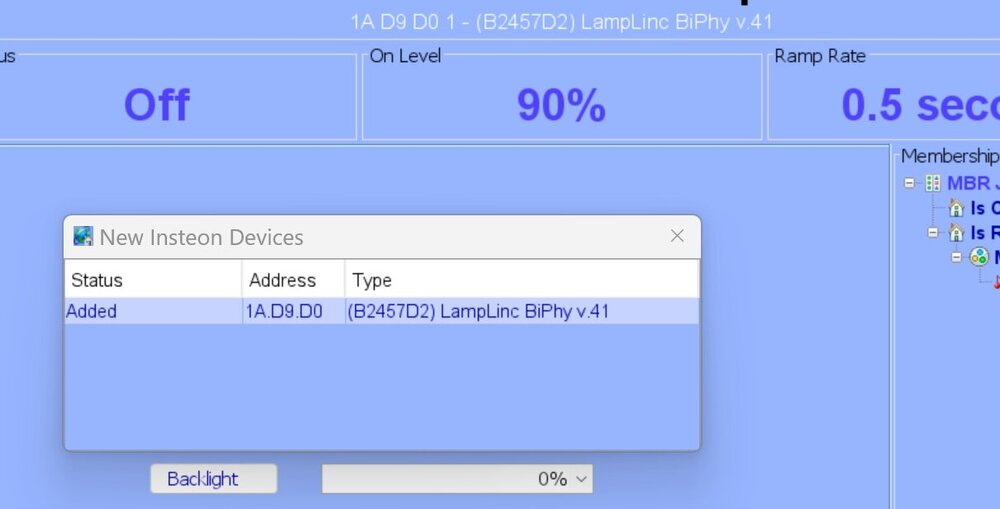
Every time I open IoX I get this error alert box since v6.0.4 happened. How do I stop this from happening? This device was suddenly crashed a few weeks ago and I had to delete it and start from scratch adding it to my polisy and then re-include it in the Insteon scenes previously created. I have Restored it several times but IoX just doesn't seem to know about it. This a new error alert I have never seen before.
-
Totally agree. USB-C connectors should not be putting out 12v, only 5v on standby. One of the factors is, the photo shows a requirement of 24W of power. USB-C, at any voltage, can only supply a maximum of 3.0 amperes IIRC. This means the load equipment has to negotiate a higher voltage so that at 12v or higher the total power available would be 12v x 3.0 amperes or 36 Watts. Android phones can negotiate higher voltages (15, and 20v?) for SUPER fast charging rates, while Apple devices can only negotiate up to 9 and 12 v (fast charge) unless Apple has caught up to the newer specs now.
-
-
From the lines or reporting I would say every file in the polisy was replaced. A guess would be about 3-4, 000 files were downloaded, unpacked, and installed. After turning on my spare polisy it updated itself from v6.0.0 to v6.0.4 and I wasn't even aware of it. It was only online for about 10 minutes. I must assume we have no control over updates anymore. I also have discovered PG3x is not accessible without online access now. As soon as my Internet was restored PG3x became available again.


