


ctviggen1
Members
-
Joined
-
Last visited
Everything posted by ctviggen1
-
I just installed the last of 4 Embrighten smart fan Zwave controllers. They look like on/off switches. Hitting the "up" once causes the fan to come on and hitting the "down" once causes the fan to go off. To increase the speed, you push the up for a while until you hear the speed increase. These have the following entries: Dimmer switch; scene button 1; scene button 2; SC basic asssoc 2; and SC basic assoc 3. I have been renaming the "dimmer switch" part from "ZY 025 dimmer switch" to "Bedroom fan" (or whatever) and using that to work with ISY portal. That SEEMs to work, in that I can use an echo to turn this on/off, and also select low or high speeds (I remember there's no "middle", so you have to say 50% power). Is there a better way to do this? Also, I end up with extra elements. Should I also name with with the "Bedroom Fan" or just leave them?
-
For some reason, we have the "new" Alexa. (1) Her voice is terrible; (2) She talks too much; and (3) For lights/scenes we've been using for a long time, she was turning on/off stuff that was completely unrelated For instance, we have a "dog lights" scene were we turn on 5 different lights to light up the yard so the dog and/or us can go out. Instead of doing that, the living room lights (completely unrelated to dog lights) came on, and the "grill light" (a light that shines on the grill so it lights up the surface of the grill; also unrelated to dog lights) came on. Is anyone else having issues with lighting control after Alexa? These are Insteon lights controlled by IoX.
-
By the way, what does the "device links table" tell me in the admin console? I ran this for both switches. There are a bunch of hexadecimal numbers, but both have 3 of the 4 hexadecimal numbers of the other in one entry. That is, Switch A has 28.85.7E of 28.85.7E.1 that is Switch B's address. Is this meaningful or meaningless?
-
Sorry for my delay -- had to work and then had a holiday. I'll try removing them from IoX, then factory reset, then adding them back. What happens to programs though? Will they come back into the programs I have once I re-add them, or do I need to somehow figure out in which program they are currently in, and re-add them to the programs? This is a box with 4 switches that turn on various lights in the front of the house. They have been there a while and I don't remember how I programmed them, although I do think I had electricians install them (and maybe they programmed them?). I did many installations, but this is one I did not do.
-
I have this odd issue with two Insteon on/off switches that are in the same box and side by side, but operate two different lights. They are two-way switches (that is, on/off for a single light and not in a 3-way circuit). If I turn on Switch A, it turns (its light) on fine. If I turn on Switch B (next to Switch A), it turns (its light) on fine, BUT Switch A turns off. I can then turn on Switch A, but if I turn off Switch B, both Switch B AND Switch A turn off. I wired a lot of my Insteon switches, but I think electricians wired these. Could this be a wiring issue? An IoX issue? Where do I start (wiring or IoX), and if it is an IoX issue, how do I debug this?
-
I have to say that it's hard for me to log in to the admin console with ISY portal info. I have to log into Bitwarden, then copy my user name, enter it in, copy my password (which I HAVE NO IDEA WHAT IT IS because it's a bunch of characters in lowercase and uppercase and random characters) then enter it in. Why was this done? I prefer using my "in house only" passwords and "admin" instead. So much easier. Can I go back to that?
-
Thanks, all. This morning it had the correct time,. I did apply new updates yesterday, so maybe that rebooted it? I'm not sure, as I started the updates then quit to do other stuff. But it's all fixed now.
-
I live in CT and have selected NYC as my address. My admin console says sunrise is 5:27am, but everywhere else I look, sunrise is at 6:27am. Here, for instance: https://www.timeanddate.com/sun/usa/new-york Is there anyway to change this?
-
Thanks, daily does work. I had interpreted "daily" to mean every day, and I think it means whatever days you've selected and not the scheduled days. But when did we get scheduled days? I don't remember that being a "thing". (For the last year, I've had one kid who has/had pediatric acute-onset neuropsychiatric syndrome, PANS, and was in so many hospitals/institutions she missed 1/2 a year of 8th grade, and meanwhile a senior in high school who was doing tons of stuff and going to multiple colleges. So, I couldn't keep up running the house and haven't kept up here.) For instance, I didn't know you could copy a program into text. I can see the scheduled days being very useful. Changing everything to scenes will be quite a bit of work, because I didn't do that for many things. And my whole house will be Insteon once they have another sale (missing maybe 8 switches total, for things we really don't need to control). Thanks for the help, and I'll work on changing everything (most? things) to use scenes.
-
Well, I have the Dog lights program to turn on/off the 4 switches for outside lights. I've had 5 switches, and I'd like to keep that option open too, and maybe even 6 switches is a possibility. I have this program and another that use the Dog lights program. So, if I don't have the dog lights program, and I want to change the dog lights to add/remove lights, I'd have to do that in multiple programs instead of one. Doesn't "daily" mean every day? Or does "Daily" mean something else? I just want m-f for now. I did not know that about the scenes. I could make this a scene, then redo the Dog Lights with the scenes, ensure that works, then check that the other versions work too. Let me see when I can do this.
-
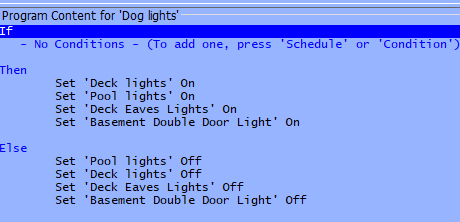
Dog lights - [ID 0048][Parent 0001] If - No Conditions - (To add one, press 'Schedule' or 'Condition') Then Set 'Deck lights' On Set 'Pool lights' On Set 'Deck Eaves Lights' On Set 'Basement Double Door Light' On Else Set 'Pool lights' Off Set 'Deck lights' Off Set 'Deck Eaves Lights' Off Set 'Basement Double Door Light' Off Thank you. That's it above. There is a red mark on the left side of the icon for it, but we use this all the time via Alexa/Amazon Echo. It's not set to run at any time, though.
-
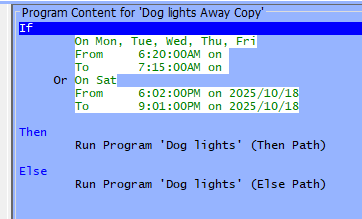
This is the program I have. The Then path of "Dog lights" turns on 4 sets of lights. The Else path turns them off. The program does not work? Here's the "Dog lights": The lights did not go on at 6:20 am and did not go off at 7:15 am on a Friday (today). Any idea why? Thank you.
-
Thanks for the fast response. Hmm...it's in at least 3 programs: a going to bed one; a "normal" daily routine"; and a guest routine (to lowly light the hallway while guests are upstairs). I'm plugging it in again.
-
I went to install something neat a lamp that's in our upstairs hallway. The lamp was plugged into the outlet, but in the outlet also was an Insteon plug-in lamp module (lamp not plugged into the module). Using the address written on the lamp module, I found that the module is called "Lamp upstairs hallway". I assume I had it programmed at one time, and then someone unplugged the lamp from the module. Is there a way to use the address and/or name of this module to determine which program(s) it's in?
-
We got a new front door. The "old" (different model) zwave lock didn't align with the new strike. I had another ("new") zwave lock, which I tried on the front door. (Alas, also doesn't align with the strike. More work to do.) I'm keeping the "new" zwave lock, however, and I'll put the "old" zwave lock on a different door, some day.... Should I put the batteries in the old lock and "officially" remove it from my system? Or just wait to put it on the other door (could be a while)? Also, I have a "phantom" "entry control". I was trying to add my new lock and did it incorrectly. After adding, removing, adding correctly the new zwave lock, I still have this phantom entry control. Can I remove this?
-
Hi Geddy, Thank you. Were is the "My ISY"? I got both computers working without the error. I thought I had already removed the applications and reinstalled, but I guess not. Once I removed the applications and reinstalled with the latest start.jnlp, everything went back to normal. And zwave is back to normal too.
-
I found it. I guess I have to bookmark this: https://forum.universal-devices.com/topic/24381-iox-launcher/
-
One thing I don't understand: Where do I get the latest start.jnlp? Don't I need the latest version?
-
Thank you. It's on a different computer, but I'll try these this weekend.
-
I'm on IoX v5.8.0 (2024-01-01-10:29:02). Just upgraded to the latest software/firmware this morning by upgrading packages. Any idea what this message means and how I debug it? It came up a few times before the upgrade, then went away. By the way, I had upgraded a few days before, and then my Z-wave went completely offline. Did not realize this until none of my Z-wave worked, including my door locks. (I may have to change them to automatically lock by themselves. Not fun to have doors that don't lock.) A reboot did not fix, but removing the power and putting the power back in, along with the upgrade, seems to have worked. Not sure if this is related to the current error or not.
-
Thank you. This "trick" has been a lifesaver. I have too many lights/plug ins to drag successfully with a mouse.
-
Thank you, thank you, thank you. That has saved me so much time!!! I was looking for something like this, but I failed to see it.
-
I cannot do this. I'm trying to grab a light that is 50 places or so in the menu above the new scene, and move it to the new scene. I cannot get all the way to the scene before I accidentally grab something else and try to add the wrong thing to the scene. Is there a way in the scene to select a device? This is what it looks like, but nothing is available in "device":

-
Thank you, that did work after a while. Is there a way to add something to a scene through a menu? I have been dragging the remote button down to the new scene, and so many times I'd either lose it or I'd accidentally pick up a different light. I'm using a mouse.
-
Hi Techman, it's the latest version of the remote. 4 button. I manually added 4 lights to it, before realizing that I could link it to my EISY. One of the lights happens to be the light that's programmed to the keypad we're discussing. This is for an in law apartment. The idea is that the remote is used to turn on 3-4 lights that provide light for parking and for walking the steps up to the in law door. Once you open the door, you can directly turn off 3 of the 4 lights at a 4 gang box, one of which has the keypad (which itself turns on/off one of the lights). The lights for parking are controlled by the A button on the keypad (thanks to you, and where the switch for those lights is in a hard to reach place). I started a different thread about the remote here: Recent thread about remote However, should I add the remote button to the scene I've already created, or add a scene for the remote button only?

