


Spring
Members
-
Joined
-
Last visited
-
Can one of the developers please confirm that this critical feature is on the roadmap for inclusion in eisy.ui?
-
I migrated this plugin back to PG3. It works in PG3. I tried again, migrating the plugin to eisy.ui. But it still fails to work, throwing the same error (Could not connect Flirc device...). Did multiple re-installs and restarts, but it won't work after it is migrated to eisy-ui. I'll keep it in PG3 until this gets resolved.
-
Thank you, mmb, for the tip on using Unicode to "un-jumble" notifications to make them readable. For anyone who needs to do this in macOS, here is what I did. Enable the Unicode Keyboard (System Settings, Keyboard, Text Input Source / + (add) / Others / Unicode Hex Input). Enable “Show Input menu in the menu bar” to make it easy to switch between standard and Unicode keyboards. Open TextEdit with the Unicode keyboard active and create a new blank document. Type your message and at the location where you want a new line or new paragraph, hold the Option key while typing a 4-digit code. Option 2028 (line separator) Option 2029 (paragraph separator) Copy your message to the clipboard and paste it into a Notification Template in eisy.ui. You won’t see the line returns or paragraphs, but the email message will have the desired formatting. To verify this, you can create and save a test program to send an email. Use the contextual menu “Run Then” in the program to execute the command (send the email). Glad to have a work-around for now. Hopefully, WYSIWYG will get enabled for notification templates in eisy.ui.
-
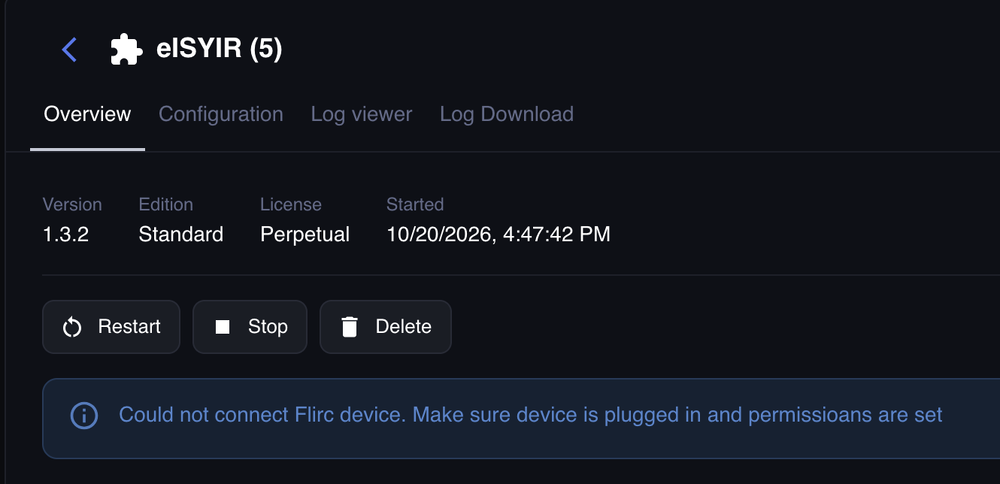
After migrating all plugins to eisy and updating all of the latest production versions, IR function became unreliable and eISYIR log says cannot connect Flirc device. The plugin and Flirc device had been working properly before migration and updates. Tried the following: I disconnected/reconnected Flirc USB in eisy-lite (several times) I rebooted eisy (several times) I used the "reinstall all" function in eisy Plugins I restarted the eISYIR plugin (several times) Regarding the error message "Could not connect Flirc device. Make sure device is plugged in and permissions are set," I don't know what permissions this refers to, but since it worked before I assume permissions are correct. From the debug log... 2026-10-23 08:09:25.628 Thread-62 (poll) udi_interface.custom INFO custom:_save: Sending data notices to Polyglot. 2026-10-23 08:09:25.636 Thread-1 (send_thread) udi_interface.interface DEBUG interface:_send: PUBLISHING {'set': [{'key': 'notices', 'value': {'device': 'Could not connect Flirc device. Make sure device is plugged in and permissioans are set'}}]} 2026-10-23 08:09:25.646 MQTT udi_interface.interface INFO interface:_message: Successfully set key = notices 2026-10-23 08:09:40.508 MQTT udi_interface.interface DEBUG interface:_message: QUEUING incoming message shortPoll 2026-10-23 08:09:40.509 Command udi_interface.interface DEBUG interface:_parseInput: DEQUEING shortPoll 2026-10-23 08:09:40.509 Command udi_interface.interface DEBUG interface:_handleInput: PROCESS shortPoll message {} from Polyglot 2026-10-23 08:09:40.624 Thread-63 (poll) udi_interface ERROR eisy_ir:connect: Device not found 2026-10-23 08:09:40.624 Thread-63 (poll) udi_interface.custom DEBUG custom:__setitem__: CUSTOM: device = Could not connect Flirc device. Make sure device is plugged in and permissioans are set ...saving 2026-10-23 08:09:40.624 Thread-63 (poll) udi_interface.custom INFO custom:_save: Sending data notices to Polyglot. 2026-10-23 08:09:40.628 Thread-1 (send_thread) udi_interface.interface DEBUG interface:_send: PUBLISHING {'set': [{'key': 'notices', 'value': {'device': 'Could not connect Flirc device. Make sure device is plugged in and permissioans are set'}}]} 2026-10-23 08:09:40.636 MQTT udi_interface.interface INFO interface:_message: Successfully set key = notices 2026-10-23 08:09:55.498 MQTT udi_interface.interface DEBUG interface:_message: QUEUING incoming message longPoll 2026-10-23 08:09:55.498 Command udi_interface.interface DEBUG interface:_parseInput: DEQUEING longPoll 2026-10-23 08:09:55.499 Command udi_interface.interface DEBUG interface:_handleInput: PROCESS longPoll message {} from Polyglot 2026-10-23 08:09:55.538 MQTT udi_interface.interface DEBUG interface:_message: QUEUING incoming message shortPoll 2026-10-23 08:09:55.538 Command udi_interface.interface DEBUG interface:_parseInput: DEQUEING shortPoll 2026-10-23 08:09:55.538 Command udi_interface.interface DEBUG interface:_handleInput: PROCESS shortPoll message {} from Polyglot 2026-10-23 08:09:55.626 Thread-64 (poll) udi_interface ERROR eisy_ir:connect: Device not found 2026-10-23 08:09:55.626 Thread-64 (poll) udi_interface.custom DEBUG custom:__setitem__: CUSTOM: device = Could not connect Flirc device. Make sure device is plugged in and permissioans are set ...saving 2026-10-23 08:09:55.626 Thread-64 (poll) udi_interface.custom INFO custom:_save: Sending data notices to Polyglot. 2026-10-23 08:09:55.629 Thread-1 (send_thread) udi_interface.interface DEBUG interface:_send: PUBLISHING {'set': [{'key': 'notices', 'value': {'device': 'Could not connect Flirc device. Make sure device is plugged in and permissioans are set'}}]} 2026-10-23 08:09:55.638 MQTT udi_interface.interface INFO interface:_message: Successfully set key = notices 2026-10-23 08:09:55.657 Thread-65 (poll) udi_interface ERROR eisy_ir:connect: Device not found 2026-10-23 08:09:55.657 Thread-65 (poll) udi_interface.custom DEBUG custom:__setitem__: CUSTOM: device = Could not connect Flirc device. Make sure device is plugged in and permissioans are set ...saving 2026-10-23 08:09:55.657 Thread-65 (poll) udi_interface.custom INFO custom:_save: Sending data notices to Polyglot. 2026-10-23 08:09:55.662 Thread-1 (send_thread) udi_interface.interface DEBUG interface:_send: PUBLISHING {'set': [{'key': 'notices', 'value': {'device': 'Could not connect Flirc device. Make sure device is plugged in and permissioans are set'}}]}
-
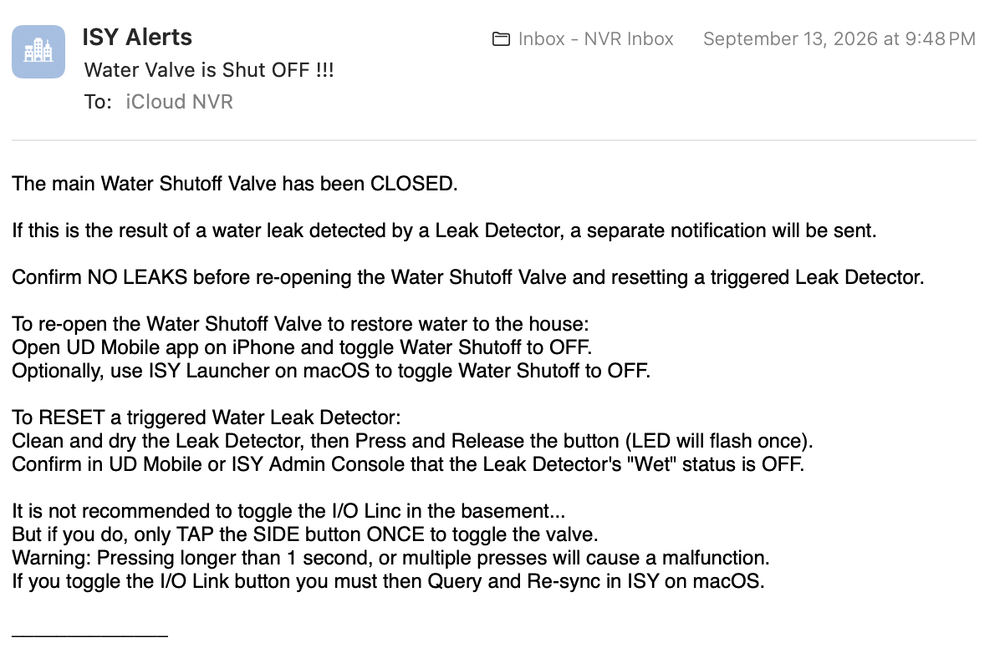
These emails are being sent by a Program when an "If" statement triggers an event. The attached (Sep 13) email was sent when I was still using the Java based Admin Console, but I'm using macOS Golden Gate now, so I have no option to use anything other than eisy.ui. The earlier email examples were sent from a Program that was migrated from ISY-994 into eisy (and the format remained intact), then the notification text was edited in eisy.ui (and the format broke).
-
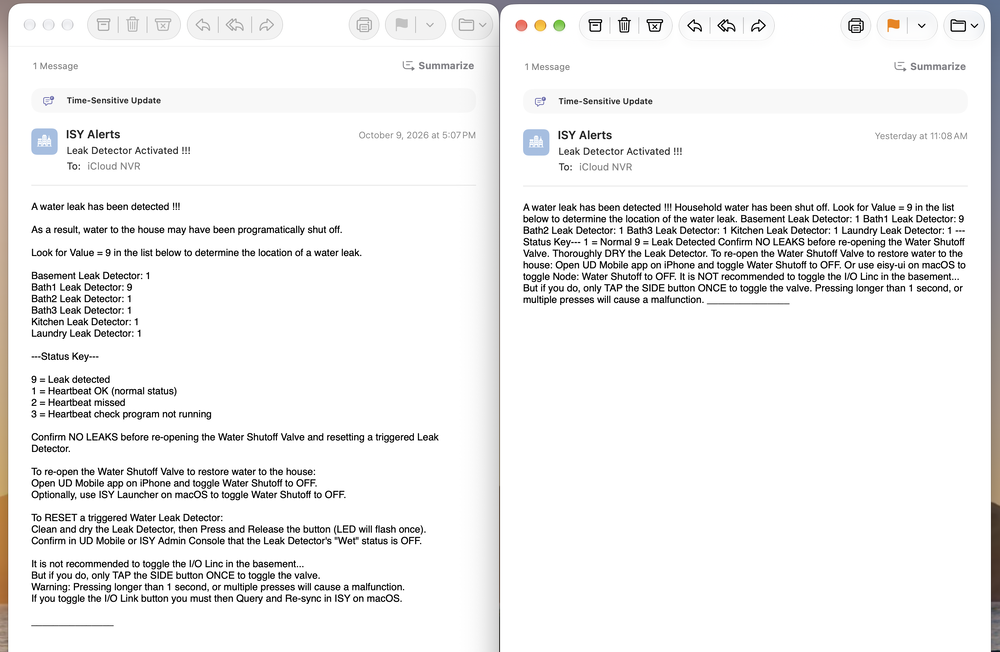
The attached screenshot shows two emails as received, the one on the left was sent Oct 9th and is formatted properly. That notification template (text) was migrated from ISY-994 to eisy and it displayed as expected in the eisy program on Oct 9th. Then I edited the notification in eisy.ui changing some wording, but leaving the line spacing as it was, and now the formatting has been stripped out. The radio button was set to text.
-
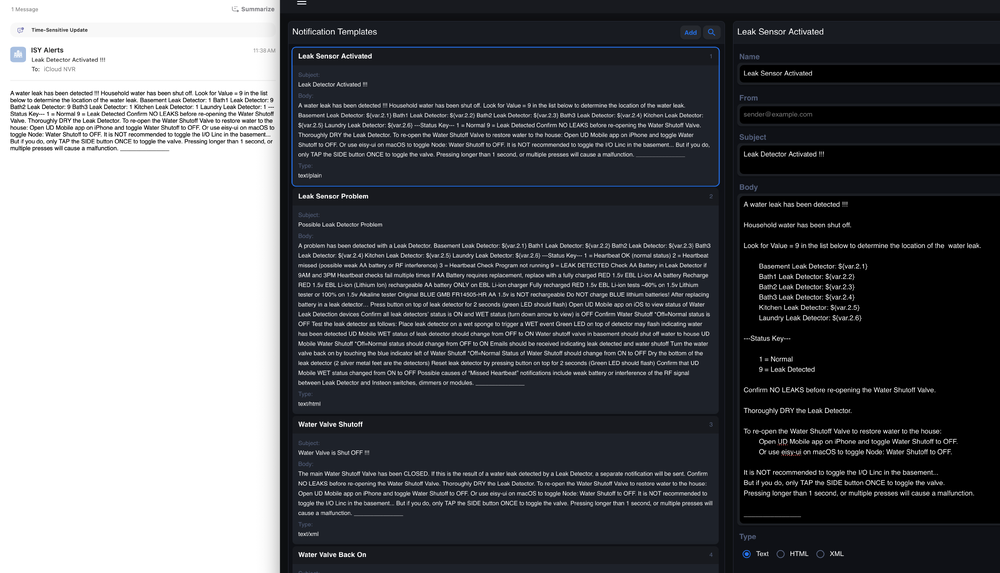
Notification emails configured in eisy.ui are not properly formatted in the emails as sent and received. I experimented by changing the radio buttons for text, html and xml, but the format in the emails did not change. Everything is jumbled together in non-formatted plain text appearing in the email as it is shown on the left side of the screenshot, unlike the right side of the screenshot where formatting includes line spacing and indentation. ISY-994 preserved the rich text format in emails, and that's what I'm trying to achieve again. Is this a bug in eisy.ui or is there something I'm missing ? I'm using the latest production repo 1.2.2. Thanks.
-
Thank you gdavis. Your method of recording both long press and short press for every keystroke (IR code) solved the problem. I had originally imported the code file circulated on the forum, so now I added the same codes again as long presses at your suggestion. Between your steps 2 and 3, I accessed Flirc's Advanced menu (File / Advanced) to select Long Press before recording the same IR codes from the Harmony Hub. This is useful advice for anyone using Harmony Hub and Flirc with the plugin for eisy.
-
Looking for help getting eISYIR plugin on FLIRC-enabled eisy-lite to respond reliably to RC5 infrared codes (the original set of 40 codes previously used with ISY994) sent from a Harmony remote. The problem has been consistency/reliability. Commands frequently fail on the first button press but always work if the button press is repeated within 1 or 2 seconds. In the eISYIR plugin v.1.3.2 configuration page, I’ve tried multiple different values for Press Threshold (from 100ms to 700ms) with ~300ms working better than other values (but still only works on first button press about 60-70% of the time). I also tried several different values for Idle Threshold (from 400ms to 2000ms), but I saw no difference in any of the values, so I’m leaving the idle threshold set to 500ms for now. I left Release Threshold at 50ms, short poll at 15 and long poll at 60. If anyone has used this plugin with a Harmony remote successfully, I’d like to hear your comments regarding consistency and your settings. This same Harmony remote worked 100% perfectly on the first button press every time with ISY994iZW/IR PRO before migrating to eisy-lite with FLIRC and eISYIR plugin. My goal is to get this plugin to perform equally well.
-
Using the IP address, as Guy suggests, is the only way I can access eisy.ui since macOS (Sequoia and newer web browsers including Safari and Firefox) do not give an option to access a non-secure web address. But once logged in with eisy's IP address and later when logged out for inactivity, if you refresh the page to log in again, the appended characters in the URL that were added during browsing within eisy.ui may prevent login from working [something may have changed because now the appended characters are no longer causing login to fail]. In that case, remove the appended characters at the end of the URL leaving only eisy's IP address. Or use a password manager to login each time. By comparison, on Windows 10 the Edge browser permits access to a non-secure site by accepting the risk.
-
Does anyone know how to get the Blue Iris plugin on eisy to ignore Blue Iris Motion Triggers and respond only to Blue Iris Alerts (On Alert / actions)? Whenever an eisy program uses the node server's IS ALERTED property, the action fires on motion triggers, not AI confirmed alerts.
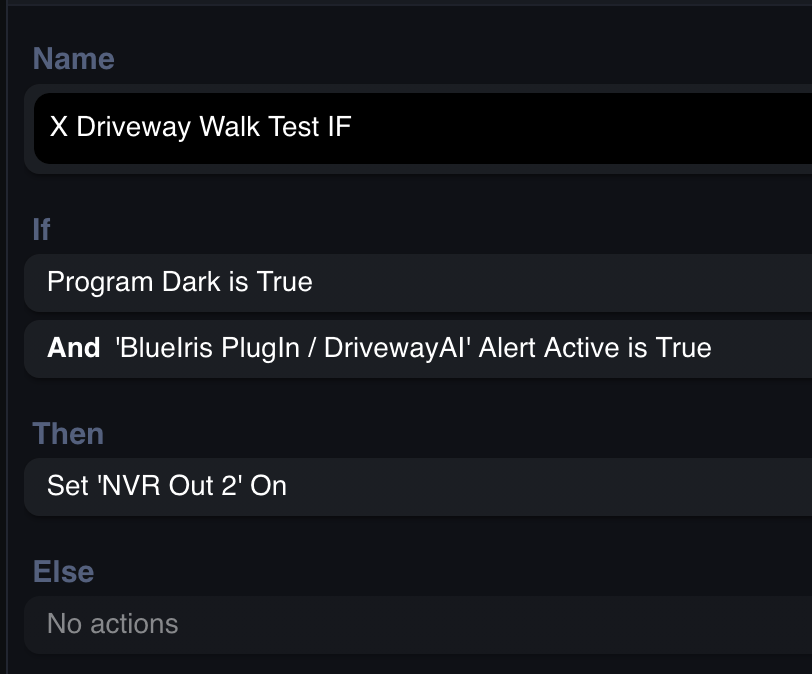
-
If IR is not built in to eisy, can it be added? I rely on IR and RC5 codes in my HA system.


