


Athlon
Members
-
Joined
-
Last visited
Everything posted by Athlon
-
Updated my Polisy. It went smoothly and relatively quickly. The only issue was not being able to access PG3 after doing so, but I resolved that by reading the thread about that issue here: https://forum.universal-devices.com/topic/46419-cant-log-into-pg3-after-update-to-604-from-5xx/
-
That solved the same issue for me - thank you. I did as you suggested using my Polisy's address: http://polisy.local/
-
That's where I've been getting it for years...
-
Brilliant. Thank you for this!!!
-
Are you using Alexa or Alexa+ ? If so, delete the 'ISY Optimized for Smart Home V3' skill in your Alexa app as well as your Alexa spokens in your portal. If the offending devices stop 'offending' for a few days, add back the ISY skill to Alexa, then add each of your spokens slowly one at a time (each day or so) to see which one is the offending one(s).
-
If you are talking about the Portal subscription - just delete all of the 'spokens' (devices) you have set up for Alexa in there. That should have no impact on that subscription. Then add them back one at a time (after a few days) if that solves your issue.
-
@jlloyd_UD Why not just delete the 'ISY Optimized for Smart Home V3' skill. I also use it extensively with my Polisy. I've had none of the issues you describe here. I'm a Prime member - deleting that skill will not have any affect on your Prime subscription. Adding to my comment: You would delete it to see if that resolves your issue. - then, as @IndyMike suggested, after reactivating the Skill, add the offending devices back one at a time. (Reactivate the Skill only after you are certain deactivating it solved your issue.)
-
The post just above yours describes how you might be able to determine where the 'on' signal came from. Take a look at that.I agree with the idea of using Alexa Routines. Been using them for a long time to keep her from getting confused (misinterpreting what I actually want her to do). I have had no issues since upgrading to Alexa Plus a few months ago. My 'routines' are programmed based on what I want to say - not on what I think she wants to hear.I have Alexa Plus and been having no issues. I have a Polisy with a mix of Insteon, Kasa (TP-Link), Z-Wave, Sensibo, Caseta and Ecobee devices. Over half of my devices are Insteon. I know every environment is different, but knock on wood, so far so good here. We prefer the new Alexa over the old one by a lot.I get that, but it's not clear to some.It's possible the wording in the update announcement calling the new UI the 'default interface' might be causing some confusion.The new UI is a work in progress. It's nowhere near complete. You are seeing what it can do at the moment, and that's it for now. It will replace the AC some day - that's the goal - but not for some time.Was hoping it would be that simple for you. Someone else is going to have to chime in here.I'm not on Apple device - I use Firefox on a Windows PC, so I'm not exactly sure what that looks like to you. Having said that, I sometimes get a warning saying a website is not secure. Usually on that same screen is an 'Advanced' link I can click to see more info. On the advanced screen there is an option to ignore the warning. In the case of eisy.local I know it to be safe, so I click on proceed anyway because I know it to be safe. It's local (on my own network). Take a closer look at that Safari screen to see if you can go to the eisy.local site despite the warning. The warning usually has to do with unsigned certificates - ignoring that warning is not an issue in this case.Yep, that's how I did it. Someone else will have to chime in here.How did you reinstall them? (From what screen?)http://polisy.local/ or https://eisy.local@woodchip Main Menu (upper left corner): Then Settings: Then Reinstall Plugins:
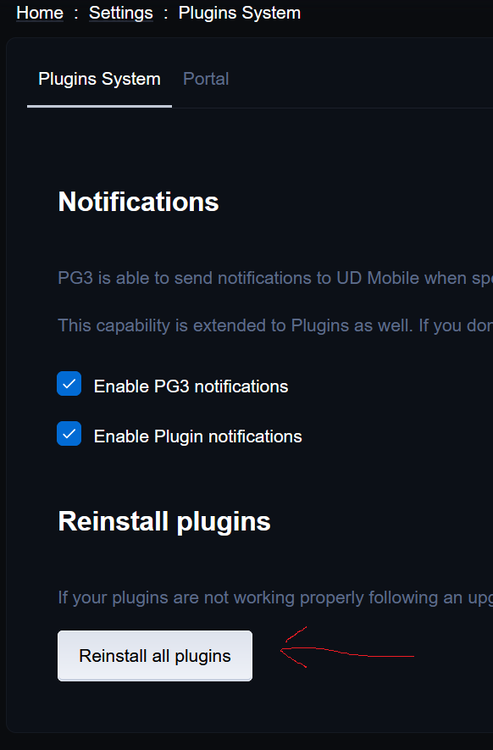
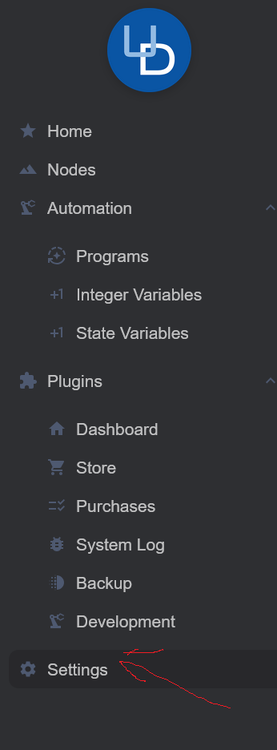
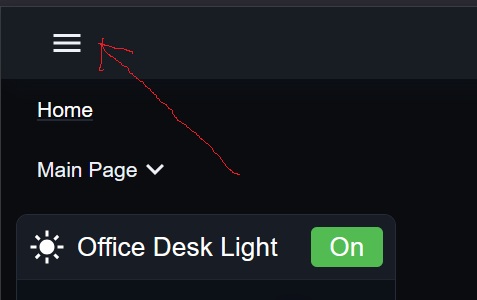 Try from the Main Menu - Settings/Reinstall all plugins Worked for me...No sir. And I've been playing around with it - adding tiles and widgets just for the hell of it.Figured it out. 😀 Went to Main Menu/Settings/Reinstall Plugins and clicked on Reinstall All Plugins. I can now add tiles.


