


pinlawr
Members
-
Joined
-
Last visited
-
Runtime from upgrade button in AC to reboot: 24 minutes Runtime from reboot button in AC to AC accessible: 5 minutes eisy-ui accessible: 13 minutes PG3 accessible: 18 minutes Total upgrade time ~42 minutes. Once the PG3 dashboard was up I found that my 3 hue node servers (still running old version 0.1.11) and ratgdo (4.0.8) all would not start. I had to re-install each of them into their same slot from the plugin store screen. These 3 hue node servers have notoriously been problematic for me over the years, likely due to the number of devices (hence the need for 3 hubs). I've been slowly moving my programs that reference them to Home Assistant so I can get Hue off the eISY.
-
Looks like the added delays didn't resolve it. My issue came back for one of the devices. I opened a ticket with support.
-
So far so good with the program delays. Fortunately each device that I had the issue with had no links/scenes/etc attached to them. The SwitchLinqs were just switching the local load, and the KeypadLincs only had the "MAIN" button in use to also switch the local load. Somehow in 6 years I've never actually done anything with the other buttons. I did make sure to copy from a device that also had no links/scenes associated with them. Perhaps after copying the file you could do a restore device in the admin console. The wording says it will reprogram it with the settings in IoX, so maybe that will rewrite the file out as it should be for that device.
-
I just updated to v 1.0.2 and when I try to load eisy-ui I get the below error. This was an upgrade from 0.9.0, which loaded fine. Unexpected Application Error!MUI X: The path returned by getTreeDataPath should be unique. The rows with id #47298 and #47298 have the same. Path: ["Master Bath KP C - Color Loop\n47298"].Error: MUI X: The path returned by `getTreeDataPath` should be unique. The rows with id #47298 and #47298 have the same. Path: ["Master Bath KP C - Color Loop\n47298"]. at l (https://eisy.ZZZ.local/assets/App-D57SMzq5.js:109:32974) at qc (https://eisy.ZZZ.local/assets/App-D57SMzq5.js:108:68939) at tL (https://eisy.ZZZ.local/assets/App-D57SMzq5.js:108:69548) at https://eisy.ZZZ.local/assets/App-D57SMzq5.js:110:37 at Object.applyStrategyProcessor (https://eisy.ZZZ.local/assets/App-D57SMzq5.js:99:45114) at UD (https://eisy.ZZZ.local/assets/App-D57SMzq5.js:24:800) at https://eisy.ZZZ.local/assets/App-D57SMzq5.js:104:46170 at Object.setState (https://eisy.ZZZ.local/assets/App-D57SMzq5.js:99:45595) at W (https://eisy.ZZZ.local/assets/App-D57SMzq5.js:104:46145) at https://eisy.ZZZ.local/assets/App-D57SMzq5.js:104:46382I have a scene named "Master Bath KP C - Color Loop" that has ID 47298, and is broken. It has no devices on it and I can't edit/remove/delete/move/rename this scene. It's essentially stuck in my IoX. It's been like this for years and I've never bothered to mess with it as it's just been a very minor visual annoyance before this. I actually have 2 scenes with this exact same issue, but I guess eisy-ui hits the first one and stops.
-
What a coincidence. I have 4 devices that have multiple changes to their settings depending on time of day. Two SwitchLincs and two KeypadLincs. Depending on time of day things like on level and button backlighting is changed. I noticed that these changes stopped working at some point. I followed the same error message trail and that's when I found the devices in question were either missing it's .REC file, or a .REC file with 0 bytes. The good news I was able to fix it once by copying the .REC of an identical model device to the filename for the device that was missing. This immediately restored the ability to control these parameters (no reboot, admin console still open). Doing it this way I did not have to remove/re-add the device. I just ensured I copied the .REC file from a matching model. On a whim I adjusted the program that changes the parameters to include a 1 second delay in the changes. Previously they were all back to back. The thinking was maybe some IoX process was failing to write these files without a delay. I don't know if it was the underlying cause or not but since then I have not had the issue come back. This system has been running with the same keypad/switchlincs for over 6 years and I don't know exactly when the problem started. I do know that it happened to each of them over time. I assumed the device itself had stopped responding to the parameter changes. Once I found the file issue I figured it could have happened during any number of changes between moving PLMs, from ISY994, to Polisy/IoP, to eISY/IoX, and not counting the handfule of backup/restores that have occured.
-
I found the below info (bolded text by me) in the github docs page on the latest update to Timedata. Can someone clarify which "certain elements" may need to be updated? Timedata is used throughout many of my programs but I don't know what to hunt down and update. I did see the post below where were referencing sunrise/sunset values, but wasn't sure if there were other things to be on the lookout for. Thanks! 3.4.0 28/102/2025 minor code and profile changes to fix a problem with data not showing properly in eisy-ui the changes may require that certain elements in IoX programs be updated.
-
Ah. That fixed it. I did get the notice to sync when I opened the app after the latest update. I did let it do the sync process when prompted. The "additional" sync took care of it. Thanks!
-
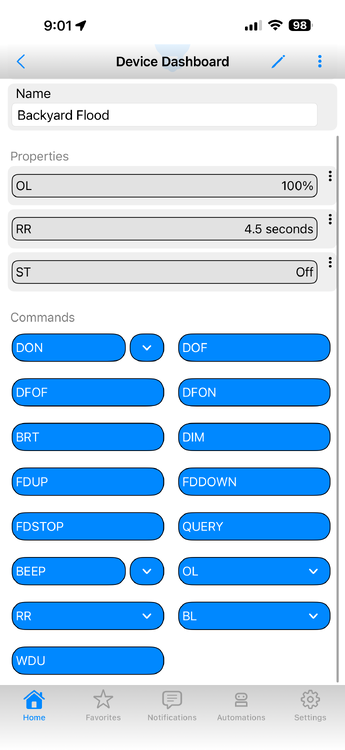
After the latest update on iOS (1.4.3) all the buttons inside a device show the commands (DON) on their label rather than their friendly label such as “On”.
-
Sorry for the delay, I forgot to turn on notifications on this thread. Currently everything shows time of last car update was 4/26 14:14. Nothing since then. The car was driven today (4/28) for over an hour, and pretty much all of the data is not current. There are no "stream" type entries in the log file for today's drive. Of note, the commands always seem to work (start/stop charging, honk, etc.) so there is authenticated connectivity to the vehicle. I changed the log level to debug and restarted the plugin. I've DM'd the log from TeslaEVstream. Once the plugin was restarted some of the data updated (mileage, etc.) but not everything, for example it still shows the charger is engaged, but it's not (the vehicle isn't even at home). I also installed TeslaEVpwrSh into a different slot. I just went for a drive. Data in the TeslaEVpwrSh updated some data (but not all), and TeslaEVstream didn't record any changes.
-
I switched to the new streaming plugin a week or so ago. Since then a lot of my use cases have stopped working correctly due to out of date information, and no way to trigger an update. One of the main use cases for me has been using the plugin to start/stop charging based on the status of the car (rather than just a plain X-X schedule). I also use it to flash lights in the house if I run our goodnight routine and the car is not plugged in and below X% charge. I also have a button on a keypad link that is lit when the charger is connected, and now that light is never correct. Literally right now it shows the charger port latch is engaged. It's not. The car is in the middle of a parking lot. At night, when home and plugged in, it will show disengaged, because it wasn't connected during the drive (obv), and never updated after arriving home and plugging it in. This causes the program that starts charging to not run (it checks the latch state, no need to send the charging start command and wake the car up if it's not plugged in). Once the car gets somewhere and the drive stops, the streaming stops (actually since the mileage and other things are also off, I wonder if it's stopping before the drive ends). A lot of other things stop updating as there is not poll or refresh of the vehicle state after streaming stops. Mileage, temperatures, charging latch state, window/door status, etc. Nothing updates after streaming stops. Currently the car is online (as it's not home and sentry is on) and all the data in the admin panel is out of date. The time of last car update is 10:03:25, but the drive didn't end until 10:07:46. I fully understand the need to move to the new API and reduce calls, but there is still a need to keep the data up to date if the vehicle is online, even if hourly, or with a triggered command. Perhaps when streaming (or vehicle is offline/asleep) don't poll to save calls, but otherwise if the car is online a regular poll schedule seems needed to ensure the data is up to date. I'm happy to provide logs or run tests.
-
That is URL (not HTML) encoded. You may check your network resource and change the "mode" from URL Encode to Raw Text. Or, if that doesn't help, depending on the code on the server, you should be able to call a URL decode routine. URL decoded output would then be: Source:SunRoom,Temperature:21.6°F,Humidity:70%,BatteryLevel:53% The degree (º) and percent (%) symbols are being encoded.
-
Polisy updated fine. It took around 33 minutes to complete. I have around 15 plugins running. Wired connectivity.
-
Sorry for the late reply, and thanks for the help. I guess I had email notifications off. I ran into this (bitstring problem) a while back when it was first a problem on my PG3 instance and used the above instructions to fix it. Everything worked fine until the move to PG3x. My pip3 list shows "bitstring 3.1.9", but I went ahead and tried the steps you sent just to verify and it made no difference. I'm still getting the same "no module named 'lifxlan'" error, even with pip3 list showing that "lifxlan 1.2.7" is installed. I'll go open a ticket.
-
Hello! I've been running the LiFX node server on my Polisy for awhile now, migrated from PG2 to PG3 a while ago. Just moved to PG3x. Now when the node server tries to start all I get is the same lines in the log over and over until I stop it. 2023-08-31 16:08:57,295 MainThread udi_interface INFO __init__:<module>: UDI Python Interface for Polyglot version 3 3.1.0 Starting... 2023-08-31 16:08:57,300 MainThread udi_interface ERROR udi_interface:write: Traceback (most recent call last): 2023-08-31 16:08:57,301 MainThread udi_interface ERROR udi_interface:write: File "/var/polyglot/pg3/ns/000db952cee0_12/lifx-poly.py", line 10, in <module> 2023-08-31 16:08:57,302 MainThread udi_interface ERROR udi_interface:write: import lifxlan 2023-08-31 16:08:57,303 MainThread udi_interface ERROR udi_interface:write: ModuleNotFoundError 2023-08-31 16:08:57,303 MainThread udi_interface ERROR udi_interface:write: : 2023-08-31 16:08:57,304 MainThread udi_interface ERROR udi_interface:write: No module named 'lifxlan' 2023-08-31 16:08:58,914 MainThread udi_interface INFO polylogger:set_basic_config: set_basic_config: enable=True level=30 I SSH'd in and manually and ran the install.sh script and it re-installed the lifxlan module. I can see "lifxlan 1.2.7" in the list when I "pip3 list". Other potentially relevant version info: PG3x Version 3.2.3 Frontend Version: 3.2.3 IoX Version: 5.6.4 Not sure where to go next to get the node server back up and running. Thanks for any help!
-
Error log was the last attachment. It just says "Net-Resource: Failed connecting to 192.xxxx". Nothing else shows in the log.


