


paulbates
Members
-
Joined
-
Last visited
-
Agreed. It's likely a low volume and definitely higher cost. Also Insteon may not be navigating the supply chain / chip mfg / tariff changing and murky waters as well as others. Raising the price would also raise hell, so not a realistic option for an unchanged, years old design - good as it is. There are also complaints about the fit.. they didn't design it with the rectangular bezel to meet the faceplate like Leviton (and others) do. It did take a little longer to get them in right and sometimes took removing, adjusting wires and pushing back.
-
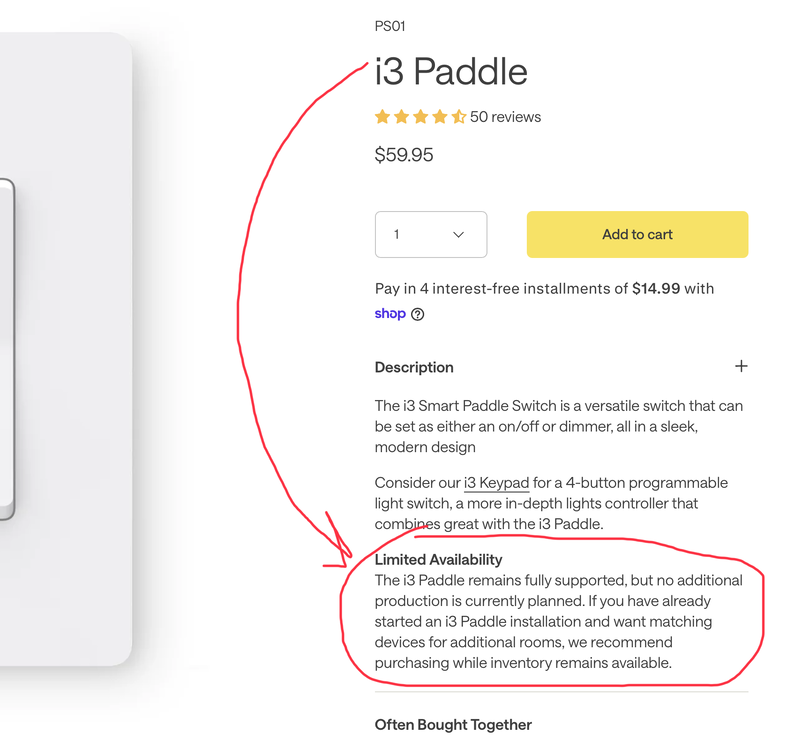
This was one of those "stumbled across it" events. Insteon will continue to support yet no more production is planned for the I3 paddle. I don't write this to stir things up, more to alert others that may have bet their entire switch "farm" on the I3 paddle like me. I have almost 40 of them. I have a reasonable stock of uninstalled paddles and a few that I decided separately really aren't needed and will add them to the spares. TLDR: If you depend a lot on i3 paddles, now is the time to build up spares if you don't have them. The only grumble I have is that I finished my install several years ago, and if someone hadn't pointed it out to me, I wouldn't have known.
-
Great. My easyfloras were set as master valve zones when I moved to ISY994, so I never had to do this part.
-
This is a wayback machine topic for me. There's a harder way and an easier ways. The hard way, IMO, is downloading the utility (which remains on sourceforge as a win32 app) AND wiring up a special serial cable to a pc with a serial port (who has that today??) to your PLM to make the change with the smartenit app. OR.... Easier way (IMO) - X10 can be used 1 time to push the setting in to the ezflora Do these 2 throw away X10 program steps: Step 1- Set the X10 House code for the ezflora so the command can be sent in step 2: Go into iox programs Create a new progam No If statement, leave it blank 5 Then statements: X10 send X10 A1 Wait 5 seconds X10 send X10 A1 Wait 5 seconds X10 send X10 A1 Press and hold the EZFlora's set button for ~4 seconds — the LED starts blinking steadily, waiting for an X10 code. Right click on the program you just created in iox and pick "Run then".. This sets the X10 house code for step 2 The LED stops blinking — the EZFlora is now listening on that house code Delete the iox program, it's done its job and no longer has a purpose. Step 2- Use X10 house code just set to make Ezflora Zone 8 terminal the master valve zone: Go in to programs Create a new progam No If statement, leave it blank Have one Then statement Send X10 A16 ON Right Click that program, pick "Run then" Delete the iox program, it's done its job and no longer has a purpose. Now the ezflora is a 7 zone controller zones 1 - 7, and zone 8 terminal is wired to the master valve. I used 2 ezfloras this way for a number of years. >Repeat for additional ezfloras >X10 has no role in the final solution, it was the simplest way (IMO) to get the master valve setting in the ezflora. (>NOTE: If you use x10 for other things and use housecode A, pick one you're not using, as long as you're consistent, it does not matter.)
-
Can't help there.. that was a total and complete rug pull by Chamberlain: First Chamberlain had an API for solutions like eisy to integrate. Then they rug pulled that support. Then Ratgo, Meross (et al) made WiFi controllable add on boards. Then Chamberlain introduced a new security standard that the controllers downloaded and that effectively locked those alternatives out... the final rug pull. Hard to believe GDOs is where things are raging... 🤪 Remembering the simpler time at my old house were an iolinc did a good job. My current house has 2 chamberlains and one needs to be replaced. Even though they're not automated, I'll be going with something else.
-
There's are threads about this in the ecobee section of the forum. The updated plugin is using the HomeKit Accessory Protocol (HAP). Apple (unusually) made HAP an open, public spec. No apple devices are required on your network to get it to work. Go to the ecobee section of the forum and you'll find the posts. One's a little long, and I think there are others where jimbo makes the steps more brief. I think there is both a new ecobee plugin as well as a HomeKit plugin and both are needed
-
We travel a lot and my worry is I won't know till I get home and have ruined food. My answer to the fridge/freezer state was using a YoLink hub and a YoLink ys8803 temp/humid sensor in each fridge and freezer. It reports the temp, which see/saws due to defrost cycles. I watched with the YoLink app graphs it till I knew a "normal" range and then if it goes outside the range, wait a while and then send a notification. The sensors normally report out once and hour, but will report sooner if there is a larger change. It can be used in iox with the YoLink plugin which works really well. YoLink works well and is relatively cheap to install.
-
Here's an example you can modify. It takes 2 programs to work. The thing to think about is that every time it runs, it creates some Insteon traffic which could interfere with other things, so think about how often it really needs to be checked. Or consider condition. In my case it was long has it been since i heard from my sump pump
-
I've had a few of these. Do you occasionally have the dreaded Insteon "All on" events"? Iolincs are vulnerable to "All On" events. I've used them to sense things, but hold short of using them for major house infrastructure control like turning water on/off. If closing the contacts means the water is on, you'll probably be ok as a random "all on" will simply turn on something already on. If it's the other way, it might unintentionally shut your water off. If you don't get "All Ons" then it likely won't be a problem. I've followed the endless forum thread of what to do about "all ons", did everything prescribed including removing all Insteon rf sensor devices, and I still get a couple a year. I you use it, i would add some "dead man" programs to detect an unintentional triggering of the iolinc.
-
👍 and I was not inferring the Canada or Celsius are wonky🤪. (I watched America try and fail at metric conversion in the 1970s and really wish we had finished the job). It's wonky to have to convert and convert back again.
-
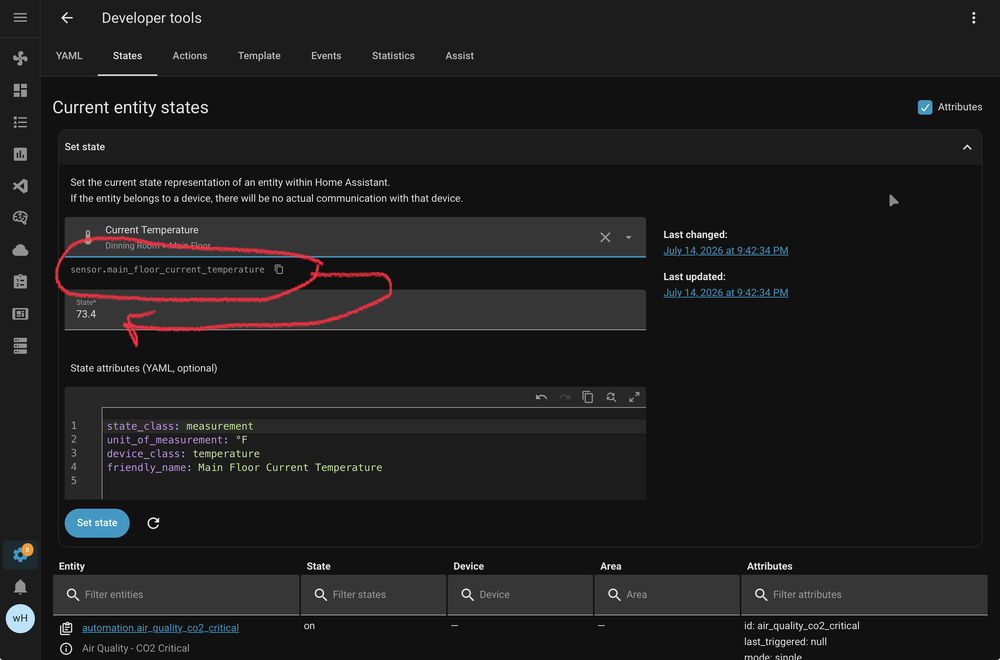
Looks like you are in Canada? What the HomeKit Accessory Protocol (HAP) gives in a fast and local connection, it takes back in a reduced feature set and, well, 'wonkyness'. The ecobee is likely set in degrees F, but HAP ships the data in C. So the tstat values are converted from F in ecobee, converted to C for HAP and converted back to F in plugin/HA. So in the US in degrees F, the double conversion hurts. However, You can get the tenths on HA>Ecobee>Homekit device. There are sensor entities not exposed by the main controls presented in the default dashboard. Go to Developer Tools > States and paste in sensor.*_current_temperature. That will give you the ecobee entity to use to get degrees F in tenths, see below. Oddly, in another "wonkyness" moment, my remote ecobee sensor does report in tenths via the default entity. I'm not trying to steer this convo to HA; I'm guessing something like this is possible for the Ecobee HomeKit plugin.
-
@Guy Lavoie is correct. If it's a bathroom exhaust fan, it's an inductive load which can damage the switch, especially when initially starting it, as the inrush current is higher than when in running state. You'll have to look, but I'm fairly certain Insteon docs mention this. Since this is for the isy994 you'll need to get an Insteon on/off... the i3 paddle that can do both dimmer and on/off jobs isn't fully compatible with 994.
-
As @Guy Lavoie pointed out, iot manufacturers commonly adopt a "sell once, support forever" business model.. AND.. insist on a cloud API <- I'm not clear why on this part, probably to collect data on us. And then they realize they sold their product once, have no more revenue stream and yet have real costs to operate the infrastructure for their api and fix bugs and security problems. Or, sometimes plugin developers reverse engineer an iot manufacturers API and get it to work, eg there's no official API. Then one day the manufacturer changes or locks it. I've found UDI plugin developers to be clear about it when they are reverse engineering something. When the developer has to create the new API to solve the vendor breaking it, they spend real time doing real work to address the problem. And candidly, plugins are a "sell once, support forever" model. It's a risk of having a home automation system... any of them, not just a UDI product.
-
Green is that the conditions for the program are true. It may be running, the Then, or it may have completed the program steps for the Then. Either way, a solid green means the conditions of the program are true ... and remaining true. So it's going to be hard to give a straight answer without seeing the program and a short description of how it's expected to work. Another possibility tied with the eisy locking up report is that the program's "Then" has an infinite loop tied with a condition that is always true. Shutting it off, per @Guy Lavoie 's suggestion, will make that apparent. If you disable it, it can't loop and the eisy won't crash.
-
If your current mac is older and has an intel based processor, no that will not work. Apple is sunsetting development of the intel processor/silicone based software platform, MacOS. No more updates coming. What you can do: Do you have a Mac with Mac silicone = does it have an M1 - M5 chip? If yes, install the appropriate Java software for an Apple Silicone Machine... . then install the iox launcher. The Java installer typically picks the right version automatically. You're going to keep your older Intel silicon based mac (not M1 - M5 chip). Do nothing, as you are frozen at both MacOS and Java versions. Apple is not providing more updates to you. You keep using what you have the way you have it with no new improvements or security upgrades on the horizon. Think of the Intel Mac like the ISY994. UDI created the ISY994 many years ago and has moved on to new and improved products like the polisy and eisy. There's no changes or feature enhancements coming for the ISY994, yet many users still use them.


