


jkmcfadden
Members
-
Joined
-
Last visited
Everything posted by jkmcfadden
-
@sjenkins Thanks for the quick turn-around. I am working on an on-call issue for my job tonight but will try to give this a try tomorrow. I'll keep you posted. Thanks!
-
@sjenkins That looks good to me (but then again, I don't have to write it 😁 ). Thanks!
-
@sjenkins that is wonderful news - thanks! I'll try to answer your questions. 1) The device type could just be "Droplet" - the -AE50 part is what my specific device on my Droplet App has been automatically named. Each device is given a unique (I assume) value. I only have the one device (so far) so I assume it would be unique in my account. 2) Here is the link to the Droplet MQTT interface docs - I think it gives you the return types and possible responses. 🌐 Smart Home API - Technical Specifications | Droplet Resource Center 3) My wishlist would be a single device entry for a Droplet that has the individual state values as sub-categories. Right now, my configuration has 4 separate device and each sends a state request for each "device". A single device that handles all of the state values would be cleaner. Again, just a wish. I leave the implementation details up to you. I am happy to help test with anything you come up with. Or if you need anything else, just let me know. Thanks again, Kelly
-
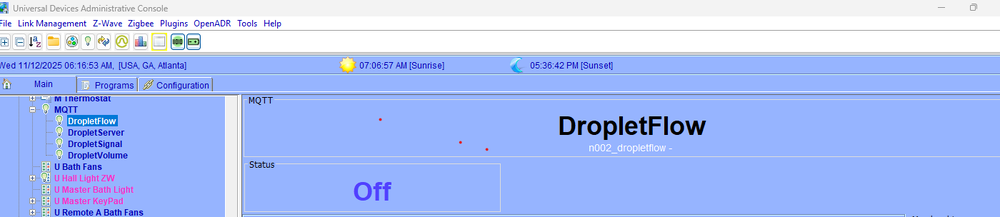
So I have made some progress. Using the following yaml file, I can now get all 4 "devices" to show up in the admin window. But all they do is to execute the same "state" command. devices: - id: "DropletFlow" name: "DropletFlow" type: "sensor" sensor_id: "Droplet-AE50" status_topic: "droplet-AE50/state" value_template: "{{ value_json.flow }}" cmd_topic: "droplet-AE50/cmd" - id: "DropletVolume" name: "DropletVolume" type: "sensor" sensor_id: "Droplet-AE50" status_topic: "droplet-AE50/state" value_template: "{{ value_json.volume }}" cmd_topic: "droplet-AE50/cmd" - id: "DropletSignal" name: "DropletSignal" type: "sensor" sensor_id: "Droplet-AE50" status_topic: "droplet-AE50/state" value_template: "{{ value_json.signal }}" cmd_topic: "droplet-AE50/cmd" - id: "DropletServer" name: "DropletServer" type: "sensor" sensor_id: "Droplet-AE50" status_topic: "droplet-AE50/state" value_template: "{{ value_json.server }}" cmd_topic: "droplet-AE50/cmd" Note - I have the "value_template" option in the yaml after some discussion with the Droplet support bot. It does not seem to hurt so I have left it for now. And the "Status" value in the admin console is just a phantom leftover of whatever I clicked on last. What my issue is (I think) is that the Droplet has just a single "state" command that returns all the values. Droplet does not have individual state requests for each value. status_topic: "droplet-AE50/state" Payload = {"server":"Connected","signal":"Strong Signal","volume":-23.06,"flow":0.00}, Topic = droplet-AE50/state So my question seems to be, how do I get the parsed value out of the state request to associate with the entity? The value_template appears to be how it is handled in the Home Assistant variation of this interface. Is there a different type I should be using?
-
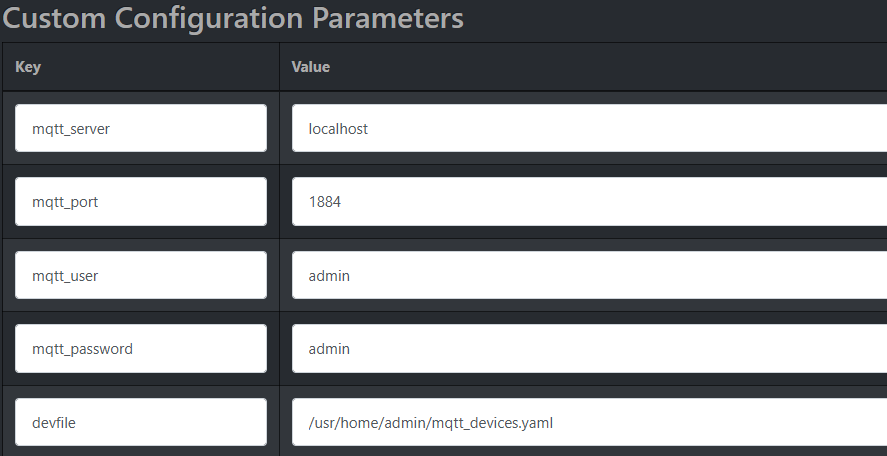
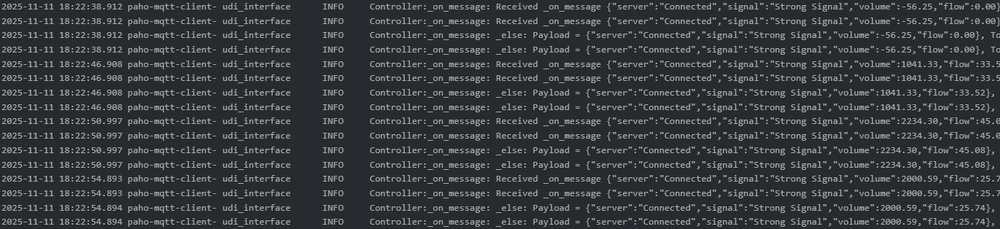
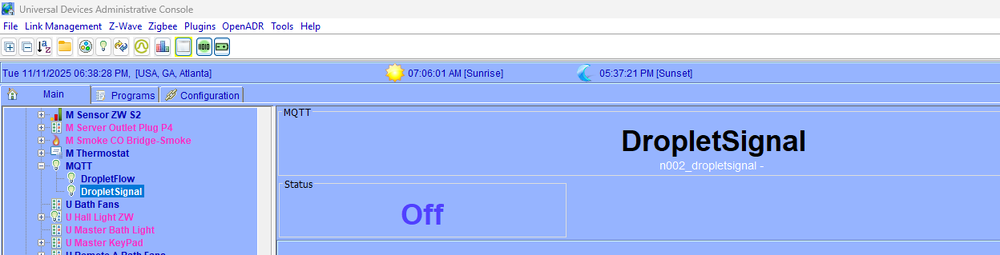
Here is where I have gotten so far: My .yaml I used "sensor" as the type. I am not sure that is correct but nothing else looked any better. devices: - id: "DropletFlow" name: "DropletFlow" type: "sensor" status_topic: "droplet-AE50/state" value_template: "{{ value_json.flow }}" cmd_topic: "droplet-AE50/cmd" - id: "DropletVolume" name: "DropletVolume" type: "sensor" status_topic: "droplet-AE50/state" value_template: "{{ value_json.volume }}" cmd_topic: "droplet-AE50/cmd" - id: "DropletSignal" name: "DropletSignal" type: "sensor" status_topic: "droplet-AE50/state" value_template: "{{ value_json.signal }}" cmd_topic: "droplet-AE50/cmd" My MQTT config settings: I am getting good data back in the Polyglot MQTT log. All three expected values are present - signal, volume and flow. But this is all I see in the Admin window. Volume is not present and the values associated with the entities that do show up are not present. The Polyglot MQTT window says I have the 3 nodes so I should see flow, volume, and signal. Node DetailsNode Name 1 Address NodeDef Primary Node Hint Enabled Is Primary Delete DropletFlow dropletflow mqsens mqctrl 0x00000000 true false Name Driver UOM Value Variable CLIHUM 22 0 ${sys.node.n002_dropletflow.CLIHUM} CLITEMP 17 0 ${sys.node.n002_dropletflow.CLITEMP} GPV 17 0 ${sys.node.n002_dropletflow.GPV} GV0 78 0 ${sys.node.n002_dropletflow.GV0} GV1 100 0 ${sys.node.n002_dropletflow.GV1} GV2 100 0 ${sys.node.n002_dropletflow.GV2} GV3 100 0 ${sys.node.n002_dropletflow.GV3} GV4 100 0 ${sys.node.n002_dropletflow.GV4} LUMIN 36 0 ${sys.node.n002_dropletflow.LUMIN} ST 2 0 ${sys.node.n002_dropletflow.ST} Node Name 2 Address NodeDef Primary Node Hint Enabled Is Primary Delete DropletSignal dropletsignal mqsens mqctrl 0x00000000 true false Node Name 3 Address NodeDef Primary Node Hint Enabled Is Primary Delete DropletVolume dropletvolume mqsens mqctrl 0x00000000 true false Node Name 4 Address NodeDef Primary Node Hint Enabled Is Primary Delete MQTT mqctrl mqctrl mqctrl 0x00000000 true true I feel like I am very close. I am guessing (hoping) it's a yaml config issue, but I am not sure where. And talking with the DropLet AI support made things worse. They focus primarily on HomeAssitant integration. But the fact that HA works tells me that we should be able to get this working in EISY. If you have any suggestions, I am all ears :) Thanks!
-
Thanks! - I will give this a try - likely tomorrow.
-
Hi All, I am trying to configure the Droplet water flow device which supports the MQTT interface. I am struggling with the .YAML entry (I think). I have MGTT added in the Polyglot window and can see it in the EISY admin control window. Has anyone successfully configured this device? If so, could you provide the details - the Droplet app settings, the MQTT configuration settings and the /YAML file you used. I have been able to at least see the details of the device in the Polyglot log, but getting it to show up in the EISY interface is where I seem to be getting stuck. I have been back and forth with the Droplet support AI bot all afternoon, and it has been helpful, but I am still not getting exactly what I need. I think because it just does not understand the EISY. I have been an ISY/EISY user for many years, but this is my first foray into MQTT. There is another post about the Droplet device in this forum who was working on this same device a few months ago. I have asked my question in that post as well, but I am hoping that someone else might also have solved this issue. Thanks!
-
Hi @tmorse305 I ran across this post because I also am trying to integrate my Droplet into eISY. I have it sort of showing up as a device under MQTT, but only as a switch. I know it is my specific config parameters. Can you show me what you are using? I know I am missing something. Specifically: Your integration settings in the Droplet app? Your Node configuration settings in the Polyglot configuration screen? Your entry in the .yaml file? And anything else you found useful. Thanks!
-
Very common item to buy. I have several for my testing. Amazon.com: EP 2 Pack 3 ft 14/3C SJTW Appliance and Power Tool Cord, 14 Gauge 3 Prong Heavy Duty Replacement Power Supply Cord Cable, 110V 115V 120V AC Pigtail, 15A, 1875w : Tools & Home Improvement
-
I mix the two often, though over the years I have relegated the older switches to out of the way places like closets and the garage. Primarily since the ones I have are toggle and everything else is generally decora. Just make sure a dual band is somewhere in the vicinity and you should be OK. In the same box (like Guy mentioned) is ideal but probably anywhere nearby will help. I have one older switch, that consistently does not get the signal, that I plan to replace in an upcoming remodel. In the meantime, I have a dual band keypad in a tabletop encloser (that I use for testing and other things) and I plug it in near the "offending" switch. Problem solved. For Z-wave, I like the Zooz line. Lots of options for switches and keypads. I have a few dozen installed of different types. Only issue with Z-wave is that they will respond to, but not control, a scene. So programs are required. Good Luck!
-
While Insteon is my first choice, they just don't offer the variety that Z-wave does. I love the Zooz Z-wave motion detector switches - I use them in closets, pantry and my attic. A Z-wave fan controller for a fan that is 18 foot up and just not an easy install with the Insteon fanlinc. The Z-wave water detectors are much better as well. I use the UD Z-wave dongle. Z-wave does not always play well with scenes (it can respond, just not control) so that is the only real drawback.
-
I have been hesitant to upgrade given all the posts mentioning issues. So, this gives me hope. However, some recent posts mentioned issues with their Z-wave devices after their upgrade. And as I have a significant number of Z-wave devices, I continue to hold off. Do you have any Z-wave in your configuration?
-
I wonder if it is now automatically included in the normal backup with the newer version. It is annoying to have to remember to do it because it apparently becomes embedded in the normal backup anyway. UD Support should be able to answer.
-
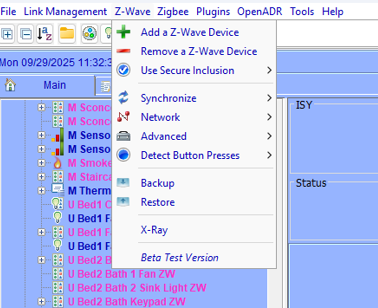
You are saying that you don't have this? I am on 5.8.4. If not you might need to open a ticket unless someone else has an idea.
-
You might investigate using a program as the Alexa interface instead of the device directly. The program can set the actual on level. I use a ZooZ Z-wave dimmer switch in this manner and programmatically set the on dimming value when turned on. I like Z-wave devices, but you (like many of us) have discovered that there are some limitations where Eisy is concerned. Programs seem to be the best/only solution.
-
I currently use a program or programs to activate a scene. But occasionally, in my more complex scenes that also have multiple zwave devices as responders, I end up in what I can only describe as a feedback loop where the scene turns off and on repeatedly. That is why I am trying to find a less complex solution.
-
For those of you who use Z-wave, has anyone found a solution where the Z-wave device will control a scene? I can only get it to work as a responder. There is a setting under the Z-wave main menu called "Detect Button Presses" that is defaulted to "Off". Setting it to "On" displays a worrying warning box, so I hit cancel. The Help Wiki has no specific info on the setting that I could find. Is there more substantial Eisy/Z-wave documentation anywhere? Or is anyone aware of a solution to the problem?
-
Nothing is obvious where Z-wave is concerned when implementing with Eisy 😉 but I have figured out quite a lot though trial and error. I still have not figured out how to get Z-wave to control a scene though (my Holy Grail). It will respond but not control based on my experience and anecdotal reports of others. There is a setting under the Zwave menu called "Detect Press" that is off by default. But I can't find any specific info on it in the Help Wiki. And when trying to turn it on a warning box pops up with all sorts of worrying statements, so I hit cancel. When I have time, I might turn it on to see what happens, but that scares me a little that I might break a perfectly working Eisy environment. 😬
-
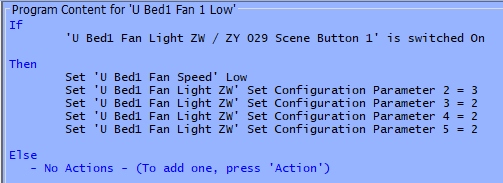
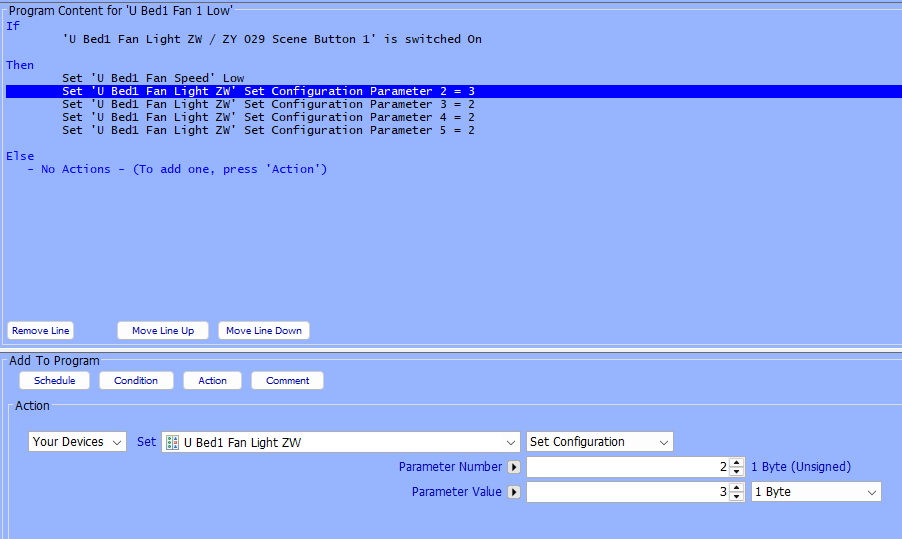
I use the Zen32 as fan controllers in my secondary bedrooms. The smaller buttons control the speed via an Insteon Fanlinc. Here is what I do to change the parameters of the small buttons when one is pressed. When one is pressed, it lights up and turns off the led on the others. I have a separate program for low, med, high and off. Scene Button 1 is parameter 2, the rest are the other small buttons.

-
Following as I am also on 5.8.4 with a LOT of Z-Wave devices. Can you add any new Z-Wave devices? If you can, that might indicate just an issue with the upgrade. Can you remove and re-add one of the existing devices? Maybe one not in a bunch of scenes or programs to minimize inconvenience. Just make sure to use the Z-Wave remove and not just the normal delete. Again, this would indicate an issue with the upgrade and not your Z-Wave implementation. Please let us know what you find out.
-
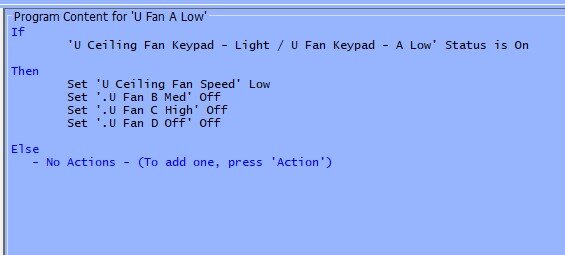
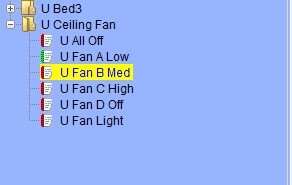
I have done something similar using just scenes, but it is pretty convoluted in my opinion. You have to set a key "on" status to "off" and the like. So, I generally use programs to do this. I find them easier to understand and maintain. Create a scene for each key and assign just the one key as a controller for the scene. The create a program for each key that, when triggered, executes whatever you want to do but also turns the other key scenes off. I use this procedure for my ceiling fan buttons. When I press the 'low" button, it sets the fan to low and turns the other buttons off. Similar programs for med, high and off. I group all my key programs in a folder for readability. You have to create a scene for each key because, while you can recognize a key press in an if statement, you can't control a specific key in the resulting then/else. So, you control via the scene.
-
I love the Zen32 but as you have discovered (which I did as well) there is no obvious small button "off". I was fine with that since I use them primarily as fan controllers, so each of the buttons triggers a program to set a fan setting. And it "turns off" the other button by just turning off the led. In my setup (details attached) the big button controls the fan light and the small buttons control the speed via an Insteon fan controller. zen32-bed fan-howto.rtf

-
In my yard utility room, I ran power to the low voltage transformer through a smart on/off wall switch. I am currently using z-wave, but an Insteon switch (or any other controllable by eISY) would work just as well. With my setup, I can control manually at the switch or programmatically using my eISY. It is currently part of my sunrise/sunset program. My setup is just on or off only. Nothing beyond that.
-
It is likely tmobile doing this. Verizon started disallowing this as well several years ago. Though I was too lazy to completely remove my text notifications and still occasionally I get one hours or days later. I now just depend on email notifications. Those seem solid. Try googling tmobile email to text notifications and see what might come up.
-
Major Kudos to bpwwer - Amazon delivered my Bond Bridge an hour ago. I fired it up and got it talking to my gas fireplace. Then I added the BOND plugin to my eISY (best $11 ever) and, after a restart of the admin console, it just magically showed up in my devices list. I added on and off as a responder to my Fireplace scene and now I can control my fireplace from button "F" (what else would I choose ) on my 8 button keypad. Thanks again!


