


Ross
Members
-
Joined
-
Last visited
Everything posted by Ross
-
@paulbates Paul, will you please let me know what you replace the IOLink with? Hopefully something from YoLink. Thanks, Ross
-
Grew up in Indiana. Most of the state stayed on Eastern Standard time year-round. The counties in the NW corner were on Central time and changed their clocks to stay with Chicago. Same for a few counties in the SW corner. The counties near Louisville were officially not supposed to change their clocks, but they did anyway to stay on Louisville time. There was a West Wing episode about Indiana's crazy time zones back then. I lived in Evansville and went to school in Bloomington. It took "3 hours" to drive to school, but only "1 hour" to drive home. We just used to call it Slow Time or Fast Time so we all knew when lunch was. Ross
-
I ran into this over the weekend. I recommend drinking. In Configuration - System, there is a checkbox "Query at Restart". Uncheck it! Good luck, Ross
-
@PhanTomiZ Worked like a charm! @Geddy had previously mentioned that I may need to update my App Password. When I went in to create a new one for my EISY, my previous App Password for my ISY said it was last used on Feb 23 - that corresponded to when it stopped working. @PhanTomiZ Please offer your "Instruction Services" to UDI and write the definitive instructions to Migrate to an EISY! I needed it this past weekend. The only thing I would change is #7 Instead of "7. For Password enter the password associated with your Account" Use this: "7. For Password enter your newly created App Password associated with your Account" Thank you again! Ross
-
@Geddy I will consider changing the app password; however, I might wait until I exhaust other possibilities (including opening a ticket) as I've forgotten the process and will need to do some research. To answer your other question: I send to both a text email (Verizon - I know, archaic) and a once/day email to another Gmail account. My last Sent email was Feb 24. I'm good with UD Mobile notifications, but my wife just wants a text. I prefer the texts myself. Thanks, Ross
-
I just migrated to EISY yesterday and that happened to me last night. Same result - it kept working. I don't know if it's normal/expected so I'm not really answering your question! I agree with Techman that it is probably timing out. With my ISY994, I kept my Admin Console running at all times and it stayed active for several days before locking up. I like it up as I'm a tinkerer. I hope that can continue with the EISY. Ross
-
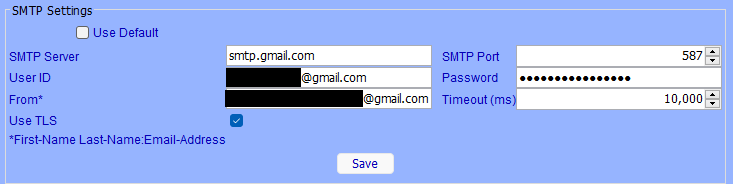
@Geddy Thank you for your responses, Geddy. My Gmail stopped sending notices around Feb 24 - about the same time as others seem to have stopped. I was on the ISY994 then (I migrated this past weekend). My default on the ISY994 also didn't work. On the EISY, the settings don't work, but the Default does. Based on your advice, I went and logged into the account - you are right - something I don't hardly ever do. I also noticed I had 10,000 Sent emails in there dating back years. I deleted and trashed them. I sent an email from the account and it worked. However, still no joy sending emails from EISY. Here are my settings. Based on @Michel Kohanim previous post, I'll open a ticket. Thanks, Ross
-
I migrated yesterday. It wasn't painless for me. I found the instructions a bit confusing. Seems to me that there should be exact instructions for every use case (mine was ISY994+Polisy+Keeping Serial Modem to EISY r2) instead of commingling instructions (e.g. "if you have zWave, then do this first...). I'm kicking myself for not writing down everything I did (in order) so I could post it and help others. I had trouble with the portal (it kept saying my ISY wasn't approved) until a message came up in the Admin Console that I needed to go to a website. When I clicked on the Configuration-Portal tab, there was nothing. When I clicked on it again, the message appeared. Once I logged into that, my ISY was magically approved. I could login to PG3 and then I couldn't. I changed passwords to mirror the EISY password and still no luck - even after I changed the password via Forgot Password. I'm sorry to say I don't know what I did to fix it, but after poking around here and there, it finally let me in. Maybe there was a time lag for the new PW to take. My backup (and a previous backup) for PG3 half worked - my plugins appeared in their slots, but everything was unmanaged. My patience was wearing thin; so, I ended up just buying/reinstalling all of my Plugins again. My iAqualink Plugin would not connect nor the programs associated with it didn't work. I deleted/reinstalled and Disabled-Saved-Enabled-Saved each associated program and now I believe they are working. Each Network Resource needed to be Saved. UD Mobile was an involved process, but the instructions were clear - just a lot of steps that seem counterintuitive (e.g., delete your NEW controller and disregard any popup messages). But, it works! It was a lot for me due to lack of ability and lack of patience, but I'm happy with the situation now. The ISY and Polisy sure were trusty over the years. I'm not someone who likes to mess with stuff when it's working perfectly, but I'm glad I'm on the other side now. Ross
-
I migrated over to EISY r2 yesterday (not fun - that's another story). My Gmail doesn't work on an EISY either. However, I haven't researched yet whether the settings should be different for an EISY compared to an ISY. Clicking the default checkbox does work (neither Gmail nor Default worked on my ISY994). But, I'd rather use the Gmail account. Ross
-
I am now getting the same error (using a Gmail account). The last time mine worked was 7:30am PST on Monday, Feb 23.
-
Here are my settings and it works on an ISY 994i 5.3.4:
-
In the IF section of a program, I can check whether my Solar Heater (solar panels) are N/A, OFF, ON or ENABLED. However, in the Then/Else Section, I can only Set it to ON or OFF. I would like to be able to Set it to ENABLED as well, but it's not an option. Just FYI - the ENABLED option allows the system to compare the solar panel temperature to the pool temperature and automatically switch the valves accordingly. My current workaround is to compare outside air temperature to the pool. This is pretty close; however, the roof is hotter on a sunny day than the air temperature. Thank you, Ross
-
FYI - Verizon allows email to text. Sounds like T-Mobile allows it too.
-
@Guy Lavoie I do get a notification in UD Mobile if the portal is down (and then up). I didn't create any programs to do that - it just does it. I'll play with your suggestions today. Thanks to all for the advice, Ross
-
@roblombardo I bought this 2A power supply from Amazon and my Polisy came back to life. It's important to get the correct barrel size as you said - 5.5mm x 2.5mm. https://www.amazon.com/dp/B0D269PYK9?ref=ppx_yo2ov_dt_b_fed_asin_title 1A (the original PS) would work too, I just decided to have a little extra. Thank you for your help, Ross
-
@larryllix What do you recommend for a direct (and easy) method of sensing that the internet is down? I would like to have a program that senses it and then reboots the router. @apostolakisl I agree that checking for non-updating conditions would be a way, but I would rather not have to determine if it was a PGx problem. And FYI, I've had my router/modem on an automatic daily reboot for years now and it's never hung because of the reboot.
-
@raymondjiii When I am home, my ISY reboots the router for 1 minute at 5:15pm each day. If my network happens to be down or on the fritz, 99% of the time it comes back up. When I'm on vacation, the ISY reboots the router twice per day. Therefore, I never have more than 12 hours of home-blindness (I like that term @larryllix). As long as the network is up, I can then use a manual app (Kasa or Yolink with their respective smart plugs) to reboot my ISY and/or Polisy if I feel it's necessary to do so. Both have plug-ins; so, you could program them to also reboot if you choose. I prefer the manual method. I hope this is responsive to your questions. Ross
-
I have a program that turns off my router for 1 minute and then turns it back on. [Edit based on @dbwarner5's question below: As @larryllix says below, my router and cable modem is plugged into an Insteon On/Off module that is controlled by my ISY. No wifi needed]. I have Kasa wifi plugs for my ISY and Polisy that allows me to turn those on/off manually (as long as the router is on, of course). YoLink also has similar wifi plugs. Ross
-
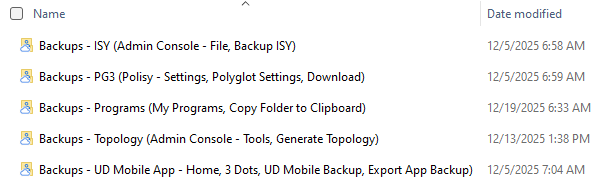
I usually backup my stuff once per month (or more often if I'm messing around with things). Here are my folders with remind me what I need to do. Please let me know if I'm missing any important backups. I don't know if I need to backup the topology, but I do. I have an ISY with a Polisy and use UDM. Thanks, Ross
-
I'm lurking here as I (and everyone else with Sonos speakers, I assume) have the same issue with the random joining. However, I use ST-Sonos rather than the Sonos plug-in. But I'm willing to switch if successful. If this can't be "fixed", can it be accomplished through Network Resources instead? I believe it's possible to pause/play/next/previous/shuffle + volume up/down, but I'm not sure certain speakers can be joined. Thanks, Ross
-
@roblombardo My Polisy is doing the same thing (3rd light flashing). Will you please let me know the specs of what you replaced it with or the Amazon link? Thanks, Ross
-
I replaced a device for the first time this weekend, but I couldn't figure out how to move it from any folder. When I added my new device, I could see the replace option for it, but the AC wouldn't allow me to move my old device to the top (kept giving me the circle with the line through it). Luckily, it was involved in only 1 scene and no programs, so I just deleted/added. Ross
-
@Guy Lavoie Hi Guy, this is my program to monitor my current pool temperature: Pool Temp - [ID 00B1][Parent 0094] If 'Nodes / YoLink / Temp Pool' Sensor Temperature > 0.0°F Then $sPoolTemp = 'Nodes / YoLink / Temp Pool' Sensor Temperature °F Else - No Actions - (To add one, press 'Action') I don't know that your High Temp program works as the temperature might not go up exactly 1 degree (maybe more, maybe less). I posted elsewhere (and can repost here if you want) what conditions are required for a YoLink sensor to update. No matter what, it updates each hour. You may need another program to set the High Temp variable only if the Current Temp is > than the High Temp. Ross
-
I have YoLink temperature sensors placed where I care what the temperature is (e.g., living room couch, bed, kitchen). I don't care about the temperature where the thermostats actually are. I then use programs to control my heat pump via old Insteon thermostats.
-
@paulbates I had this happen with one of my keypads about a month ago. I just started pressing buttons on it at random and it snapped out of it. It's been behaving ever since.


