


IndyMike
Members
-
Joined
-
Last visited
Everything posted by IndyMike
-
If you can Telnet into the ISY, here's another process: https://wiki.universal-devices.com/ISY-99i/ISY-26_INSTEON:Replacing/Formatting_an_SD_Card I just tried this, it does work on the ISY994.
-
New card not formatted properly or incompatible? Is it truly a new unformatted card? If it's the correct card size you could copy the files from the old card using a PC. Note that people have had issues initializing/copying files using a Mac.
-
Curious that Mobilinc works but you can't connect locally. When you do a manual "Add" in the IOX finder, what does it show you when you try to connect? You could also try to connect to the ISY shell via Telnet - https://docs.universal-devices.com/production/ISY%20Advanced%20Configuration%20Guide.pdf
-
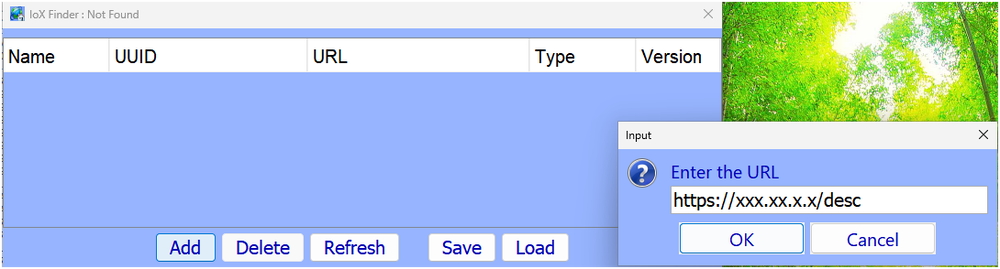
If you can ping the ISY you should be able to manually add the address: Click the "Add" button and manually add the local address as shown. Also add an address for http ( http://xxx.xx.x.x/desc). After doing this click "save" and save the configuration to a local file for the Next time things are lost. Use the "Load" command from the file you created. My "saved" file is from 2022, still working.
-
@mmb , I second the opinion that performing a whole house query may be doing more harm than good. This is particularly true if your overall communication (and scene accuracy) is good - meaning that you don't benefit from the query. Why you ask? It turns out there are serial communication errors occurring regularly between the ISY and the PLM. Most of the time these are harmless and the ISY simply retries the command and we never know the problem occurred. Rarely, the corruption results in a valid command that the PLM puts on the powerline (think all-on/all-off). @kclenden was the 1st to document that these errors were occurring and could cause All-on/all-off events. Since that time I have see 1 case of a All-on and 1 instance of the PLM Reset due to corrupted communications. The communication errors are more frequent during periods of heavy communication - Device restores, Program activity with no delays, and system queries. I have found a mitigation on the ISY994 using the low level "CD" (configure delay) command through the ISY Shell interface (Telnet). This allows you to reduce the rate of successive commands that the ISY issues to the PLM. Unfortunately, I don't believe this exists on the EISY. This is why I would recommend eliminating the query-all if you can tolerate it. Another possibility would be to shorten/improve the quality of the serial/usb cable to the EISY. I have not found this to help on the ISY994, but the EISY is a different animal.
-
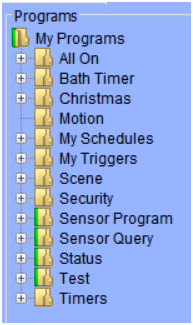
@MMAltair , I am starting to believe that your EISY filesystem was corrupted during the power outage. You will not be able to do much with only 10 devices in your PLM. You can try another PLM restore to see if that corrects the issue, but my guess is that the EISY image has been corrupted. BEFORE you perform the restore, open the Event Viewer on Level 3. The EISY will then show you exactly which device records are being written to the PLM as in the example below. If you wind up with a "short list" of devices, the EISY image is corrupt. To restore properly, you will need to find a good backup. Programs can be exported to save them. I have had mixed results with this. The best results were obtained by exporting each subfolder to a separate file (do not try to save "My Programs" itself). You can also export individual programs. I would suggest trying this (export/import) to make sure you understand the functionality prior to restoring the backup. You can import folders/programs as a test and then hit "undo changes". If you believe you have a good restore (all 41 of your devices) then you can start working through any remaining communication issues. PLM Restore Snippet Mon 07/27/2026 08:51:35 AM : [ 53 BC 3A 1] Restoring PLM Mon 07/27/2026 08:51:35 AM : [ 58 B0 78 1] Replacing PLM links (locally and in PLM) Mon 07/27/2026 08:51:35 AM : [ 58 B0 78 1] Replacing PLM links Successful Mon 07/27/2026 08:51:35 AM : [ 1A 5D C7 1] Replacing PLM links (locally and in PLM) Mon 07/27/2026 08:51:35 AM : [ 1A 5D C7 1] Replacing PLM links Successful Mon 07/27/2026 08:51:35 AM : [ C C2 32 1] Replacing PLM links (locally and in PLM) Mon 07/27/2026 08:51:35 AM : [ C C2 32 1] Replacing PLM links Successful Mon 07/27/2026 08:51:35 AM : [ 18 93 83 1] Replacing PLM links (locally and in PLM) Mon 07/27/2026 08:51:35 AM : [ 18 93 83 1] Replacing PLM links Successful Mon 07/27/2026 08:51:35 AM : [ 58 B0 74 1] Replacing PLM links (locally and in PLM) Mon 07/27/2026 08:51:35 AM : [ 58 B0 74 1] Replacing PLM links Successful Mon 07/27/2026 08:51:35 AM : [ 16 CD 80 1] Replacing PLM links (locally and in PLM) Mon 07/27/2026 08:51:35 AM : [ 16 CD 80 1] Replacing PLM links Successful Mon 07/27/2026 08:51:35 AM : [ 41 21 1 1] Replacing PLM links (locally and in PLM) Mon 07/27/2026 08:51:35 AM : [ 41 21 1 1] Replacing PLM links Successful Mon 07/27/2026 08:51:35 AM : [ 29 53 3C 1] Replacing PLM links (locally and in PLM) Mon 07/27/2026 08:51:35 AM : [ 29 53 3C 1] Replacing PLM links Successful
-
There's a bit to unpack here... Normally when you delete a device it removes all links/scenes from the ISY. Relinking (if you chose remove existing links) refreshes the device with a responder link to the PLM and a controller link to the PLM. Your device has "old links" from scenes that no longer exist. I've never seen that before (Curious), but it's not necessarily a problem. You might try a factory reset to see if things behave differently. Also curious that you still have a (!) on this device. The ISY was able to program it and read the link table. Obviously it CAN communicate with the device. Not sure why it would flag it as non-responding. Could you perform a link table read on the device with the event viewer on level 3, then post the viewer contents? This would help to assess communications with the device. You should NOT need to remove the device from scenes prior to a delete. The ISY will do this automatically. You likely have some "pending writes" on your devices. When the ISY is asked to update a specific device it will also try to update any other devices that are flagged as needing updates. The ISY994 has a method to turn off automatic write to devices. Not sure if that is available on the EISY. That PLM table is a definite problem. It shows links to 10 of your 41 devices. It is either a partial listing (interrupted by communications) or a corrupt table. If you could try a few more reads to verify the contents, that would help. Otherwise you need to restore (or restore from a difference backup).
-
@MMAltair , you can disregard the mismatch @0FF0. the the "A" in the "EA" byte is a feature associated with newer device communications. For all intents and purposes, the tables are identical. This devices has controller and responder links to your PLM and nothing else. It is not currently included in any scenes. I'm a little confused by the fact that the device table shows deleted entries on lines 2, 3, and 4. Normally deleting the device/re-adding would eliminate these entries (like what I posted above). How are you deleting/re-adding? Does this device still have the (!) indicator?
-
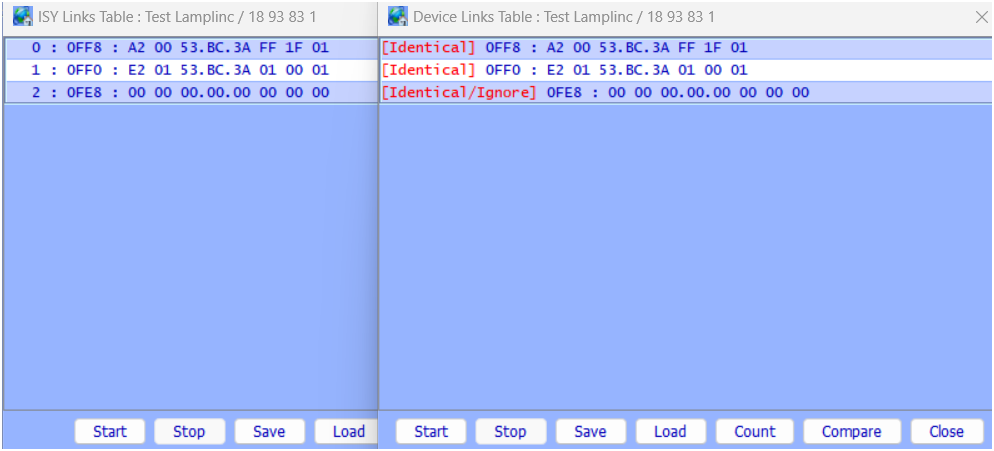
@MMAltair, I am struggling to understand how your devices came to be programmed with the incorrect PLM address. The would normally require a PLM change and a corrupted restore, or a restore from a backup from a previous PLM (without the ISY knowing a New PLM was attached). Your description of events is not matching up with the symptoms. As a result, I'm very hesitant to suggest going to a new PLM. I do not see and indication that the old PLM has an issue. You have good communications, and your PLM can see device activations (sign that the PLM records are intact. Could you try restoring an older Eisy backup? Edit - before doing any thing drastic, could you perform/provide the following: Open the event viewer to level 3. Right click on a working device on the tree and select "Diagnostics\Show Device Link table" A window will pop up showing the device Links and the links will begin populating (reading in process). Once complete, click "Compare" on the lower right. Upload both the link table windows and the event viewer contents. Repeat the above for a device that is not working properly (!). Also - please confirm that your current PLM address is 3D.94.80 Example link records and event viewer for one of my devices shown below Example Link Table Read/Compare Example Link Table Communication in Event Viewer Wed 08/05/2026 07:51:58 AM : [INST-TX-I2 ] 02 62 18 93 83 1F 2F 00 00 00 0F FF 01 00 00 00 00 00 00 00 00 C2 Wed 08/05/2026 07:51:58 AM : [INST-ACK ] 02 62 18.93.83 1F 2F 00 00 00 0F FF 01 00 00 00 00 00 00 00 00 C2 06 (00) Wed 08/05/2026 07:51:58 AM : [INST-SRX ] 02 50 18.93.83 53.BC.3A 2F 2F 00 (00) Wed 08/05/2026 07:51:58 AM : [Std-Direct Ack] 18.93.83-->ISY/PLM Group=0, Max Hops=3, Hops Left=3 Wed 08/05/2026 07:51:59 AM : [INST-ERX ] 02 51 18 93 83 53 BC 3A 15 2F 00 01 01 0F FF 01 A2 00 53 BC 3A FF 1F 01 C2 Wed 08/05/2026 07:51:59 AM : [Ext-Direct ] 18.93.83-->ISY/PLM Group=0, Max Hops=1, Hops Left=1 Wed 08/05/2026 07:51:59 AM : [INST-TX-I2 ] 02 62 18 93 83 1F 2F 00 00 00 0F F7 01 00 00 00 00 00 00 00 00 CA Wed 08/05/2026 07:51:59 AM : [INST-ACK ] 02 62 18.93.83 1F 2F 00 00 00 0F F7 01 00 00 00 00 00 00 00 00 CA 06 (00) Wed 08/05/2026 07:51:59 AM : [INST-SRX ] 02 50 18.93.83 53.BC.3A 2F 2F 00 (00) Wed 08/05/2026 07:51:59 AM : [Std-Direct Ack] 18.93.83-->ISY/PLM Group=0, Max Hops=3, Hops Left=3 Wed 08/05/2026 07:52:00 AM : [INST-ERX ] 02 51 18 93 83 53 BC 3A 15 2F 00 01 01 0F F7 01 E2 01 53 BC 3A 01 00 01 CA Wed 08/05/2026 07:52:00 AM : [Ext-Direct ] 18.93.83-->ISY/PLM Group=0, Max Hops=1, Hops Left=1 Wed 08/05/2026 07:52:00 AM : [INST-TX-I2 ] 02 62 18 93 83 1F 2F 00 00 00 0F EF 01 00 00 00 00 00 00 00 00 D2 Wed 08/05/2026 07:52:00 AM : [INST-ACK ] 02 62 18.93.83 1F 2F 00 00 00 0F EF 01 00 00 00 00 00 00 00 00 D2 06 (00) Wed 08/05/2026 07:52:00 AM : [INST-SRX ] 02 50 18.93.83 53.BC.3A 2F 2F 00 (00) Wed 08/05/2026 07:52:00 AM : [Std-Direct Ack] 18.93.83-->ISY/PLM Group=0, Max Hops=3, Hops Left=3 Wed 08/05/2026 07:52:01 AM : [INST-ERX ] 02 51 18 93 83 53 BC 3A 15 2F 00 01 01 0F EF 01 00 00 00 00 00 00 00 00 D2 Wed 08/05/2026 07:52:01 AM : [Ext-Direct ] 18.93.83-->ISY/PLM Group=0, Max Hops=1, Hops Left=1
-
@MMAltair thanks for the log. In general, your communications to the devices are good. The NACK's are not. These are programming errors at the device. You have 1 device that is returning a NACK (4D.9B.F0). This is an indication that a I2CS device is not programmed with your current PLM address. This should have nothing to due with a power outage. Try a "restore device" on this device. If it does not correct the problem, then the ISY image is corrupt for this unit. If this is the only device affected, a "delete/re-add" should correct the problem. If you have many devices affected we need to dig a bit deeper. I can't comment on devices that were not responding (!) because there weren't any in the log. You mentioned 15 devices that were having issues. If see the 1 NACK in the log, can't help with the others.
-
OK the mobile app would make sense for the rest commands. I would not suspect the new PLM programming. That would result in consistent failures for a given device. That is not my understanding of your problem. This really sound like a classic noise/signal absorption problem. You need to use a methodical process to isolate when/where the problem is. If the problem is always/frequently present, you can turn off breakers in an attempt to improve communications. Also inspect the circuit the PLM is on for any new or possibly failing devices. If the problem occurs at certain times of the day, try to alter the timing of events to improve communications (well pumps, heat pumps, photo cells, etc). These are the worst to locate. Noise/absorption related to certain devices turning on can be a horrible pain to isolate. They require a lot of patience and observation to pin down. You can use the event viewer to monitor "hops remaining" in response to a system query to assess communication quality. If you find a problem device, you can use the "show link table" feature to interrogate the device table. This is a rather intensive read procedure that will show problems if communication issues are present. As you acquire data, post it to the forum. As an example - I had a variable speed heat pump/condenser installed a few year ago. For the 1st couple of years I had no issues. Then it got hot and the heat pump started hitting 80%+ speed levels. As soon as it did, my I1 (powerline only) devices near the electrical panel went offline. Took me quite awhile to pin down. It's been pretty hot this year...
-
@sndflea , The Event Viewer output does not appear to match the programs that you posted - was that intentional? The log shows that you attempted to turn off 10 devices using direct commands (device specific - no scenes). Direct commands require that the device respond with it's acknowledgment of the command. 3 of the devices did not respond (Err 1). 2 of the devices appear to be older based on their addresses (2C 36 41, 18 A0 D7) and may be powerline only devices. The third is more recent (47.E2.57) and would likely be dual band (unless it's a IOlinc). Other than the errors, your communications aren't stelar, but they are not horrible either. From the statistics below, 72% of the commands used 1 Hop (good) with the remaining commands using 2 Hops (Fair). It does appear that you are dealing with signal absorption or noise. The troubleshooting links that @Geddy supplied are applicable. I find it interesting that all of the commands being issued are "rest commands" as if they originated external to the EISY. I am not that familiar with the EISY (I use the ISY994). Were these OFF commands generated by another controller or by a EISY program? Sat 08/01/2026 09:14:07 AM : Create REST U7 [/rest/nodes/2C%2036%2041%201/cmd/DON/0/51] Sat 08/01/2026 09:14:07 AM : U7 Rest: submitCmd([2C 36 41 1],[DON],[<NULL>]) Sat 08/01/2026 09:14:07 AM : [INST-TX-I1 ] 02 62 2C 36 41 0F 13 00 Sat 08/01/2026 09:14:07 AM : [INST-ACK ] 02 62 2C.36.41 0F 13 00 06 LTOFFRR(00) Sat 08/01/2026 09:14:11 AM : [D2D EVENT ] Event [2C 36 41 1] [ERR] [1] uom=0 prec=-1 Sat 08/01/2026 09:14:11 AM : [2C 36 41 1 ] ERR 1 Event Viewer Statistics Elapsed Time 0:01:41 Communications TX-I1 10 TX-I2 0 INST-ACK 10 INST-SRX 7 INST-ERX 0 Total Comms 27 Errors Unknown 0 ERR 1 3 Unexpected Response 0 Unexpected, Ignored 0 Failed 0 Hops Max Hops=3, Hops Left=3 0 Max Hops=3, Hops Left=2 5 Max Hops=3, Hops Left=1 2 Max Hops=3, Hops Left=0 0 Max Hops=2, Hops Left=2 0 Max Hops=2, Hops Left=1 0 Max Hops=2, Hops Left=0 0 Max Hops=1, Hops Left=1 0 Max Hops=1, Hops Left=0 0 Hop Efficiency 0 Hops Used 0 0.00% 1 Hop Used 5 71.43% 2 Hops Used 2 28.57% 3 Hops Used 0 0.00%
-
dual band devices are far better than powerline only, but that can still be affected by signal absorbers/noise. I have a filterlinc on my fancy linear compressor refrigerator because it takes 2 dual band devices offline without it (V.45) Devices can absolutely work in one direction and not the other (send vs receive). The fact that you have several devices affected normally indicates that the issue is near the PLM. The (!) indicates that a device did not respond to the ISY (On/off command, query, or programming command). A scene on/off will NOT cause a "failed to respond" (!) since it does not request status. The fact that it takes 10 minutes to delete a device indicates that ISY/PLM are re-trying communications many times during the process. I previously asked you to post an event viewer output from a query of "My Lighting" (event viewer on level 3). This will show which devices are having issues and the general status of your communications. The following is a small snippet of a "My lighting" query from my system: Hops left = 3: excellent Hops left = 0: poor Multiple communications without a response: timeout (!) My Lighting Query: Thu 07/30/2026 09:49:53 AM : [INST-TX-I1 ] 02 62 0C C2 32 0F 19 00 Thu 07/30/2026 09:49:53 AM : [INST-ACK ] 02 62 0C.C2.32 0F 19 00 06 LTSREQ (LIGHT) Thu 07/30/2026 09:49:53 AM : [INST-SRX ] 02 50 0C.C2.32 53.BC.3A 2F 04 00 (00) Thu 07/30/2026 09:49:53 AM : [Std-Direct Ack] 0C.C2.32-->ISY/PLM Group=0, Max Hops=3, Hops Left=3 Thu 07/30/2026 09:49:54 AM : [INST-TX-I1 ] 02 62 18 93 83 0F 19 00 Thu 07/30/2026 09:49:54 AM : [INST-ACK ] 02 62 18.93.83 0F 19 00 06 LTSREQ (LIGHT) Thu 07/30/2026 09:49:54 AM : [INST-SRX ] 02 50 18.93.83 53.BC.3A 2F 11 00 LTONRR (00) Thu 07/30/2026 09:49:54 AM : [Std-Direct Ack] 18.93.83-->ISY/PLM Group=0, Max Hops=3, Hops Left=3 Thu 07/30/2026 09:49:54 AM : [INST-TX-I1 ] 02 62 58 B0 74 0F 19 00 Thu 07/30/2026 09:49:55 AM : [INST-ACK ] 02 62 58.B0.74 0F 19 00 06 LTSREQ (LIGHT) Thu 07/30/2026 09:49:55 AM : [INST-SRX ] 02 50 58.B0.74 53.BC.3A 2F 37 00 (00) Thu 07/30/2026 09:49:55 AM : [Std-Direct Ack] 58.B0.74-->ISY/PLM Group=0, Max Hops=3, Hops Left=3 Thu 07/30/2026 09:49:55 AM : [INST-TX-I1 ] 02 62 16 CD 80 0F 19 00 Thu 07/30/2026 09:49:56 AM : [INST-ACK ] 02 62 16.CD.80 0F 19 00 06 LTSREQ (LIGHT) Thu 07/30/2026 09:49:56 AM : [INST-SRX ] 02 50 16.CD.80 53.BC.3A 2B 37 00 (00) Thu 07/30/2026 09:49:56 AM : [Std-Direct Ack] 16.CD.80-->ISY/PLM Group=0, Max Hops=3, Hops Left=2
-
FWIW, If you have the event viewer open (Level 3) during a "Restore Devices" operation it will show you the actual devices being restored and the PLM records written. This can be helpful if you suspect your backup has issues. The following is a snippet from a restore operation. The 1st section shows the devices being restored. The second section shows the PLM records being written. Now the enterprising person might think they could simply count the number of write entries to the PLM to determine the record count. Unfortunately life is never the simple. Note that one of the entries has a "15" at the end rather than a "06". The "15" indicates a "NAK" (negative acknowledge) and can't be counted. In my case there were 478 PLM writes attempted or which 414 were successful (excel is very helpful here). Sun 03/29/2026 04:45:10 PM : Optimizing Device Databases Sun 03/29/2026 04:45:10 PM : [ 58 B0 78 1] Preparing Device 'BSMT Kitchen Ceiling' for Restore Sun 03/29/2026 04:45:10 PM : [ 58 B0 78 1] Device 'BSMT Kitchen Ceiling' ready for Full Restore Sun 03/29/2026 04:45:10 PM : [ 1A 5D C7 1] Preparing Device 'Bar Cans' for Restore Sun 03/29/2026 04:45:10 PM : [ 1A 5D C7 1] Device 'Bar Cans' ready for Full Restore Sun 03/29/2026 04:45:10 PM : [ C C2 32 1] Preparing Device 'Kitchen Cans' for Restore Sun 03/29/2026 04:45:10 PM : [ C C2 32 1] Device 'Kitchen Cans' ready for Full Restore o o o Sun 03/29/2026 04:45:14 PM : Reset PLM Sun 03/29/2026 04:45:16 PM : [RST-ACK ] 02 67 06 Sun 03/29/2026 04:45:16 PM : [SET-CNF-RSP ] 02 6B 80 06 Sun 03/29/2026 04:45:17 PM : [MNG-LNK-RSP ] 02 6F 40 E2 00 58 B0 78 01 20 45 06 Sun 03/29/2026 04:45:17 PM : [MNG-LNK-RSP ] 02 6F 40 E2 10 58 B0 78 01 20 45 06 Sun 03/29/2026 04:45:18 PM : [MNG-LNK-RSP ] 02 6F 41 A2 01 58 B0 78 01 20 45 06 Sun 03/29/2026 04:45:18 PM : [MNG-LNK-RSP ] 02 6F 40 E2 00 1A 5D C7 01 19 40 06 Sun 03/29/2026 04:45:19 PM : [MNG-LNK-RSP ] 02 6F 40 E2 10 1A 5D C7 01 19 40 06 Sun 03/29/2026 04:45:19 PM : [MNG-LNK-RSP ] 02 6F 40 E2 13 1A 5D C7 01 19 40 06 Sun 03/29/2026 04:45:19 PM : [MNG-LNK-RSP ] 02 6F 40 E2 13 1A 5D C7 01 19 40 15 Sun 03/29/2026 04:45:20 PM : [MNG-LNK-RSP ] 02 6F 40 E2 17 1A 5D C7 01 19 40 06
-
@MMAltair , If your ISY is seeing manual device activations the PLM link table is intact (for that device at least). I believe that the V.9E firmware is the latest version (has not changed in some time). This is sounding like a communication issue at the devices or the PLM: Are the devices on the same circuit - could mean a problem with that circuit. Any chance that a phase coupler died during the power outage - doesn't apply if you have newer dual band devices. Most likely is a problem near the PLM (or the PLM output stage). You might try unplugging devices on the same circuit as the PLM. If you could open your event viewer on Level 3 and perform a query of "My Lighting", then upload the results, we can get an idea how well your devices are communicating.
-
@Bumbershoot , my apologies. I was mixing problems. I did not mean to infer that you PLM was having issues. I do not believe that is the case. I do believe that your ISY had a filesystem issue at some point. That issue was present during your backup and your PLM replacement. This was your root cause of the issue. After this point, system, PLM, and device restores were corrupted. Separately, there was 1 previous instance reported on the forum where a PLM was reset due to a communication error. My request regarding PLM counts was one of curiosity since you saw some extremely low PLM record counts. I'm sorry for mentioning this confusing issue.
-
@johnjces , no cause for embarrassment. The ISY does not publish information on programming x10 codes. Unless you have a separate controller that is capable of programming devices, there was no reason to suspect an X10 code being present. I have had this happen on older powerline only units - presumably due to a communication error during programming. I have not experienced it on a V.45 unit that uses dual band communication. Keep an eye on that unit. It may be in a "poor communication" area or it may be having issues.
-
Perfect. There is just no substitute for good backups. Kudos Try to keep an eye on your PLM link count. Report back if you see a sudden dive. As I said earlier, there have been issues with the PLM being reset due to communication errors.
-
@johnjces , Insteon switches are very capable of sending X10 commands. Your log seems to indicate that the "Garage Outside Switch" is doing exactly that. How the switch came to be programmed with an X10 code, I can't say. It's actually not that easy to program the code. To remove the code, factory reset the switch. Then restore with the ISY. The ISY will NOT restore the X10 codes.
-
That does sound low. For reference, I have 62 devices and 408 PLM links. There is the unfortunate possibility that the file corruption occurred some time back. You may need to regress though multiple backups.
-
The absolute minimum number of links in your PLM should be 2X the number of devices you have. Every device should have 1 responder link (A2) and 1 controller link (E2) in the PLM. KPL's will increase this # drastically - a 6 button KPL requires a minimum of 6 responder links and 1 controller link if you have no scenes. Scenes also add to the PLM link count. If you have fewer than the Minimum link count you have missing links or the PLM read was interrupted by communications (happens frequently).
-
You do understand correctly. It's great that you have good backups - this should be far easier than deleting/re-adding devices and re-creating scenes and programs. I believe the ISY will restore the backup and the write PLM in one fell swoop. It may also ask if you want to restore devices (you do). Keep an eye on the messages from the ISY. The process should be: Restore ISY (backup file) Restore PLM (ISY should recognize that you have a new PLM) Restore Devices Very odd for the PLM to have 0 links. Had you checked it before? I ask because we had another forum member experience PLM resets due to serial communication errors.
-
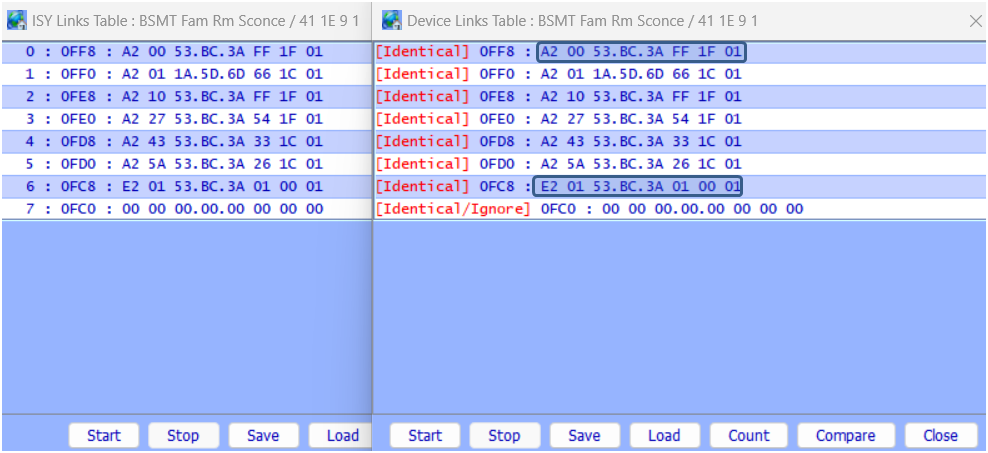
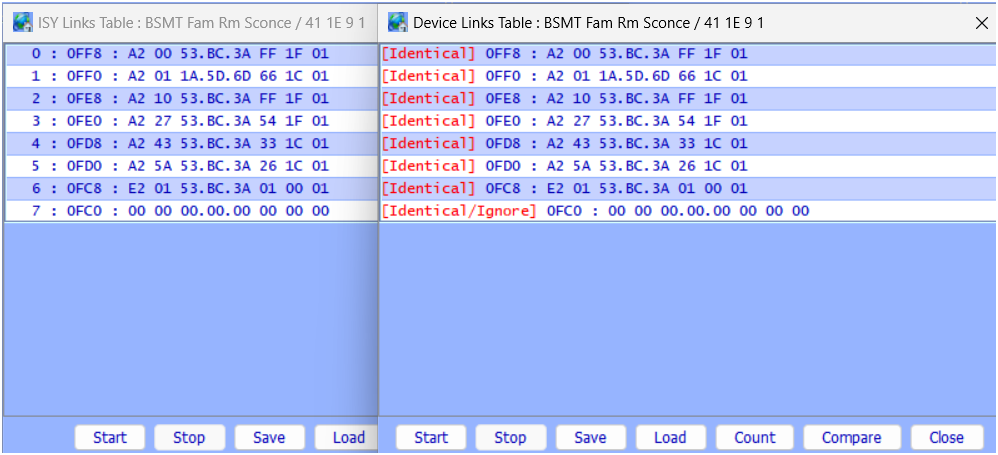
@Bumbershoot , your Switchlink is missing the Link that tells it to be a controller to the PLM. From my SWL table below, the E2 entry @0FC8 tells the unit that it is a controller of the device @53.BC.3A (my PLM). Your device doesn't have this link. Without it, the SWL will not communicate to the PLM when it is activated. Unfortunately, the ISY believes the table is correct. That means the ISY data is also corrupt. You could delete/re-add this device but you seem to have quite a number of scenes that it is involved with - that sound painful. You also mentioned that your PLM seemed to have surprisingly few Links - could you quantify that (number of links vs number of installed devices)? Given the above, I'm leaning toward asking you to install from a previous backup (Restore ISY).
-
Hey @Bumbershoot , The fact that your device restores didn't work and your PLM record count is low is rather foreboding. This normally (not always) means that the ISY configuration itself is incorrect. Could you perform a "Device Link Table Read/Compare" of one of your switchlincs and post it? Also, please provide your current PLM address. From this we can try to figure out the least painful path forward.
-
@IndyUDIuser , As @Guy Lavoie indicated, changing ramp rates, on levels, backlights and Adjust Scene commands write to devices EEprom. You may choose to use them in a program that gets activated 2x/day. Using them in a Looping program is unwise. Adjusting the backlight on a device is also a rather communication intensive activity. This is likely why you saw the "system busy" notification. The ISY makes this so easy to accomplish that it's not at all obvious what is going on "under the hood". Timing/communication varies depending on the type of device involved. The follow sample timings are for setting the backlight to zero and assume "perfect" communication timing: Old I1 Devices: 2 seconds - 8 I1 send/receive comms I2 Devices: 1 second - 2 I2 send/receive comms I2CS Devices (most newer devices): 2 seconds - mixture of 5 I1/I2 comms For the program shown above (set backlight to 0, wait 1 second, set backlight to 100%) the times shown above would be 2x + 1 second. You can easily see that you are at (or over) the 5 repeat time under perfect conditions. If you encounter external powerline activity, rest activity, or device retries, things will go sideways quickly. A couple of "interesting" observations regarding using these commands in programs: If you disable "automatic writes to devices" (ISY994 Pro), programs will run, but they will NOT write to the device EEprom (no communication in event viewer). If you have devices with pending writes (green 11010 showing), a program that writes to a Different Device EEprom will trigger the ISY to perform the pending write (ISY994 Pro again). Your solution of using the "Beep" command is an excellent one. I often use this when I can't remember where a particular device is located. You can further reduce overhead by placing your device in a scene and "Beeping" the scene. I1 Peek/Poke Backlight Write: 8 comms/2 seconds Thu 07/16/2026 10:33:15 AM : [All ] Writing 2 bytes to devices Thu 07/16/2026 10:33:15 AM : [B B7 F8 1 ] Memory : Write dbAddr=0x0264 [00] cmd1=0x2E cmd2=0x00 Thu 07/16/2026 10:33:15 AM : [INST-TX-I1 ] 02 62 0B B7 F8 0F 28 02 Thu 07/16/2026 10:33:15 AM : [INST-ACK ] 02 62 0B.B7.F8 0F 28 02 06 SET-MSB(02) Thu 07/16/2026 10:33:15 AM : [INST-SRX ] 02 50 0B.B7.F8 53.BC.3A 2F 28 02 SET-MSB(02) Thu 07/16/2026 10:33:15 AM : [Std-Direct Ack] 0B.B7.F8-->ISY/PLM Group=0, Max Hops=3, Hops Left=3 Thu 07/16/2026 10:33:15 AM : [INST-TX-I1 ] 02 62 0B B7 F8 0F 2B 64 Thu 07/16/2026 10:33:15 AM : [INST-ACK ] 02 62 0B.B7.F8 0F 2B 64 06 PEEK (64) Thu 07/16/2026 10:33:16 AM : [INST-SRX ] 02 50 0B.B7.F8 53.BC.3A 2F 2B 7F PEEK (7F) Thu 07/16/2026 10:33:16 AM : [Std-Direct Ack] 0B.B7.F8-->ISY/PLM Group=0, Max Hops=3, Hops Left=3 Thu 07/16/2026 10:33:16 AM : [INST-TX-I1 ] 02 62 0B B7 F8 0F 29 00 Thu 07/16/2026 10:33:16 AM : [INST-ACK ] 02 62 0B.B7.F8 0F 29 00 06 POKE (00) Thu 07/16/2026 10:33:16 AM : [INST-SRX ] 02 50 0B.B7.F8 53.BC.3A 2F 29 00 POKE (00) Thu 07/16/2026 10:33:16 AM : [Std-Direct Ack] 0B.B7.F8-->ISY/PLM Group=0, Max Hops=3, Hops Left=3 Thu 07/16/2026 10:33:16 AM : [INST-TX-I1 ] 02 62 0B B7 F8 0F 24 00 Thu 07/16/2026 10:33:16 AM : [INST-ACK ] 02 62 0B.B7.F8 0F 24 00 06 (00) Thu 07/16/2026 10:33:17 AM : [INST-SRX ] 02 50 0B.B7.F8 53.BC.3A 2F 24 00 (00) Thu 07/16/2026 10:33:17 AM : [Std-Direct Ack] 0B.B7.F8-->ISY/PLM Group=0, Max Hops=3, Hops Left=3 Thu 07/16/2026 10:33:17 AM : [B B7 F8 1 ] Memory : EPROM Refreshed Thu 07/16/2026 10:33:17 AM : [All ] Writing 0 bytes to devices I2 Backlight Write: 2 comms/1 second Thu 07/16/2026 10:35:23 AM : [All ] Writing 1 bytes to devices Thu 07/16/2026 10:35:23 AM : [1A 4F 19 1 ] Memory : Write dbAddr=0x0264 [00] cmd1=0x2E cmd2=0x00 Thu 07/16/2026 10:35:23 AM : [INST-TX-I2 ] 02 62 1A 4F 19 1F 2E 00 00 03 00 00 00 00 00 00 00 00 00 00 00 CF Thu 07/16/2026 10:35:23 AM : [INST-ACK ] 02 62 1A.4F.19 1F 2E 00 00 03 00 00 00 00 00 00 00 00 00 00 00 CF 06 (00) Thu 07/16/2026 10:35:24 AM : [INST-SRX ] 02 50 1A.4F.19 53.BC.3A 2F 2E 00 (00) Thu 07/16/2026 10:35:24 AM : [Std-Direct Ack] 1A.4F.19-->ISY/PLM Group=0, Max Hops=3, Hops Left=3 Thu 07/16/2026 10:35:24 AM : [All ] Writing 0 bytes to devices I2CS Backlight Write: 5 comms/2 seconds (mixture of I1 and I2) Thu 07/16/2026 10:36:35 AM : [All ] Writing 1 bytes to devices Thu 07/16/2026 10:36:35 AM : [INST-TX-I2CS] 02 62 41 1E 09 1F 2F 00 00 00 00 00 01 00 00 00 00 00 00 00 00 D0 Thu 07/16/2026 10:36:35 AM : [INST-ACK ] 02 62 41.1E.09 1F 2F 00 00 00 00 00 01 00 00 00 00 00 00 00 00 D0 06 (00) Thu 07/16/2026 10:36:36 AM : [INST-SRX ] 02 50 41.1E.09 53.BC.3A 2F 2F 00 (00) Thu 07/16/2026 10:36:36 AM : [Std-Direct Ack] 41.1E.09-->ISY/PLM Group=0, Max Hops=3, Hops Left=3 Thu 07/16/2026 10:36:36 AM : [INST-ERX ] 02 51 41 1E 09 53 BC 3A 15 2F 00 00 01 0F FF 00 A2 00 53 BC 3A FF 1F 01 B8 Thu 07/16/2026 10:36:36 AM : [Ext-Direct ] 41.1E.09-->ISY/PLM Group=0, Max Hops=1, Hops Left=1 Thu 07/16/2026 10:36:36 AM : [41 1E 9 1 ] Memory : Write dbAddr=0x0264 [00] cmd1=0x2E cmd2=0x00 Thu 07/16/2026 10:36:36 AM : [INST-TX-I2CS] 02 62 41 1E 09 1F 2E 00 00 07 00 00 00 00 00 00 00 00 00 00 00 CB Thu 07/16/2026 10:36:36 AM : [INST-ACK ] 02 62 41.1E.09 1F 2E 00 00 07 00 00 00 00 00 00 00 00 00 00 00 CB 06 (00) Thu 07/16/2026 10:36:37 AM : [INST-SRX ] 02 50 41.1E.09 53.BC.3A 2F 2E 00 (00) Thu 07/16/2026 10:36:37 AM : [Std-Direct Ack] 41.1E.09-->ISY/PLM Group=0, Max Hops=3, Hops Left=3 Thu 07/16/2026 10:36:37 AM : [All ] Writing 0 bytes to devices


