


Panda88
Members
-
Joined
-
Last visited
Everything posted by Panda88
-
i know there are some issues with udMobile that is supposed to be fixed with next release. it may be related to that. if AC works with the same devices i believe it is udMobile related
-
Could there be someone around having another hub - YoLink devices will work with any hub it sees - not only the ones registered to you. but they need a connection to show data (unless you use the LocalHub) Did you try to sync UDmobile? It does sound a little like an issue on your side, but cannot say for sure
-
Can you define what the different APPs you mention are - is it UDmobile, The AC, the new eISY or ? I assume the YoLink app is the one from YoLink/YoSmart on your phone ? Sometimes you need to reboot/restart the eISY/Polisy for things to fully deploy (never found the pattern)
-
Can you enable debug in the PG3x console - restart the node server wait 5-10 min and then download the log and send it to me - I can see if there are errors during initilization - It sounds to me like the yolink node is not installed correctly
-
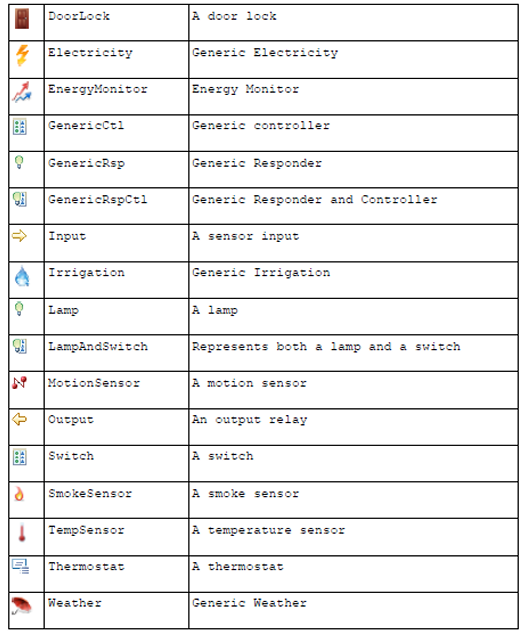
OK - I have updated the leakSensor icon to be irrigation - I made the Water related devices irrigation as well Made the hubs GenericCtrl, made the remote controllers Output, made the doorsensors DoorLock, and made the soilSensor Weather If you do a reinstall it should overwrite the existing definitions - I did not rev the version number, as there are no code changes. Below is a list of what is available (incl the icon) - Let me know if others should be changed
-
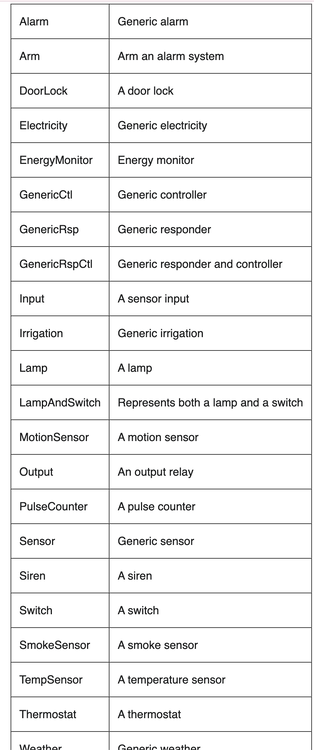
I do not think anything has changed - The current and the old both use Input as the icon. The only thing I could think of using is irrigation (the options are above) - I can try to contact UDI to see if there are new icon definitions. It seems it is eisy picking the icon if it showed water drop - maybe you can try to contact UDI for their input as well - they often try to make things "smart"
-
1.5.58 is released - mostly fixes to the yolink Thermostat
-
Can you send me a log where you issue a control event - It is supposed to send DON DOF
-
As it is said - its core is a vibrationSensor so it is already supported Wish they made it for rat-traps as well
-
1.8.56 released Minor bug fixes. Water meter measure was off for some meters (correction factor) and old thermostat issue. Was trying to fix the UDmobile issue with labels not showing, but it is believed to be a known issue with current udx release, so hopefully it will get fixed with an upcoming release of this Does anyone have issues with scenes not triggering from sensors? One user has this issue, but I cannot reproduce it here. May be the same udx issue mentioned above (but less sure about this one)
-
You can easily have multiple hubs - You only need the local hub if you plan your system to operate without internet access (for mission critical operation). Not sure there is a big difference in speed I would say unless you need its benefits, I would not buy the localHub - if you think you have marginal coverage, you can always buy another "normal" hub
-
Most likely it is the schedules - yolink operated schedules are now separate child nodes (I did not look at log yet)
-
Can you send me another log with it working - it may help identify the issue
-
Working to get some help - Have other experienced this One temporary solution should be to use status (not control) of the motion sensor in a program to trigger your scenes - I assume that would work - from the log I can see status changing - adds a small delay but not significant
-
I have contacted UDI to see if they have any idea
-
There are 5 of your door sensors that do not register the DON/DOF (triggers for scenes or actions) - others do not have this issue - You can see what they are if you look in nodes in pg3 interface Line 5763: 2026-05-12 01:43:43.741 Command udi_interface.node ERROR node:runCmd: node 8b4c01000e752f command DOF not defined Line 5764: 2026-05-12 01:43:43.781 Command udi_interface.node ERROR node:runCmd: node 8b4c01000e735a command DOF not defined Line 7098: 2026-05-12 02:16:54.781 Command udi_interface.node ERROR node:runCmd: node 8b4c01000a41c7 command DOF not defined Line 7099: 2026-05-12 02:16:54.824 Command udi_interface.node ERROR node:runCmd: node 8b4c04000354c2 command DOF not defined Line 9269: 2026-05-12 02:40:37.239 Command udi_interface.node ERROR node:runCmd: node 8b4c0200013692 command DOF not defined Is there anything unique about them? It must be coming from PG3 as other door sensors are using the same code and work well - Is this related to the zwave devices not working - e.g. are these doorsensors paired with ZWave in scenes or similar?
-
Yes - I can see this in your log the node reports it does not know the trigger commands to scenes. I do not see this in other logs which is strange, Could you try an thing - try to back up system, delete the node , reinstall it and restore the backup I also need to look at linking - it seems to be needed for zigbee/zwave, but I have never needed to use it before - maybe something has changed
-
udimobile has stricter rules for the node definitions than AC. I need to find a bug somewhere - I do see it on my side as well (Not a big user of UDImobile so I did not check) Do you know how to run the java console and see if there an any warnings when you start AC. Also, did you check if there is an update to PG3 (from the AC)
-
I think it is expected that the 2 swithes start as unknown - there should be 2 sub nodes (one per botton) - The bottons are like the remote, where you can assign a short press to generate DON (switch on) DOF (Switch off) DFON (fast switch on) DFOF and toggle (DON/DOF) or (DFON/DFOF) Once you press the key it should update from unknown If that is not the case send me a log with debug enabled and where you press the two keys with short press and long press and I'll see what I can do - if that does not work I may take you up on the Amazon offer :-)
-
Updated version to 1.8.51 - Fixed a needed correction factor for certain water meters - should report correct now (not 10x)
-
Forgot to mention the yolinkLocal is a superset of Yolink node server, so if you plan to go to localHub in the future, I would get that - there is no upgrade path (UDI does not support this in the PG3x system). Without localHub they should behave identical
-
Yolink offers a waterdept sensor - I have not tried it myself - I think it has +/- 1 inch accuracy - I assume it could work. You can likely adjust it to become more accurate, but it will likely change with weather (My guess) I personally use a Yolink alarm power unit (it is really a power supply you can turn on and off) and then a door sensor with a float sensor (with a small circuit added) replacing the normal sensor. The circuit on the float ensures the door sensor only can change state when powered by the alarm - I then only turn the power on when I need to see if the pool needs filling (once a day) - It is a little complex but it is from before the water dept sensor was available - I assume you can hide the dept sensor inside a skimmer (like i currently do ). The issues I had with the traditional float was it ran out of battery quickly as waves in the pool when close to the filling point would sends changes all the time draining the battery - I know Yolink talked about an improved algorithm but not sure if it happened. Naturally you can control the alarms to set the rearm time long and if you fill on first trigger the sensor should not trigger after you fill the pool - the sensor was not good in high humidity either (I had to have it in a "waterproof" box ).
-
the water level is the leak sensor- reversed, so it is supported. They also have valves with water measurement capabilities and a water dept sensor (both supported). The float is a little tricky if there are "waves" as it triggers multiple times. Motion sensor is supported The local version supports the local hub (special HUB) - that allows control without internet - I do not believe speakerhub runs without internet (yet)
-
released version 1.8.50 - minor bug fixes I believe I have addressed reported issues - Only known issues is Dimmers and Switches report an ERROR in Log - Yolink is working to fix this - it is an docmented but non-functional API to control attributes - should not matter (should allow controlling the LEDs on the devices) Online reporting has been updated - there was a bug it would report offline if a state did not change for 4 hours (It should only be if reporting did not update for 4 hours) I now ignore historyReports from some newer sensors (it was the root cause for reporting offline/Unknown) - Data is not used anyway I have updated the Fob behavior a little to make sure it identifies remotes with one press type and remotes with 2 press types (LONG and SHORT press) I do not have the old lock anymore so I cannot test it - let me know if ok I do not have a flex switch so I cannot test it - let me know if ok
-
thanks - that works - I had a bug in the old Lock code (I no longer have that device) - I'll fix, and release a new updated version - hopefully you can help test


