


Panda88
Members
-
Joined
-
Last visited
Everything posted by Panda88
-
Can you retrieve the profile files again?
-
I saw there just was a new release of the UI - maybe try that before anything else I would try to delete and reinstall - I believe they are really the same
-
There are no errors in the Yolink log - Maybe try to reboot the system or reinstall the nodes - there are other nodes with errors as well
-
can you send me a log and I can take a look
-
Yes - I use something similar Jari has promised to fix this in a future release of eISY-UI (simply dropping the non-numeric type)
-
It seems there is a bug in the eisy-ui interface - I have specified time with 2 possible value types - 1 being the actual time (unix time) and 2 if there is no time a text string showing that (indx, uom25) - This also shown when you pick the variable - it shows index, unixtime - I guess it picks the index (0 or 99) - not the unix time - although it programmed to be unixtime when the value is updated I can remove the index, but in my mind it is a bug in the system - Note, if you use the AC, you can pick unix time and it works there - this is why I have not had issues so far

-
Let me know when you think it works and I can do a full release
-
The original issue was related to smartRemoter devices, so I believe it is covered - I do not have all permutations to test, and each behave slightly different but I do believe the ghost triggering so common - so it should be addressed already
-
Code was updated, but not activated for the 5708 switch - sorry I'll build a version 1.8.61 in the non-production store to make sure it works for you - can you test before I release
-
It should be the same code, but I'll confirm If you can enable debug and capture a ghost event (along with rough time) and pm me log, I can see if I can find the issue
-
No, first time after the new node is installed, it is required - after that it should not be needed unless down for a long time. Note, I just fixed one more bug, so please reinstall
-
I have noticed that once in a while a reboot of the system or a delete and reinstall of the node is necesary for up to fully update
-
Released versio 0.1.21 Fixes bugs in eisy-ui interfsace Ensures time only updates if new data is received Moved to dynamoc profiles
-
Version 0.6.29 is released It now stored tokens so a reboot should not require F2A code Updated to latest API Time now only updates if camera provides data Swapped ST and GV0 or GV1 so main parameter shows Armed state Few minor bug fixes to show nicely in eisy-ui among other things
-
Just released version 2.2.20 in productions store - Hybrid mode supporting older and newer system (as much as possible) Few bug fixes related to time - now it does not update if data is not updated - makes it useful for testing if node is running or not (test against unixtime)
-
The new NuHeat_v2 plugin is designed to replace the old ST-NuHeat plugin. It uses the new API and authentication method - follow the readme in the node. Expect to rewrite programs as some variables and functions are redefined/added
-
There is an updated version supporting the new API and credentials - check out NuHeat_v2 It is not 100% backwards compatible, so programs must be updated Existing users can request a license transfer
-
Try 2.2.0 in non-production store - moved to static profiles to support older systems - also serialized creation of nodes (for slower systems)
-
You can set the temp using perment hold (I guess I should rename it to permanet set) - but it looks like you do nto see that in UDmobile I am using dynamic parameters in this node, and I wonder if it could be caused by that - it does require a newer version of the udi_interface
-
@bpwwer Do you know what could be causing this? Is the PG3x/udi_interface version too new - I just made the version I currently use the requirement @jwagner010 Just to be 100% sure - you were able to press authenticate and then log into your account and then you see data in the Polisy with same values as the app - can you also change temps etc? If that is the case, we just need to understand why you do nto see the same in the ISY994. BTW - is there any special reason for not moving to run on the polisy?
-
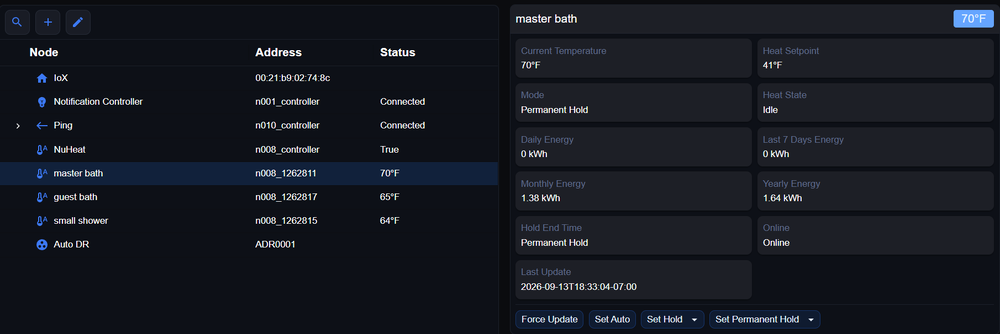
I added a new node server to test in the beta (non-production) store - can you give it a try it is called NuHeat_v2 You will need to redo the programs as I may have changed some values - for sure the commands are changed Your should only need to login to your nuheat account once requested (after pressing Authenticate during start up) and then accept the different scopes. I believe this is sufficient, but cannot test if the credentials I got only cover my account of if all users can use it (I hope this is the case) Once it is working - I'll do a full release. I am working with UDI to see if they can move licenses from the old to the new plugin
-
If it is Yolink specific - the devices have a last update time (that gets updated when yolink send new data - it is updated even if the value does not change) - you can compare that to the system unix time (under system parameters) - both represents seconds after jan 1st 1980 e.g. if system unix time - last update > xxxx seconds you may need to create a variable first (containing the difference) and then run a program that tests for the difference, but I am sure it can be done multiple ways
-
I am through the authentication process - moving the python code base I have - to PG3x Can somebody remind me the current functionality of the node - I am using a very old version as reference - I can no-longer run the node - and I do not remember what the latest functionality is This one is reporting of power consumption per day/week/year - Anybody using this?
-
Thanks - I'll see what the AI agent can do first :-)
-
I do have a nuheat - I think there is a python version under siimplextech github - I forked that to start from GitHub - simplextech/udi-poly-nuheat: NuHeat Signature Thermostat Polyglot Nodeserver · GitHub I was going to ask an AI to perform the changes and see where it gets me :-) - I believe it is doable without too much effort - no need to reinvent the thing from scratch Not sure how to release this (assuming I get it to work) - I assume you have the ability to update the PG3x store to point to a new version - or can it be handed over (if I am to support going forward)

