


Panda88
Members
-
Joined
-
Last visited
Everything posted by Panda88
-
You can easily have multiple hubs - You only need the local hub if you plan your system to operate without internet access (for mission critical operation). Not sure there is a big difference in speed I would say unless you need its benefits, I would not buy the localHub - if you think you have marginal coverage, you can always buy another "normal" hub
-
Most likely it is the schedules - yolink operated schedules are now separate child nodes (I did not look at log yet)
-
Can you send me another log with it working - it may help identify the issue
-
Working to get some help - Have other experienced this One temporary solution should be to use status (not control) of the motion sensor in a program to trigger your scenes - I assume that would work - from the log I can see status changing - adds a small delay but not significant
-
I have contacted UDI to see if they have any idea
-
There are 5 of your door sensors that do not register the DON/DOF (triggers for scenes or actions) - others do not have this issue - You can see what they are if you look in nodes in pg3 interface Line 5763: 2026-05-12 01:43:43.741 Command udi_interface.node ERROR node:runCmd: node 8b4c01000e752f command DOF not defined Line 5764: 2026-05-12 01:43:43.781 Command udi_interface.node ERROR node:runCmd: node 8b4c01000e735a command DOF not defined Line 7098: 2026-05-12 02:16:54.781 Command udi_interface.node ERROR node:runCmd: node 8b4c01000a41c7 command DOF not defined Line 7099: 2026-05-12 02:16:54.824 Command udi_interface.node ERROR node:runCmd: node 8b4c04000354c2 command DOF not defined Line 9269: 2026-05-12 02:40:37.239 Command udi_interface.node ERROR node:runCmd: node 8b4c0200013692 command DOF not defined Is there anything unique about them? It must be coming from PG3 as other door sensors are using the same code and work well - Is this related to the zwave devices not working - e.g. are these doorsensors paired with ZWave in scenes or similar?
-
Yes - I can see this in your log the node reports it does not know the trigger commands to scenes. I do not see this in other logs which is strange, Could you try an thing - try to back up system, delete the node , reinstall it and restore the backup I also need to look at linking - it seems to be needed for zigbee/zwave, but I have never needed to use it before - maybe something has changed
-
udimobile has stricter rules for the node definitions than AC. I need to find a bug somewhere - I do see it on my side as well (Not a big user of UDImobile so I did not check) Do you know how to run the java console and see if there an any warnings when you start AC. Also, did you check if there is an update to PG3 (from the AC)
-
I think it is expected that the 2 swithes start as unknown - there should be 2 sub nodes (one per botton) - The bottons are like the remote, where you can assign a short press to generate DON (switch on) DOF (Switch off) DFON (fast switch on) DFOF and toggle (DON/DOF) or (DFON/DFOF) Once you press the key it should update from unknown If that is not the case send me a log with debug enabled and where you press the two keys with short press and long press and I'll see what I can do - if that does not work I may take you up on the Amazon offer :-)
-
Updated version to 1.8.51 - Fixed a needed correction factor for certain water meters - should report correct now (not 10x)
-
Forgot to mention the yolinkLocal is a superset of Yolink node server, so if you plan to go to localHub in the future, I would get that - there is no upgrade path (UDI does not support this in the PG3x system). Without localHub they should behave identical
-
Yolink offers a waterdept sensor - I have not tried it myself - I think it has +/- 1 inch accuracy - I assume it could work. You can likely adjust it to become more accurate, but it will likely change with weather (My guess) I personally use a Yolink alarm power unit (it is really a power supply you can turn on and off) and then a door sensor with a float sensor (with a small circuit added) replacing the normal sensor. The circuit on the float ensures the door sensor only can change state when powered by the alarm - I then only turn the power on when I need to see if the pool needs filling (once a day) - It is a little complex but it is from before the water dept sensor was available - I assume you can hide the dept sensor inside a skimmer (like i currently do ). The issues I had with the traditional float was it ran out of battery quickly as waves in the pool when close to the filling point would sends changes all the time draining the battery - I know Yolink talked about an improved algorithm but not sure if it happened. Naturally you can control the alarms to set the rearm time long and if you fill on first trigger the sensor should not trigger after you fill the pool - the sensor was not good in high humidity either (I had to have it in a "waterproof" box ).
-
the water level is the leak sensor- reversed, so it is supported. They also have valves with water measurement capabilities and a water dept sensor (both supported). The float is a little tricky if there are "waves" as it triggers multiple times. Motion sensor is supported The local version supports the local hub (special HUB) - that allows control without internet - I do not believe speakerhub runs without internet (yet)
-
released version 1.8.50 - minor bug fixes I believe I have addressed reported issues - Only known issues is Dimmers and Switches report an ERROR in Log - Yolink is working to fix this - it is an docmented but non-functional API to control attributes - should not matter (should allow controlling the LEDs on the devices) Online reporting has been updated - there was a bug it would report offline if a state did not change for 4 hours (It should only be if reporting did not update for 4 hours) I now ignore historyReports from some newer sensors (it was the root cause for reporting offline/Unknown) - Data is not used anyway I have updated the Fob behavior a little to make sure it identifies remotes with one press type and remotes with 2 press types (LONG and SHORT press) I do not have the old lock anymore so I cannot test it - let me know if ok I do not have a flex switch so I cannot test it - let me know if ok
-
thanks - that works - I had a bug in the old Lock code (I no longer have that device) - I'll fix, and release a new updated version - hopefully you can help test
-
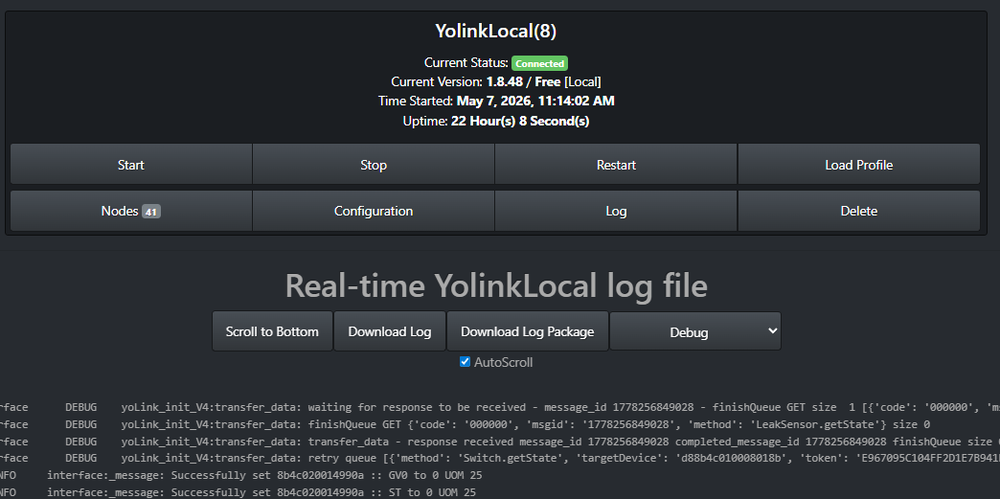
Sorry - no - click download log - make sure debug is enabled Best if you can restart after enabling debug, wait a little, and then click Download Log
-
Can you enable debug and send me the node log (not the PG3 log) - that will help me understand the issue
-
I think I can receive messages again - hit a limit Can you send me a log with debug enabled - and let me know when you pressed the update (roughly in time) Also if you can turn the switch on and off in the log Found a bug for Alert
-
I found a few of the bugs - I still need to figure out the time jump issue - I'll try to release a patch release once I have the last bug ironed out
-
can you send me a log with debug enabled. there must be a bug somewhere but i need to know what the device reported you can pm it to me. enable debug under logging. update sensor —set log back to info and download log - just the pg3 log i did find a bug but nit related to this
-
Can you send me a log with debug enabled. It may be I mapped alert wrong - it is likely charging. I did add new functionality in the localHub to allow it to detect if it is operating of its own battery or by power from outlet, but it seems Alert is not the correct message. I do not own a flex switch - I should be able to identify the issue from the log I think the last NS-70 message is beyond the node server layer but I'll check
-
Do you need anything changed? I do not 100% follow - if yes, can you send a log with debug enabled (just PM me) Can you send me a log with debug enabled - There were changes to THsensor and LeakSensor as new functionality we enabled in the API (and I wanted to include those) - There is likely a return from the API I do not know of that may cause the unknow state to appear (if the device is not reporting its value in this return _ I just need to ignore it missing) Can you validate the device types you have - the node sees the garage sensor as T only - look at the name - They must have different types YSXXXX-UC in the app ... area
-
Legacy has been there a while :-) (previous release had it also) - the two are the same - It is to be able to assign the ST parameter to the main function of the node - not just online - This is to show in UDImobile and also an issue with how the system handles variables I tried to reduce the number of functions (some a doing the same) as they take u a lot of space on AC Is open/close swapped in the manipulator?
-
Hi I added a new BroadLink node server (BroadLink). It currently supports RF and IR code transmitters as well as the optional temp/Humidity sensor cable. It supports learning codes (@ 430MHz and 315MHz) remotes as well as IR codes (I have not been able to make it work for 305MHz RF controllers, so check the FCC ID to know the frequency of operation - or check with Broadlink). The node created a main controller node (per hub) where the sensor is a child node (if available) - the IP address is embedded in teh name). The node spins separate RF controller and IR controller nodes (with IP addresses in the name as well). Each code learned becomes a child to the respective node and you transmit it from there. You can rename the created codes. It will not allow generation of 2 identical codes (RF for sure - not 100% sure about IR codes). To erase a code (limit of AC) you either ungroup the node, delete and then regroup or erase in the polyglot web interface. Configuration required HUB_IP and TEMP_UNIT The node supports multiple hubs (list them under the HUB_IP space or comma separated) The node assumes the hub is already assigned to the Wireless network (has an IP address). The easiest way it to use the BroadLink app go as far as where the hub is assigned to the WiFi network - stop after that - If you complete to the end, but hub gets locked and cannot be controlled by the node- This also means you cannot use the APP in parallel It should be possible to add other BroadLink devices, but I do not own any so I cannot test it. Contact me if there is interest Enjoy (I hope :-))
-
not all devices have schedules :-)

