


dwengrovitz
Members
-
Joined
-
Last visited
Everything posted by dwengrovitz
-
I consistently have issues with status deltas across the various UIs, to the point where the only one I can really use is the Admin Console when logging in with my ISY credentials. Does your question apply to just the device status or also flag status? For example, in the Admin Console (login via ISY credentials), all of my devices and device flags have current states. In the Admin console (login via portal credentials), most devices are missing flag status. In eisy-ui, most devices are also missing flag status.
-
I reached out to Insteon about six weeks ago to ask about the status of their rumored new PLM. The comment I received back from their support folks was: "There are plans to release a new PLM with increased memory and enhanced capability. The module has already undergone testing, though a few items are still being refined before production. While we don’t yet have a confirmed release or availability date, it remains an active item on our development roadmap." So no date set, but it was still on the roadmap as of early November.
-
I have a couple of these I3 keypads and am using them as 2-way switches to control the same four devices. I'd really like the 4 buttons to mirror each other in terms of which button controls which devices, but it's not possible to do that with just an eisy as reassigning the load hasn't been implemented there yet. I think it's been around two years since this requirement originally surfaced in the UDI forms, so I submitted a ticket to get an update. Sadly, the response was "Updating the code to support moving the load to a different button is on the list but I'm not sure when or if it will be prioritized", so that doesn't sound too promising.
-
My experience with the Eve Home Energy (Matter) modules was also very useful. I have a ton of relatively new Insteon switch devices and an eisy hub for lighting control in my house. I also have Home Assistant set up to integrate a lot of non-Insteon devices in my environment, such as a dozen Smartwings Shades (with Matter over Thread motors). For the longest time, I could not get them to reliably stay online, even with their latest firmware update (1.3) which supposedly implemented improvements in that area. As you mention, the Eve On/Off modules include a Thread Border Router. After I installed a couple of those around the house, my Matter/Thread network and the Smartwings shades have been rock solid. I've also converted a bunch of YoLink sensors to use the local Matter network via their YoLink Local hub, and they have also been rock solid, and maybe even slightly better performing with signaling being local versus using the cloud. I even have a Shelly 1 Mini device integrated through the Matter interface in eisy that I use to control on/off (via an Insteon switch) and scheduling (via an eisy automation) of an old towel warmer device near a shower. I'm not a Matter/Thread expert, and Matter/Thread is clearly early in its evolution, but I credit the improved coverage and reliability in my environment to those Eve devices.
-
It's been a while since I've done that, but I believe you can setup a state variable within your ISY or eisy device and expose that to the Amazon Echo ecosystem via the ISY portal as a device/contact sensor. Then setup a routine with the Alexa app to monitor the state of that device/contact sensor as the trigger, then perform whatever you want on the Amazon side via the Alexa routine.
-
The issue seems to be resolved in the Yolink Local plugin for my motion, vibration, and contact sensors. Thanks!
-
FYI. I submitted a ticket to UDI on this issue, and Michel replied he was "... escalating the ticket. Please stay tuned."
-
It happens for me regardless of if I'm creating new programs or editing programs I've had for long time.
-
Interesting ... I also ran into this problem. I installed a new Local Hub and went to update my programs so they used the status from that plugin, but in the process, I had to change all of the logic from options like "is Open" and "is Motion" to "is not Closed" and "is not No Motion". The "is not" option is a workaround, but not being able to specify status options like "is Open" and "is Motion" is kind of problematic. Would it help if we opened a ticket with UDI and asked that they take a look at what's happening on their end? I'm not in any rush, and can certainly wait for them to address things in the new UI, but it would be nice to have that function/capability back at some point.
-
Yolink support states: The Local Hub units currently available are already the latest hardware revision. There are no additional hardware updates planned at this time.
-
Unfortunately, I do not know any details on the HW version or revision. I messaged with Yolink support about a month ago when the Local Hub was out of stock to inquire when it might be back, and they indicated sometime in November. Seems odd if they would have a release now and another one with something newer/different around the end of the year, but who knows. I sent a message to their support folks after seeing your question to ask for more details on the hardware, and I'll post here if they provide an update. I can also find out a bit more when the device I ordered for testing arrives, but that probably won't be for a week or so.
-
For anyone interested, the Yolink Local Hub is back in stock at Yosmart.com. It's still overly expensive, but their Black Friday discount is 20% for any product, so that helps a little bit. BTW, it doesn't show up on their website with the other hubs, but it's visible if you search for Local Hub.
-
My system was able to sync without throwing an error using 1.6.9. Thanks!
-
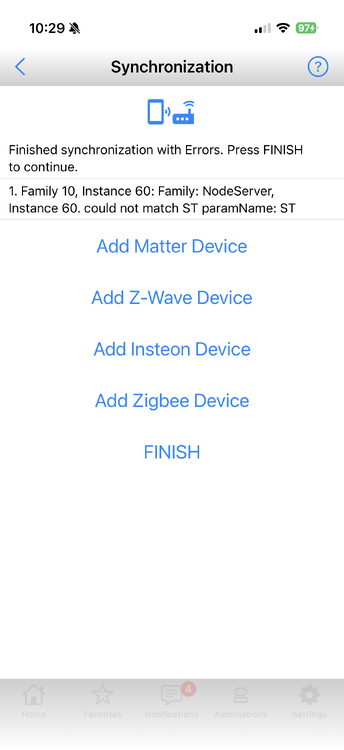
I am still seeing an ST issue on UD Mobile when syncing, similar to what @TUhl01 posted above. I'm running UD Mobile 1.4.3, with Yolink plugin 1.6.8.
-
I have multiple Yolink temp sensors, and I do get responses when I ask Alexa what the temperature is on each. Interestingly, the answers don't seem to correspond exactly to what's reported at the sensor, but they are very close, so perhaps it's a timing issue of some sort around when the sensor last reported data to the app. I haven't done extensive testing on it.
-
Speakerhubs now show as Connected - thanks!
-
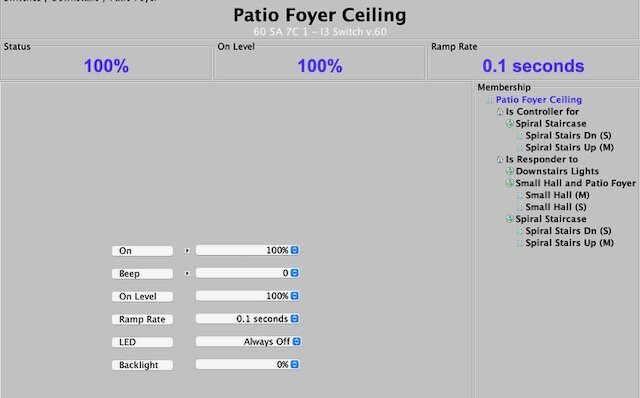
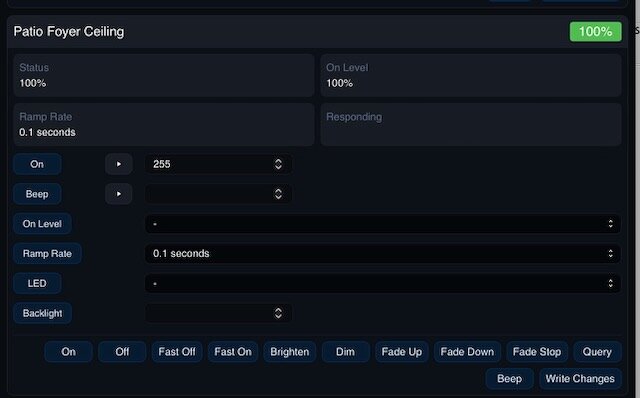
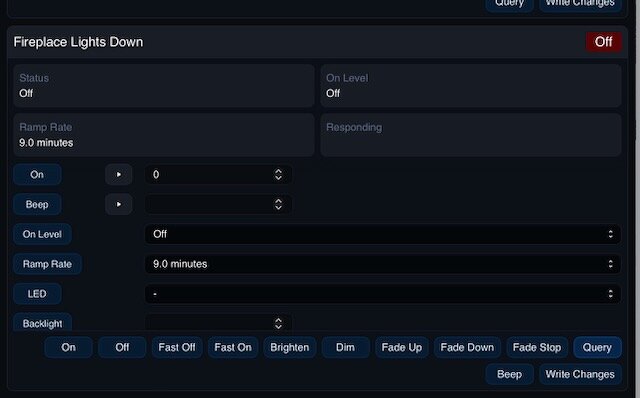
I recently updated to OS 14.3 and IoX 6.0.0, am just starting to do some testing, and am seeing some odd behaviors when looking at the configured values that show up for Insteon devices. While the data that appears in the java-based Admin Console seems fully populated and correct (meaning, as configured), the data doesn't always seem to populate in the eisy-ui interface either fully or correctly. Additionally, some of the values that populate are well beyond the expected ranges. For example, here are screenshots of data for one of my Insteon I3 paddle switches. In the java-based admin console, the On value is configured as 100% and the On Level is configured as 100%. But in eisy-ui, the On value shows as 255 and the On Level shows as blank. Running a query on the switch in eisy-ui didn't seem to change anything for those values. I'm also seeing some ramp rate defaults for several switches showing at 9 minutes instead of the usual 0.1 seconds, though that seems to clear up (at least in some cases) if I query the switch. It's almost like there are some default values that aren't translating properly or some kind of refresh isn't running when it should be. Anyone else seeing similar results?
-
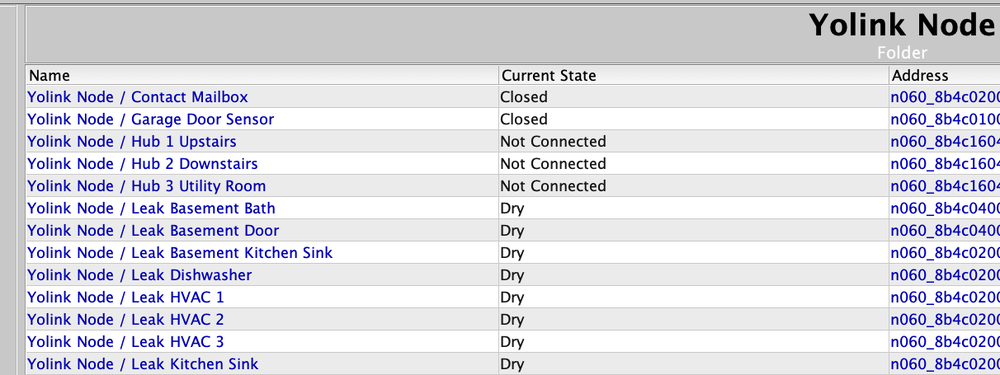
I also like the ability to see this without having to dive deeper into the UI. One odd thing I noticed is that the current state of my Speaker Hubs always show as "Not Connected", even if the individual devices seem to be reporting changes. I'm running IoX v6.0.0, with PG3x v3.3.22, and Yolink Plugin V1.5.15.
-
I have a few Big*** fans, including two Speakeasy models, but I haven't tried controlling them directly via Matter yet. Matter wasn't far enough along on the eisy when I bought the fans to try that route, so I set them up using Home Assistant as my "go between". The HA integration and app easily controls fan speed, direction, and preset mode. I also set up a physical on/off control via an Insteon I3 paddle that signals a Home Assistant automation to turn them on or off. It works very reliably, and the Speakeasy fans are quite nice.
-
I would also be interested if someone updated this to support the RGBW PM.
-
Re-authenticating brought my devices back online.
-
It's down for me, as you described. The plugin Indicates it is Online but all of the individual nodes appear as Offline.
-
I have several RGBW LED strips (indoors) that I control using Shelly RGBW2 devices, and they integrate directly with eISY just fine - though I believe the RBGW2 is an older device at this point. I'm able to turn the strips on/off via Insteon switches (which just basically turns the 24v power supplies on/off). I have several eISY scenes setup to control colors and those can be activated a variety of ways, including virtual switches setup in eISY as well as via Alexa voice. Additional tweaks to colors/brightness can be made via the Shelly app if needed. I haven't tried the RGBW PM, but it doesn't look like anyone has updated the Shelly plug-in for eISY in several years. That was too much of gamble for me when I was starting to play around with LED strips, so I just went with the RGBW2. I have since setup a Home Assistant instance, and that allows for integration of eISY/Insteon as well as a broad range of Shelly devices, so I have additional options and backups for control.
-
There are lots of fun options to play with if you also have Home Assistant. Take a look at the Ring MQTT add on in HA as it lets you integrate most all of the Ring ecosystem into your home automation setup (including contact/motion/flood sensors, smart lights, keypads, etc.). And Yolink also plays nicely with HA via an integration. Definitely sounds like you have a weekend project coming up.
-
I'm not suggesting abandoning Ring or Insteon sensors just yet, but I've had a lot of success integrating outdoor sensors to eisy via Yolink devices. The LoRa technology works great over long distances, battery life is outstanding, and the Yolink plugin for eisy works quite well (the developer has been very responsive to requests and feedback via the forums). I also have a ton of Ring devices but I prefer Yolink for anything where distance is involved. For example: I have a Yolink contact sensor inside a mailbox about 150 yards away to detect when mail gets delivered, with a hilly terrain and lots of trees in the line of sight, and the sensor is rock solid. I suspect one of their contact sensors would work quite well for gates. If new to Yolink, one would need a hub, but the starter kit cost for a Yolink speaker hub plus two outdoor contact sensors is pretty reasonable at around $65 (the speaker hub adds a nice dimension by providing the ability to easily integrate custom audio alerts). And it just reliably works without a lot of hassle.


