


wmcneil
Members
-
Joined
-
Last visited
Everything posted by wmcneil
-
I'm running eisy-ui 1.4.8 on my eisy with ZMatter dongle. I started the new protocol / z-wave / backup about 15 minutes ago, and it is still running. The window shows the circle spinning to the left of "Backing up..." This is after a reboot of the eisy.
-
@GTench thanks, your workaround works for the %open value as well. After doing some more digging, I see that eisy-ui / nodes / right click - node info / node info includes the node variable values. For my SmartWings ZWave shades, the open% is in *.ST, and the battery% is in *.BATLVL For my Lutron ZWave shades, the open% is in *.OL . This difference between Lutron and SmartWings is what tripped me up. BTW, for anyone considering buying shades, I would not recommend Lutron. they are 3 times the price, there is no option for rechargeable batteries, and there is no way to obtain the current battery level, even within the Lutron app itself.
-
I looked through a backup archive and I could not find the programs anywhere, but I may have missed something. Where are the programs stored in the archive?
-
Neither topology nor programs are currently part of eisy-ui backup. The topology and copy-folder-to-clipboard functions are also not available currently on eisy-ui, rather you must use Admin Console for those functions.
-
I have several SmartWings ZWave shades, and want to be able to have the open percentage be displayed in an email. The status email substitution variable ${sys.node.ZYXXX_1.ST} does not work (displays no value). Has anyone else found a way to display the value?
-
I'm not seeing this listed anywhere as a future eisy-ui feature, so I wanted to point out that the AC find/replace function (which provides a search function within the contents of all programs) is something I use constantly.
-
+1, 'copy folder to clipboard' is absolutely indispensable
-
This morning I tried once again to update from 7.42 to 7.45 . This time it worked, with no timeouts during the countup. I then successfully updated from 7.45 to 7.46, again with no timeouts during the countup. Both of the updates were done with Bootloader 2.04.00.05 in place. I don't have any idea why it worked today with no timeouts, whereas all previous attempts failed. If anyone has a direct link to the firmware release notes, it would be great if you would post it. I can't seem to find a combination of search terms that will get me to the release notes. My zwave devices all seem to be working correctly with firmware 7.46 . That said, note that the EISY wiki directions say to update only to 7.42 .
-
I was able to update to 7.42, but have not been successful in updating to 7.45 The bootloader pull down shows 2.04.00.05 grayed out, and so clicking on it does nothing. I assume this means bootloader 2.04.00.05 was installed successfully. I agree the count up percentage is most likely showing the progress of writing the firmware update to the dongle. The release notes that you posted for the 2.04.00.05 bootloader include "Improved UART DMA & Flow Control", but I am wondering if the retry mechanisms have actually been worsened by the update?
-
@junkycosmos , can you provide the link you used to get to the release notes? (I have been digging around and can not seem to find them) I was able to update to 7.42 but have not been successful trying to upgrade to 7.45 (the first one in the pulldown). The first couple time I tried to update to 7.45, I kept getting failures, so I then updated the bootloader to 2.04.00.05 . I then kept trying to update to 7.45 , and it is failing each time. I have tried many times. The messages indicate that the fail is occurring while trying to write the updated firmware: I am getting Connect device failed: 24 or Connect device failed: 23 messages. The highest percent complete I have reached before having a failure is about 80%, but the failures have occurred a lower percentage complete than that as well. I have tired a different USB port, both the CP2105 enhanced com port and the CP2105 basic com port, plugging the ZMatter dongle directly into both of my laptop USB ports, and both Chrome and Firefox web browsers. I have also tried leaving the ZMatter dongle unconnected for 20 sec between tries to be sure it is fully powered down.
-
That may be a hint that Firefox was not properly clearing its cache.
-
In my ticket dialog, UD support recommended using Chrome. Right when I saw that advice in the ticket, I refreshed my Firefox browser again, and then it showed connected. It had been about 15 minutes that is showed disconnected, and I had repeatedly refreshed prior to it finally showing connected. So I now have my suspicions about Firefox.
-
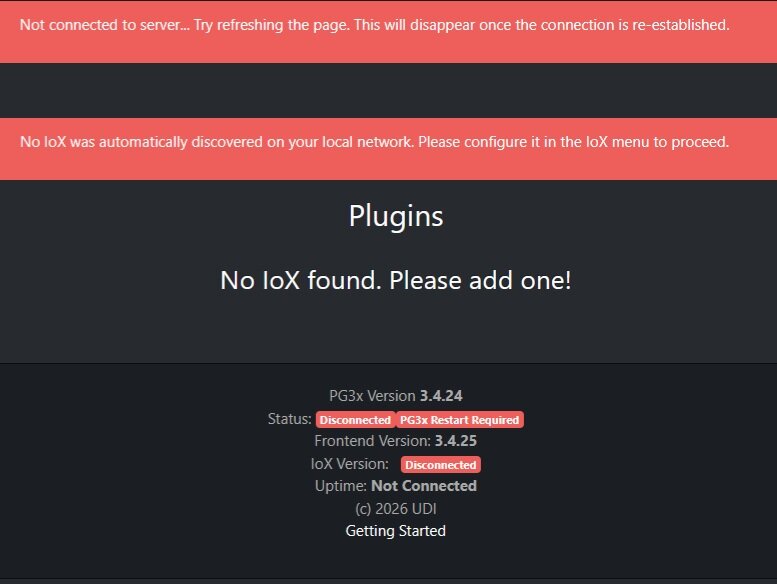
Upgraded to eisy-ui 6.1.2_7 and PG3x 3.4.25 . The Dashboard is displaying the following (I have rebooted twice to no avail): I have opened a ticket. posting here in case others see the same thing.
-
@danncas The sensor is running on batteries. You can tell this by the fact that there is a Wake Up device. In order to either read or write parameters, you will have to first wake up the sensor by pressing the zwave button once. The sensor will stay awake for a brief period, just long enough to read or write a parameter. You read a parmeter by right clicking on the Security Alarm device / Zwave / Set Configuration Parameter / Query. You write a parameter with the same interface, selecting Set instead of Query.
-
Some more info from UD (from my ticket dialog): Blank values are created by IoX only by the following two events: 1) Reboot 2) Query with blank result. So if the device is not awake when the query is done, and the query does not cause the device to wake, then the query will have a blank result. This is what is happening with my ZSE11. A workaround is to do a query only when the device is known to be awake. In the case of the ZSE11, I can follow a motion sense event (or the nth occurrence of a motion sense event, to reduce queries and therefore battery consumption) immediately with a query. So to summarize, the two behaviors that the ZSE11 has that create the issue are: 1) No ability to set a minimum interval for Battery Level reporting 2) Query does not cause the device to wake if it is sleeping
-
I have done more testing, and had interaction with both Zooz and UD support: When the Zooz ZSE11 800 sensor (firmware 2.30) is running on batteries, it does not have any minimum reporting interval for Battery Level. When not awake, a query is ignored. A workaround that will cause Battery Level to be updated: If an IoX program detects a Motion Sense change, and then immediately does a query to the ZSE11 Security Alarm device (this is the device that displays Battery Level), the Battery Level is updated. Clearly the Zooz design would be much improved if it supported a minimum interval for reporting Battery Level. I did not get any sense from their tech support that they took this point. In the past, I have observed that if a long period of time (not sure what the minimum is) goes by without a Battery Level value being reported, the Admin Console (AC) will eventually change the Battery Level field to be blank. I have asked UD (in a ticket), what value gets reported if a program is using the Battery Level status and it shows as blank in the AC, and have not heard back.
-
In the First Alert app, there is a message saying that it will be migrating to Resideo Connect.
-
I was able to get both of my Honeywell T10+ Pro thermostats paired by uninstalling/reinstalling HomeKitHub. My Lutron Caseta hub is still being added during the discovery process (not clear why it is being seen as a HomeKit accessory by HomeKitHub), but I am leaving it unpaired and it does not seem to be causing problems, AFAIK. The thermostats seem to be working properly.
-
I noticed something that may be a clue about something being wrong. In the table, the "LAN host:port from last DISCOVER (informational; optional)" has the value of the local IP of my Lutron Caseta hub. I am also running the Caseta nodeserver.
-
@Jimbo.Automates , I am trying to pair a Honeywell T10+ Pro for the first time. I believe I am following the directions exactly, and each attempt I make to do a DISCOVER and then save the pairing code. I am getting a "pairing code rejected" message. I have verified that the thermostat has not timed out of pairing mode at the time I enter the pairing code in the Custom Typed Configuration Parameters row. The node server is running on an eisy with software releases shown below inline. I have also attached the node server log file *** OS *** FreeBSD eisy 14.4-RELEASE-p6 FreeBSD 14.4-RELEASE-p6 #5 releng/14.4-n273726-3d95ec875867-dirty: Wed Jun 24 07:24:18 PDT 2026 root@bsdev144.isy.io:/usr/obj/usr/src/amd64.amd64/sys/eisy amd64 *** Hardware *** eisy-home-next (UPC: 00857386003206) *** Package Information *** ************ UDX ************ udx-5.0.0 Name : udx Version : 5.0.0 Installed on : Wed Aug 19 13:35:46 2026 EDT Origin : misc/udx Architecture : FreeBSD:14:amd64 Prefix : /usr/local Categories : misc Licenses : Maintainer : michel@universal-devices.com ************ IoX ************ isy-6.1.1 Name : isy Version : 6.1.1 Installed on : Wed Aug 19 13:35:41 2026 EDT Origin : misc/isy Architecture : FreeBSD:14:amd64 Prefix : /usr/local Categories : misc Licenses : Maintainer : michel@universal-devices.com ************ libwebsockets ************ libwebsockets-4.3.3 Name : libwebsockets Version : 4.3.3 Installed on : Wed Aug 19 13:36:21 2026 EDT Origin : net/libwebsockets Architecture : FreeBSD:14:amd64 Prefix : /usr/local Categories : devel net Licenses : MIT Maintainer : ports@FreeBSD.org ************ tpm2-tools ************ tpm2-tools-5.6_2 Name : tpm2-tools Version : 5.6_2 Installed on : Wed Aug 19 13:43:31 2026 EDT Origin : security/tpm2-tools Architecture : FreeBSD:14:amd64 Prefix : /usr/local Categories : security Licenses : BSD2CLAUSE Maintainer : tstruk@gmail.com ************ eisyui ************ eisyui-1.2.2 Name : eisyui Version : 1.2.2 Installed on : Sun Aug 23 15:27:53 2026 EDT Origin : misc/pkg Architecture : FreeBSD:14:amd64 Prefix : /usr/local Categories : misc Licenses : Maintainer : benoit@universal-devices.com ************ iox_matter_bridge ************ iox_matter_bridge-1.3.24 Name : iox_matter_bridge Version : 1.3.24 Installed on : Wed Aug 19 13:35:38 2026 EDT Origin : misc/pkg Architecture : FreeBSD:14:amd64 Prefix : /usr/local Categories : misc Licenses : Maintainer : benoit@universal-devices.com ************ mosquitto ************ mosquitto-2.0.18 Name : mosquitto Version : 2.0.18 Installed on : Wed Aug 19 13:36:21 2026 EDT Origin : net/mosquitto Architecture : FreeBSD:14:amd64 Prefix : /usr/local Categories : net Licenses : EPL Maintainer : joe@thrallingpenguin.com ************ pg3x ************ pg3x-3.4.23 Name : pg3x Version : 3.4.23 Installed on : Sun Aug 23 15:28:00 2026 EDT Origin : misc/pg3x Architecture : FreeBSD:14:amd64 Prefix : /usr/local Categories : misc Licenses : MIT Maintainer : benoit@universal-devices.com *** Networking Information *** re0: flags=1008843<UP,BROADCAST,RUNNING,SIMPLEX,MULTICAST,LOWER_UP> metric 0 mtu 1500 options=8209b<RXCSUM,TXCSUM,VLAN_MTU,VLAN_HWTAGGING,VLAN_HWCSUM,WOL_MAGIC,LINKSTATE> ether 00:21:b9:02:67:e1 inet 10.55.83.194 netmask 0xffffff00 broadcast 10.55.83.255 inet6 2605:a601:9b42:5100::1006 prefixlen 128 pltime 4500 vltime 7200 inet6 fe80::7176:badd:1585:bdee%re0 prefixlen 64 scopeid 0x1 inet6 2605:a601:9b42:5133:964:eb02:8a54:e092 prefixlen 56 autoconf pltime 14400 vltime 86400 inet6 fdd0:3a7c:f054:b267:74c5:e0c0:6c7f:e092 prefixlen 64 autoconf pltime 1800 vltime 1800 media: Ethernet autoselect (1000baseT <full-duplex>) status: active nd6 options=1<PERFORMNUD> lo0: flags=1008049<UP,LOOPBACK,RUNNING,MULTICAST,LOWER_UP> metric 0 mtu 16384 options=680003<RXCSUM,TXCSUM,LINKSTATE,RXCSUM_IPV6,TXCSUM_IPV6> inet 127.0.0.1 netmask 0xff000000 inet6 ::1 prefixlen 128 inet6 fe80::1%lo0 prefixlen 64 scopeid 0x2 groups: lo nd6 options=21<PERFORMNUD,AUTO_LINKLOCAL> *** USB Devices *** ugen0.1: <XHCI root HUB Intel> at usbus0, cfg=0 md=HOST spd=SUPER (5.0Gbps) pwr=SAVE (0mA) ugen0.2: <CP2105 Dual UART Bridge Silicon Labs> at usbus0, cfg=0 md=HOST spd=FULL (12Mbps) pwr=ON (100mA) ugen0.3: <AX201 Bluetooth Intel Corp.> at usbus0, cfg=0 md=HOST spd=FULL (12Mbps) pwr=ON (100mA) *** Upgrade Status **** UDX_UPGRADE_STATUS="inactive" HomeKitHub_8-28-2026_105843_AM.zip
-
My recent unsuccessful attempts are documented here Note that the First Alert app is going to be replaced by the Resideo Connect app. That will be the 4th name/app change so far.
-
Wow, that's some serious customization!.....I am using scenes as well.
-
Digging some more, I see the On command allows a % to be specified, and that is working.
-
I am using the ZMatter ZWave dongle. I have installed several Smartwings roller shades with ZWave motors. I am not seeing a way to request that a shade be moved to a partially open value. The various commands (EX: Fade Up, Fade Down) will cause the shade to open completely, or close completely, but I do not see a way to request partially open?
-
No. It showed 100% immediately after it was included, then subsequently became blank and has remained blank.

