


paulbates
Members
-
Joined
-
Last visited
Everything posted by paulbates
-
@Techman's factory reset is the next logical step, then a restore device. Possible it will fix it, if not replace it
-
The PLM shouldn't affect the ISY, but if it was a brown out and it affected the eISY, it may have affected the PLM too. My comment was more about pulling the plug on the eISY versus rebooting as it could be the electronics affected, not the software
-
Based on your write-up, it seems that it's the eISY. One possibility is if there was a brown out, the hardware of the eISY could have been affected by that. Have you tried unplugging the eISY and the PLM, if you have Insteon. Wait 30 seconds... Plug in the PLM, wait 10 seconds and plug in the eISY?
-
I3 devices do not respond to an Insteon generated ALL ON... the ALL ON issue with Insteon products, beat to death here on the forums and yet still relevant even today. There's a test button on iox, you can press it, and everything else turns ON but not i3 devices... they removed the code that responds to it.
-
The new version is called PS01. It's both a relay and a dimmer, you configure which at installation, or afterwards. To me it's s all pros: It appears different than prior models, more subtle, less "clicky / techy", doesn't draw attention. The light on the switch is dimmer and more subtle I and others have proven via testing that it is immune to ALL ONs Slightly smaller package, a little easier to get in the jbox It uses the i3 protocol and that is claimed to better... very little docs on what exactly that is and how it works I started over a new-to-me house and only have PS01 switches and they work really well. I have some legacy micromodule dimmers and they work as expected with the PS01s
-
When java is refreshed, you need to re-download the launcher: https://isy.universal-devices.com/start.jnlp Delete existing links/icons first
-
Ok. Policy has both, my bad recollection. I wouldn't upgrade if you're not experiencing problems
-
If you don't have a need to upgrade, not experiencing problems or limitation, I'd stay as you are. Not sure the time and $ involved would serve you vs investing in additional automations. Maybe proactively change your SD card in your ISY. The product history is - ISY 994 - Node server capability added years ago and a separate server was needed - Policy became UDIs official method of hosting node servers - eisy does both functions in one box
-
Yes, that block of code would be needed including the Repeat 1 time, which simply marks the end of steps in the repeat loop. If your count down scenario is the same for all zones, you could put this repeat -countdown code in a separate program (with no if) and call it from each zone's program. Might take some experiment and testing, but it's plausible.
-
Yes, you'll need a PLM. You can move your existing PLM over, but if it's a serial PLM you'll need UDI's special serial > usb cable. Sometimes these migrations require you to spend a lot of time re-establishing Insteon. Since your PLM is that old, it comes from a time before they made production changes... maybe get a new PLM now and switch over and get it over with during your upgrade. We can talk about the steps later if you choose to go this way One more thought... Insteon is releasing a new version of the PLM, they say this summer. If it was me, and my system was working ok... I'd wait till later this year and upgrade to a new eisy, new re-engineered PLM... go through the upgrade headaches all at once... and let it sit another 10 year.
-
Insert @IndyMike's suggested repeat loop steps at this point in your program Then $I.MinuteCount = 2 Repeat While $I.MinuteCount > 0 $I.MinuteCount -= 1 Wait 1 minute Repeat 1 times Set 'Basement / SC BSMT Entry' Off Obviously tweak the variables of the loop to count down your desired wait time
-
I have to believe it's via Node-Red. Since no one else answered this, I'd open a ticket with UDI and point to this thread and ask them specifics. Posting back how you successfully got it work here afterwards will help others in the future.
-
Ok. Where/how are you telling it to turn on? With UD Mobile App? Or using geofencing in the UD mobile app so it tries whenever you get close to home (driving, etc)?
-
See the Programs, right next to Main.. click that one and it will let you create the program iox is the new name for the software you are seeing, the admin console.
-
Have you logged into the iox java console, or did you do everything in the UD Mobile app? The programs tab in the iox java console is right next to the network tab, which is where all of your devices are. That's where you'll create that program
-
This works on 994, Polisy and Eisy
-
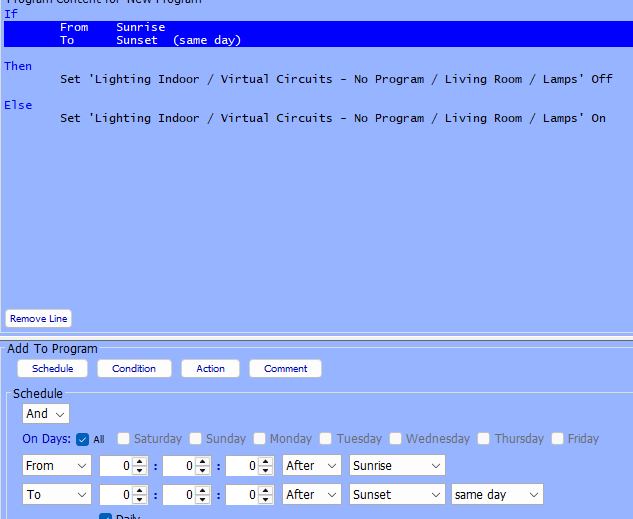
Hi and welcome to the forums! Yes you can. The scene you created is considered a 'virtual circuit'... meaning use it, and it only to control the lights together and not the devices themselves 1- For dusk - dawn automation, you create an iox program that looks like this New Program - [ID 005E][Parent 0001] If From Sunrise To Sunset (same day) Then Set 'Lighting Indoor / Virtual Circuits - No Program / Living Room / Lamps' Off Else Set 'Lighting Indoor / Virtual Circuits - No Program / Living Room / Lamps' On This is how it looks in iox when you do it, substituting your scene for my sample above The Set ... lamps on is my scene for 2 lamps, turn the Scene on and off, not the individual devices. The scene icon looks like this in iox 2- Use the same scene in UD mobile... Turn the Scene on and off, not the individul devices. Hope this answers it

-
Yeh I forgot to mention that the old iox desktop icon(s) need to be deleted before downloading start.jnlp so it doesn't get confusing. Sounds like you got it working so its all good!
-
You'll want to down load a new start.jnlp https://isy.universal-devices.com/start.jnlp That should get you in business
-
The approach by members here has been to isolate problems. If the Insteon switch itself isn't functioning as a switch at the switch, I don't see how changing the ISY SW version will help. Again, I didn't reread everything but the final isolation test would be to unplug the suspected plm, pull the tabs and retry.
-
Have you had a major power event like a lightening strike or brown outs? I did a quick read... did you follow @Brian H's suggestion to pull the tab on the bottom of the switches, wait 10 seconds, push back in?
-
Slightly different circumstances, but I've had Insteon switches get set to a zero on level and it behaves exactly like this
-
A possibility is that the "On" level of the switches somehow got set to zero. This could be symptomatic of a dying PLM. Do you have an older backup from before the problem popped up? Restoring a recent backup may put the problem back. It's possible that the switches' on level is zero but Alexa and other methods are sending a different on-level, if that makes sense
-
If you installed Java, then visit this link https://isy.universal-devices.com/start.jnlp You should not need to edit any of the files to make it work. You can also try clearing the Java cache, not that should not be necessary for a new Java install
-
Go to pg3x and go to the production store, scroll down to the notification plug-in, click that and follow the directions If you've not been to pg3x before, you can go into iox, click the plug-in menu and pick the bottom option to open pg3x. (You'll need to be on you local network in your house, not remote through the portal)


