


paulbates
Members
-
Joined
-
Last visited
Everything posted by paulbates
-
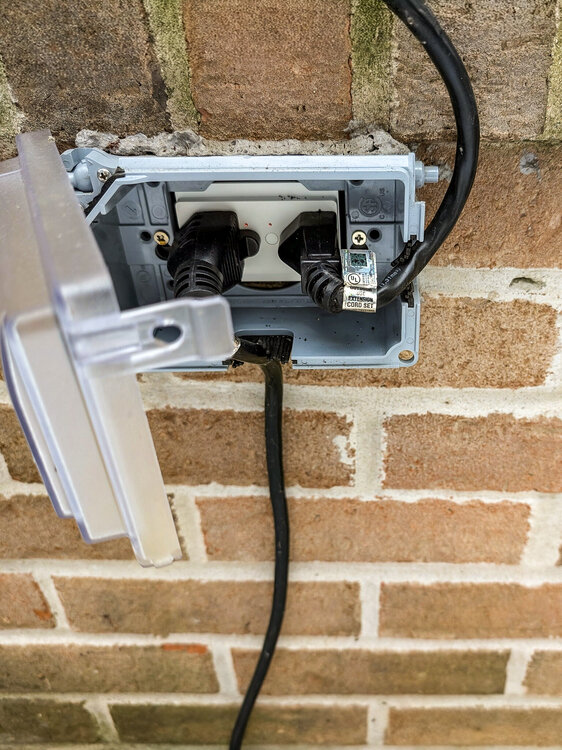
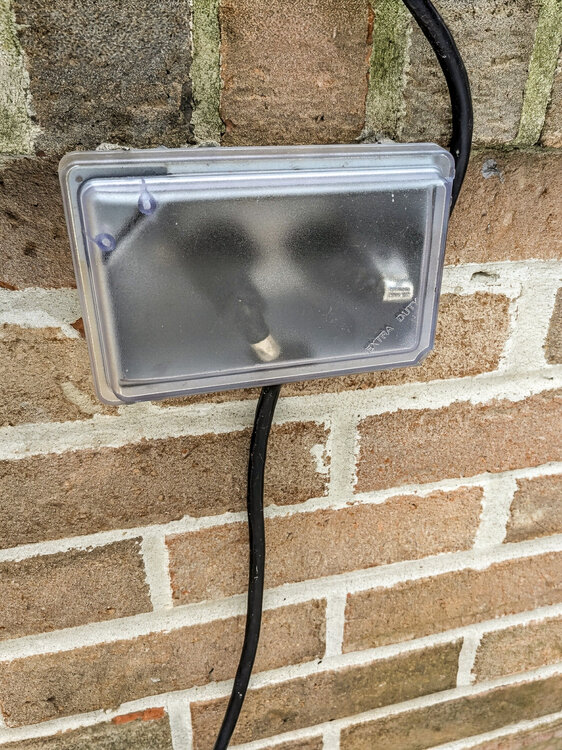
I've had multiple of the older on/offs at my last house for over 10 years in southeast Michigan.. -20 to 100 degrees I installed the i3 outlet, the one at your link, 2 years ago. It runs our patio gazebo lights year round and a home made drip sprinkler in the summer. Same weather and no problems with it. A few things The outside jboxes can be smaller or crowded, especially with an older home I recommend a cover box to screw in where a smaller outdoor faceplate would be so the wires and everything are covered. Caulk the edges of the plate cover and the house. I lost an i3 outlet because I didn't get a good enough cover.. the grill was right in front of it and water from rain splashed right in. Water was dripping out of the sockets when I removed it.... not insteon's fault. These are not GFIC. If there is another GFIC outlet, it needs to be between the Insteon outlet and the electrical panel. Wire it up and press the test botton on the GFIC. If if power remains at the insteon outlet, replace the breaker the outlet leads to with a GFIC breaker.
-
You can delete the switch from the ISY and re-add it. Caveats are: if the switch is in scenes, in which case the switch will need to be re-added to the scene(s). Likely you'll have to go back to iox programs that referenced the original switch and re-add it if necessary Also, another method of copying the file. isy backups are bunch of zipped folders which follow the path of the file in question here. The individual file could be copied out of the backup and moved to the eisy. Here are high level directions (off the top of my head): Take a copy of a backup file, open it in a zip app and navigate to the file location Copy/unzip the file to the local storage of the machine you're restoring SSH into the eisy, use that or SCP, etc to copy the file to the right location in the eisy Reboot the eisy
-
You'll need to define a variable that has a precision (Prec column) of 4 (4 digits to the right of the decimal) to copy the value from the device into, then do these iox 'Then' statements: Variable = Emporia Node (kw) Variable = Variable * 1000 (This converts kW to W) That should give you the watts value to take action in other iox conditional statements. ** Remember to use the eISY variable type of State (State Tab) with a Precision of 4, if you plan to use the variable for iox If statements
-
I made a similar post. I shut off all notifications from the app as most of mine come through the notification plugin. Had difficulty determining which of the 3 notifications was doing it, but shutting them all off stopped them coming (at ~3am) until there is a way to limit it.
-
The error means that the ISY's definition file for that switch, /FILES/CONF/50B976.REC, has become corrupted or otherwise unreadable by iox, so it does not have definition/reference for it on your system. Likely nothing is wrong with the switch. If you have an ISY with an SD card for its hard drive, likely that's going bad. If you have an eisy, something happened to that that file and it needs to be replaced, by a recent restore if you have it.
-
Is this with an eisy, it sounds like an isy problem? It looks be the sd card if going bad. You can remove it and try running an eraser over the contacts and cleaning with alcohol. If you search the forums for SD card you should find more detailed info. Also it may be time to replace the SD card
-
This happened to me when I first set up my eisy. Let it set for another day and it should act as you're expecting
-
I don't, the one I use triggers on being in or out of a certain consumption amount. But I think the results are about runtime and an approximate power consumption per unit of time. Is the ventilator multi-speed? If it's single speed you should be able to calc the number by measuring steady-state power usage from outlet and then multiplying it out with minutes (or seconds) of runtime, based on the program model above.
-
One thing to note about the Yolink wireless sensors, at least the 8003, is that they don't instantly update. I have one that checks humidity rise in my master bath shower to turn on the fan. The display on the unit will show the humidity going up, but it can be anywhere from almost instant to 7 - 10 minutes before the Sensor tells the hub to tell the plugin that it's working. That's not the case with the yolink outlet, it's usually a second or 2 from the dryer getting turned on to the fan getting switched on.
-
I've seen this with older Insteon device that have been in service for years. I could have a working virtual circuit of Insteon devices in a scene.. but if I went to add or change something in the scene, that device would always have the green 0101 next to it, meaning it would not take updates.
-
I do that with Xfinity/Comcast. I have my own cable modem and a router with network management features including a DHCP assignment table.
-
One way to do what you want is to install the smartplug and find the energy levels for when the ventilator is idle versus on. You can then use the app to set an alarm state for when the ventilator is on: You can write an Iox program to detect an alarm state of "On" and take action with iox programs using repeat loops with variables counting up minutes or seconds of runtime. You can count cycle time as well as number of cycles count this way. I use this approach for control my 2nd floor laundry vent fan by monitoring the dryer's on (alarm) state
-
I do not believe that there is a range or a < or >. The related topic is that you can give the eisy a static IP address, or use DHCP, where your router will assign it. Three points If you use a static IP address for eisy, and you change your internet service/router in the future, there's a good change you'll lose contact with your eisy based on the different subnet choices different router manufacturers use. This is the support headache you mentioned In the early days of node servers, they could run on a separate box and needed the exact (=static) ip address of the ISY. If you're not using older node servers and you are not running them a separate computer (Rasberry Pi, etc)... this problem no longer applies to you and there is no reason to use static up addressing any longer If you want your ISY to have a specific IP address, the DHCP features of most routers allow you to define a specific address for network devices like the eisy The eisy only needs to be on your network, ideally one of your router's switch ports to minimize network hops. ANSWER: It's best to go into the config tab of iox and make sure your IP address is NOT static and is DHCP and let your network and eisy take care of themselves.
-
I used mine though my ecobee thermostat. Initially worked great for about 8 months, then started either ignoring the command, indicating it completed the command-but nothing happened, or a response said it couldn't do it or didn't understand. Even with native functions like a timer, not isy integration Wife got frustrated. I shut Alexa off in ecobee and added switches where they were voice only. I could pull off Google home with devices I have, but not worth it to me.
-
Just a little clarity. True that if the ISY can't turn it on, neither can Alexa. If you use the ISY to turn an individual device on, the ISY get's a confirmation from the device indicates on or gives an error. Scene members don't confirm they've received the message. When you activate a scene from the ISY, it's fire-and-forget.. and the ISY assumes its on and indicates that. It could be the switch, the scene or noise problem, but I think you might have eliminated one or more of them. Go to tools / diagnostics / Event Manager and set it to level 3 at the bottom Fire off the scene Turn that specific device on directly post back the results
-
You might have to go to Alexa and say "Discover devices". If that doesn't do it, you might have to remove the device and any related scenes from Alexa, re-add them, and say "Discover devices"
-
I wouldn't necessarily put the blame on the eisy for iolinc. The iolinc is single band, meaning it doesn't get wireless Insteon signals and is vulnerable to powerline noise, It's possible/likely that some powerline change, something new plugged in to your house has caused that
-
A next step will be to capture what's going on with the Event Viewer. Get the switch wired up to test In iox - Tools/Diagnostics/Event viewer In the event viewer window at the bottom, set for level 3 With the event window open, go to the linking menu and repeat the steps for either method of adding the switch Saved the results and post it back here We have folks here that are experienced translating those logs into English and hopefully one of them will chime in
-
How old is it? Possible it's end of life
-
I would try the alternative add method: Wire one of the new switches up From the linking menu, put iox in linking mode Press the set button You should see iox recognize it and press finish
-
Insteon sells the Power Line Noise filter. It's about the same size package as the PLM. I bring that up because that package size can block a couple of outlets in a confined space electronics cabinet. It does have an unfiltered pass through in the back like the io modules do so one outlet can be recovered. You can also plug a 1ft pigtail into the wall and the filter module into that. It's rated for up to 10amp load so the specs of the UPS and any other electronic items in there that don't exceed that. I'm not sure on how it handles noise vs signal suckers, and which a UPS creates but not sure what the options are. It's a good precaution / insurance to keep things working
-
Yes. You make a back up of the 994 and will restore that to the eisy. The eisy is in a transformational stage to a "next level" release level including web interface to ultimately replace the admin console, lots of new features. Lot's of changes going in that are in-process, not complete. You might consider buying the eisy now and taking advantage of any trade ins and specials, and the look around the forum to see how things go. Some things have changed, like how you log into the admin console. Some upgrade to the new releases easily, some have problmes
-
The page will download start.jnlp. Do you see any recent files in your download folder or the desktop?
-
Follow the instructions in this post, including clearing java cache. Do you have java installed?
-
Yeh I know that you researched this well and pointed that out before. I exchanged emails with Insteon a while back, curious if it would include i3 and didn't get answer to that part which I take as a "no". If it was proposed that long ago it's plausible it's design predates i3. I'd be happy with one that is updated, faster and more powerful. It was mentioned late last year that it would be summer time (I think) this year. .... Also UDI would have to include it in iox. Since they have a wrench in that anyway right now (V6 & 7), the timing would be better than it has been for the last few years from a release perspective.


