


wrj0
Members
-
Joined
-
Last visited
Everything posted by wrj0
-
Updated ST-Inventory today from v1.0.12 to 1.0.13. Plugin status now shows: Disconnected. Rebooted eisy running v6.1.1. Allowed time for both short & long poll times to pass. Allow ISY Access by Plugin is Enabled. ST-Inventory status continues to show: Current Status: Disconnected Current Version: 1.0.13 / Standard [Production] Suggestions on how to resolve will be appreciated.
-
My first eisy upgraded without any issues, following the upgrade procedure. The second eisy completed the upgrade, but after two reboots, eisy.ui was reported as not found. After performing 6x presses of the multifunction button to shut down the eisy, pulling and reconnecting power, the eisy booted fine and eisy.ui is now accessible.
-
Update to 0.6.19 worked fine. Received 2FA on first restart. Thanks @Panda88
-
Same kind of problems here syncing. UDM 4.45.24, isy-6.0.5_10 Think I'll wait for the permanent solution before syncing via cell service.
-
My eisy upgrade via the AC from isy-6.0.5_1 proceeded without any problems. sysconfig.txt now shows: eisyui-1.0.1 pg3x-3.4.17 And my.isy.io shows and opens the new eisy-ui option. Nice work UDI.
-
I also had trouble adding the Cync bulb directly to UDM. So, first added it to the Apple Home app which allowed the bulb to be added to UDM without any trouble. After scanning the Matter code for the Cync bulb into the Home app, select 'Turn On Paring Mode' and Copy the provided pairing setup code. Then open UDM, in Settings -> Matter, Select Add Matter Device with Setup Code and paste the copied code into UDM. UDM added the Cync bulb that functions fine in IoX.
-
My two Talentcell UPS also failed in just under two years. Lousy battery connections that are welded in place. IMG_5020 2.HEIC
-
Blink 0.6.6 is working fine with my eisy. Thanks for the update.
-
@Panda88 0.6.5 is working great! Thanks for the fast response and your effort to fix the new authorization issue. Well done.
-
That’s got to be tough on you. Thanks for finding the problem; hope you find that it’s an easy fix.
-
-
Ran the IoX update twice, then a reinstall All plugins in PG3. Restarted the Blink plugin. Still, no 2FA received. Same error showing in debug log shown below. Any other suggestions? Thanks. 2025-12-05 13:48:08.839 Thread-14 (systemPoll) udi_interface INFO udiBlinkController:systemPoll: System Poll executing: longPoll 2025-12-05 13:48:08.840 Thread-14 (systemPoll) udi_interface ERROR BlinkSystem:wrapper: Error executing async method refresh: 'NoneType' object has no attribute 'base_url'
-
Thanks. I'll run the IoX upgrade again. Only reinstalled the Blink plugin but will try the reinstall ALL after an IoX upgrade.
-
I managed to break my Blink plugin connection to eisy. Plugin version: 0.6.4. It had been running fine for a week under IoX 5.9.1 and allowed eisy programs to arm and disarm the Blink devices. Yesterday, I upgraded the eisy IoX to version 6.0.3. Programs and plugins except Blink seem to be running properly. When I restart the Blink plugin, or restart or power cycle eisy, I do not receive a 2FA code from the Blink servers. I do however receive a 2FA code if I try to change a setting in the Blink app. Blink plugin configuration remains the same as it was in IoX 5.91 - Blink app password has not been changed. I have tried deleting the AUTH_KEY field in the plugin and restarted the Blink plugin, but no 2FA code is received. Debug log excerpt is shown below. I'm not sure how to correct the ERROR shown. Suggestions on how to correct this will be greatly appreciated. Thanks. 2025-12-05 07:42:52.787 MQTT udi_interface.interface DEBUG interface:_message: QUEUING incoming message longPoll 2025-12-05 07:42:52.787 Command udi_interface.interface DEBUG interface:_parseInput: DEQUEING longPoll 2025-12-05 07:42:52.787 Command udi_interface.interface DEBUG interface:_handleInput: PROCESS longPoll message {} from Polyglot 2025-12-05 07:42:52.788 Thread-62 (systemPoll) udi_interface INFO udiBlinkController:systemPoll: System Poll executing: longPoll 2025-12-05 07:42:52.788 Thread-62 (systemPoll) udi_interface ERROR BlinkSystem:wrapper: Error executing async method refresh: 'NoneType' object has no attribute 'base_url'
-
@Panda88 I agree - Nice Work! Many thanks for getting the Blink Authorization to work again. It's great to have eisy be able to Arm/Disarm Blink motion, especially when combined with eisy Geofence capability to arm/disarm these cameras when entering or leaving the premise. Really appreciate your digging into this issue.
-
Ticket opened, UDI performed diagnostics. Ticket response was: Marking this as solved. Terrific support by UDI!
-
-
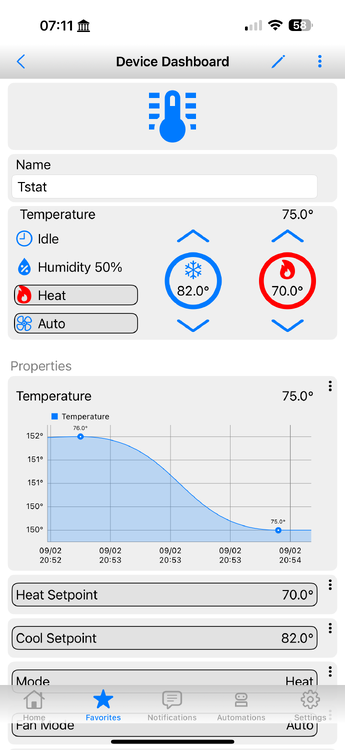
The y-axis scale for temperature in the UDM graph for my Venstar 1800 is displayed as twice the actual value. The actual value is presented correctly on the graph. Anything I can to do correct the scale?
-
I too had problems migrating Schlage z-wave locks (BE469NX and BE369) from working fine on a Polisy to an eisy. Opened a ticked with UDI and was advised to: 1) Remove the BE469NX and factory reset it. 2) Z-Wave | Network | Interview Timeout and make sure its set to at least 1 minute 3) Z-Wave | Capture Log and start capturing the log 4) From Admin Console or UDMobile, add the device again 5) Stop capturing the log when adding the device has completed My Interview Timeout was set at 30 seconds before; after making that change and performing the factory reset on the locks, then trying to add the devices again, they both immediately registered with my eisy. Didn't have to submit the requested log as both locks registered and are now functioning OK with the eisy.
-
eisy upgrade from 5.8.4 to 5.9.1 went smoothly; took 20 minutes. After the upgrade PG3x initially showed ver 3.3.18 and Frontend 3.2.27. A power cycle of the eisy brought both to 3.3.18. Everything seems to working fine, including 14 Plugins. Well done UDI!
-
One day after the DST change, my eisy console now displays the correct Sunrise and Sunset; no reboot was performed. Also, notifications using ${sys.sunrise24} and ${sys.sunset24} are also correct today; they too were off by an hour yesterday.
-
Sunrise & sunset off by an hour here as well; system time is OK and the system did not reboot at DST change. eisy v5.8.4
-
@Ross Nice work! Thanks for sharing. I had to use https and the corresponding port # to get to work for me.
-
Figured it out. The BaseURL to specify the device is: BaseURL https://my.isy.io/isy/longkeyfromtheportal/ Shortcut works after adding the long portal key for the specific device to the BaseURL. Thanks again @maxnorth for the shortcut.
-
@maxnorth Many thanks for providing this shortcut; something I'd really like to get it to work for me. I've implemented the shortcut on my iPhone as shown in your screenshot. It seems that I have the Authorization set correctly, since if I change my portal username or password by 1 character in the Userpw key, the shortcut returns: "user authorization not valid." With the correct portal username and password the shortcut returns: "Requested ISY not found in the user's domain." I've compared the BaseURL encoded value generated by the shortcut and it is identical to that provided by https://www.base64encode.net/ using the format myportalusername:myportalpassword I do have two devices configured in the portal, an eisy and a Polisy. How do I specify the desired device in the shortcut BaseURL dictionary key? My entry for that key is: https://my.isy.io/isy/

