epete
Members
-
Joined
-
Last visited
Everything posted by epete
-
I am glad to see the IoX announcement but extremely nervous about using the replacement. I would like to request that Universal Devices invest in a few Youtube Tutorials when this rolls out.
-
Wow, that was it! I guess i missed that last reboot step. Everything is working, so time for a fresh back-up.
-
I will do that, I have done so at least 10 times throughout the process but maybe I didn't after an important step.
-
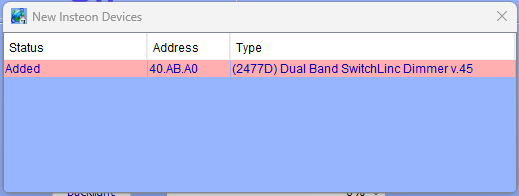
End of August Update. My system is back online with minimal or no communication issues. The occasional "can't communicate with ..." are random and point to different devices each time so I think that is all caused by noise and has minimal impact. My RJ45 to USB cable arrived the other day but I think I will just stick with the USB PLM that I used when I thought my old RJ40 to USB cable got damaged. Ome inhering item I am seeing that never happened before the corrupted data issue is that the last device that I add to the system seems to be remembered by IoX and will always pop up every time I log in on the admin console. If I add another Insteon device the above message will then switch to the latest one I added. It is as if something didn't finish in the set-up process. Everything functions as they are supposed to but if it is an indication that I still have a problem, then I am looking for ideas on how to resolve.
-
I purchased a few spare Insteon Dimmer switches, keypads and those fanlink modules that burn out frequently, but realistically a new owner will not know how to replace one and then reprogram it. Given Insteons' lack of imagination on expanding their echosystem, who knows how much longer they will be around. I will also simplify as much as possible and maybe make sure that it works without eISY. I also have a couple Insteon Hubs in case a new owner wants to connect remotely or whatever Insteon supports these days.
-
The 6 button (reprogrammed from 8 Button) KPL did go back to 8. I was able to find the documentation and reprogram again to 6. I removed both KPLs from IoX / eISY and linked them back they are now working.
-
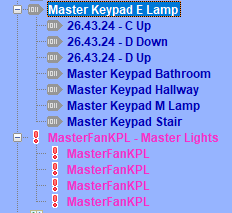
Those repeated names are corrupt data. My Naming Convention was RoomItem. I believe the MasterFanKPL items were MasterFanKPLoff, MasterFanKPLHi, MasterFanKPLMed, MasterFanKPLLow at one point. I deleted the two devices and I get cant read config file error. I am now going back to my June 2025 back-up and see if I can restore the devices from that backup.
-
Guy - I think this may have been related to my bad USB to RJ45 eISY to PLM cable from my other thread that you also posted in. After swapping PLMs to USB PLM this had gone away.
-
OK, I tried factory resetting two Keypad Links. Both were 8-button but one was updated to 6 Button. I thought restoring might also convert it back to 6 button after the factory reset. I tried restoring both and it seems like eISY is doing nothing. This is how they both looked before the factory reset and this is how they still look after the factory reset on both and after selecting Right Click, Restiore Device and Yes I would like to proceed. It is like I never selected restore devices. When logging out and back into IoX i and still getting many "Failed communicating with, so maybe the PLM Restore didnt work even though the PLM Event Viewer Links Tables and other items under Tools Diagnose look like there are no issues. I think this may be a good time to re-look at my naming convention for all devices and maybe start from scratch. My preference would be to still figure out what is going on, fix and then make updates to clean up naming convention of devices
-
-
Oh, very helpful. I did have that and there are still some devices that the PLM seems to be having difficulty communicating with. I am trying the right click, restore device but they are not restoring. I may have to remove them and then link them back in. Hopefully I dont have any keypadlinks connected to fans with issues as they are the ones I struggle with the most. They were all working recently so I dont want to have to redo them.
-
I did not unplug but I did reboot. Restoring IoX did another reboot and it seems to be proceeding to update the modem now. However this nessage just popped up but the system busy progress indicator is still progressing.
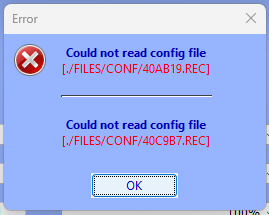
 I am getting old and my memory isnt as good as it used to be. The modem I found with the serial cable was my first modem that failed. I forgot about that. I found the new modem with the USB connector. It is now connected to eISY and I followed the instructions from Techman but get this error I am now restoring my IoX backup from yesterday, rebooting and will try again.
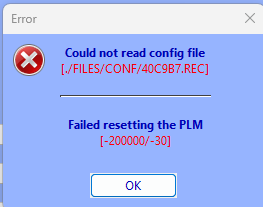 ok, I found my new PLM, that I assumed was USB but I see it is the same PLM with an RJ45 to Old Style Serial Port. That isn't going to do much for me. I think I am stuck waiting for the new cable.ok, it is the cable. it finally hit me to check tools/diagnostics/PLM Info / Status and this is what I get. I think I will use the above procedure to restore the USB PLM
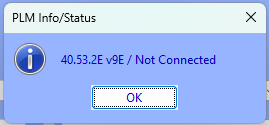 updated java, cleared cache, used what I believe to be teh latest launcher per above and am getting 26 of these again
 ok, cable is ordered and will replace when it arrives. It may have caused an intermittent problem where eISY could not communicate with the PLM. There were several programs that have errors like what I pasted below // Warning: Unrecognized Action (program may not run) // <cmd NODE="32 CE 41 1" ID="BEEP"/> // I wonder if these were caused by the communication disconnect. These also seem to be the programs that say out of memory. Techman, thanks for the Replace PLM info. Good for future reference as I am going to try and stick with the existing PLM and Cable for now as I think it is working again and should last until the new cable arrives. I always start using the link on teh Universal-devices page. I thought that would always be the latest version. I did not clear my java cache and will do that now. (I don't know why, but I hate going through the clearing cache procedure in Java.)
 well, thanks for suggesting that. I went down to where my eISY is located to unplug. It is supposed to be in the cabinet that the FamilyRoom TV is on. It seems to have fallen down behind the cabinet, and someone had moved the cabinet closer to the wall putting strain on the Serial PLM Kit (USB-Ethernet cable) that goes between the eISY and PLM. The USB end of the cable is now a little bent. I bent it back but am now ordering another cable. Not sure if that was the full problem. It is strange that there are some insteon devices I can communicate with and others I cannot, for example there are a bunch of Keypad Links that I can communicate with and one that I cannot. I also have a spare USB version PLM that I purchased when Insteon went back in business as a spare. I guess I could try that one with a Standard USB Data CableOK, after upgrading to IoX v.6.1.1 my programs have stopped running. I looked at the programs and see several say Activity=- Not Loaded - and Status = Out of Memory. I never had this issue before. did the eISY come with less memory than the ISY994 or Polisy? My programs are quite small and I mostly rely on scenes. I also get about 50 windows that come up saying cannot communicate with... that I didnt see before, yet I am able to communicate with the Insteon devices.I cannot get rid of this notification I have clicked the upgrade packages multiple times and it says successful and then the next time I log in this warning comes up again.
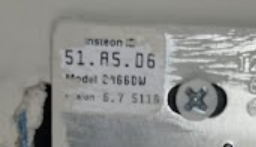
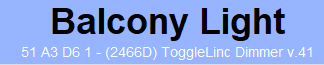
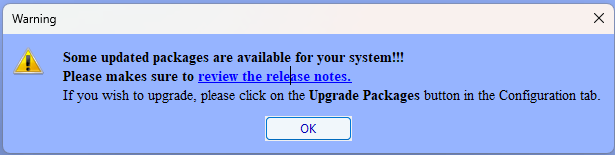 Is there any way to print out all of my devices, scenes, programs and variables that are in my August 2026 Back-up so I can go back to my June 2025 backup and use the printout to bring that working version up to date?My last backup was from 6/5/2025. I had been making minor tweaks here and there, but it has really added up. I should have backed up after each tweek. Anyway after restoring the June 2025 version and File, Restore Devices, I see I am able to delete devices from the bathroom scene. There was no balcony device linked in that version of IoX. So maybe I removed it earlier or maybe I was never able to figure out how to link it with the incorrectly labeled address. Who knows. I still don't know how balcony got added to the scene after I linked it. Anyway, I am going to reload my August 2026 version again and restore Devices to see if that resolves what ever was previously corrupt so I can make this fix without having to figure out all of the changes I made in the past year.It is 5116. The right clicking did not work either. I Just did a back up and will now restore from an earlier version and see what happens.I can only drag the scene into another folder. It gives me a Circle with line through it when I try to drag to the Network or ISY level. on the Insteon Address thing, I cannot remember if this was a problem when I first set it up or maybe something got corrupt in the device over time and maybe that is why it disappeared from eISY